How To Handle Clients Who Stop Responding
When clients stop responding, it can disrupt timelines, waste resources, and create uncertainty. But most of the time, silence isn’t intentional - clients are busy, overwhelmed, or facing internal delays. To minimize these situations, focus on prevention and clear communication. Here's how:
- Set Expectations Early: Define communication rules, deadlines, and responsibilities during onboarding.
- Identify Decision-Makers: Ensure you know who approves work and their backup contacts.
- Simplify Processes: Use tools that make feedback and approvals easy - avoid complicated steps.
- Follow Up Consistently: Use a structured follow-up schedule (e.g., 2–3 days, then 5 days, etc.) to keep things moving.
- Use Safeguards: Add clauses like "silence equals consent" or restart fees to protect against delays.
The goal? Make it easy for clients to stay engaged while protecting your team from unnecessary disruptions. Tools like BoastImage can streamline feedback and keep projects on track with minimal friction.
How to Manage Ghosting Clients (Mid-Project)
Set Clear Expectations from the Start
Avoid the frustration of client silence by addressing it right from the beginning. During onboarding, establish clear communication guidelines to ensure mutual accountability. As Drew McLellan, CEO of Agency Management Institute, aptly notes:
"If you're not clear about what you need from your client, you'll end up taking the blame for missed deadlines yourself".
By setting expectations early, you're not only safeguarding your timeline but also building trust. When clients know exactly what you need from them - and when - they’re more likely to stay involved. Documenting these expectations in contracts or kickoff meetings helps ensure progress, even when scheduling conflicts arise.
Identify the Right Stakeholders
Before diving into a project, confirm who holds the authority to approve work. Ask key questions: Who makes the final decisions? Who provides daily feedback? Who manages internal approval processes? Knowing the decision-making structure upfront can prevent unnecessary delays caused by confusion or non-approvers stepping in.
It’s also smart to identify a backup contact, such as an assistant or colleague, in case your primary contact is unavailable. Discuss their schedule and any potential conflicts to set realistic expectations for responses.
Once the decision-makers are identified, define how you’ll collaborate with them to ensure feedback remains prompt and actionable.
Establish Communication Standards
After pinpointing the key players, outline how and when communication will occur. Agree on preferred channels - whether that’s email, Slack, phone, or another platform - and set clear expectations for response times. For example, you might decide that feedback requests should be answered within 1–2 business days.
Alfredo Ramirez, COO and Co-Founder of Prosal, highlights the importance of this step:
"Clearly articulate what the client can expect regarding regular communications and deliverables and, equally important, what you expect from them. This mutual understanding helps prevent unresponsiveness by keeping both parties accountable".
Regular check-ins, whether weekly or bi-weekly, can help maintain momentum. Always schedule the next meeting before wrapping up the current one to avoid open-ended gaps in communication.
When it comes to deadlines, consider using relative timelines instead of fixed dates. For instance, instead of saying, "We’ll deliver on March 15th", say, "We’ll deliver the final product five workdays after receiving your approval." This approach makes it clear that delays in client responses directly affect the project timeline.
Lastly, include safeguards in your contract to address prolonged silence. For example, you could add clauses for "restart fees" if a stalled project needs to resume or specify that a lack of response within a set period constitutes approval of work. You might also create a contingency plan - an "if we don’t hear from you" protocol - that allows your team to move forward with default decisions if the client remains unresponsive. These measures protect both sides and prevent projects from stalling indefinitely.
Improve Proposal and Onboarding Processes
To keep clients engaged from the start, focus on refining your proposal and onboarding processes. These initial stages set the tone for your entire working relationship. When handled smoothly, they create a sense of collaboration and trust that can carry through the whole project. Consider this: 74% of potential clients will choose a different provider if the onboarding process feels difficult. That’s a big number and a clear reminder of how critical this phase is.
Clients often have a lot on their plates, so every interaction counts. The easier you make the process, the more likely they are to stay engaged. Removing unnecessary friction during approvals and feedback is key to maintaining momentum.
Review Proposals Together
Instead of sending a static PDF for review, schedule a meeting to go over the proposal live. This allows you to clarify any points, answer questions in real time, and ensure both parties are fully aligned on the project’s scope, timeline, and expectations before work begins.
During the meeting, focus on discovery and alignment. Discuss the client’s main objectives, their internal workflows, and - importantly - their review and approval process. Ask questions like: Who needs to approve deliverables? How long does their internal approval process typically take? What’s their preferred method of communication? Addressing these details upfront prevents confusion later and shows your commitment to a smooth partnership.
Live proposal reviews also build trust by being transparent. When you explain your approach, timelines, and how you’ll handle challenges, clients feel reassured. Use this opportunity to highlight how delays - like late feedback - can ripple through the schedule. Instead of promising fixed dates (e.g., "March 15th"), try using relative deadlines like: "We’ll deliver the draft three business days after receiving your feedback." This makes the cause-and-effect relationship clear and ensures the next steps are planned before the meeting ends.
Make Approvals and Payments Easy
Once the proposal details are finalized, focus on simplifying contract approvals and payments. Complicated workflows or multi-step payment processes can frustrate clients, leading to delays or even silence. For example, if signing a contract requires printing, scanning, and emailing - or if paying an invoice involves too many steps - you’re creating unnecessary obstacles. Streamline these processes wherever possible.
Request an upfront financial commitment, such as a 25% to 50% deposit, before beginning work. This not only secures the client’s buy-in but also significantly reduces the likelihood of them disappearing mid-project. Additionally, consider using milestone-based payment schedules tied to specific deliverables. This keeps both parties accountable and ensures steady progress.
To protect against prolonged silence, consider adding contractual safeguards. For instance, a "ghosting clause" can outline fees if a client becomes unresponsive for a set period, like 30 days. Similarly, a "restart fee" can be applied to resume work after extended delays. These measures ensure that the costs of disruptions are covered.
Another helpful addition is a "silence equals consent" clause. This states that if the client doesn’t respond within a specified timeframe - say, 72 hours - the work is automatically considered approved, allowing the project to move forward. As John Boitnott, a journalist and digital consultant, puts it:
"Include some language that gives your small business the right to consider a lack of response to be the client's consent and approval of your work".
Lastly, centralize all project documentation in one easily accessible location. Whether it’s a client portal or a shared folder, having contracts, NDAs, invoices, and other materials in one place ensures clients can quickly find what they need. The simpler you make it for clients to take action, the more likely they are to stay engaged and responsive throughout the project.
sbb-itb-32f6eb2
Follow Up Consistently
Strategic Follow-Up Schedule for Unresponsive Clients
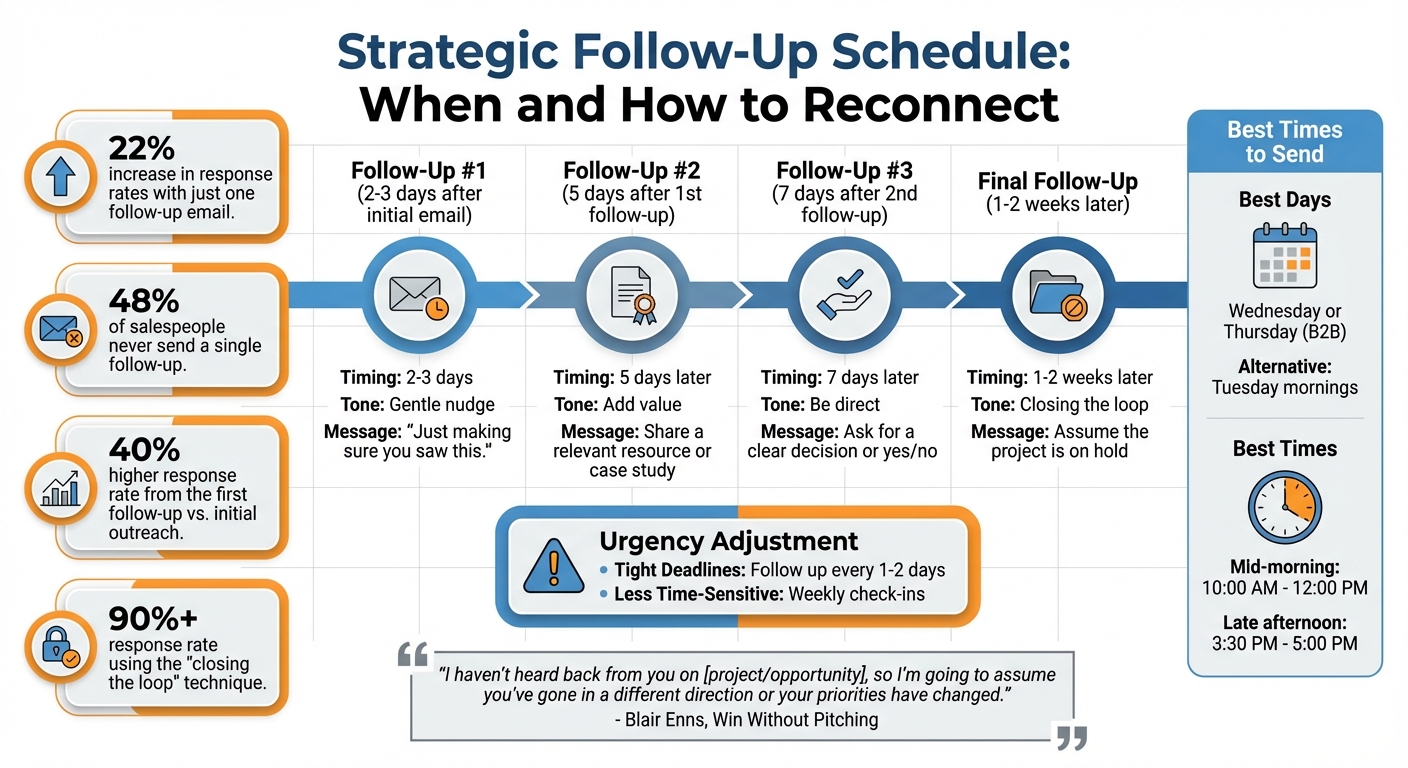
Staying consistent with follow-ups not only improves response rates but also helps prevent clients from disappearing mid-project. In fact, sending just one follow-up email can boost response rates by 22%. Yet, nearly half of salespeople - 48% - don’t even send a single follow-up, missing the chance to keep things on track.
The key is to strike a balance: be persistent, but not pushy. A structured approach can help you reconnect without overwhelming your client.
Build a Follow-Up Schedule
Having a set routine for follow-ups can keep things moving forward without making you feel like you’re constantly chasing. Start with a gap of two to three days before your first follow-up. Then, send a second email five days later, and a third one after another seven days. Research shows the first follow-up email is the most effective, with a 40% higher response rate compared to the initial outreach. However, effectiveness drops after the fourth attempt, so aim for two to three follow-ups.
Timing is just as important as frequency. For B2B follow-ups, midweek days like Wednesday or Thursday work best, while Tuesday mornings can also be effective, avoiding the Monday rush. As for time of day, mid-mornings (10:00 AM–12:00 PM) and late afternoons (3:30 PM–5:00 PM) tend to yield better results.
Adjust the schedule based on urgency. For projects with tight deadlines, follow up every one to two days. For less time-sensitive tasks, weekly check-ins are more appropriate.
Here’s a simple framework to guide your follow-ups:
| Follow-up Attempt | Recommended Timing | Tone/Strategy |
|---|---|---|
| 1st Follow-up | 2–3 days after initial email | Gentle nudge: "Just making sure you saw this." |
| 2nd Follow-up | 5 days after 1st follow-up | Add value: share a relevant resource or case study. |
| 3rd Follow-up | 7 days after 2nd follow-up | Be direct: ask for a clear decision or yes/no. |
| Final Follow-up | 1–2 weeks later | "Closing the loop": assume the project is on hold. |
If you’ve sent three follow-ups with no response, try a final "closing the loop" email. As Blair Enns, founder of Win Without Pitching, suggests:
"I haven't heard back from you on [project/opportunity], so I'm going to assume you've gone in a different direction or your priorities have changed."
This approach works because it leverages loss aversion - clients often don’t want to lose an opportunity. In fact, this technique boasts a response rate of over 90%.
Once your schedule is set, focus on personalizing each message to make them more engaging.
Personalize Your Messages
Generic emails like "just checking in" rarely lead to replies. Personalization, on the other hand, makes your follow-ups more relevant and demonstrates that you’re paying attention to their unique situation. Reference specific details - like the project name, proposal content, or the date of your last conversation.
Show genuine interest in their business. For example, if you notice a recent milestone or achievement on LinkedIn, mention it. A thoughtful note like, "I saw your team just launched a new product line - congratulations! I’d love to hear your thoughts on the homepage mockups we discussed", shows you care about their success, not just your deliverables.
Be empathetic about potential delays. Clients may go quiet because they’re busy, traveling, or dealing with internal challenges. Acknowledging this with a line like, "I know this might be a hectic time for your team", can make your message feel more considerate.
Instead of vague questions, ask specific ones like, "What are your thoughts on the hero image?" or "Should we move forward with Option A or Option B?" This reduces decision fatigue and makes it easier for clients to respond.
If email isn’t working, try switching up your communication channel. Reach out via LinkedIn, send a quick text, or even make a phone call. Another option is to use video platforms to share a brief walkthrough or update - this can grab their attention in a way text might not.
Lastly, consider adding a short "tl;dr" summary at the end of your email with a clear call-to-action. For example:
tl;dr: Please review the attached design and let me know if we should proceed with Option B by Thursday.
With inboxes flooded with messages, clarity and personalization can make all the difference in getting your follow-up noticed.
Make Feedback Easy with BoastImage
Getting feedback from clients can sometimes feel like pulling teeth, but often the real issue is the process itself. With the average office worker receiving about 121 emails daily, it's no surprise that your feedback request might get lost in the shuffle. Add to that complicated tools, account setups, or unclear instructions, and responding starts to feel like a chore instead of a step toward project completion.
The key to solving this problem? Make giving feedback so simple that clients can’t find a reason to put it off. That’s where a streamlined feedback experience makes all the difference.
Remove Login Requirements
The biggest hurdle to client feedback isn’t a lack of willingness - it’s the hassle of getting started. Asking clients to create accounts, remember passwords, or navigate unfamiliar tools often leads to delays or, worse, silence.
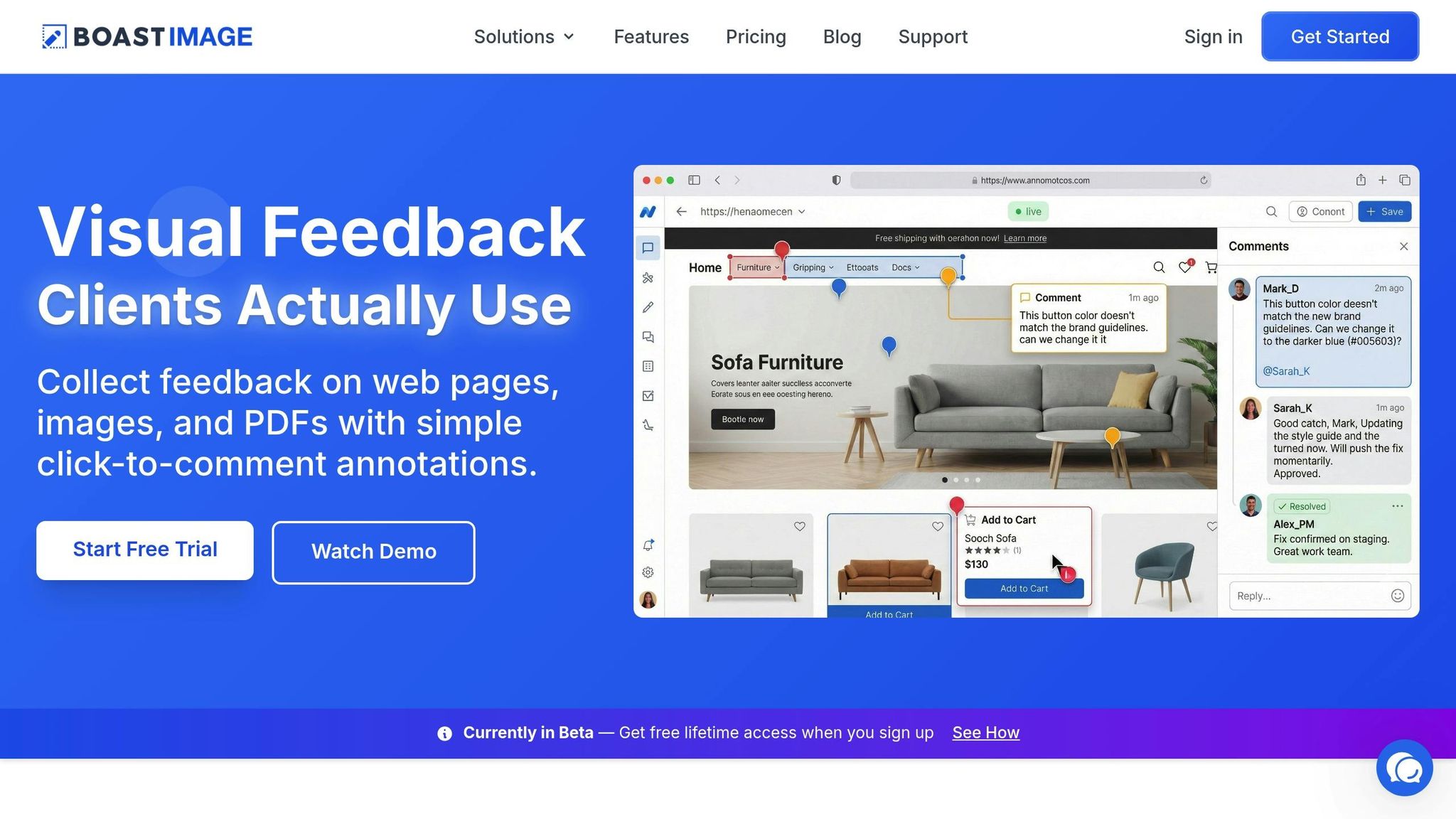
BoastImage removes these roadblocks completely. With a single click, clients can view the project and leave comments directly - no logins, no unnecessary steps. This friction-free approach ensures even non-technical clients stick to the tool instead of resorting to chaotic email threads that can easily get buried in overcrowded inboxes.
The platform’s click-to-comment feature takes it a step further. Clients can pinpoint exactly where they want changes by clicking on specific areas and typing their feedback. This eliminates confusion, speeds up the process, and ensures everyone is on the same page. As Consulting Success puts it:
"Overwhelmed people avoid tasks that feel complicated. When you make it crystal clear what they need to do and how long it should take, you dramatically increase your response rate".
Once feedback is collected effortlessly, the next step is to keep everything organized in one place.
Keep All Feedback in One Place
Streamlining access is only part of the solution - consolidating feedback is just as important. With roughly 40% of consumers having at least 50 unread emails sitting in their inboxes, scattered feedback across multiple threads can lead to confusion and missed details.
BoastImage solves this by centralizing all visual feedback in a single platform. This creates a clear, organized record of every comment, preventing important requests from getting lost. Clients can easily revisit previous feedback, ensuring everyone stays aligned and nothing gets overlooked. Meanwhile, your team benefits from built-in tools like version control, task management, and Kanban boards, while clients enjoy a clean and intuitive interface.
This centralized system keeps clients involved without the need for constant follow-ups. They can check progress anytime without digging through emails, and you’ll know exactly what’s been approved and what still needs work. It’s a win-win for both sides.
Conclusion
Dealing with unresponsive clients doesn’t have to derail your projects or strain professional relationships. The secret lies in prevention rather than reaction - setting clear expectations upfront, defining communication standards, and creating systems that keep projects moving forward, even when client responses are delayed.
Here’s an important perspective: while you might dedicate 25% to 40% of your time to a project, your clients are likely only allocating about 5% to 10%. Recognizing this imbalance with empathy can help you maintain momentum without letting delays disrupt your workflow.
To bridge this gap, focus on strategies that combine consistent follow-ups with simplified processes. For instance, simply sending a follow-up email can boost response rates by 22%. Even better, offering a one-click feedback option eliminates unnecessary hurdles - no logins, no confusing instructions, and no digging through emails. This ease of use encourages clients to respond more quickly and efficiently.
Tools like BoastImage play a crucial role in this process. By making client feedback effortless and streamlining project management, they help ensure smooth collaboration from start to finish.
As Drew McLellan from the Agency Management Institute wisely advises:
"An empathic approach to your client relationships - rather than an angry one - will be better for both you and your client".
FAQs
What can I do to keep clients from going unresponsive?
Preventing a client from going silent starts with establishing clear communication right from the beginning. During the kickoff, agree on the preferred communication methods - whether it’s email, phone, or a visual feedback tool like BoastImage. Document these preferences and set mutual expectations, including realistic response times, so everyone has a shared understanding. Offering clients a simple, no-login option to provide feedback can also make the process smoother and keep them actively involved.
If communication starts to lag, follow up with polite, to-the-point reminders that provide context and a clear action item. For instance, you could write: “Just a quick follow-up to see if you’ve had a chance to review the mock-up. Could you confirm the color choice by Friday?” If there’s still no response, consider switching to a different communication channel, like a phone call or text, to rule out any technical issues.
It’s also important to set boundaries and maintain professionalism. Keep a record of your attempts to reach out, and if necessary, inform the client that work will pause after a specific date if you don’t hear back. By combining clear upfront communication, accessible feedback tools, and regular follow-ups, you can reduce delays and keep your projects moving forward.
What’s the best way to follow up with a client who isn’t responding?
Start by revisiting your original message to ensure it wasn’t overlooked. Check if it landed in a spam folder or was sent to an outdated email address. If you can, try CC’ing an alternate contact. A quick follow-up like, “Just making sure this didn’t get lost,” can often grab their attention without sounding too forceful.
If there's still no reply, consider changing how you reach out. Pair a polite email with a phone call, voicemail, or even a text message. Be clear about what you need and when, such as, “We need your approval by Friday to keep things moving.” If needed, gently escalate the situation with a note like, “If I don’t hear back by [date], I’ll assume we should pause the work.” Keeping your tone courteous but firm can make all the difference.
To avoid similar issues in the future, set clear expectations for response times during onboarding or include them in your contract. For visual projects, tools like BoastImage can simplify client feedback - no logins or complicated steps required. These approaches can help ensure a lack of response becomes a small hiccup rather than a major setback.
What’s the best way to handle feedback from unresponsive clients?
To make it easier for clients to share their thoughts, offer them a straightforward way to provide feedback. Skip the hassle of lengthy email chains or overly complex tools. Instead, use a visual feedback board - clients can click directly on a design, image, or document to leave comments. No need for accounts or logins - this simplifies the process and encourages quicker responses.
Be upfront about deadlines and the type of feedback you need. For example, you might say, "Please provide your comments by Friday, January 26, 2026." Clear guidelines help clients understand what’s needed to keep the project on track. If the deadline passes without a response, send a polite follow-up, referencing your original request and outlining the next steps.
If necessary, reach out through another channel, like a quick text or phone call, to ensure your message doesn’t get overlooked. Using multiple communication methods boosts the chances of getting timely feedback without overcomplicating things.