The Complete Guide to Managing Design Feedback and Revisions
Managing design feedback can feel like navigating a maze. Without a clear process, vague comments like "make it pop" lead to confusion, delays, and endless revisions. This guide breaks down how to simplify feedback, reduce revision rounds, and keep projects on track. Here’s the key takeaway: structured workflows and the right tools make feedback manageable, saving time and money.
Key Points:
- Set clear goals upfront: Define business objectives, aesthetic benchmarks, and revision limits (e.g., 3 rounds).
- Use feedback tools: Platforms like BoastImage let clients leave precise, visual comments directly on designs.
- Organize feedback: Consolidate input, track changes with version control, and turn feedback into actionable tasks.
- Handle common issues: Address vague comments, limit revisions, and prevent client ghosting with specific strategies.
By following these steps, you’ll avoid "revision hell" and create a smoother, more efficient design process.
Effortless Client Feedback for Web Designers | Workflow Walkthrough
Setting Up Your Feedback Process
Before diving into sharing a design file, it’s crucial to set some ground rules. First impressions online are heavily influenced by design - 94% of them, to be exact. That means there’s no room for disorganized feedback. The solution? Define what success looks like and establish a clear path to achieve it together.
Define Project Goals and Feedback Rules
Start by identifying measurable business goals. What actions do you want users to take? Which audience is your top priority? Agree on a ranked list of target audiences to ensure the design resonates with your primary users while still addressing secondary ones. To guide creative decisions, establish aesthetic keywords like "minimalist", "energetic", or "trustworthy" - these will act as benchmarks when evaluating the design.
Set boundaries for revisions by sticking to a three-round limit:
- Round 1: Strategy and direction
- Round 2: Full deliverables and layout adjustments
- Round 3: Final tweaks
Make sure to clearly define what counts as a "major" revision (big structural changes) versus a "minor" one (like text or image updates). This keeps the process focused and avoids scope creep.
Another important step? Appoint one person on the client’s side to consolidate and communicate feedback. Bill Macaitis, former marketing leader at Slack and Zendesk, said it best:
If you want to be involved in this, you've got to be involved in all the meetings. You can't just have someone come in at the end and go, 'Oh, I don't like this'.
Set clear timelines for both design delivery and client feedback. Consider including penalties for missed deadlines to keep the project on track.
Before starting the project, send the client a detailed questionnaire to gather essential details like branding guidelines, color preferences, typography, and examples of designs they admire. Then, brief them on their role in the feedback process. Encourage them to focus on identifying problems - such as “this doesn’t appeal to our target audience” - instead of suggesting solutions like “make the logo bigger”. To guide them, provide a feedback template that promotes actionable, specific input tied to business objectives.
Once you’ve set clear goals and structured feedback rules, it’s time to choose tools that make the process seamless.
Pick Client-Friendly Feedback Tools
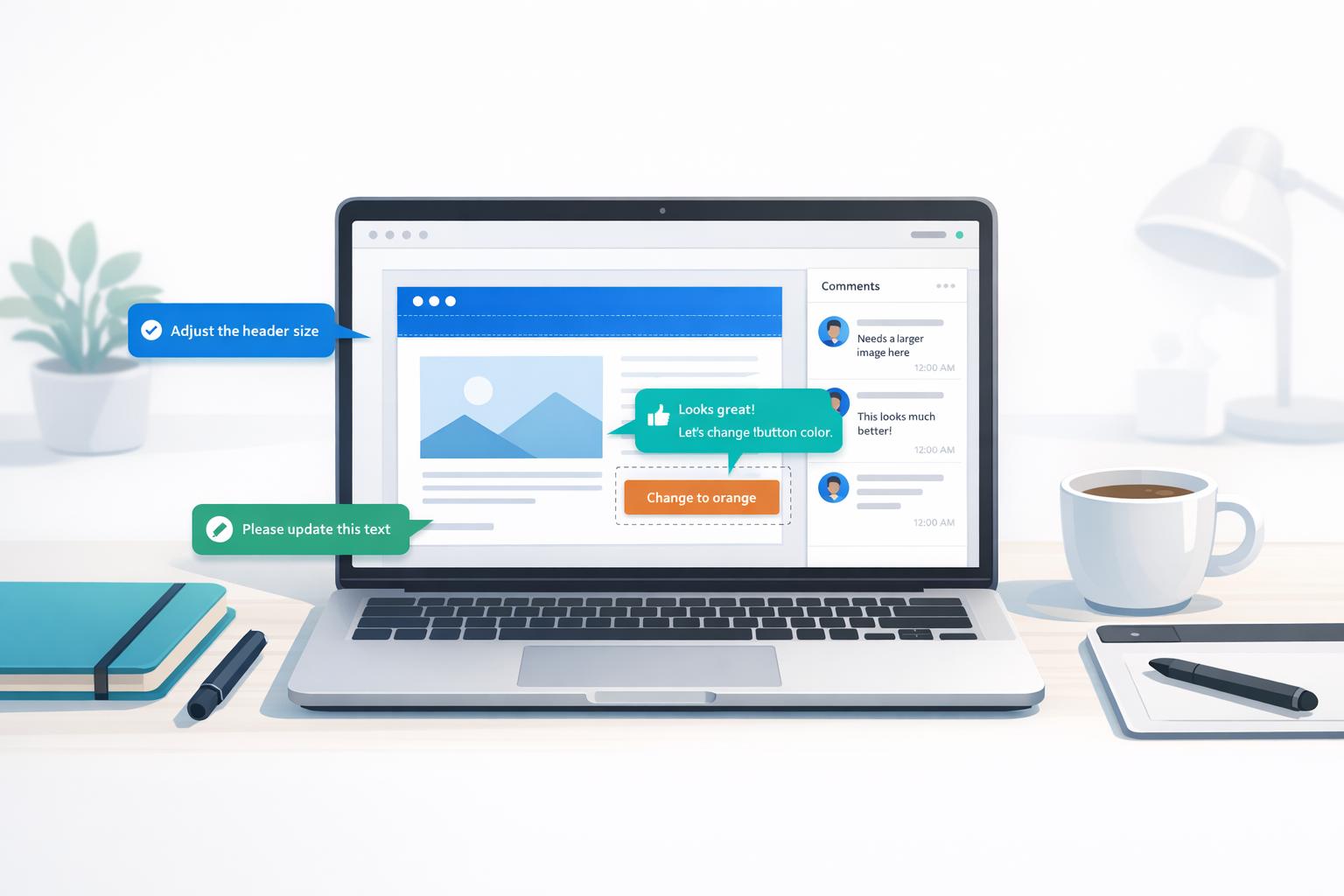
The right tools can replace messy email chains, Slack messages, and calls with streamlined, annotated feedback. Clients should be able to pin comments directly to specific design elements using a simple point-and-click interface, eliminating any guesswork. Look for platforms that automatically track version history, so clients always review the latest design and can compare updates side by side.
Ease of use is critical. Tools that don’t require complex logins or technical know-how make it easier for external reviewers to participate. For example, BoastImage allows clients to leave visual feedback without needing to create an account, which speeds up the process. Introduce the tool early so clients can provide input effortlessly.
For additional clarity, consider recording video walkthroughs. A quick Loom video explaining your design decisions can guide clients toward more thoughtful feedback. This asynchronous approach is also great for navigating time zone differences, as it doesn’t require live meetings. In fact, 8 out of 10 employees report feeling more engaged after receiving clear, high-quality feedback. When clients understand the reasoning behind your choices, their input becomes sharper and more constructive.
How to Collect and Manage Feedback
5-Step Design Feedback Collection Process
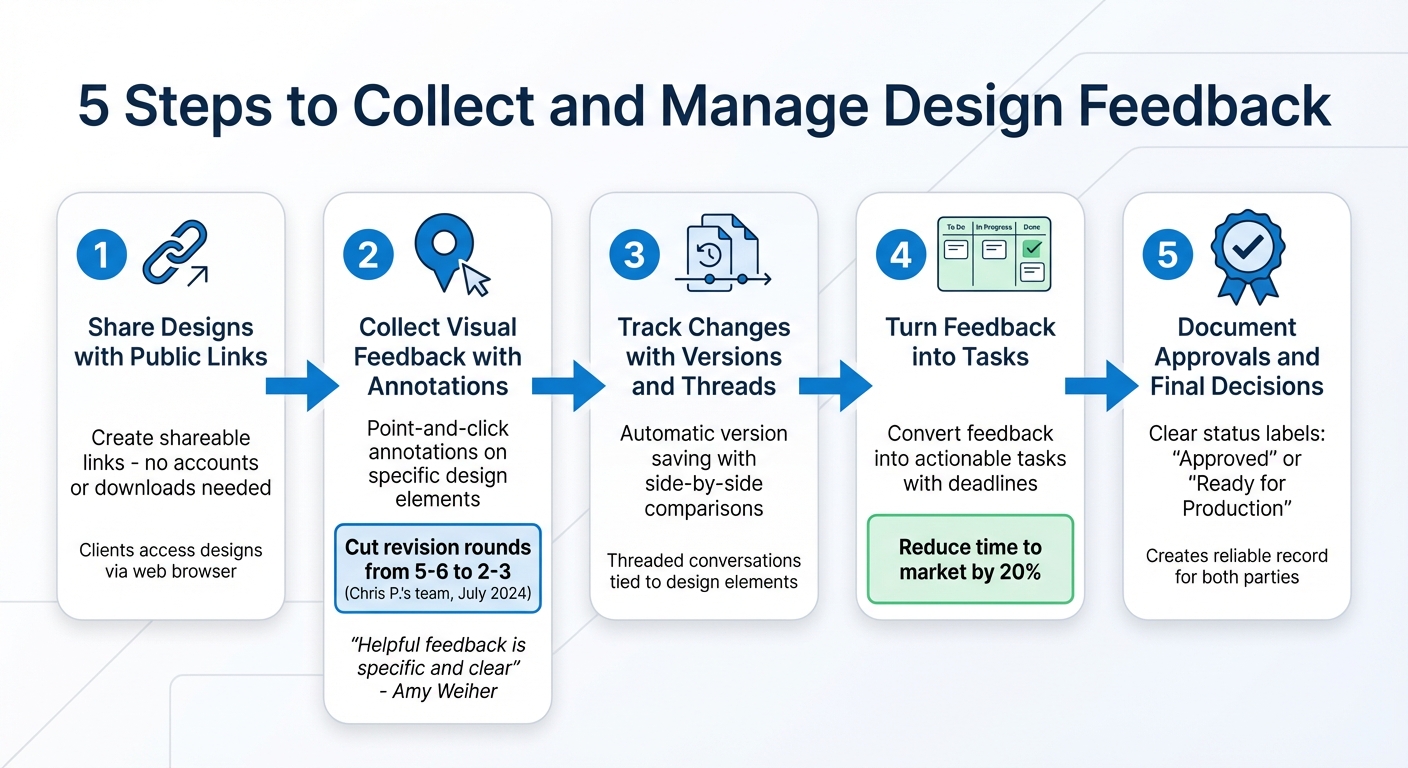
Once you’ve established your process and selected the right tools, it’s time to put everything into action. Following these five steps will help you gather clear, actionable feedback, keep track of changes, and guide your designs toward approval without unnecessary delays.
Step 1: Share Designs with Public Links
Start by creating a shareable link using BoastImage. This link allows clients to view your designs without the hassle of creating accounts or downloading additional software. As long as they have a web browser, they can access the design. This ease of use speeds up the feedback process and keeps the project moving forward.
Step 2: Collect Visual Feedback with Annotations
Encourage clients to leave comments directly on specific design elements using point-and-click annotations. This method eliminates vague feedback like “make it pop” or “move that thing over there.” Instead, annotations provide precise visual context. Graphic designer Amy Weiher sums it up perfectly:
"Helpful feedback is specific and clear: change a color or a font, find a new photo, make something bigger, or move a graphic over there to make it the focus. But I can't make a design 'pop' or 'feel right' to you unless I know more specifically what you mean by it."
For example, in July 2024, Chris P.'s design team used a feedback tool that enabled clients to comment directly on designs. This approach cut their average revision rounds from 5–6 to just 2–3 per project.
Step 3: Track Changes with Versions and Threads
Use version control to keep a clear record of every design iteration. BoastImage automatically saves each version, making it easy for clients to compare designs side-by-side and confirm that changes were made as requested. Discussions can be organized into threaded conversations tied to specific design elements, helping everyone stay on the same page. To avoid confusion, disable comments on older versions once a new one is live.
Step 4: Turn Feedback into Tasks
Transform approved feedback into actionable tasks with BoastImage’s built-in Kanban boards. This ensures no revision is overlooked and gives your team a clear view of what needs to be done. Assign deadlines to each task to keep the project on track. In fact, using an effective feedback tool can reduce a product’s time to market by as much as 20%.
Step 5: Document Approvals and Final Decisions
When a design is approved, document the decision within BoastImage. Use clear status labels like “Approved” or “Ready for Production” so everyone knows the project has moved forward. This documentation creates a reliable record, protecting both you and your client from potential disputes over agreed-upon changes. For instance, during a website redesign, Marketing Lead Tom C. used multi-resolution views to catch a mobile menu bug that wasn’t visible on desktop, preventing a drop in mobile conversions. Careful tracking like this ensures a thorough and professional process.
Solving Common Feedback Problems
Even with a well-organized process, feedback issues can still pop up and slow down project approvals. Luckily, most of these challenges follow familiar patterns, and with the right approach, they can be managed effectively. Below, we’ll explore how to secure clear feedback, handle revision rounds efficiently, and deal with client ghosting.
Getting Specific Feedback Instead of Vague Comments
Comments like "make it pop" or "it doesn’t feel right" can derail progress because they’re too vague to act on. Often, the issue is that clients struggle to articulate their concerns. To address this, explain the importance of consolidating all feedback into one round rather than sending scattered thoughts over several days. This keeps the project moving toward the final goal.
When presenting your work, provide context. A video walkthrough or live presentation can link design decisions to business goals, reducing subjective reactions like "I just don’t like it." In fact, direct communication between designers and clients can cut revision cycles by up to 50%.
Ask targeted questions to guide clients toward actionable input. Instead of asking, "What do you think?" try something more specific, like, "Does this color palette match your brand’s professional tone?" or "Is the call-to-action standing out enough?" For clients who struggle to give clear feedback, offer a structured form that focuses on key project objectives. Before making any changes, confirm that the feedback represents the final input from all stakeholders for that round.
If feedback is still unclear, dig deeper to uncover the underlying business concern behind the comment. As agency owner Jennifer Bourn puts it:
All problems that arise from design revisions can be attributed to a failure to properly set expectations, poor communications, or mismanagement of the client or project.
Handling Multiple Rounds of Revisions
Once feedback becomes clear, managing revision rounds is the next challenge. From the start, outline the number of revision rounds in your contract - three rounds are a common standard. Each round should involve you submitting drafts, the client consolidating feedback from all stakeholders, and then you implementing the agreed-upon changes.
To keep things on track, set a rule that each round should become less complex. For example, no major layout changes should be introduced in the final round. Use side-by-side comparisons of versions to confirm that all requested changes have been addressed and to prevent feedback on outdated files.
Include a five-business-day window for feedback in your contract. If the client misses the deadline, move the project forward to the next stage to protect your timeline. Build a small buffer into your project estimate to handle minor, out-of-scope requests without needing a formal change order.
Preventing Client Ghosting
Client ghosting is surprisingly common - over 50% of salespeople report experiencing it within a year. Design projects are no exception, often due to price shock, lack of involvement from decision-makers, or overly complicated feedback systems.
To reduce barriers, use tools like login-free interfaces or public sharing links. These make it easier for clients to view and comment on designs without needing to create accounts or download software, encouraging quicker responses. Reinforce this with automated reminders - follow up one day after sending a request, then again after two days, and finally, once a week. If the client still doesn’t respond, send a final email stating that the project is being moved off the active calendar to make room for other clients.
Discuss budget expectations early in the discovery phase instead of waiting until the proposal stage. As UI/UX designer Matt Olpinski explains:
If a freelance client is surprised by the cost of the project, it’s because you didn’t adequately discuss their budget or your pricing, and only included those details in the proposal.
sbb-itb-32f6eb2
Using BoastImage to Improve Your Workflow
A well-defined feedback process is crucial for keeping design projects on track. Adding visual tools like BoastImage to the mix takes things a step further by simplifying communication and boosting efficiency. One of the biggest hurdles in design projects is client engagement. Even the most organized teams can hit roadblocks when clients delay feedback or provide unclear input. By incorporating BoastImage, you can strengthen your feedback system and eliminate delays caused by scattered or incomplete communication.
Features That Speed Up Feedback
BoastImage offers a range of tools that make the feedback process smoother and more precise:
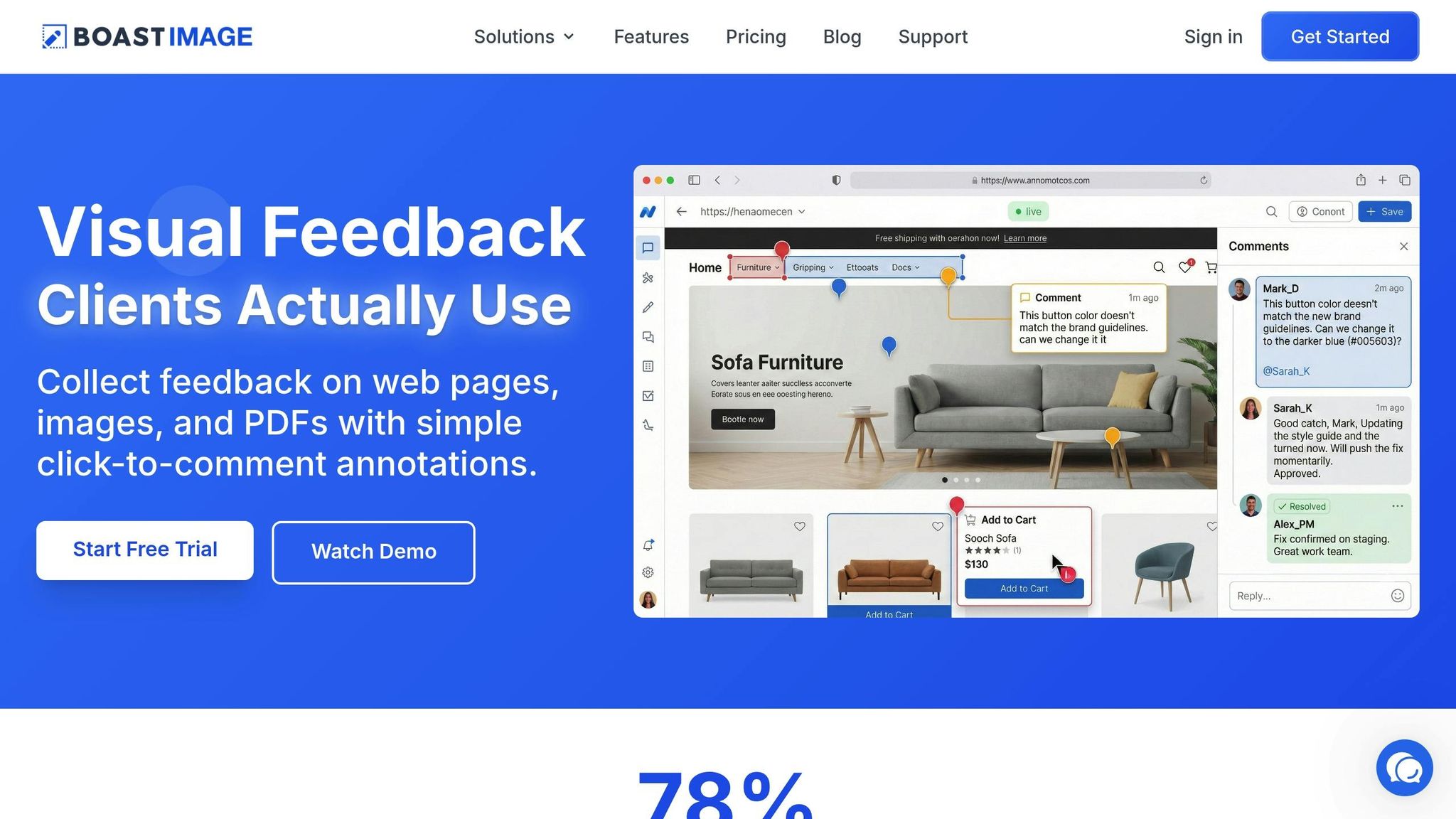
- Click-to-comment annotations allow reviewers to mark up designs directly. Clients can highlight changes using shapes, emojis, or freehand drawings. This visual method eliminates guesswork and reduces unnecessary revision cycles.
- Version tracking ensures every iteration is documented. Teams can easily review past versions, compare changes, and revert to earlier designs if needed. This prevents confusion over outdated files and shows that client requests have been addressed.
- Threaded discussions keep all feedback in one place. Each comment stays linked to the exact design element it references, so you’re not digging through emails or chat logs to find relevant input.
Behind the scenes, Kanban boards convert client feedback into actionable tasks. These boards allow teams to organize designs by project stage, assign tasks, and track progress - all without requiring clients to deal with complex project management tools. Clients simply click a link to leave comments - no logins, accounts, or training necessary.
Pricing Plans for Different Team Sizes
BoastImage offers flexible pricing options tailored to fit teams of all sizes. All paid plans include unlimited external collaborators, so your client list won’t impact costs:
| Plan | Price | Best For | Key Features | Storage |
|---|---|---|---|---|
| Free | $0 | Testing the platform | 1 active project, 5 items per project, 3 external collaborators, unlimited annotations, browser extension | 5GB |
| Solo | $9.95/month | Freelancers & consultants | 5 active projects, unlimited items, 10 external collaborators, version control, Kanban view, priority support | 50GB |
| Team | $19.95/user/month | Small agencies & teams | Unlimited projects, unlimited collaborators, project-level permissions, custom branding with your logo | 50GB |
| Business | $39.95/user/month | Larger organizations | Unlimited storage, full white-label branding, audit logs, custom SLA, dedicated success manager, priority phone support | Unlimited |
The Solo plan is ideal for freelancers juggling multiple clients, while the Team and Business plans cater to agencies and larger organizations. These higher-tier options unlock advanced features like project-level permissions and white-label branding, making them a seamless fit for more complex workflows.
Tracking and Improving Your Feedback Process
Keeping track of feedback metrics is key to refining your workflow and identifying potential bottlenecks. By monitoring these metrics, you can make smarter adjustments and ensure a smoother process.
Start by keeping an eye on approval turnaround time - the number of days between sharing a design and receiving final approval. If delays occur, consider adjusting timelines or involving slower clients and departments earlier in the process.
Another important metric is the revision count per client. For most design projects, up to five drafts are common. However, if a client consistently exceeds three rounds of revisions, it might be time to revisit your feedback guidelines or even update your contractual terms.
Stakeholder response time measures how quickly clients provide feedback after each design submission. Automated reminders can help keep reviewers on track as deadlines approach, cutting down on unnecessary follow-ups.
Don’t forget to track deadline adherence and scope creep frequency. These metrics can highlight when you might need to renegotiate timelines, introduce late fees, or tighten review windows. Clear, measurable data also helps ensure client accountability and fosters respect for the process.
Using project dashboards can simplify the tracking process. They allow you to see who has approved a document and who still needs to respond. Version comparison tools are also invaluable - they help confirm that previous feedback has been implemented, saving you from dealing with repetitive comments and redundant work.
To streamline your process further, include a standard number of revision rounds - typically three - in your contracts. A RACI matrix (Responsible, Accountable, Consulted, Informed) can clarify roles at each approval stage, speeding up decision-making.
Historical data from past projects can act as a guide for improving future workflows. For example, if certain review stages are consistently delayed, adjust your timelines proactively.
Lastly, educate clients on how to provide clear, actionable feedback. Vague comments like "make it pop" often lead to unnecessary revisions. Monitoring these metrics monthly, sharing insights with your team, and making data-driven adjustments can improve your process. Use this information to fine-tune client education and reinforce a structured, efficient feedback system.
Conclusion
Streamlining design feedback starts with a clear and structured workflow. Establishing boundaries - like limiting revisions to three distinct rounds that progress from broad strategy to fine-tuned details - keeps projects on track and protects your bottom line. This method ensures clients stay focused on the most important aspects of the project.
Shifting to objective feedback makes discussions more productive. Instead of asking vague questions like "What do you think?", try something more targeted, such as, "Does this design highlight the main call to action effectively?". This approach cuts through subjective opinions, encouraging clients to provide actionable insights that align with measurable goals. When paired with the right technology, these practices create a solid foundation for collaboration.
The right tools can make all the difference. Platforms like BoastImage integrate seamlessly into structured workflows, offering features like version control and task tracking. Reviewers can leave comments directly on designs via a simple link, while your team stays organized with built-in task management. With flexible pricing, it’s accessible for all stakeholders.
As highlighted throughout this guide, educating clients is just as important as the tools or processes you use. Graphic designer Amy Weiher captures this perfectly:
Helpful feedback is specific and clear: change a color or a font, find a new photo, make something bigger... But I can't make a design 'pop' or 'feel right' to you unless I know more specifically what you mean by it.
Teaching clients how to give constructive feedback can drastically reduce unnecessary revisions. By combining structured workflows, focused feedback, and effective tools, you can transform your design process into a smooth, client-centered system.
FAQs
What are the best strategies for managing client feedback and minimizing revisions?
To handle client feedback efficiently and keep revision cycles under control, it’s crucial to set expectations from the start. Begin by sharing a comprehensive project brief that spells out the deliverables, limits the number of revision rounds (three is a common standard), and establishes clear deadlines for client feedback. Providing a structured feedback form with specific prompts - like rating design elements or selecting from predefined options - can help avoid unclear or overly general input. Visual annotation tools, such as PDFs with comment features or screen recordings, can also make it easier for clients to convey their thoughts.
Help clients give actionable feedback by offering simple guidelines or a quick-reference sheet that explains how to assess designs in relation to the project’s objectives. When feedback rolls in, prioritize changes that align with the agreed-upon scope and tactfully address any requests that go beyond it. Organizing feedback into categories - such as layout, branding, or content - can streamline the revision process. Following up with a brief response that confirms what will be updated reassures clients and keeps the workflow smooth. To maintain progress, gently remind clients of upcoming deadlines and express appreciation for their clear and constructive input.
What are the best tools for gathering clear and actionable design feedback?
The most effective way to gather clear, actionable design feedback is by using a collaborative proofing tool. These tools let stakeholders comment, annotate, and review designs in a shared space. They simplify the feedback process with features like real-time markup, version control, and centralized discussions, which help transform vague input into precise, actionable tasks.
To add another layer of clarity, video messaging apps can be incredibly helpful. They allow reviewers to record walkthroughs, capturing tone, gestures, and visual cues that text-based feedback might overlook. Additionally, survey tools can collect structured input on specific design elements, ensuring consistent feedback from multiple reviewers.
By combining these tools, you can streamline the feedback process, reduce miscommunication, and speed up project approvals.
How can I stop clients from disappearing during the feedback process?
To avoid the frustration of clients going silent, it’s crucial to establish clear expectations from the beginning. Agree on deadlines and set up communication protocols that work for both sides. Using structured feedback forms or specific prompts can simplify the process for clients to share their input. Regular check-ins or polite reminders can also help keep everything on track. Additionally, addressing the consequences of missed deadlines early in the process encourages mutual accountability. These strategies promote open communication and keep projects progressing smoothly.