
Why Design Feedback Gets Lost and How to Fix It
Lost feedback in design projects can cause delays, increase costs, and damage client relationships. Here’s why it happens and how to fix it:
Why Feedback Gets Lost:
- Scattered Communication: Feedback is spread across emails, calls, and meetings, making it hard to track.
- Complex Tools: Clients avoid tools that require downloads or logins, leading to vague feedback.
- Email Overload: Important feedback gets buried in long threads or mixed with unrelated messages.
How to Fix It:
- Use Simple Tools: Choose platforms with guest access and visual annotation features to make feedback straightforward for clients.
- Automate Tasks: Convert feedback into actionable tasks directly within your workflow.
- Set Clear Guidelines: Define response timelines, approval steps, and feedback formats upfront.
Example Solution:
Tools like BoastImage simplify feedback collection with features like no-login client access, version control, and task management, reducing confusion and revision cycles.
By centralizing feedback and simplifying the process, you can save time, avoid miscommunication, and keep projects on track.
All Your Web Design Feedback in ONE App – Game Changer!
Why Design Feedback Gets Lost
Design feedback often goes astray due to three main issues: scattered communication channels, clients avoiding complicated tools, and the overwhelming clutter of email inboxes.
Scattered Communication Channels
Feedback tends to get stuck in isolated "silos" like emails, phone calls, Zoom chats, unrecorded meetings, and spreadsheets. This fragmented communication leaves teams scrambling to piece together vague or incomplete feedback, often wasting hours on clarification. For instance, when a client emails something like "change the header color" without specifying which element, designers are left guessing, trying to match the description to the actual design. This inefficiency forces project managers to spend unnecessary time consolidating and interpreting feedback. Teams are then left wondering why a particular decision was made, when a change was requested, or who approved a version - issues that can lead to disputes over scope and deadlines.
Next, let’s look at how clients’ reluctance to use complex tools adds to the problem.
Clients Avoid Complicated Tools
Freelancers make up 90% of graphic designers, meaning tools need to be client-friendly. However, when feedback platforms require IT permissions, downloads, plugins, or confusing logins, clients often fall back on sending vague emails, bullet points, or even paper printouts. This leaves creative teams guessing. Clients' discomfort with these tools can also lead to micromanagement or ambiguous instructions, like the infamous "make it pop". It’s no surprise that 26% of designers identify feedback collection as their biggest time sink, while another 26% struggle most with getting approvals.
"Nine times out of 10, it's happening either in a meeting or over Slack, and both of those things are ephemeral. Especially in a meeting... it often comes down to remembering who said what."
– Sarah McIlwain, Director of Product Design, Abstract
And then there’s email - where feedback often gets buried under a mountain of unrelated messages.
Email Overload and File Version Problems
The average office worker receives between 80 and 120 emails every day. Feedback can easily disappear among newsletters, meeting invites, and sales pitches. Long email threads - sometimes with over 50 replies - make finding critical comments a frustrating task.
"Today's email inbox is a Frankenstein of newsletters, invites, feedback, meeting requests, sales outreach, and all sorts of threads – getting into the hundreds a day."
– ReviewStudio
This chaos not only slows down design revisions but also disrupts budgets and timelines. Without a centralized system, clients may accidentally review outdated files, leading to errors and wasted effort. When approvals are buried in email threads with no clear record, teams struggle to track who signed off on what. This lack of organization creates unnecessary administrative work, delays projects, and contributes to designer burnout. Unbillable revisions eat into profit margins, while the creative process itself gets bogged down.
How to Fix Feedback Workflows
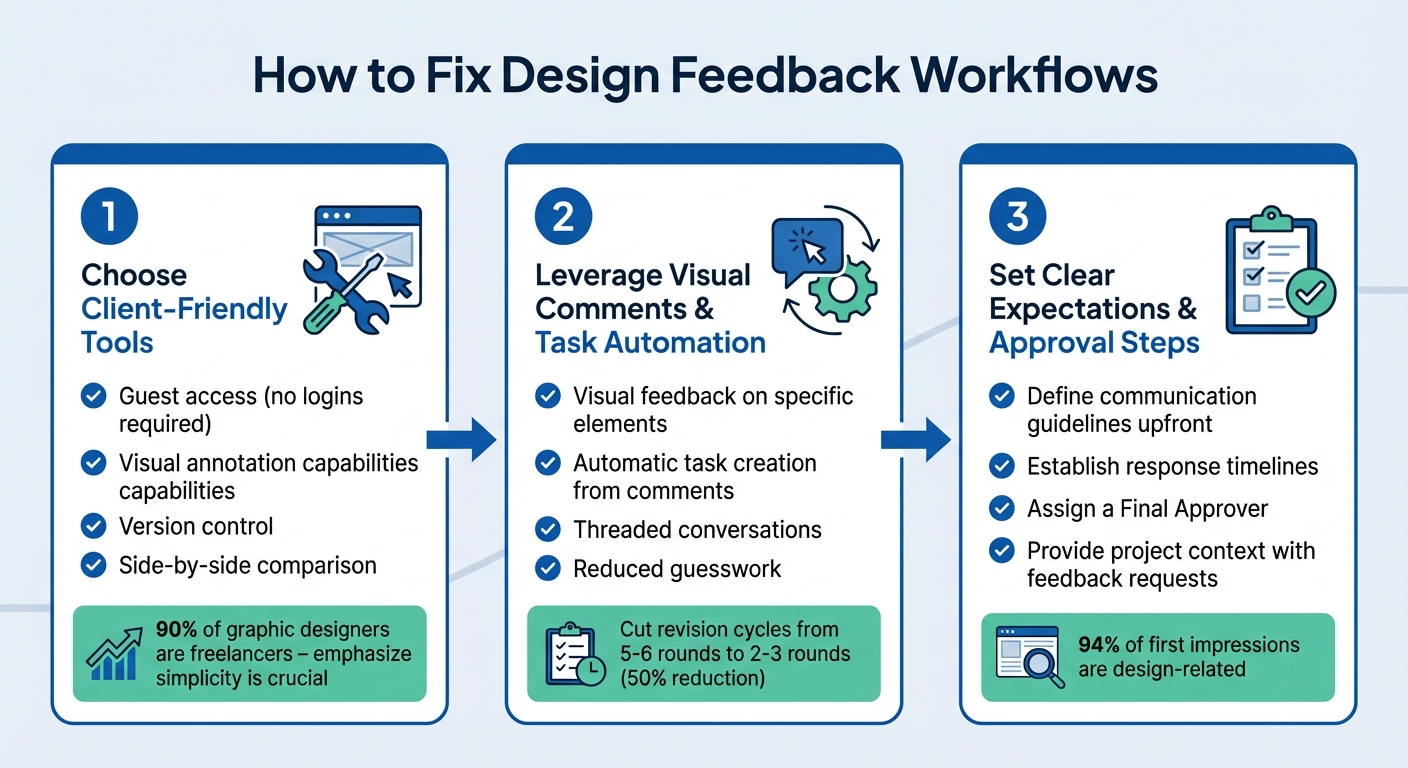
3-Step Process to Fix Design Feedback Workflows
Streamlining your feedback process can help eliminate unnecessary confusion and delays. The goal? Make it simple for clients to provide clear input while giving your team the tools to stay organized. Start by choosing tools that prioritize ease of use for clients.
Choose Tools That Clients Can Use Easily
Complicated tools that require downloads or logins can slow things down and frustrate clients. Instead, opt for tools with guest access - this allows clients to jump in and provide feedback without extra steps. With 90% of graphic designers working as freelancers, keeping things simple is crucial.
Look for tools that offer visual annotation, where clients can point, click, and even draw directly on images, PDFs, or live websites. This eliminates vague feedback like "change the header color" when multiple headers exist. Precise visual input saves time and reduces misunderstandings.
Another must-have is version control. This ensures clients aren’t reviewing outdated files or asking for changes you’ve already made. Tools with side-by-side comparison features can also help clients quickly see what’s been updated, minimizing confusion and redundant feedback.
Leverage Visual Comments and Task Automation
Visual feedback tools make life easier by turning unclear instructions into actionable tasks. For example, when a client clicks on a specific element and leaves a comment, you know exactly what they’re referring to.
The process becomes even smoother when feedback automatically converts into tasks. Instead of copying notes from emails into your project management system, the right tool creates a to-do list for you. Threaded conversations keep all discussions tied to specific elements, so you won’t waste time digging through email chains to find context.
Using these tools can cut revision cycles in half - reducing rounds of edits from 5–6 to just 2–3. That’s a big time-saver for everyone involved.
Set Clear Expectations and Approval Steps
From the start, establish clear communication guidelines. Outline the tools you’ll use, the expected response times, and the preferred format for feedback. If you’re a freelancer or agency, formalize these details in your contract. Specify when feedback will be requested and how quickly clients should respond.
Assign a Final Approver to avoid delays caused by waiting for "just one more person" to weigh in. Automated reminders and clear deadlines can help keep the review process moving forward.
Whenever you request feedback, provide context. Share the project’s goals, intended use cases, and any constraints so clients can focus on whether the design aligns with the objectives rather than personal preferences. For instance, asking, "How does this element enhance the user experience?" encourages more thoughtful and relevant feedback. Considering that 94% of first impressions of a brand or website are design-related, getting feedback right from the start is essential for protecting your client’s brand image.
How BoastImage Solves Feedback Problems
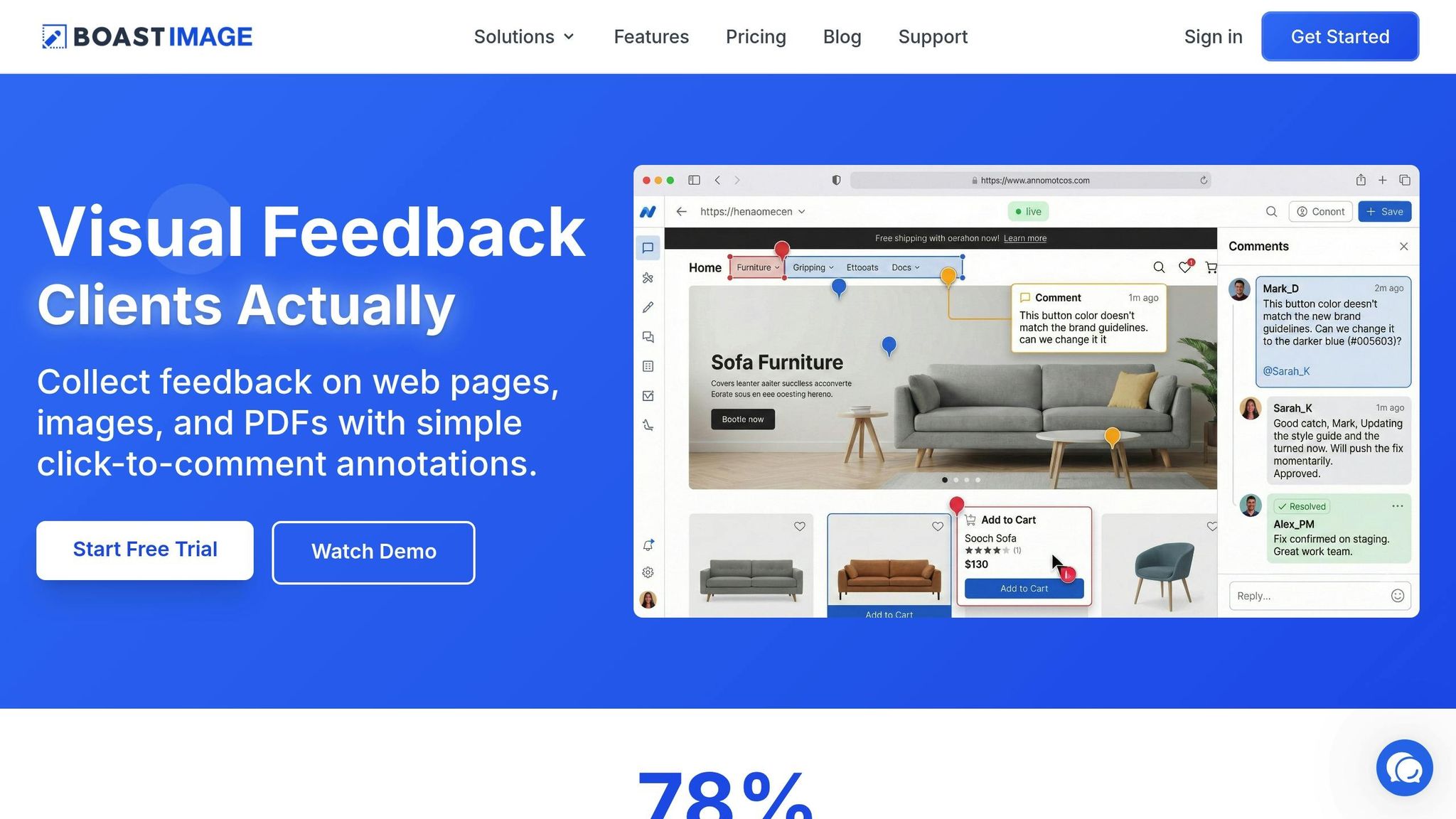
BoastImage removes the usual hurdles clients face - no need to create accounts, remember passwords, or download anything. Clients simply click a link, check out the designs, and leave their comments directly on the visuals. This straightforward process makes giving feedback easier and faster.
Easy Client Access Without Logins
Forget the hassle of logins and onboarding tutorials. With BoastImage, clients just click the link you provide, pinpoint the exact part of the design they want to address, and leave their comment. The use of visual annotations ensures clarity, cutting down on back-and-forth revisions.
Advanced Features for Teams
While clients enjoy the simplicity, your team gets access to robust tools that make managing feedback a breeze. BoastImage includes version control to track every update, Kanban boards for visualizing project progress, and task management tools to turn feedback into actionable steps. You can even compare design versions side-by-side, so clients always see the most up-to-date files - no more confusion over which version is the right one. Plus, all paid plans allow unlimited external collaborators, so you can include as many client-side stakeholders as needed without worrying about extra costs.
Pricing Plans for Different Team Sizes
BoastImage offers flexible pricing options tailored to teams of all sizes, ensuring everyone can collaborate effectively:
- Free plan ($0): 1 active project, 5 items per project, 3 external collaborators
- Solo plan ($9.95/month): 5 projects, 10 external collaborators, version control, Kanban views
- Team plan ($19.95/user/month): Unlimited projects, unlimited collaborators, custom branding
- Business plan ($39.95/user/month): Unlimited storage, full white-label branding, dedicated support
All paid plans include unlimited external collaborators and custom branding, helping streamline the review process and keep projects moving efficiently.
Conclusion: Make Feedback Work for You
Feedback often gets tangled in scattered channels - emails, Slack messages, PDFs - while vague requests like "make it pop" only add confusion and slow projects down. On top of that, tools requiring client logins can create unnecessary friction, delaying progress. The solution? Centralize your workflow and use tools that are simple and intuitive for clients.
Switching to a visual feedback platform takes the guesswork out of the process. Instead of deciphering unclear descriptions, clients can click directly on design elements and leave precise, actionable comments. This approach can cut revision cycles by up to 50%, speeding up approvals and reducing back-and-forth.
To take it further, opt for tools that are easy for clients to use and structured for your team. Features like version control ensure work doesn't get lost, task tracking turns feedback into actionable steps, and a centralized dashboard keeps everyone on the same page. With 80% of organizations planning to automate key operations for greater efficiency, streamlining your feedback process isn’t just helpful - it’s necessary. A smoother system can eliminate delays and miscommunications that often derail design projects.
Set clear protocols from the start: choose the right tool, define response timelines, and assign final approval responsibilities. Encourage specific, visually contextual feedback to avoid ambiguity. These small but effective steps can transform chaotic review cycles into seamless workflows, keeping your projects on track and moving forward efficiently.
FAQs
How can I make sure design feedback is organized and doesn’t get overlooked?
To streamline design feedback and ensure everything stays on track, use a centralized feedback tool that gathers all comments in one place. Set clear communication guidelines with clients, specifying timelines and preferred methods for submitting their input. Adding visual annotations or timestamped notes can make feedback more precise and easier to follow. These practices create a reliable system for managing feedback effectively.
How do visual annotation tools improve design feedback?
Visual annotation tools make it easy for reviewers to give precise feedback by marking specific parts of a design, like mock-ups or prototypes. This direct approach eliminates unclear comments and ensures the feedback is tied to the exact element in question, cutting down on confusion and making revisions faster.
By centralizing all feedback within the design itself, these tools eliminate the mess of scattered emails or chat threads. Everything stays in one place, making it simple to track and ensuring no input gets lost.
The result? Smoother collaboration. Designers and stakeholders get the clarity they need, leading to quicker approvals, fewer misunderstandings, and a much more efficient design process.
How do clear guidelines make design feedback more effective?
Clear and specific guidelines can transform feedback into something genuinely useful. When you outline exactly what you need - whether it’s clarity on project goals, insights about the target audience, or opinions on key design elements - you shift feedback from vague and unhelpful to precise and actionable. This approach cuts down on misunderstandings, avoids unnecessary back-and-forth, and ensures the feedback stays aligned with the project’s objectives.
Clear guidelines also make communication far more efficient. Defining who should provide feedback, when it’s needed, and how it should be delivered helps keep everything organized. Using a single platform or tool with well-defined steps ensures that comments are easy to track, address, and manage. This not only saves time but also prevents valuable feedback from slipping through the cracks, keeping the project on track. Together, these strategies create smoother workflows and lead to better outcomes for everyone involved.