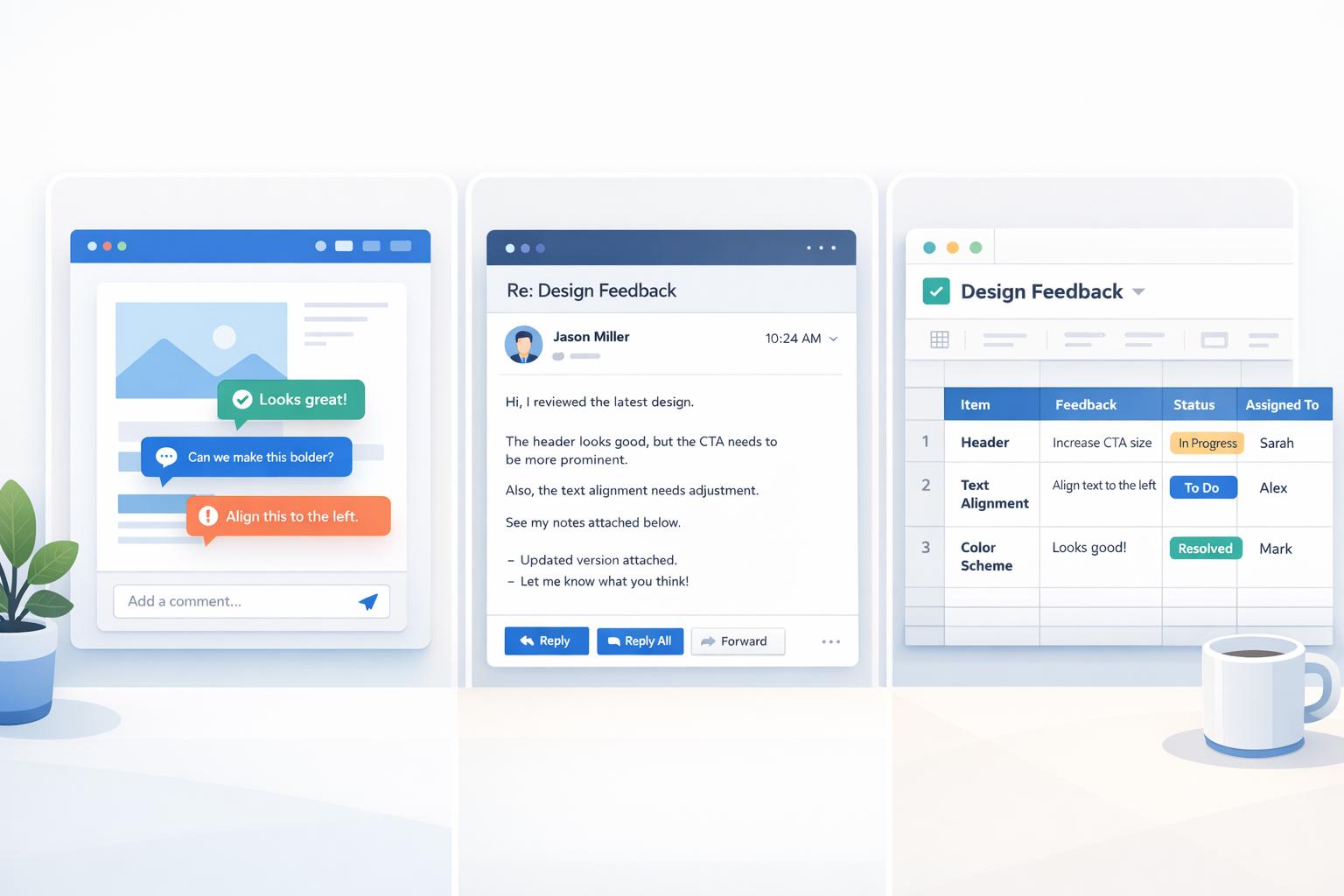
Design Feedback Tools: In-App Comments vs Email vs Spreadsheets
When managing design feedback, three popular tools - in-app comments, email, and spreadsheets - each offer unique benefits and drawbacks. Here's a quick breakdown:
- In-App Comments: Pin feedback directly on designs for clarity, reduce back-and-forth, and streamline workflows. Best for visual projects but may require onboarding for clients.
- Email: Familiar and flexible, making it easy for clients to share feedback. However, it often leads to disorganized threads and version control issues.
- Spreadsheets: Structured and budget-friendly for tracking feedback but requires manual effort and lacks visual context.
Quick Comparison
| Tool | Best For | Challenges | Key Benefit |
|---|---|---|---|
| In-App Comments | Visual, detailed feedback | Learning curve for some clients | Precise, actionable comments |
| Quick, informal communication | Scattered threads, version confusion | No setup required | |
| Spreadsheets | Budget-conscious, basic tracking | Time-consuming manual updates | Organized feedback management |
Choosing the right tool depends on your project’s complexity, client preferences, and workflow needs. Each offers trade-offs in clarity, efficiency, and ease of use.
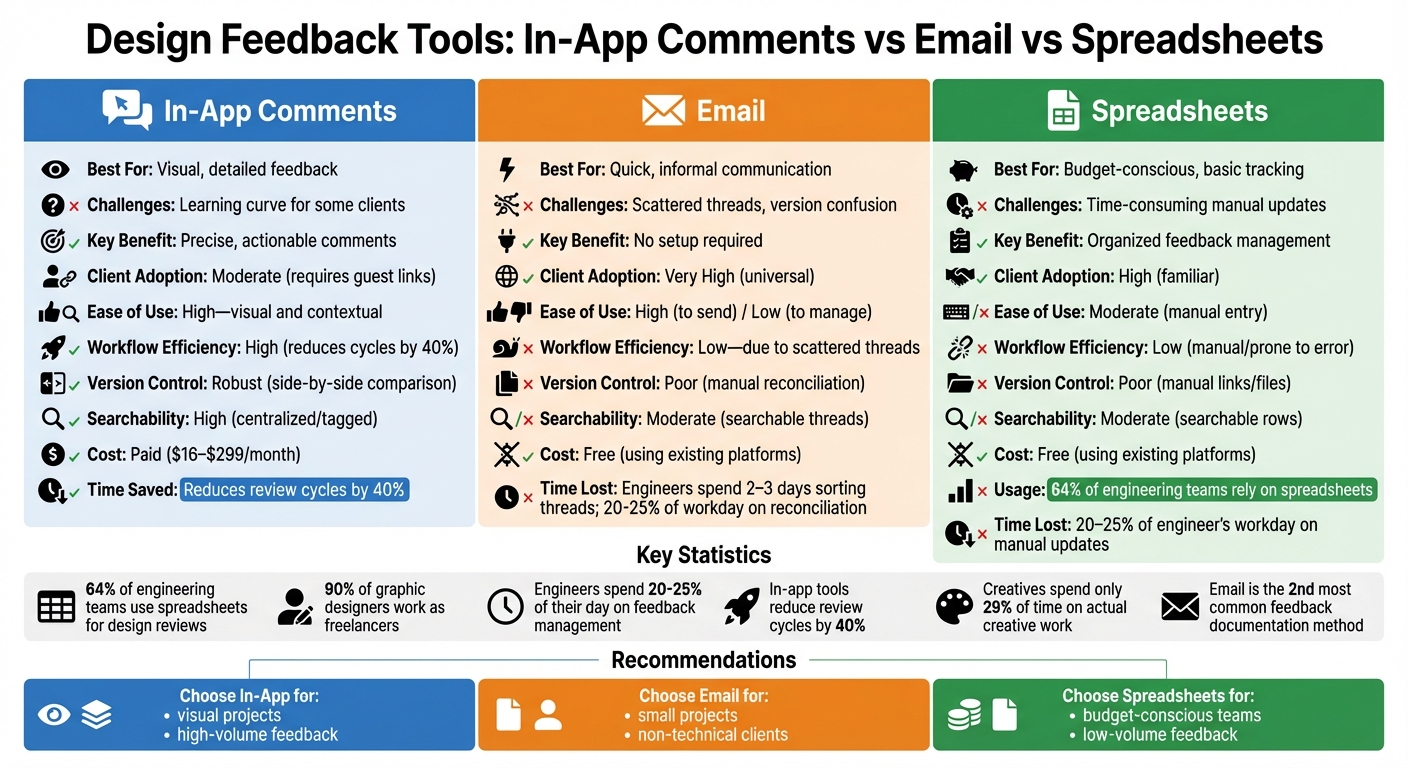
Design Feedback Tools Comparison: In-App Comments vs Email vs Spreadsheets
Design Feedback Tool Loved by Designers and Reviewers
In-App Comments: Feedback Directly on the Design
In-app comments let stakeholders provide feedback precisely where it's needed - directly on the design elements themselves. Instead of sending vague emails like, "Can you move that banner on the homepage?" reviewers can simply click on the banner, type their feedback, and pin it to the exact spot. This eliminates the need for screenshots or unclear descriptions, creating a centralized, visual layer for collaboration. By tying comments directly to design elements, teams achieve greater clarity and speed during the review process.
What’s more, these tools automatically capture metadata like the URL, browser version, operating system, and screen dimensions whenever a comment is made. This removes the hassle of manually filling out spreadsheets or chasing down missing details. Forget dealing with broken links or "#REF!" errors - this streamlined process ensures everything is in one place, ready for action.
Strengths
One of the biggest advantages of in-app comments is their contextual precision. By visually pinning feedback to specific design elements, teams avoid the guesswork of figuring out what "the top part looks weird" actually means. This clarity saves time and reduces frustration.
Another strength is real-time collaboration. With these tools, multiple people can review and discuss changes simultaneously while viewing the most up-to-date version. Gone are the days of reconciling conflicting feedback from different sources. Many in-app tools also integrate seamlessly with project management platforms like Jira or Asana, turning comments into actionable tasks without extra effort.
Lastly, these tools significantly reduce the administrative burden. Tasks like uploading screenshots or manually describing bugs become obsolete. Some tools even record the 30 seconds leading up to a bug report, making it easier for developers to reproduce and fix issues without additional back-and-forth.
Limitations
Despite their benefits, in-app comment tools aren’t without challenges. For one, there’s often a learning curve for non-technical clients. While designers tend to find these tools intuitive, less tech-savvy stakeholders may need some guidance. To address this, many tools now include guest access features, allowing clients to comment via a simple link - no account required.
Another limitation is platform compatibility. Browser extension-based tools, for example, may struggle to capture feedback on mobile devices, which is a problem when testing responsive designs. Script-based tools are generally more reliable across devices but require additional setup. And while these tools are widely used - especially since around 90% of graphic designers work as freelancers - not every client is willing to learn a new system, no matter how straightforward it seems. Recognizing these constraints helps teams weigh in-app feedback tools against other options.
Email: Familiar but Scattered Feedback
Email remains a popular choice for design feedback. In fact, a survey of 250 engineering leaders revealed it’s the second most common method for documenting feedback. Its biggest draw? No onboarding. Clients don’t need to install software, create accounts, or navigate unfamiliar tools. This simplicity makes email especially appealing for non-technical stakeholders who might shy away from specialized design platforms.
Another key advantage is its flexibility. Email supports asynchronous collaboration, allowing clients and designers to review and respond to feedback on their own schedules, even across time zones. It’s also commonly used as a catch-all hub for informal feedback methods, like sharing PowerPoint decks with screenshots or PDF markups. As the CoLab Team puts it:
"Email is still the preferred communication channel for discussing design issues and sending design files" – CoLab Team
Strengths
Email’s accessibility is one of its standout qualities. It enables quick, informal communication, making it easy to share straightforward feedback without requiring complex tools.
It also allows for a variety of communication styles. Clients can write detailed notes, attach reference files, or pass along input from other stakeholders - all within a platform they’re already comfortable using. The asynchronous nature of email is another plus, particularly for teams spread across different time zones.
Limitations
However, email’s unstructured format can lead to chaos. One of the biggest challenges is thread fragmentation. Stakeholders might reply to a group, send private responses, or start new threads with unrelated subject lines. This disorganization makes it tough to keep track of conversations.
Version confusion is another frequent issue. Feedback often comes in on outdated attachments, even as designers are working on updated iterations. Engineers can spend 2–3 days sorting through email threads to reconcile file versions and ensure no critical feedback is missed. This manual back-and-forth can eat up 20–25% of an engineer’s day - time that could be better spent elsewhere.
Email also lacks tools for precise visual feedback. Designers are often left deciphering vague descriptions like "the top part looks weird". To compensate, teams sometimes cobble together makeshift systems, combining Outlook with PowerPoint. But this approach risks losing feedback and creates additional version control headaches.
Spreadsheets: Organized Feedback Management
Spreadsheets offer a structured way to manage feedback, bridging the gap between the chaos of email and the complexity of specialized tools. By organizing feedback into rows and columns, spreadsheets make it easier to sort, filter, and track revisions. In fact, a survey of 250 engineering leaders conducted in October 2023 revealed that 64% of engineering teams rely on spreadsheets to document design reviews.
The appeal lies in their simplicity and efficiency. Unlike email, where feedback can feel scattered and unmanageable, spreadsheets bring order to the chaos. Their ability to categorize and track information, combined with their affordability, makes them an attractive option for teams mindful of their budgets. However, while spreadsheets come with distinct advantages, they also have their limitations.
Strengths
One of the biggest strengths of spreadsheets is their tabular organization. Feedback is neatly arranged in grids, which can be filtered by criteria like status, priority, or assignee. This setup makes it easy to spot issues, especially with tools like color-coded rows highlighting critical points. Many modern spreadsheets also support threaded comments, enabling focused discussions directly tied to specific data points.
Another major advantage is the built-in audit trail. Features like "Track Changes" and version history document who made edits and when, offering a level of accountability that's often missing in email exchanges. This transparency is particularly helpful when reconciling conflicting feedback or providing a clear record of design decisions for stakeholders.
Limitations
Despite their strengths, spreadsheets come with notable downsides. One major issue is the manual effort they require. Engineers often spend significant time pasting screenshots, typing descriptions, and updating statuses - tasks that can take up 20-25% of their workday. As projects grow, spreadsheets can become unwieldy, with broken formulas and failed references adding to the frustration.
Another drawback is the lack of visual context. Unlike in-app tools where clicking on a design element reveals related feedback, spreadsheets require users to manually attach screenshots or links. This can be problematic - what happens when a screenshot labeled "homepage issue" no longer matches the updated design? It becomes nearly useless. Additionally, spreadsheets fail to capture technical details like browser type, screen size, or specific URLs, which are often critical for developers to reproduce and resolve issues.
While spreadsheets provide structure and transparency, their limitations highlight the need for more dynamic tools in complex projects.
sbb-itb-32f6eb2
Comparison: In-App Comments vs Email vs Spreadsheets
Each tool brings its own strengths and weaknesses when it comes to familiarity, functionality, and efficiency. Here's a closer look at how they stack up in terms of client adoption, ease of use, and workflow efficiency.
Email remains the most widely adopted because everyone already uses it. But its biggest downside? Disorganized threads and version mix-ups that slow down feedback processing. Miscommunication through email often leads to delays in resolving issues.
Spreadsheets, on the other hand, offer a more structured way to manage feedback. In fact, 64% of engineering teams rely on them. The downside? They require a lot of manual effort - copying screenshots, typing descriptions, and constantly updating statuses. This eats up time that could be spent on actual engineering work. Adam Keating, CEO of CoLab, sums it up perfectly:
"99% of the engineering world is run on spreadsheets... the problem with spreadsheets is the overreliance on spreadsheets well beyond their feasible capability."
In-app comments present a more modern solution. While they come with a subscription fee ($16–$299/month), they can cut review cycles by 40%. These tools also automatically capture technical details like browser type and screen resolution, saving clients the trouble of providing them manually. The downside? Clients need to navigate a new interface, making guest access features essential for seamless collaboration.
Here's a quick breakdown of how these tools compare:
| Criterion | In-App Comments | Spreadsheets | |
|---|---|---|---|
| Client Adoption | Moderate (requires guest links) | Very High (universal) | High (familiar) |
| Ease of Use | High - visual and contextual | High (to send) / Low (to manage) | Moderate (manual entry) |
| Workflow Efficiency | High (reduces cycles by 40%) | Low - due to scattered threads | Low (manual/prone to error) |
| Version Control | Robust (side-by-side comparison) | Poor (manual reconciliation) | Poor (manual links/files) |
| Searchability | High (centralized/tagged) | Moderate (searchable threads) | Moderate (searchable rows) |
| Cost | Paid (subscription) | Free (using existing platforms) | Free (using existing platforms) |
Ultimately, the choice isn't about finding the "perfect" tool - it's about understanding which trade-offs your team can handle. Free tools might save money upfront but could cost you in wasted time. Paid tools, while requiring an initial investment, often eliminate the repetitive tasks that bog down workflows.
When to Use Each Method
In-App Comments: Visual and Iterative Feedback
In-app comments are ideal when visual context is essential, such as for websites, mobile apps, or prototypes. These tools allow users to provide pinpointed feedback by simply clicking on the issue, which is especially helpful for clients who struggle to articulate their thoughts in writing.
One of the standout features of in-app tools is their ability to automatically capture technical metadata like browser version, operating system, screen resolution, and console logs. This makes them invaluable for high-volume projects where developers need to quickly replicate and address bugs. For remote or distributed teams working across time zones, in-app comments streamline asynchronous collaboration, eliminating the confusion that often comes with long email threads. Tools that offer guest access can further simplify the process for clients, lowering the barriers to participation.
This method’s precision sets it apart from other feedback approaches, but it may not always be the best fit depending on the project’s scope and client needs.
Email: Quick and Informal Communication
Email is a solid choice for smaller projects where clients prefer a straightforward, casual approach over learning new tools. It’s particularly effective for stakeholders who might find specialized design platforms overwhelming or for projects with only minor revisions. To avoid conflicting feedback, it’s a good idea to designate a single point of contact for all communication.
To make email feedback more effective, provide clear and specific points for review, such as "evaluate the color palette" or "test the navigation menu." This helps prevent vague responses that can slow progress. It’s worth noting that creatives spend just 29% of their time on actual creative work, with the rest consumed by administrative tasks like chasing approvals and managing reviews. Without a structured system in place, email can add to this burden, so setting clear timelines and expectations is key.
While email offers simplicity, it lacks the structure needed for larger or more complex projects.
Spreadsheets: Budget-Conscious, Low-Volume Feedback
For projects where subscription fees aren’t feasible, spreadsheets are a practical alternative. With 90% of graphic designers working as freelancers and 82% of small businesses facing cash flow challenges, free tools like Google Sheets or Excel are often the go-to choice. Spreadsheets work well for clients with basic technical skills who prefer a simple, tabular format.
This method is particularly useful for low-volume projects that require a centralized way to track priorities, statuses, and assignments. They’re a good fallback option when in-app commenting isn’t available or when simplicity is preferred. However, manually updating spreadsheets can be time-consuming. As Adam Keating, CEO of CoLab, puts it:
"99% of the engineering world is run on spreadsheets."
That said, as the number of feedback items grows, the effort involved in copying screenshots, writing descriptions, and updating statuses can outweigh the cost savings. For larger projects, it might be worth considering more efficient feedback tools to save time and resources. Ultimately, the choice depends on the project’s size and complexity.
Key Takeaways
Selecting the right feedback method hinges on the complexity of your project and how comfortable your client is with technology. In-app comments shine when visual context is crucial. They replace vague feedback with precise, clickable pins placed directly on the design. Plus, they automatically capture technical details like browser version, operating system, and console logs - all without extra effort. These features cut down on follow-up delays and encourage client participation with options like guest access, which eliminates the need for account creation.
While in-app comments have clear advantages, you might also explore other methods. Email, for instance, can quickly become overwhelming as feedback piles up. Spreadsheets, on the other hand, require manual effort - copying screenshots, updating statuses - which can eat up time, even if they save on subscription costs.
FAQs
How do in-app comments make the design feedback process more efficient?
In-app comments make the design feedback process smoother by letting stakeholders leave their thoughts directly on specific elements, screens, or interactions within the design itself. This approach eliminates the hassle of jumping between tools like email or spreadsheets and ensures that feedback is tied directly to the relevant context. The result? Fewer misunderstandings and less guesswork.
By keeping all feedback centralized, teams can easily follow conversations, identify who shared input, and understand the reasoning behind changes. This method avoids the chaos of lost feedback in email chains or scattered documents, saving time and streamlining workflows. Ultimately, it leads to a quicker, more organized review process with fewer back-and-forth revisions.
What are the biggest challenges of using email for design feedback?
Email might be a go-to for many tasks, but when it comes to design feedback, it falls short in several key areas. For starters, there's no simple way to track who has reviewed or responded, which often leads to confusion and wasted time chasing updates. Plus, feedback through email usually lacks visual context, making it harder to interpret and leading to endless back-and-forth clarifications.
On top of that, email isn’t built for collaboration. It doesn’t provide a shared space for discussions, so conversations get scattered across multiple threads, making it tough to keep everything organized. And let’s not forget the chaos of managing file versions - replies often include outdated attachments, increasing the chances of working on the wrong design version. All of this adds up to make email a pretty inefficient tool for handling design approvals.
Why aren’t spreadsheets the best choice for managing design feedback?
Spreadsheets often fall short when it comes to managing design feedback efficiently. One major drawback is that they separate comments from the actual design files. Without integrated annotation tools, feedback is typically reduced to plain text, which can easily lead to misunderstandings or miscommunication.
On top of that, maintaining spreadsheets demands extra manual effort. Tasks like copying screenshots, tracking version updates, and consolidating edits can quickly become tedious. This not only eats up valuable time but also increases the likelihood of errors, making spreadsheets a clunky alternative to tools specifically built for handling design feedback.