Client feedback without login: the no-account solution
The #1 reason clients ghost feedback tools? You asked them to create an account.
24% of users abandon processes at account creation. Another 36% quit if registration feels complicated. Traditional login systems achieve only 60-85% success rates.
The cost? $6,000-$12,000 per year in lost time chasing clients, explaining tools, and managing password resets.
This page explains why client feedback without login is not a nice-to-have. Agencies, freelancers, and teams lose people at signup, and that costs them.
Why login requirements kill client feedback
Requiring clients to log in to give feedback is slowing you down. Every extra step, like creating accounts or verifying emails, causes drop-offs. Research shows 24% of users abandon the process when faced with account creation, and login success rates are only 60%-85%. That means delays, mixed signals, and more follow-ups.
How to get client feedback without accounts
The fix is loginless feedback. Clients click a link, leave comments, and move on. No passwords, no dashboards. This path has a 99.9% success rate and cuts time to feedback by over half. Projects keep moving because the review itself is short.
Here's why loginless workflows work better:
- Fewer steps: No account setup, password resets, or email verifications.
- Higher engagement: Clients focus on giving feedback, not navigating tools.
- Fewer delays: Projects move forward because the review does not stall at signup.
- Lower cost: Save $6K-12K annually by dropping support for password resets, onboarding, and chasing ghosted clients. Read more about the hidden cost of "just create an account".
The real cost of login requirements
Time and money wasted on account setup
Forcing clients to create an account for every feedback request adds hidden cost. Those minutes of setup are minutes you are not billing. With magic links, users enter their email, switch to their inbox, find the message, copy the code, and submit it. That is nine steps. Each extra step raises the chance they get distracted or quit.
The numbers behind client abandonment
Complex registration is a common reason clients abandon feedback tools. Research shows abandonment rates as high as 36%. Even when clients finish registration, login success rates sit between 60% and 85%, so a large share still fail on the first try. When they get stuck or quit, the project timeline slips.
The ripple effect of delayed feedback
Login trouble does not stop at abandoned registrations. If clients cannot log in or verify an account, comments arrive late or not at all. Momentum dies. When they fall back to vague emails or texts, you lose visual annotations and threaded discussions. Then you spend time translating what they meant, and the project slips again.
5 barriers that stop clients from giving feedback
Every extra step in the feedback process creates friction, and login requirements are usually the largest. These are the barriers that leave requests unanswered.
1. Account creation
The moment a client clicks on your feedback link and sees "Create an Account", you've likely lost a chunk of your audience. Research shows that requiring account creation can lead to a 24% drop-off rate in feedback scenarios. Busy clients often abandon requests when faced with setting up an account and creating yet another password. UX copywriter Scarlett Payne writes:
"People are tired of collecting accounts and passwords... if you require an account to buy your products, the path of least resistance might involve not purchasing from you."
The same logic applies to feedback: if it feels like a chore, clients won't bother.
2. Email verification
Even if clients make it past the account creation step, email verification is another roadblock. This process, often described as:
"incredibly tedious"
requires users to switch tabs, find the verification email, copy a code, and return to paste it. That is extra work they did not ask for. Research manager Zach Capers from Capterra notes that email verification:
"adds a time‐consuming step, alienates privacy‐focused consumers, and risks losing a sale."
With 66% of consumers expecting online tasks to take no more than four minutes, these extra steps can easily push clients to abandon the process altogether.
3. Forgotten passwords
Even if clients successfully create an account, the next hurdle comes when they forget their password. Login success rates typically range from 60% to 85%, meaning a significant number of users struggle to access their accounts later. Password managers, which could help, often fail to auto-fill credentials for feedback tools, leaving clients to manually retrieve or reset their passwords. This extra hassle often leads to complete abandonment.
4. Learning a new tool each time
If clients don't use your feedback tool regularly, they'll likely forget how it works by the time they return. As web designer Brad Frost points out:
"When we try to get too clever we force users to learn new conventions which slows them down."
Each unfamiliar interface increases cognitive load, making it harder for clients to engage, especially when they're already managing multiple projects.
5. Remembering which platform to use
Clients often juggle feedback tools from various agencies, freelancers, and internal teams. If too much time has passed since the last project, they may forget which platform they're supposed to use. When they can't quickly figure it out, they often send feedback via email or text and skip your structured system.
These five steps are why login-based tools lose comments. Remove them and clients can reply without treating it like a chore.
Why feedback tools are moving away from login requirements
Industry recognition of the login problem
Feedback tool makers have known for years that account creation cuts participation. Agencies and freelancers see it too: ask a client to log in, and many never start. A lot of platforms still sell team features. The bottleneck is not internal productivity. It is getting the client to open the link and comment.
More platforms now offer guest access. That shift matches the research already on this page: account requirements are a hurdle, and people prefer a shorter path. If you want the comments, shorten the client side.
Results from loginless systems
Loginless systems drop the extra steps, and the numbers move. Loginless workflows have a 99.9% success rate, compared with 60%-85% for account-based methods. Tasks finish 15 times quicker, and conversion rates can rise by up to 400%.
Time matters here. Studies show that 66% of consumers expect to finish online tasks within four minutes, and 28% expect it done in two minutes. Extra seconds add drop-off. Loginless systems fit those expectations.
Preferences point the same way. 93% of users favor biometric or passwordless authentication over traditional passwords. As Raluca Budiu from Nielsen Norman Group explains:
"Passwords are a major pain point in any user experience. Until recently, this pain point was considered unavoidable".
BoastImage uses the same idea: remove the account barrier, and you get comments back faster with fewer reminder emails. If you want the feedback, drop the login.
sbb-itb-32f6eb2
Login-required vs. loginless: a workflow comparison
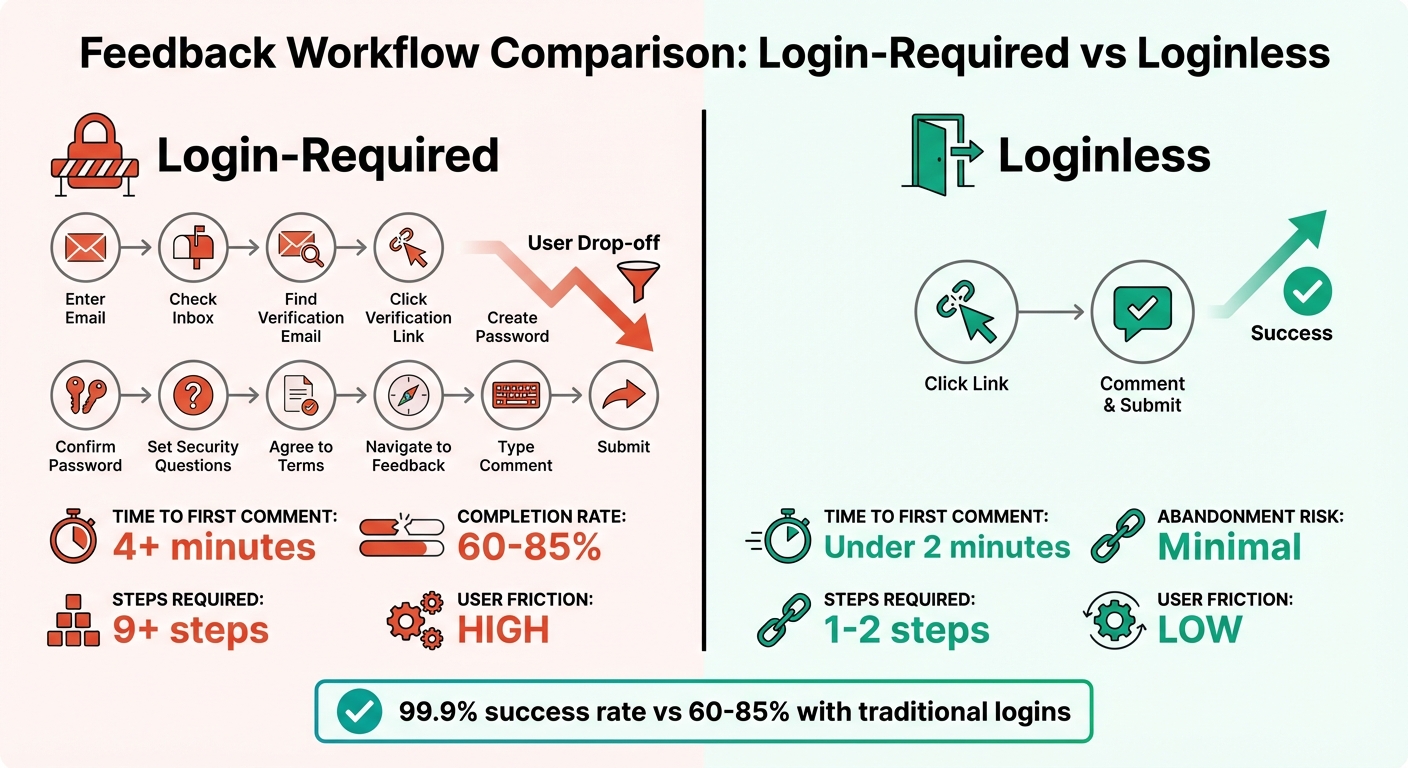
Login-Required vs Loginless Feedback Workflow Comparison
The login-required workflow
The usual feedback path is long. The client clicks a link, then hits a multi-step account setup (often nine steps) before they can log in. And that is if nothing breaks.
Here is what the numbers show: 24% of users abandon the process when asked to create an account. Another 36% quit if registration feels overly complicated. Even for those who stick it out, traditional login systems only achieve a 60% to 85% success rate. Meanwhile, you send follow-up emails like, "Did you get my link?" as the deadline gets closer.
The loginless workflow
The loginless path is shorter. You send a link, your client clicks it, and they are looking at the work. No dashboards, no navigation, no onboarding tour. They click on the page and leave a comment. For most people the whole thing takes less than two minutes, with a 99.9% success rate. No password reset, no verification email. They can come back months later and do the same thing. The review stays on the work, not the tool.
Side-by-side comparison
| Metric | Login-Required | Loginless |
|---|---|---|
| Time to First Comment | Typically exceeds four minutes | Under two minutes |
| Completion Rate | 60%-85% success rate | 99.9% success rate |
| Abandonment Risk | 24%-36% due to registration | Minimal - no barriers |
| Steps Required | 9+ steps (with email verification) | 1-2 steps (click and comment) |
| User Friction | High - password issues and delays | Low - instant access |
The gap is larger when you have more than one client. A login-required system puts everyone through the same long path. Loginless feedback skips that, which saves time and the $6K-12K you would spend chasing people. Clients comment on the work instead of fighting a password screen.
How BoastImage's loginless feedback works
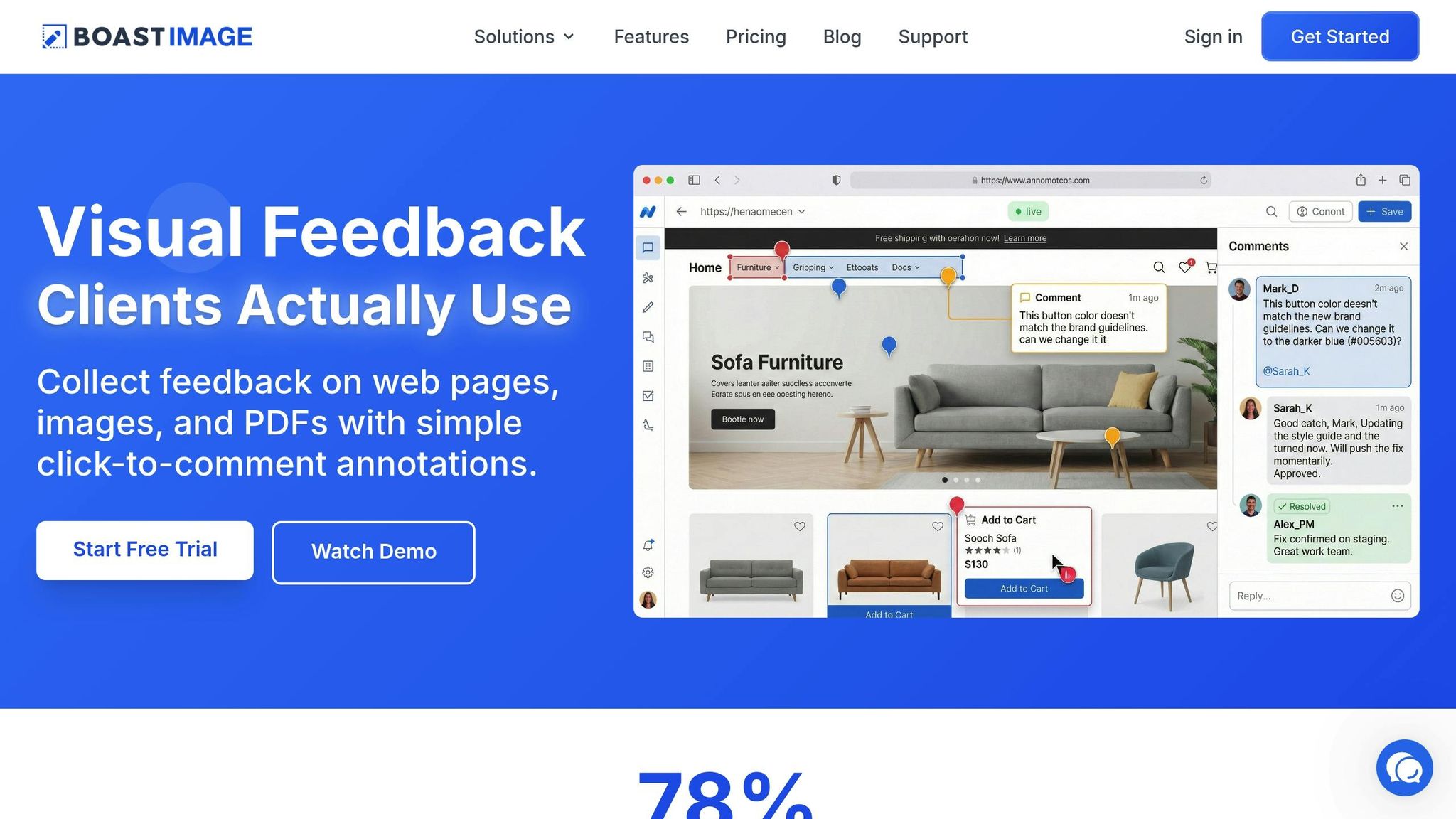
BoastImage removes the extra steps so a comment can happen on the first try.
Click, view, comment: no login needed
With BoastImage, giving feedback is three actions: click the link, view the design or mockup, and leave a comment. There is no account to create, no email to verify, and no password to remember. Clients land on the work and can share their thoughts right away. That is why the first comment arrives sooner.
Comments still get an audit trail, and you can add a PIN when a project needs a tighter lock.
Capture any web page instantly
Get our free Chrome extension to capture full pages, visible areas, or selected regions, all without leaving your browser.
Install Chrome ExtensionSecurity and tracking without the hassle
Security still matters without a login. BoastImage uses email-ledger tracking. Every comment is stored with browser type, screen resolution, and a timestamp, so you have an audit trail without passwords. For extra-sensitive projects, you can add an optional access code (a simple PIN). That limits who can view the work without turning the review into an account signup.
Links that never expire
Unlike magic links that vanish after one use, BoastImage links stay active. Clients can bookmark the link and come back days, weeks, or months later to add more comments. They do not re-authenticate or hunt for a new code. That helps on projects that span more than one review round.
Brad Frost describes that path:
"Enter email... Open new tab... Open inbox... Find message... Open message... Copy password... Go back... Paste... Submit. It's overwhelming."
BoastImage skips that path. The same link keeps working, so clients stay on the work, not the tool.
Conclusion
The numbers are blunt: 24% of users abandon a process as soon as they're asked to create an account. Those stops waste time, and they cut off the comments you need.
When clients can click a link and comment right away, with no account and no new tool to learn, you are working with how people already behave. Feedback arrives sooner, response rates go up, and you send fewer "just checking in" emails.
Every extra step slows the comment you need. As Steve Jobs famously said, "One of the things I've always found is that you've got to start with the customer experience and work backward to the technology". That is the idea behind BoastImage. Clients get a short path. You still get structured feedback, version control, and project tools, without a login screen in the way.
Curious to see it in action? Experience instant feedback for yourself. See How It Works.
FAQs
How does feedback without login improve client engagement?
Dropping the account requirement removes sign-up forms, email verification, and password resets. Those steps cause drop-offs: over 40% of people abandon processes that require a login. Cut them and feedback completion rates can move from 40-60% to 60-90%, while response times shrink from days to hours.
A shorter path also reduces decision fatigue. Clients can tell you are not wasting their time. When leaving a comment is quick, you get replies sooner and fewer stalled reviews.
How does BoastImage ensure security for loginless feedback?
BoastImage can still lock a link down without a full account. Add an optional access code so someone has to enter it before they view or comment. Every comment is also stored in an email ledger. That ledger records the reviewer's email, the time, and the exact comment, so you know who said what.
You can also set project-level permissions. Links can be view-only, open for comments, or set to expire. You can revoke access at any moment. For a tighter lock, BoastImage offers passwordless authentication, such as one-time passwords (OTPs) or passkeys sent to a reviewer's verified email or device. The content stays protected, and the client still does not create an account.
Why do traditional login systems cause users to abandon feedback requests?
Traditional login systems add hassle. Setting up an account, verifying email, and remembering another password is enough work that many people quit before they start.
That extra work also wears down trust. It is worse when the same person has to do it again on another platform or project. A shorter path raises the odds they finish.