
A good annotation tool can speed up feedback and implementation. A better one also makes it easy for stakeholders to leave comments. Markup.io does that work. BoastImage does the same job with a simpler client path and a lower price.
Markup.io gives teams more modes and deeper annotation. Clients usually want a short path: leave a comment, see the change, move on. BoastImage is built around that path.
The difference shows up in who the product is for:
- BoastImage is an affordable ($0 to $39.95) client-centric tool for agencies, freelancers, and stakeholders. It collects comments and turns them into tasks with the built-in project management board.
- Markup.io is an expensive ($79+) tool aimed at internal communication, design changes, and implementation. It has deeper annotation features like live website feedback, rendering, and external sharing, and it has a steeper learning curve.
Should you choose BoastImage or Markup.io?
Choose BoastImage if you need a small client-facing tool that keeps review short. BoastImage also includes a project management board so you can assign work from the same comments.
Choose Markup.io if you want more engagement between teammates and deeper annotation. Markup.io takes longer to learn and needs third-party integrations like Jira and Trello for task assignment.
Quick verdict: BoastImage is the Markup.io alternative for teams and agencies that want client comments without an account. It is easier to use, supports team collaboration in the app, and covers both the review canvas and the task board.
Quick overview of BoastImage and Markup.io
Here is how each tool handles a review:
| Feature / detail | BoastImage | Markup.io |
|---|---|---|
| Best fit | Agencies, freelancers, and marketing teams who need fast client approvals. | Product, design, and QA teams reviewing live sites or web apps. |
| External reviewer access | Share a link; clients can comment without creating an account. | Shareable links support guest commenting (no signup required). |
| Client friction | Built for "open link → click → comment" with little explanation. | Powerful, but can feel heavier for some external stakeholders. |
| Supported asset types | Web page captures, images, and PDFs (mixed projects supported). | Live websites, images, PDFs. |
| Website feedback | Capture-based via browser extension (full page, visible area, or selection). | Comment directly on live websites with dedicated review modes. |
| Workflow complexity | Client-first by design; simple for reviewers, structured enough for teams. | More modes and workflow depth; best when reviewers are internal. |
| Tasks and accountability | Built-in tasks (list + Kanban), customizable states, and assignable. | Issue/ticket workflows with assignment and resolution. |
| Versions | Upload new versions and keep history; reduces "version confusion." | Version history preserved across live website feedback projects. |
| Integrations | Email notifications and a streamlined in-app workflow. | Integrates with tools like Slack, Jira, Trello, Asana, and Zapier. |
| Pricing posture | Designed to stay simple as you scale (clients don't "cost seats"). | Pricing varies by team size and workflow complexity. |
| Security | Public read-only links, loginless collaborators, and optional access codes. | Granular permissions and sharing controls (plan-dependent). |
In BoastImage you create an account, upload or capture a page, comment, and ship. There is no extra setup layer. Invite teammates when you need them, assign tasks, and keep the work in the app.
BoastImage vs Markup.io features
The table below shows which outcomes each tool covers:
| Outcome / feature | BoastImage | Markup.io |
|---|---|---|
| Clients can leave feedback without learning the tool | ✅ | ✕ |
| Pinned, contextual comments (click → comment on exact spot) | ✅ | ✅ |
| Threaded discussions to keep context clean | ✅ | ✅ |
| Review images and PDFs | ✅ | ✅ |
| Support multi-round revisions | ✅ | ✅ |
| Browser extension to capture web pages | ✅ | ✅ |
| Website feedback (capture-based review) | ✅ | ✅ |
| Turn feedback into trackable work (tasks / Kanban) | ✅ | ✕ |
| Designed specifically to maximize client completion rate | ✅ | ✕ |
| Capture-only review (no staging access needed) | ✅ | ✕ |
| Optional access codes for external sharing | ✅ | ✕ |
| Website feedback via live URL review | ✕ | ✅ |
| Review dynamic website behavior (hover, states, interactions) | ✕ | ✅ |
| Third-party integrations | ✕ | ✅ |
If you still need to see it, try BoastImage for free or watch the demo. There is no hidden fine print. Sign up, use it, and decide.
Markup.io vs BoastImage: features compared
Here is how the review path differs, including the live-site step Markup.io adds.
Responsive viewing (website feedback)
Annotation tools must render each version correctly so stakeholders can leave accurate visual comments. With BoastImage, you:
- Upload the image or capture it with our extension.
- Share the link with the necessary people.
- Annotate it and assign team members.
- Work, refine, and ship.
No extra settings layer. Upload a file or use the extension, grab a screenshot, share the link, and comment. Markup.io covers the same review work, with one major difference: you can annotate live websites.
- Add the URLs of the websites or pages.
- Wait for the renders to load.
- Annotate sections, modals, or links.
- Assign the work by connecting a project management tool.
- Add fixes, and then add comments to announce fixes.
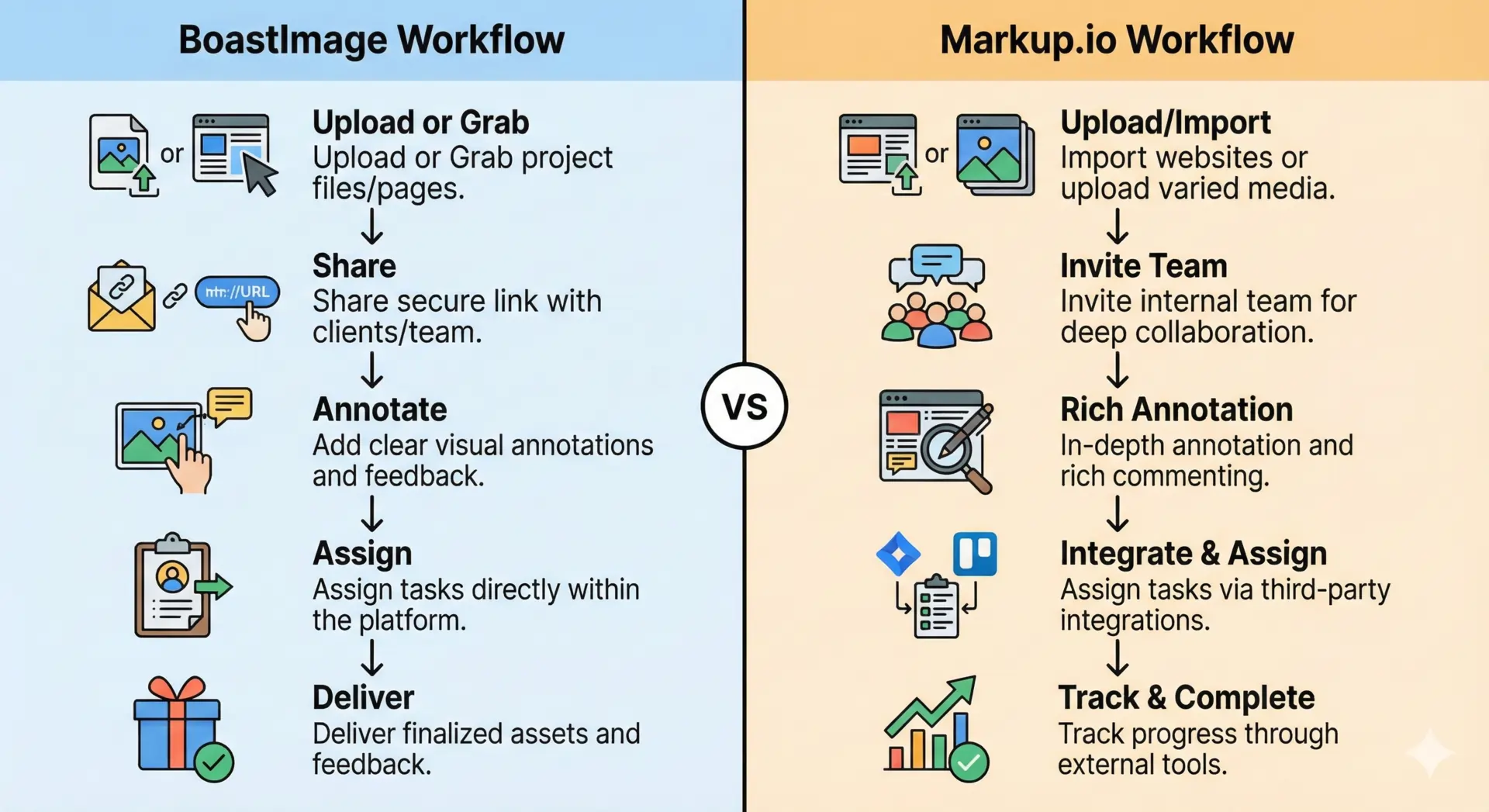
The friction gap
Markup.io has a capable responsive viewing feature. A few UI snags still add work for clients.

We created separate trial accounts for 5 different websites. On each account, Markup.io defaulted to mobile view even when we were on the desktop version. Here is what that looked like.
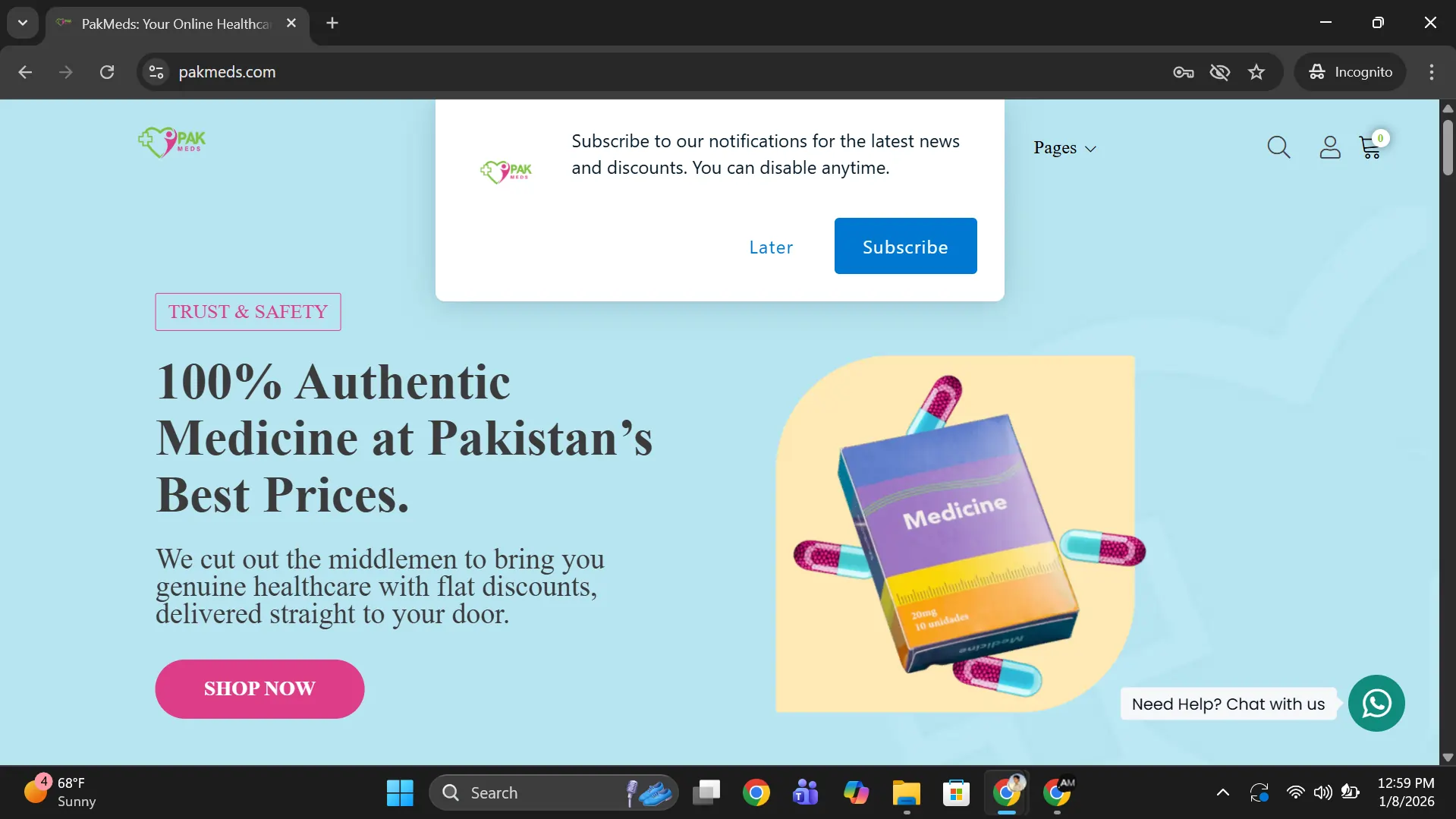
Here is one example, of a site called PakMeds.com. The actual desktop version of the site is as follows:
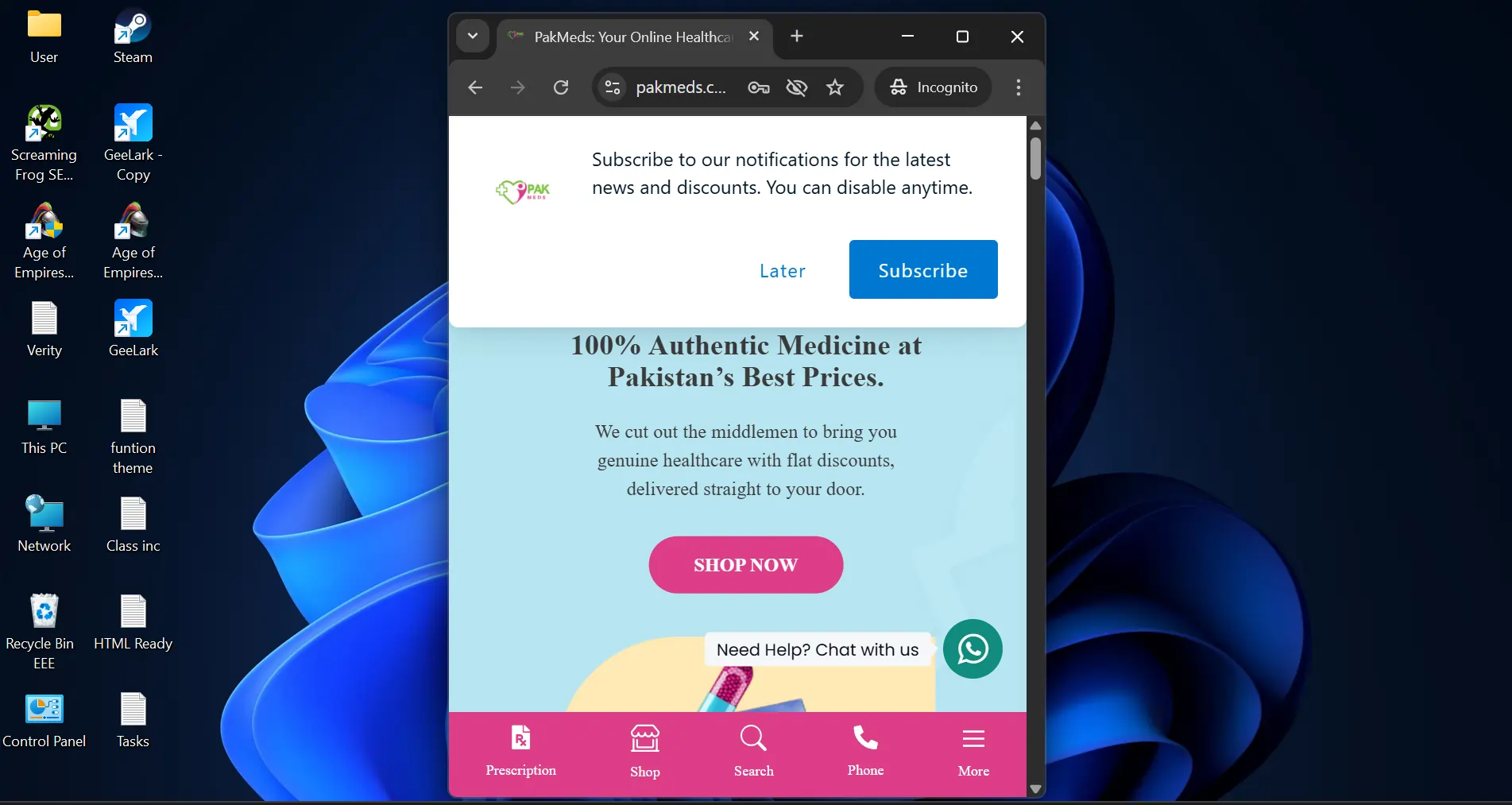
Now, here is the mobile version of the website:
And here is what markup.io showed as the desktop version:
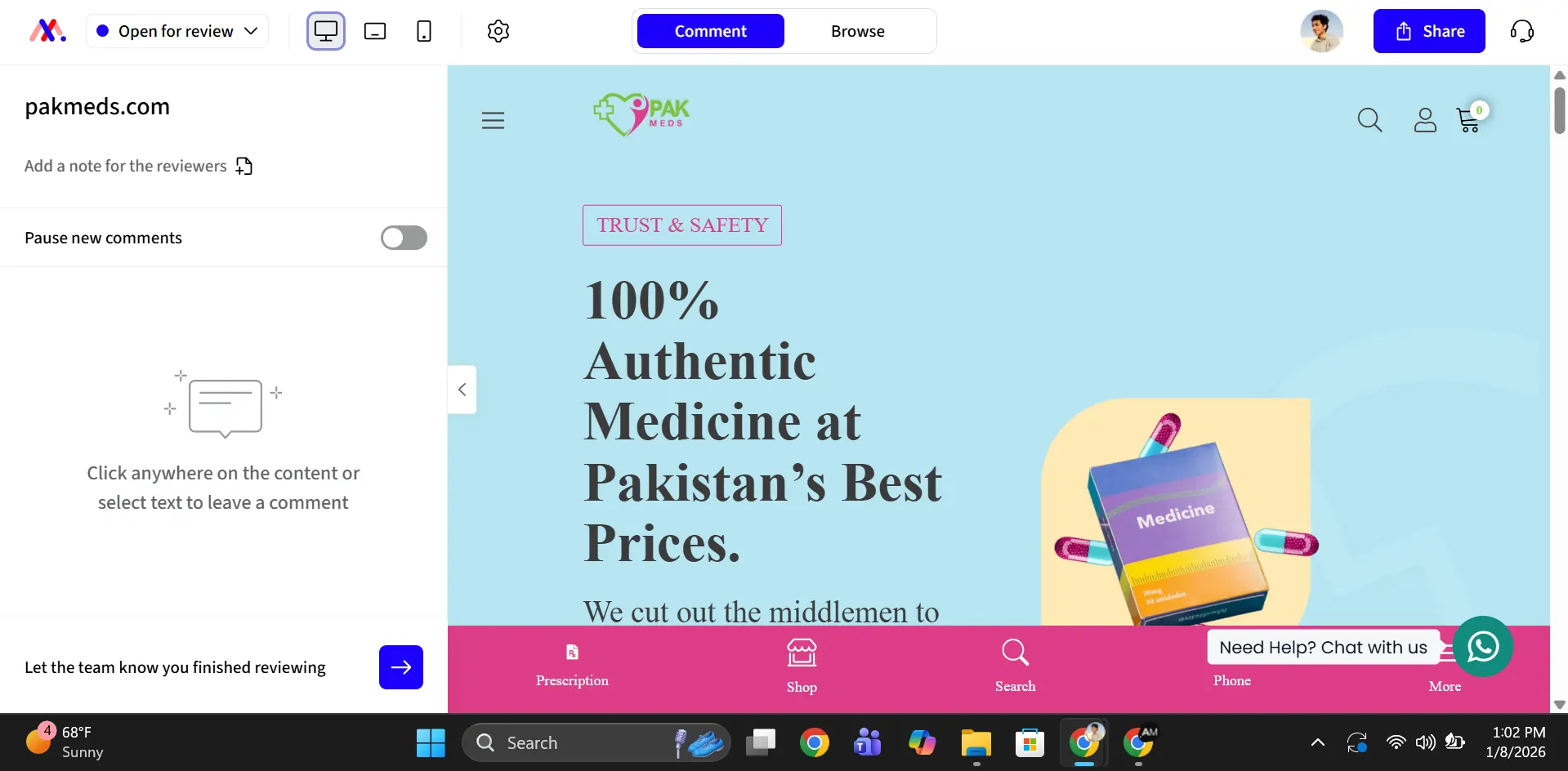
This happened because the expanded side menu squashed the pixels of the screen on the right side. It forced the screen on the right side into the mobile or small-screen version. You can easily get rid of this by clicking on the small arrow icon on the menu.
It took me 5 minutes to figure that out. I am not the sharpest tool in the shed, but other people will hit the same wall. Clients who do not know about render versions will be more confused than we were.
Usability of tool
Both BoastImage and Markup.io are usable tools. BoastImage is easier for first-time reviewers: small set of controls, upload or capture, scroll, and drop a comment.
Markup.io has more depth, with one caveat. On JPEG and PDF uploads it works like BoastImage. On live websites, you cannot scroll the page.
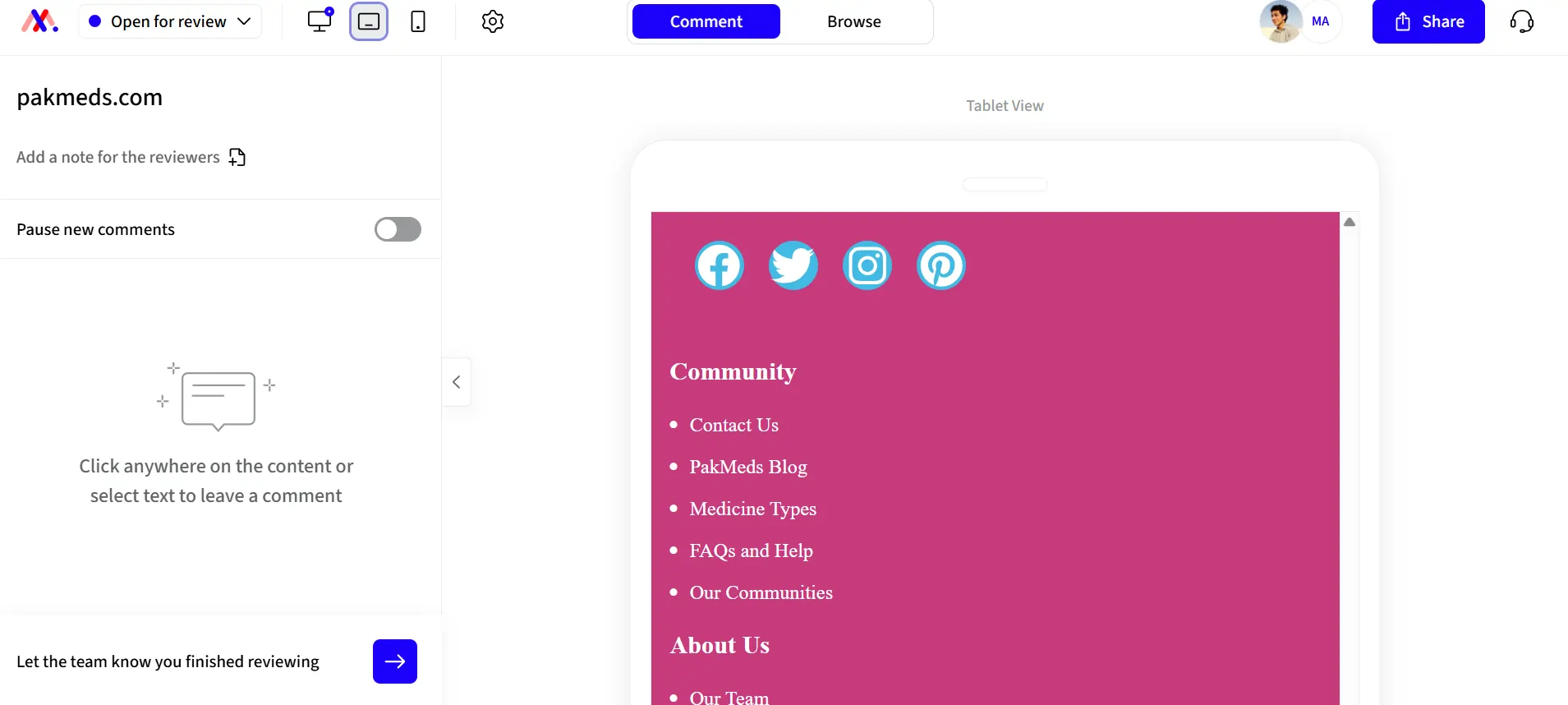
You just can't scroll down, which is a bit vexing. The only way to see the whole layout is to press "CTRL" & "-" to de-magnify the screen.
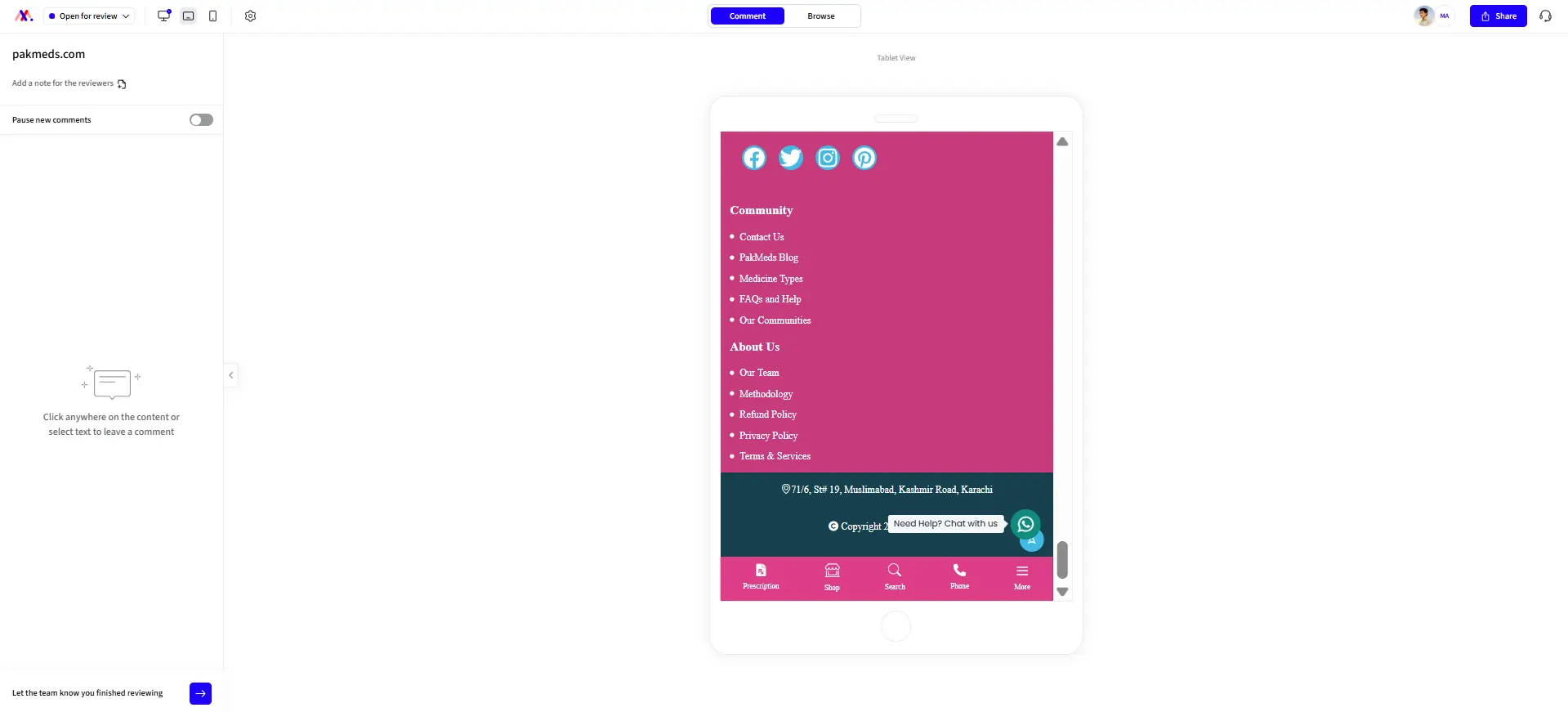
It is a small UI bug that makes review harder for clients. Apart from this, the UI is smooth. You can click and annotate just about everything on any website.
File uploads and compatibility
BoastImage allows you to annotate JPEGs, PDFs, and SVGS, with a max file size limit of 20 mb. You can also use our Chrome Extension to capture page-length screenshots of a website. You get full creative freedom for each file.
Markup.io supports more file types, including TIFF, RTF, DOCX, PPTX, and MP4. There are no known size limits, which is very nifty for detailed annotation. Unfortunately, adding annotations to MP4 and PPTX files is very clunky.
The reason is simple: markup.io automatically converts other file types, including docx to PNG snaps, which doesn't work well for MP4 or PPTX files. Despite this, their support for multiple files is commendable.
Access management and productivity
Clients hate being left out of the loop, and team members can't do anything when they aren't in the loop. BoastImage makes the whole process simple and safe. You can:
- Invite collaborators through email or links
- Allow guest commenting for zero-friction feedback
- Share entire projects or singular pages for specific teams
- Manage access for sensitive projects through access codes
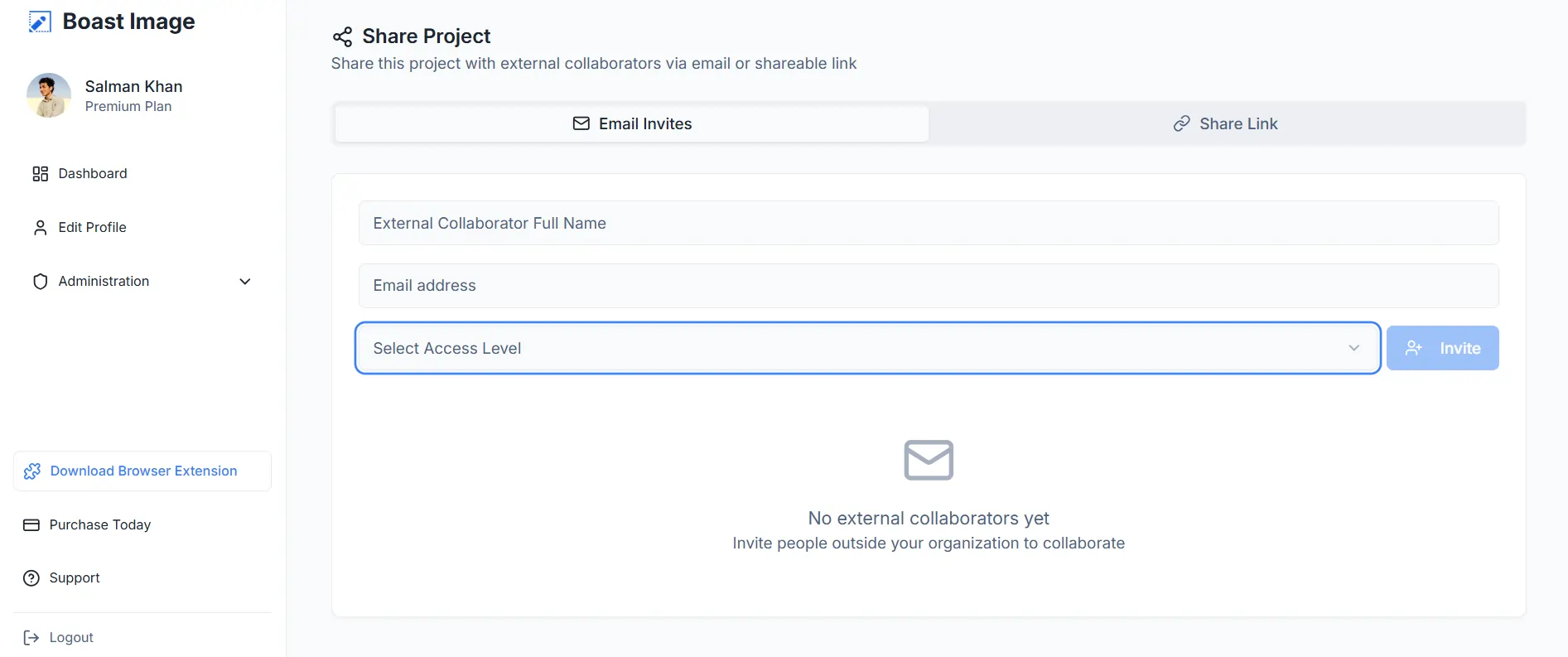
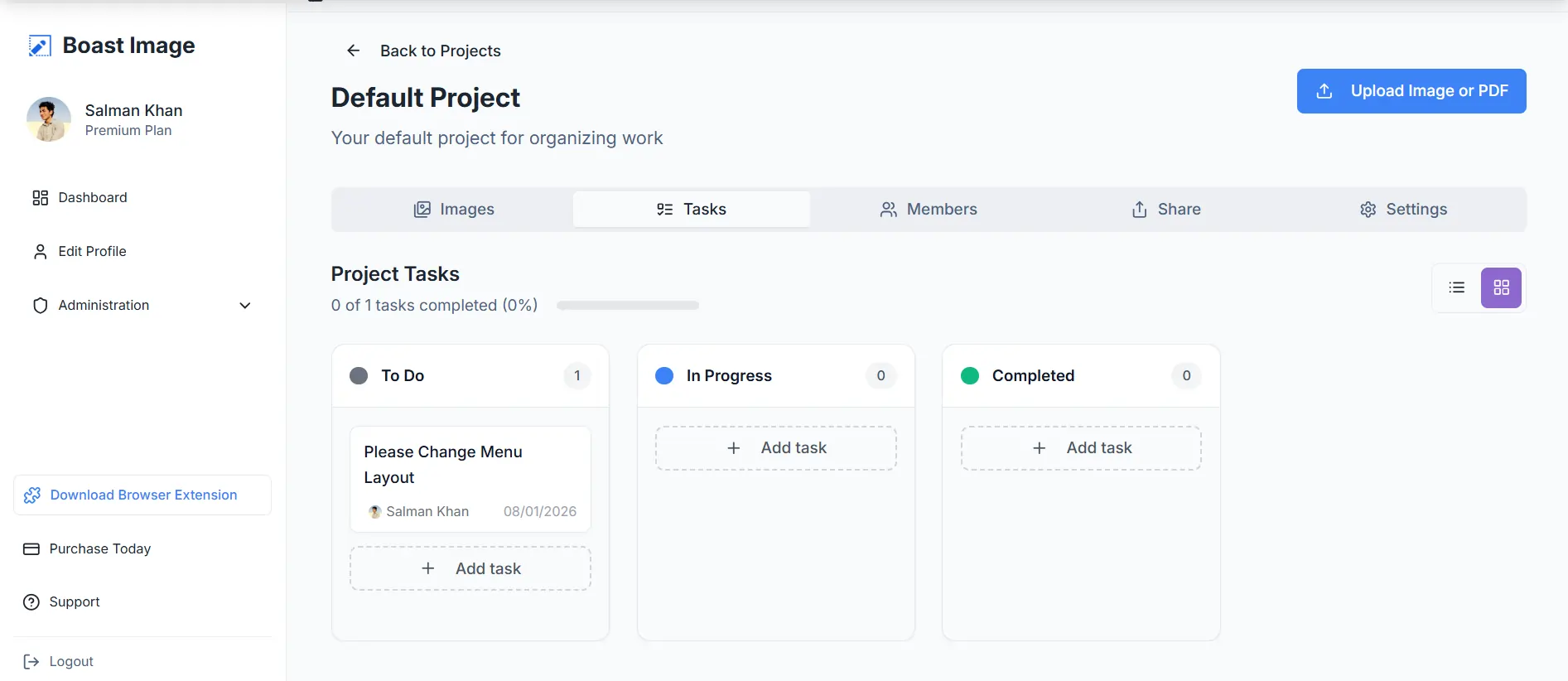
The workflow stays directly in our app, so there are no "oopsies" when handing off tasks to members. Clients can lodge feedback directly in the app, so you don't have to spend days creating and assigning tasks in Jira, Asana, or Trello.
Markup.io also allows project shares and link access. They even allow SSO (SAML) for increased security, especially with 3rd-party integrations. Unfortunately, this feature is limited to custom plans, which cost more than $80 per month.
Version histories and tracking
A Markup.io alternative needs version history. BoastImage includes version history with tracking. You can review the full timeline and comments on a project.
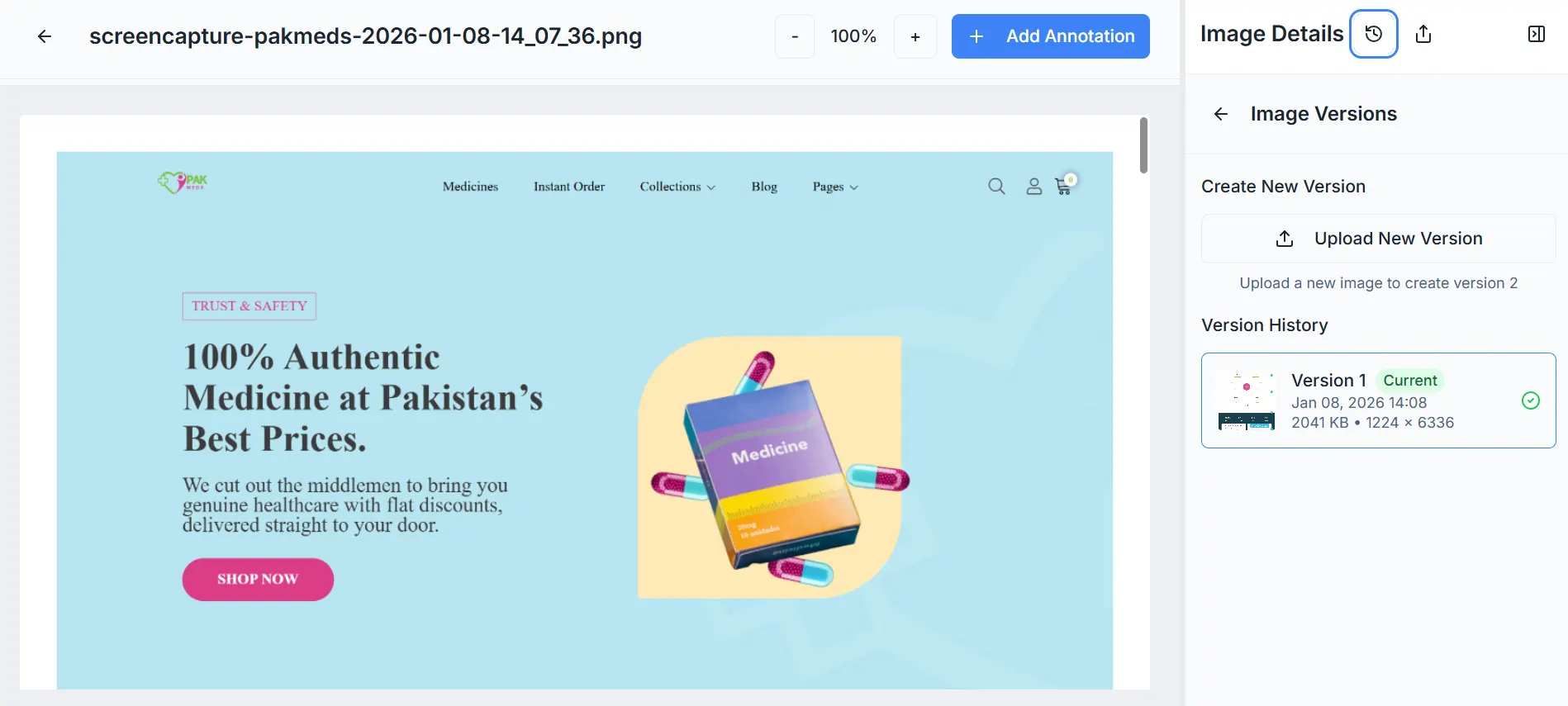
Accidentally removed a comment that wasn't resolved? Load the previous version. Client wants a breakdown of the project trajectory? Load the original version and backtrack. It's all intuitive, simple, and hassle-free.
Markup.io offers archives, which are comparable to BoastImage. The only difference is that we offer version history with our lowest tiered plans ($9.95 per month), while Markup's lowest tier begins at $79 per month.
BoastImage vs Markup ease of use
BoastImage is built so clients can finish a review without a walkthrough. That comes from:
- Simplified dashboards and workspaces
- One-click share and collaborative access
- Seamless and user-friendly navigation
There is no step five. Upload, share, annotate, and deliver. That is the whole loop.
Markup.io has a similar layout but a steeper learning curve. You need at least 2 hours to get comfortable. Deleting a comment takes 4 clicks:
- First, click on the pin.
- Second, click on the 3 dots in the annotation window.
- Third, on the delete button.
- Fourth, on the Confirm button, to actually delete the comment.
A delete control next to resolve would cut that down. Clients can add and remove annotations in BoastImage with one click. Extra clicks sound small until a reviewer gives up.
In BoastImage, stakeholders and teammates can add, approve, delete, and edit with a click. Clients stay in the review. The team sees the same comments.
Integrations and plugins
Markup.io integrates with project management (PM) tools like Jira, Asana, Trello, etc. You can add those tools to assign tasks and manage workflows. The catch is that 3rd party integrations pull stakeholders out of the feedback loop.
- Client or stakeholder adds feedback to Markup.
- The project manager translates feedback to the 3rd-party tool.
- Assigns feedback to relevant departments.
- Team members resolve issues.
- The project manager reaches out to the client.
- Client stakeholder approves changes.
- If the client doesn't like the changes, the process repeats.
That path is slow for new agencies and freelancers. BoastImage keeps comments and tasks in one app, so you do not need a plugin for the same loop.
Assign tasks in the app and add comments there. Clients see that their notes landed. You get a shorter loop without extra tools.
Markup.io and BoastImage pricing
Pricing is four plans, including a free plan with 1 project and 5 items. There are no hidden catches. You can sign up and try it now.
Markup.io is 2 to 8 times more expensive than BoastImage. That price is often too high for freelancers or individual designers and developers. They do not have a free plan. They do offer a 30-day free trial.
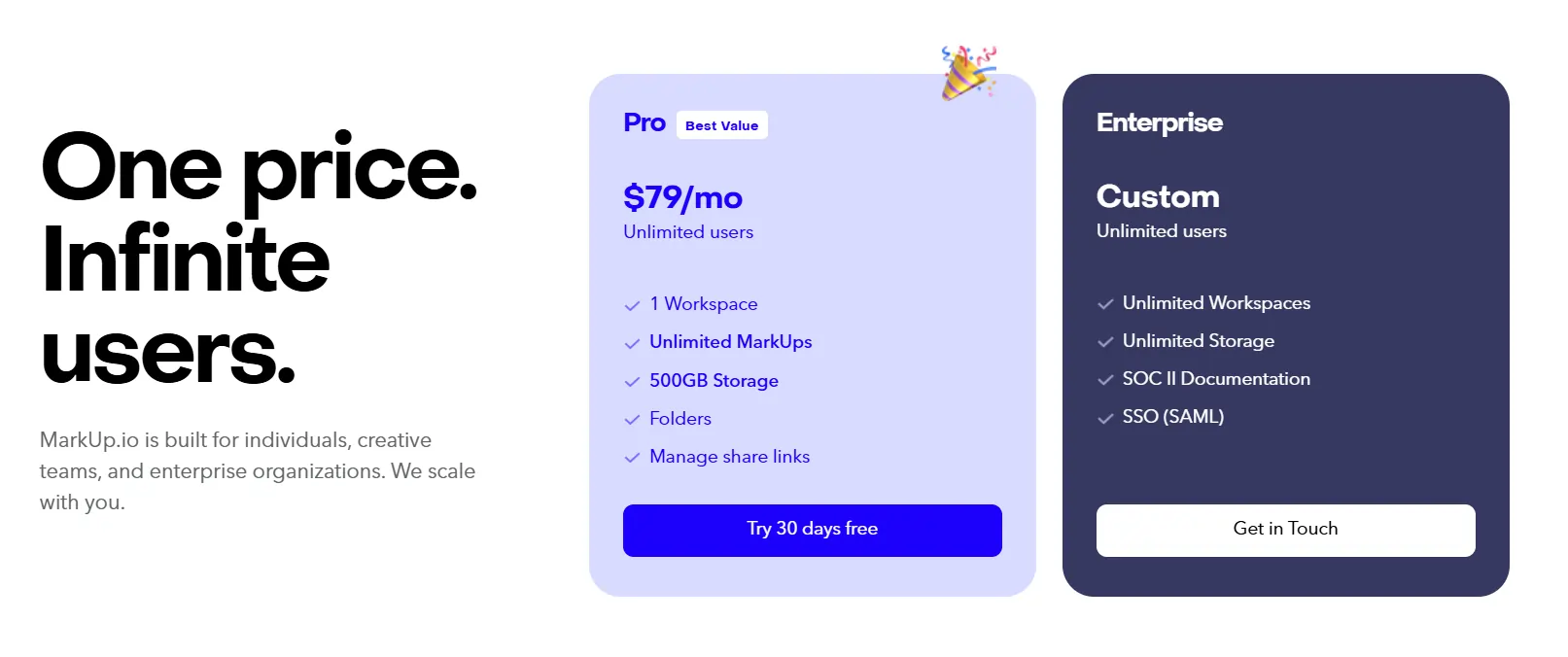
The choice is yours. An affordable, client-centric tool with built-in management, or a design and team-focused app that costs more.
Where does BoastImage win vs Markup.io?
BoastImage is stronger on client-facing review and keeping comments plus tasks in one tool. Markup.io is stronger on 3rd-party integrations, file support, and team-centric workflows. Pick based on who is reviewing and what files you handle:
| Criteria | Winner / detail |
|---|---|
| Client-facing feedback collection | BoastImage: Clients comment from a shared link without creating an account or learning a dense UI. |
| Internal team collaboration and QA | Markup.io: Built for deeper work between internal teammates, with more technical review modes and cross-department discussion. |
| Budget-conscious freelancers/solopreneurs | BoastImage: The $9.95/mo Solo plan includes professional features at a fraction of Markup's $79/mo entry point for pros. |
| High volume of non-technical reviewers | BoastImage: The smaller UI is easier for non-technical stakeholders, which helps more reviews get finished. |
| Immediate tool adoption | BoastImage: Short learning curve. Teams can collect comments in minutes instead of spending hours on training. |
| Fast-track project timelines | BoastImage: Built-in task management removes the time spent setting up and syncing third-party plugins (Jira/Trello). |
| Reviewing complex web interactions | Markup.io: Better for live, dynamic websites where you need to interact with hovers, menus, and state changes in real time. |
| Diverse asset support (video/office) | Markup.io: Conversion can be clunky, but it supports MP4, RTF, and PPTX, which BoastImage does not handle natively. |
FAQs on the Markup.io alternative
Is BoastImage better than Markup.io?
BoastImage is better than Markup.io for client-facing feedback and turning comments into tasks in the same app. Markup.io is more team-centric and focuses on deeper design feedback and 3rd-party integration. It is a better fit for large departments working on different parts of one project.
How much does markup io cost?
Markup.io costs at least $79 per month for the lowest plan, while the more expansive plans have custom pricing. Custom or enterprise plans can cost well over $200 per month, depending on your organizational needs.
What is the free app for marking up photos?
BoastImage offers a complete free plan for photo and PNG markups. You can upload images in various formats to annotate, assign, and implement markups on photo mockups. The free plan allows you to work on and store five simultaneous photos.
BoastImage as a Markup.io alternative
BoastImage is a photo and PDF tool for website feedback and annotation, plus a task board. It is not a thinner Markup.io. Clients leave comments, and project managers assign the work from the same review.
The loop is add, share, annotate, assign, and implement. Clients stay on the thread. The team stays on the same canvas.
Functions are not paywalled on the path that matters here: unlimited canvases, one-click shares, and project management. The free plan is available now.
Also compare: