
7 Ways to Reduce Design Revision Cycles With Better Feedback
Design revisions waste time and money when feedback is vague, scattered, or delayed. To fix this, you need a streamlined process that makes feedback clear, actionable, and easy to manage. Here are 7 proven strategies to cut down revision cycles:
- Use no-login visual feedback tools: Clients can give precise input instantly, eliminating delays caused by access issues.
- Define project scope upfront: A clear brief keeps feedback aligned with project goals and prevents unnecessary changes.
- Standardize templates and workflows: Organized stages like "Needs Review" and "Approved" ensure smoother progress.
- Track design versions: Side-by-side comparisons help clients provide focused feedback and reduce confusion.
- Limit reviewers and rounds: Fewer voices and capped revisions avoid conflicting input and keep projects on schedule.
- Set feedback rules and deadlines: Structured guidelines encourage clients to consolidate their thoughts and respect timelines.
- Automate reminders and use Kanban boards: Notifications and visual task tracking prevent bottlenecks and ensure everyone stays on track.
These steps can double revision speed, reduce delays by 30%, and cut project timelines by nearly half. Start by identifying your biggest bottlenecks and apply these strategies to save time and deliver faster results.
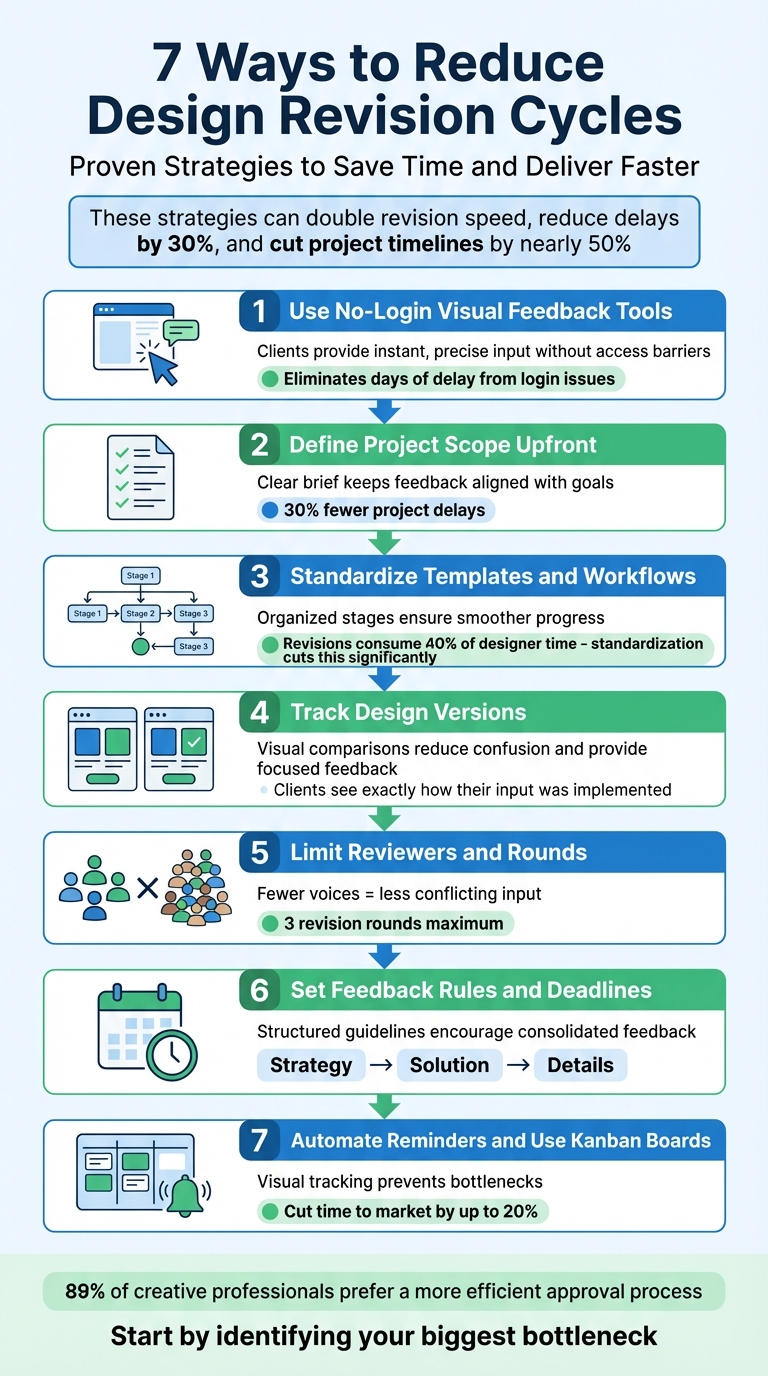
7 Strategies to Reduce Design Revision Cycles
1. Use Visual Feedback Tools That Don't Require Client Logins
Makes Feedback Easier for Clients to Provide
Login requirements can slow everything down. Imagine this: a client gets a design link but has to create an account, reset a password, or install software before they can even begin. Chances are, they'll put it off. And when feedback finally arrives - usually days later - it’s often vague, like "the header feels off."
Tools that skip the login process let clients dive right in. With just a shared link, they can instantly view the design and use point-and-click annotation tools. Instead of typing "move the logo to the left", they can pinpoint the exact spot that needs adjustment. This kind of visual feedback eliminates guesswork, making it easier for designers to act on specific requests.
As Payal Rajpoot, Content Strategist at GoVisually, explains, "Online proofing tools... eliminate long, boring email threads and feedback misunderstandings, leading to fewer, faster, and more focused revision cycles".
By removing technical obstacles, these tools ensure feedback is clear and actionable, helping projects move forward smoothly.
Prevents Delays from Access Issues
Access barriers can bring a project to a halt. When clients face complicated login steps, reviews often get delayed - or worse, abandoned. Email chains only add to the chaos, with stakeholders digging through their inboxes to find the right file, often commenting on outdated versions.
No-login tools fix this by providing secure, ready-to-use links. Clients can access designs instantly, without jumping through any hoops. These cloud-based platforms are particularly useful for distributed teams working across time zones, allowing seamless collaboration. Considering that nearly 90% of graphic designers work as freelancers, tools like these are a must for managing external stakeholders who expect simplicity and efficiency.
Speeds Up Review Workflows for Everyone
Centralized visual feedback simplifies everything. When all comments are tied directly to the design asset - rather than scattered across email threads, Slack messages, and texts - designers can spend less time searching for feedback and more time implementing it.
The Webvizio Team sums it up perfectly: "A unified tool isn't just convenient - it's your secret weapon against the dreaded 'feedback scatter'".
These tools streamline the entire review process, often doubling the speed of revisions and cutting project timelines significantly. Features like automated reminders further reduce the need for time-consuming follow-ups.
sbb-itb-32f6eb2
2. Define Project Scope and Client Expectations Before Starting
Reduces Confusion About What Needs to Change
Getting the project scope and client expectations nailed down at the start is key to avoiding endless revisions and keeping things on track. When the project brief is vague, it opens the door to confusion. Suddenly, feedback turns into personal opinions - one person wants the logo bigger, another suggests a new color scheme - and the original goals get lost in the shuffle.
To avoid this, document everything: deliverables, objectives, guidelines, and timelines. Think of the project brief as the blueprint for success - it’s the first version of your project that requires formal approval. Katie Oberthaler from Ziflow sums it up perfectly:
"The first 'true' version of a project is the creative or design brief that outlines project requirements and ensures both creative workers and stakeholders agree on those requirements before any creative work begins".
When feedback starts to drift, refer back to the approved brief. This keeps everyone focused on the project objectives and ensures feedback stays actionable.
Makes Feedback Easier for Clients to Provide
A clear project scope also makes it simpler for clients to give meaningful feedback. Let’s face it - clients aren’t always sure what kind of input you need. By setting expectations upfront, you can guide them toward providing feedback that actually moves the project forward.
In your kickoff meeting, walk clients through your workflow and explain what makes feedback useful. Define the difference between "major revisions" (big structural changes) and "minor revisions" (like swapping images or tweaking text) so they understand the impact of their requests.
It’s also smart to set limits. For example, include a maximum of three revision rounds in your contract. This encourages clients to consolidate their thoughts and provide more thorough input. Assigning one point of contact to collect and organize feedback can prevent mixed messages and save time. Teams that follow this structured approach have seen 30% fewer project delays by aligning on goals from the start.
Speeds Up Review Workflows for Everyone
When guidelines and expectations are clear, the review process becomes much smoother. Setting firm deadlines for feedback - with clear consequences for delays - keeps the project moving. Using multi-stage workflows like "Needs Review", "Needs Changes", and "Approved" adds transparency, so everyone knows exactly where the project stands.
The benefits are hard to ignore. Structured feedback processes not only save time but also align with what clients want. In fact, 89% of creative professionals say they’d prefer a more efficient approval process. By setting these expectations early, you’re not just improving workflows - you’re delivering what your clients are asking for.
3. Create Standard Design Templates and Workflows
Reduces Confusion About What Needs to Change
Once you’ve established a clear project scope, using standard design templates and workflows can make the feedback process much smoother. Breaking reviews into stages like "All Proofs", "Needs Review", "Needs Changes", and "Approved" provides a clear picture of where the project stands and helps avoid unnecessary delays.
The three-round rule - covering strategy, layout, and final tweaks - sets clear boundaries from the start. It ensures that major changes don’t pop up late in the process, when they’re often the most expensive and time-consuming to address. This structure keeps the project on track and minimizes last-minute surprises.
Makes Feedback Easier for Clients to Provide
Templates can turn vague feedback into specific, actionable steps. For every new version you send, include a short brief or checklist highlighting exactly what the client should focus on - whether it’s layout, color, typography, or another element.
Keep referring back to the approved project brief. This serves as a consistent reference point for clients, helping them evaluate the design against the original goals. It also prevents confusion later in the project, like when someone asks, “Why are we doing this?”
Speeds Up Review Workflows for Everyone
Revisions can eat up as much as 40% of a designer’s time. Standardized feedback tools can double the speed of revision cycles and cut total project time nearly in half. By catching issues earlier, structured feedback loops make the whole process more efficient.
Centralized workflows also help avoid delays caused by missing information. Katie Oberthaler from Ziflow explains:
"A lot can get lost in translation with email. Improving the clarity of feedback... can come simply from moving your feedback process into a singular review environment".
When all reference materials, briefs, and design versions are stored in one place, you eliminate the time wasted hunting for files or dealing with access problems. This streamlined approach keeps everyone on the same page and moving forward.
4. Track Design Versions and Show Before-After Comparisons
Makes Feedback Easier for Clients to Provide
Side-by-side visual comparisons make it easier for clients to provide focused and specific feedback. Instead of vague comments, clients can refer directly to the visual differences, offering more actionable input.
Tracking version history also helps build trust. Clients can see exactly how their suggestions were implemented, which reassures them that their input is valued. This visible proof of progress keeps the feedback loop running smoothly.
Reduces Confusion About What Needs to Change
Features like auto-compare overlay versions to highlight changes clearly. This eliminates the hassle of manually searching for updates or wondering whether specific requests were addressed. As GoProof puts it:
"Designers can compare side-by-side versions, roll back to earlier ones, and clearly track whether requested changes have been implemented. This transparency keeps everyone on the same page and drastically reduces the number of unnecessary revisions."
When sending updated versions, including a quick summary of the changes can keep the review process focused. This added context helps clients zero in on what still needs attention, creating a more efficient workflow.
Speeds Up Review Workflows for Everyone
Visual comparisons, combined with automated version tracking, significantly streamline project reviews. Automated systems ensure everyone is working with the latest version while maintaining a secure history of previous iterations. This makes it easy to revert to earlier designs if needed.
Punchlist highlights the benefits of this approach:
"Clients and stakeholders can hop onto a project and approve the most recent project changes without disrupting workflow."
5. Reduce the Number of Reviewers and Feedback Rounds
Cuts Down on Conflicting Feedback
Too many reviewers can slow things down. Imagine one person asking for a bold, vibrant design while another suggests a softer, more subdued look - it’s a recipe for confusion and wasted time. By narrowing the pool of reviewers, you eliminate these clashes and speed up decisions. Assigning a single point of contact to gather and deliver unified feedback ensures everyone stays on the same page.
Speeds Up the Approval Process
Fewer reviewers mean quicker feedback, which keeps projects moving. Structured feedback loops can reduce project delays by 30%, thanks to better alignment on goals. When there are fewer voices, feedback becomes more focused, and the approval process becomes more efficient.
To keep things organized, use a RACI matrix to define roles - clarifying who gives feedback and who just stays in the loop. Assign final sign-off authority to one person and lock the asset once it’s approved. This prevents last-minute changes from stakeholders who weren’t part of the main review group. This approach ensures a smoother workflow and avoids unnecessary backtracking.
Encourages More Thoughtful Client Feedback
Limiting feedback rounds to three iterations pushes clients to think critically about their requests. When clients know they only have a few chances to provide input, they’re more likely to consolidate their thoughts and offer actionable suggestions.
"A simple revision request may spark a major discussion that leads to more changes - and suddenly the entire direction of a creative project has done a drastic change in direction."
Setting a clear limit on revision rounds in your initial contract changes the dynamic. Clients become more engaged and intentional, respecting the creative process rather than treating it casually. This boundary helps maintain focus and keeps projects on track.
6. Set Clear Feedback Rules and Revision Caps
Makes Feedback Easier for Clients to Provide
Structured workflows are only half the battle; clear feedback rules make the process even smoother. Clients often struggle to give actionable feedback, especially when they’re unsure where to start. Instead of asking broad questions like, “What do you think?”, guide them. Ask for their input on specific areas like usability, branding, or messaging. When you deliver a new design version, include a short brief. Highlight what’s changed, what needs their attention, and how this particular round fits into the project’s overall goals. This clarity helps focus their feedback and sets up the revision process outlined below.
Reduces Confusion About What Needs to Change
Limiting revisions to three rounds is a standard practice for many creative teams. Why? Because it encourages clients to consolidate their thoughts and provide more focused input. Here’s how you can structure those rounds:
| Feedback Round | Primary Focus | Allowed Adjustments |
|---|---|---|
| Round 1: Strategy | Big-picture concepts & direction | Core approach and directional changes |
| Round 2: Solution | Visual elements (layout, colors, fonts) | Adjustments to design components |
| Round 3: Details | Minor tweaks and fixes | Text corrections and final polish |
Once the asset is approved, lock it. This prevents last-minute changes from stakeholders who weren’t involved earlier, keeping the project on track.
Speeds Up Review Workflows for Everyone
With clear guidelines in place, the review process becomes much faster. Set firm deadlines for each feedback round and make it clear that missing a deadline will move the project forward. This avoids bottlenecks and keeps momentum.
Teams that adopt structured feedback loops often see up to a 30% reduction in project delays, thanks to better alignment on goals and expectations. By defining the number of review rounds, their focus, and the timelines, everyone - clients and creative teams alike - can work more efficiently and predictably.
7. Send Automated Reminders and Organize Tasks With Kanban Boards
Prevents Delays from Access Issues
Automating reminders and organizing tasks can keep projects moving smoothly. One of the biggest causes of delays is silence - clients forget to review designs, team members miss important notifications buried in their inboxes, and projects end up stuck waiting for approvals. Automated reminders solve this by sending instant alerts when feedback is needed, cutting out the need for manual follow-ups. Plus, with remote teams, files are accessible instantly, removing the excuse of "I couldn't get to it".
Reduces Confusion About What Needs to Change
Kanban boards make it easy to see where a project stands. Labels like "Needs Review", "Needs Changes", and "Approved" clearly outline each stage, so there's no confusion about what’s next or which file is the latest version. In fact, 89% of creative professionals prefer an approval process that consolidates feedback, deadlines, and tasks in one place. By centralizing everything - comments, versions, and assignments - you create a clear, streamlined workflow where everyone knows what to do and when.
"By building feedback into your workflow, you make it visible and trackable, so revisions don't slip through the cracks." - Interaction Design Foundation
Speeds Up Review Workflows for Everyone
Automation takes the hassle out of manual updates. For example, you can set triggers that automatically move a project to the next stage as soon as it's approved. No more waiting around for someone to update the status. Real-time deadline tracking also ensures everyone stays on the same page. Combine automated alerts with easy-to-read Kanban boards, and teams can quickly identify and fix bottlenecks. Teams using effective feedback tools can cut time to market by up to 20% and double the speed of revisions. This mix of automation and visual organization keeps every step of the process efficient and transparent.
How to Give Better Design Feedback
Conclusion
Design revision cycles can quickly drain time and resources, especially when feedback gets lost in email chains, misinterpreted through vague comments, or delayed because clients struggle with accessing tools. The seven strategies outlined here work together to tackle these challenges: visual feedback tools simplify access, clear project scopes prevent misalignment, templates streamline workflows, version tracking highlights progress, limiting reviewers reduces unnecessary input, revision caps enforce discipline, and automated reminders keep projects on track. By centralizing feedback, providing visual context for comments, and setting clear boundaries on who reviews and when, you can transform chaotic approval workflows into smooth, predictable processes.
The impact of these improvements is measurable. Research shows that efficient feedback systems can double revision speed, cut overall project time by nearly 50%, reduce delays by 30%, and even shorten time-to-market by up to 20%.
"Without a reliable review process to facilitate creative development, those ideas often languish in delays." - Ziflow
To see results, start by addressing your biggest bottlenecks. If endless revisions are the issue, implement a cap of three rounds and enforce deadlines with late fees. If confusion stalls progress, use a RACI matrix to clearly define who has final approval authority. Even small adjustments can make a big difference - early validation alone has been shown to reduce iteration cycles by 25%.
FAQs
How do visual feedback tools without login requirements streamline design revisions?
Visual feedback tools that let clients share their thoughts without logging in make the review process a breeze. Clients can jump right in to view designs, add comments, and mark up visuals - no need to worry about creating accounts or remembering passwords.
This hassle-free setup cuts down on delays, clears up potential miscommunication, and keeps all feedback in one place. The result? Creative teams can tackle revisions faster and ensure projects stay on schedule.
Why is it important to define project scope and client expectations early?
Defining the project scope and understanding client expectations right from the start is key to avoiding confusion and delays down the line. When designers take the time to gather detailed brand guidelines, specific goals, and style preferences early on, they can sidestep vague feedback like "I don’t like it" and instead focus on delivering work that aligns with clear objectives.
Establishing expectations through kickoff meetings, written project scopes, and agreed-upon timelines minimizes the risk of miscommunication, conflicting feedback, or scope creep. This clarity leads to faster approvals, reduced costs, and a more seamless collaboration process. When everyone knows what success looks like from the outset, projects stay on track, budgets are protected, and time is used efficiently.
Why should you limit the number of reviewers and feedback rounds in a design project?
Limiting the number of reviewers and feedback rounds can significantly simplify the project workflow. It helps avoid miscommunication, conflicting viewpoints, and time-consuming delays. By keeping the feedback process streamlined, you can maintain momentum, minimize excessive revisions, and make better use of resources.
Having fewer reviewers ensures clearer communication and faster decisions, while reducing feedback rounds encourages clients to provide more focused and actionable comments. This approach speeds up approvals and leads to a smoother, more efficient project completion.