
How to Get Clients to Leave Clear, Actionable Design Feedback
Unclear client feedback can derail projects, causing delays, extra costs, and frustration. Vague comments like "make it pop" leave designers guessing, while late or incomplete feedback creates inefficiencies. The solution? A structured feedback process that ensures clarity and collaboration. Here's the approach in simple steps:
- Identify Common Issues: Vague comments, late responses, and conflicting input are common challenges. Clients often lack design language or feel overwhelmed.
- Set Clear Expectations: Use detailed design briefs, define feedback timelines, and limit revision rounds to three stages: strategy, design details, and final tweaks.
- Provide Tools and Templates: Use visual tools like BoastImage for pinpointed feedback and templates with specific prompts to guide clients.
- Educate Clients: Teach clients to focus on problems, not solutions, and tie feedback to business goals, avoiding subjective opinions.
- Track and Improve: Monitor revision cycles, feedback clarity, and client responsiveness to refine your process over time.
This approach reduces miscommunication, keeps projects on track, and helps clients provide feedback that drives results.
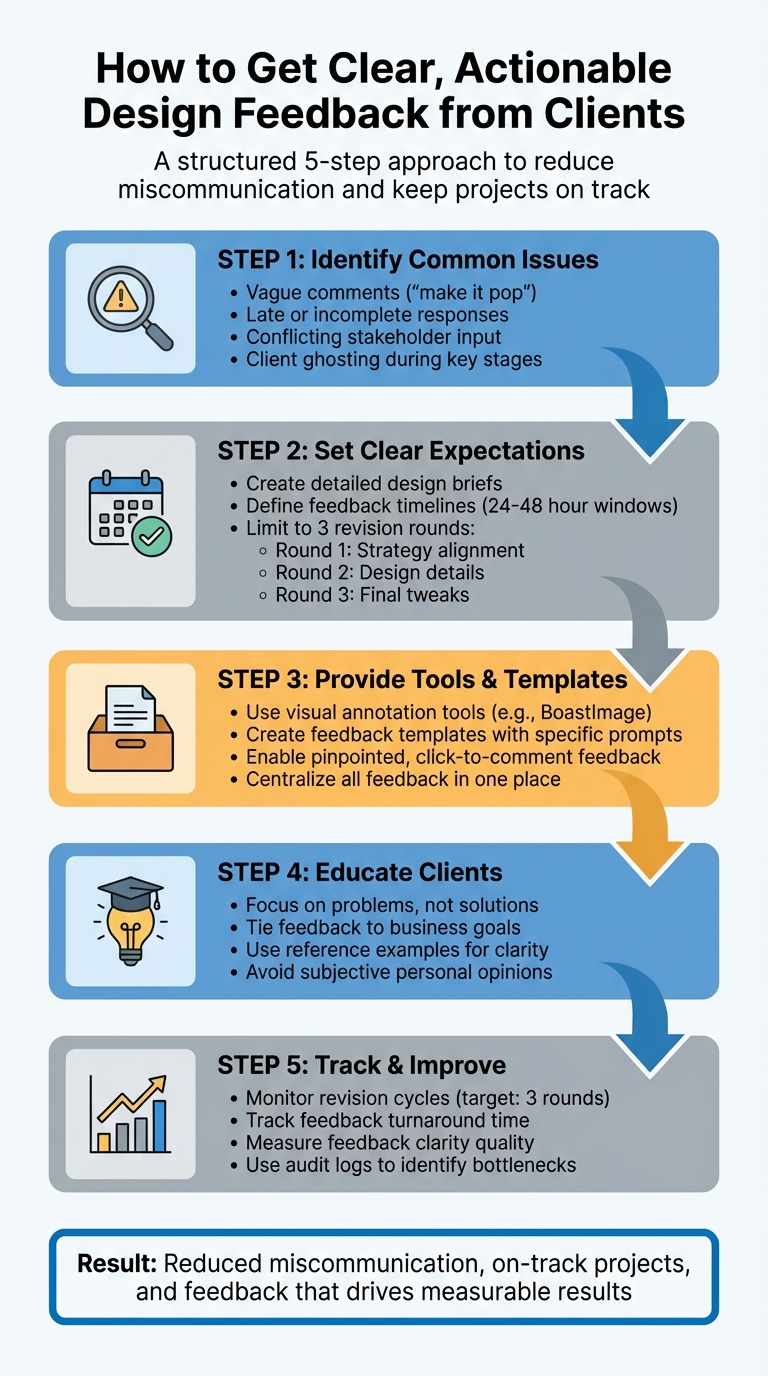
5-Step Process for Getting Clear Client Design Feedback
Home Page Design, Presentation & Feedback Processes for Clients
Common Client Feedback Problems
Before diving into solutions, it’s crucial to pinpoint the common issues tied to client feedback. Most designers encounter a few recurring challenges, and understanding why these arise allows you to address the root causes instead of just managing symptoms. Tackling these effectively can significantly improve the feedback process.
Vague Feedback (e.g., "Make It Pop")
Phrases like "make it pop" or "can you make it pretty?" highlight a disconnect in communication. Clients often lack the technical language to express their ideas, so they rely on subjective phrases that don’t provide actionable direction.
Interestingly, about 2% of people have aphantasia, which means they struggle to visualize concepts mentally. For these clients, verbal-only discussions about design can be especially ineffective, making visual aids or concrete examples essential.
Morgane Peng, Design Director at Societe Generale, explains this frustration well:
I realized that we share the same frustrations – from people who don't get design... The first one is, 'Can you make it pretty?'; 'Can you do the 'UX' (whatever it is)?'; and, 'Can you add this wow effect?'
The core issue is that clients often propose solutions (like "make the logo bigger") instead of sharing the problem they’re trying to solve (e.g., "I’m concerned about brand visibility").
Beyond vague comments, the timing and completeness of feedback also play a big role in project success.
Incomplete or Late Feedback
Feedback that’s incomplete or arrives late can derail timelines and blow budgets. This type of feedback often includes vague comments that overlook the broader strategy, focus on minor details, or even conflict with input from other stakeholders.
Sometimes, clients offer surface-level praise like "it’s nice" because they feel unprepared or uncomfortable giving critical feedback on the spot. Neal O'Grady, Co-Founder of Webflow, emphasizes the importance of giving clients clear instructions:
If you don't instruct people as to what you're specifically looking for feedback on, they'll settle somewhere on the safe side - and it's not going to be particularly helpful.
Setting expectations early is crucial. For example, defining exactly three rounds of revisions - focusing on strategy, refining details, and handling technical tweaks - can help clients provide more thoughtful and timely feedback.
Client Ghosting
Another common challenge is when clients go silent during key project stages. This "ghosting" often happens because the client feels overwhelmed or isn’t sure what’s expected of them.
To reduce the risk of ghosting, establish clear "move forward" clauses at the start of the project. These clauses ensure that if feedback isn’t provided by a specific deadline, the project can proceed to the next stage.
If a client does go quiet, try switching up your communication methods - move from email to video calls or instant messaging, and use automated reminders to nudge them for feedback. Above all, approach the situation with empathy. Assume delays aren’t personal and recognize that clients may be dealing with their own challenges.
These common feedback issues highlight how essential it is to have a structured, proactive approach to managing client input.
Building a Standardized Feedback Process
Once you've pinpointed where feedback breaks down, the next step is to establish a clear, structured process that guides clients toward providing actionable input. Without a solid framework, even the most well-intentioned clients might struggle to offer feedback that's truly helpful - they simply may not know what's expected.
Think of your clients as "occasional travelers" in the world of design. They’re not navigating this terrain every day, so it's essential to focus on business goals rather than overwhelming them with design jargon. As UX/UI designer Benek Lisefski wisely notes:
If your clients suck at providing feedback, much of the blame falls on you for not educating them in how to do it well.
A standardized feedback process eliminates confusion and holds both sides accountable. It ensures everyone knows when feedback is due, where it should go, and what format it should take. This clarity not only improves the quality of feedback but also keeps projects on track and avoids endless revision cycles.
Setting Expectations with Design Briefs and Timelines
A successful feedback process starts before any design work begins. Laying the groundwork with a detailed design brief and a clear timeline sets the tone for the entire project. Early communication about the scope, deliverables, and deadlines encourages clients to provide consolidated, thoughtful feedback rather than reactive comments.
Start with a pre-project questionnaire to gather key details like brand guidelines, target audience insights, and success metrics. This step ensures alignment from the outset.
From there, implement a three-round revision model to structure the feedback process. Bill Macaitis, former marketing leader at Slack, Zendesk, and Salesforce, highlights the importance of defining decision-makers early on:
The biggest thing I've found... at the beginning of the campaign, choose who's going to be in it and who are the decision-makers. Specifically looking at the CEO or CMO, "Hey, if you want to be involved in this, you've got to be involved in all the meetings. You can't just have someone come in at the end and go, Oh, I don't like this."
Here’s how the three-round model typically works:
- Round 1: Focus on high-level strategy and alignment with core design goals.
- Round 2: Finalize elements like layouts, colors, and fonts.
- Round 3: Address minor tweaks and perform error checks before final delivery.
To prevent endless revisions, include a set number of rounds in your contract. This encourages clients to provide thorough feedback at each stage rather than trickling in changes over time.
Establish strict review windows - usually 24 to 48 hours - for each round and make it clear that missed deadlines will either shift the timeline or result in the project moving forward without additional input. Some designers even include late fees or “move forward” clauses in their contracts to maintain momentum. While this might seem firm, it actually eases client anxiety by providing a structured process that prevents delays.
Lastly, designate one primary client contact to handle all feedback. This avoids confusion and conflicting input from multiple stakeholders, keeping communication streamlined and efficient.
Explaining the Purpose Behind Feedback Requests
With timelines and expectations in place, it’s equally important to explain the “why” behind each feedback request. Clients often struggle to provide meaningful input simply because they don’t understand the purpose of their feedback at different stages. When you clarify this, they’re more likely to focus on what matters most.
For instance, during the initial review round, you might say: “At this stage, I need your input on whether this approach aligns with your business goals and target audience needs. We’re not focusing on colors or fonts yet - those will come in Round 2.”
Todd Zaki Warfel, author and leadership coach, stresses the importance of speaking in terms clients can relate to:
Clients... speak business and outcomes and results. So, you may need to establish a basic level of understanding... They just need to know why she should care, why it matters to her line of business.
Instead of vague, open-ended questions like “What do you think?”, use prompts that tie feedback to measurable outcomes. For example, ask, “Will your ideal client be able to navigate this page easily?” or “Does this layout support the key action we want users to take?”. These types of questions shift the discussion from subjective opinions to objective evaluations tied to project goals.
Encourage clients to describe the problem they see rather than suggesting solutions. For example, if a client says, “Make the logo bigger,” they might actually be concerned about brand visibility. Guiding them to articulate the issue fosters collaboration and can lead to better solutions.
To further streamline the process, consider creating a welcome guide or standardized document that educates clients on how to provide constructive feedback. Include examples of helpful versus unhelpful input. This guide should also define roles: clients provide objectives and constraints, designers focus on research and solutions, and project managers handle timelines and any friction. When everyone knows their role, feedback becomes more focused and productive.
Tools and Templates for Better Feedback
Once you've set up a clear feedback process, the next step is to equip clients with the right tools and templates. These resources make providing feedback straightforward by cutting through the guesswork. They help clients focus on what matters most - without drowning them in technical jargon or overly complex workflows. This approach ensures feedback is clear, actionable, and aligned with a client-first philosophy.
Feedback Templates for Specific Input
Feedback templates are like roadmaps for clients, guiding them through the review process step by step. They break feedback into manageable sections, prompting clients to evaluate key aspects such as design, functionality, content, and brand alignment.
The best templates include an approval status section with simple checkboxes to clarify the project's status. Options like "Approved", "Approved with Minor Changes", "Needs Major Revisions", or "Rejected" ensure there's no ambiguity. Additionally, an action items section encourages clients to turn general feedback into specific, actionable tasks.
For example, you might ask targeted questions like, "Does the typography reflect our brand's professional tone?" or "Is the call-to-action button prominent enough?". Including a summary of the creative brief and links to brand guidelines at the top of the template keeps discussions focused on objectives rather than subjective opinions. Aim to keep templates concise - clients should be able to complete them in 5 to 10 minutes to avoid fatigue. Making most fields optional can also improve response rates. In fact, switching from lengthy surveys to structured, user-friendly feedback forms has been shown to boost response rates from about 3% to 20%.
Now, let’s look at how visual annotation tools can make client feedback even clearer.
Visual Annotation Tools Like BoastImage
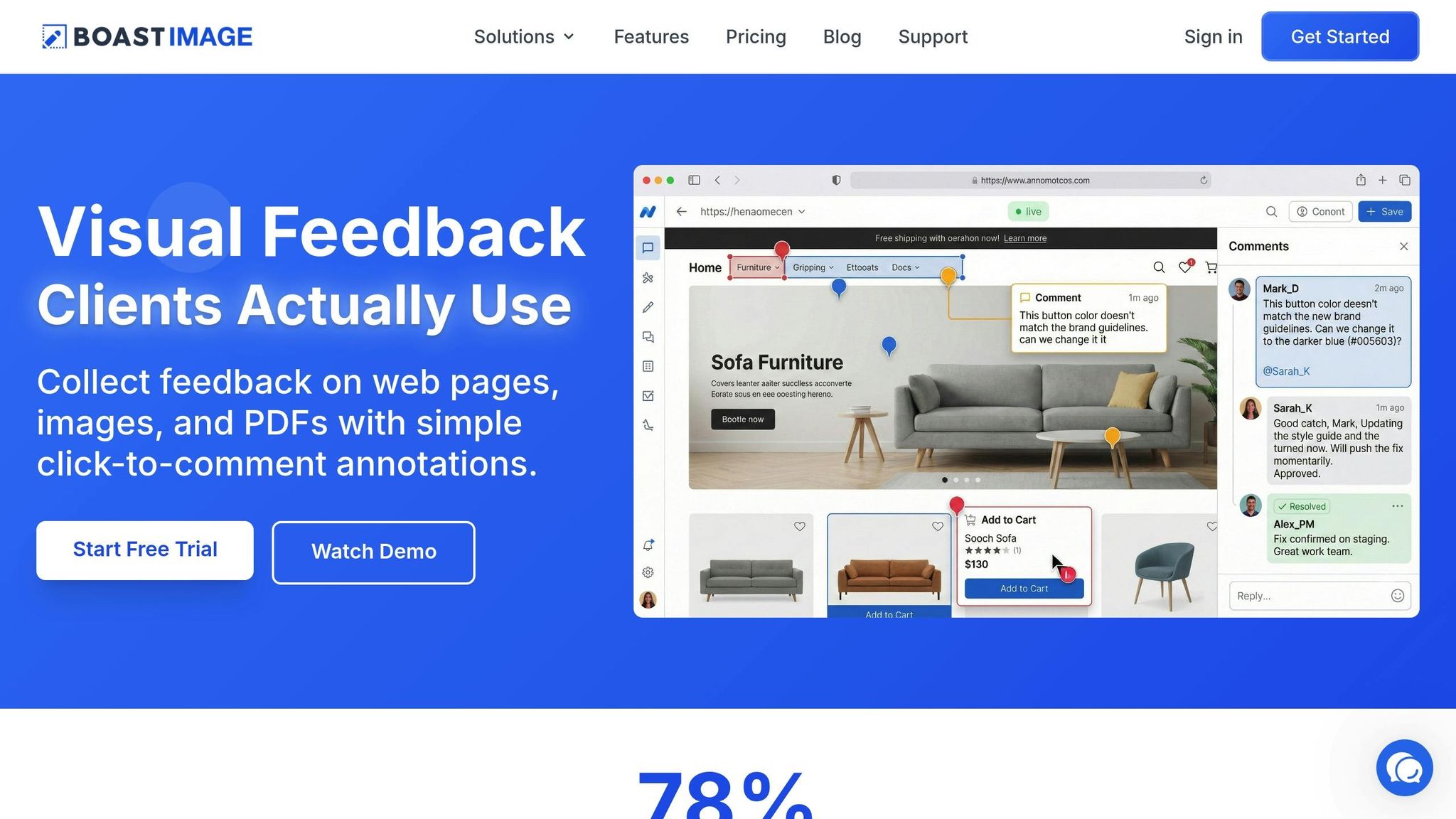
Visual annotation tools allow clients to leave precise, on-point feedback by clicking directly on specific design elements. This eliminates confusion caused by vague comments like, "The hero image needs work".
BoastImage is a great example of this approach. It puts simplicity at the forefront: clients receive a secure link, click on the design to leave comments, and they’re done - no need for account creation, software downloads, or tutorials. Rebecca Person, a Project Manager, highlights the value of such tools:
Modern design tools let you leave comments directly on mockups. Point to the exact button, image, or text block you're discussing. This precision saves time and prevents misunderstandings.
BoastImage also centralizes all feedback into one place, replacing long email threads with a single, versioned record. Some tools even attach technical details - like browser versions or screen resolutions - to client comments, offering valuable context for troubleshooting.
When encouraging clients to use annotation tools, remind them to describe the problem they see rather than suggesting a fix. For example, if a client marks a button and says, "This button is hard to see", it’s more actionable than a directive like, "Make the button red". This approach ensures feedback remains constructive and focused on solving the actual issue.
Teaching Clients How to Give Actionable Feedback
Even with the best tools and structured templates, it's crucial to guide clients on how to provide feedback that truly helps the design process. Many clients, especially those new to design, may not realize that saying something like "I don't like it" doesn’t give enough direction. The goal is to teach them how to identify the core issue rather than jumping straight to a proposed solution. For example, when a client says, "Make the logo bigger", they might actually be worried about the brand not standing out enough. Shifting the conversation from specific requests to the underlying problem allows designers to craft better solutions.
Clients should focus on explaining why something feels off, rather than dictating how to fix it. Is it a concern about readability, brand alignment, or user experience? For instance, instead of saying, "Change this font to Arial", a client could share, "I’m worried this playful font might not resonate with our corporate audience." This way, the design team can explore multiple creative options while addressing the root concern. This approach lays the groundwork for clearer client instructions moving forward.
Encouraging Specific and Balanced Feedback
When refining client feedback, specificity is key. Vague comments like "make it pop" leave designers guessing. Instead, clients should pinpoint the exact elements - such as colors, fonts, or button placement - that don't feel right and explain why. For example, they might note, "The button color blends into the background, making it hard to notice." Encouraging clients to sandwich critiques with positive observations can also help. For instance, they might praise the layout and typography before suggesting that the call-to-action button needs more emphasis. This approach keeps morale high while clarifying what works and what needs adjustment.
Another effective strategy is to steer feedback toward project goals and audience needs, rather than personal taste. If a client says, "I don’t like this color", follow up with questions like, "Does this color align with our brand guidelines?" or "How do you think our audience will respond to it?" This reframes the feedback in terms of business objectives, making it more actionable.
Using Reference Examples to Clarify Intent
Words like "modern", "clean", or "vibrant" can mean vastly different things to different people. To avoid miscommunication, ask clients to share visual references - screenshots of designs, ads, or websites they admire. Chris Finneral, CEO and co-founder of SketchDeck, emphasizes this point:
"Share both what you like and don’t like. Be as specific as possible."
Encourage clients to create simple "Do's and Don'ts" lists with images. For example, they could highlight navigation styles they love and layouts they want to avoid. This exercise helps translate abstract terms into concrete examples, ensuring everyone is on the same page.
Finally, dig deeper into why clients chose certain references. If they share a website as inspiration, ask, "What stands out to you here - the color palette, the layout, or the tone of the content?" These follow-up questions can uncover deeper preferences, leading to feedback that’s both insightful and actionable.
Measuring and Improving Feedback Processes
Once you've established a structured feedback process, the next step is to evaluate its effectiveness. Start by tracking how many revision cycles each project goes through. Ideally, a smooth workflow should involve three rounds: strategic feedback, final solutions, and minor tweaks. If you frequently exceed this - hitting four or more rounds of revisions - it’s a sign your process might need some fine-tuning.
Another key metric is feedback turnaround time. Measure how long it takes for clients to respond after you submit a design. Setting a standard response window, such as 24 to 48 hours, can help keep projects on track. If certain clients often miss these timeframes, you might need to address the issue directly or build extra buffer time into your future agreements.
You should also evaluate the quality of the feedback. Are comments actionable, like “the text isn’t legible against this background,” or vague, like “make it pop”? Over time, aim to see a shift toward more specific, problem-solving input. As UX Consultant Paul Boag puts it:
The process of endless iteration doesn't just cost time and money; it also undermines the client's confidence in your ability to deliver.
By monitoring these factors, you can identify clients who might need extra guidance on providing clearer feedback, helping you refine your workflow over time.
Tracking Feedback Clarity and Revision Cycles
To better understand how feedback impacts your projects, use clear approval statuses such as "Approved", "Approved with minor changes", "Needs major revisions," or "Rejected". This system makes it easier to track whether projects are progressing smoothly or getting bogged down in endless revisions.
Keep a log of iterations by client and project type. For example, if website projects consistently require more revisions than social media graphics, it might signal a need to improve your initial briefing process. Similarly, if one client repeatedly provides unclear or delayed feedback, consider tailoring your approach. This could include scheduling a kickoff call or offering additional guidance on how to use your feedback template effectively.
Manual tracking can provide valuable insights, but digital tools can take it a step further by offering detailed context.
Using BoastImage's Audit Logs for Process Improvements
BoastImage’s audit logs are a powerful tool for identifying inefficiencies. These logs automatically record when clients access projects, leave comments, and review different versions. This data can reveal overlooked patterns. For example, the version history should ideally show a 1:1 ratio - one fix per comment. If a single vague comment leads to multiple adjustments, it’s a sign the feedback process might need improvement. Use this data to refine your feedback templates or have a conversation with the client about providing more precise input.
Audit logs can also help pinpoint bottlenecks. If timestamps show that feedback consistently stalls with a particular stakeholder, you can address the issue by adjusting deadlines, assigning a different point of contact, or allocating more time for their review. The goal is to use these insights to make smarter adjustments, ensuring projects stay on track and run efficiently.
Conclusion
Getting meaningful feedback from clients isn’t just about asking for their input - it’s about creating a process that encourages clarity and collaboration. Start by clearly defining your client’s role at the beginning of the project. Encourage them to focus on business goals and user needs rather than personal preferences. This mindset shift can reduce back-and-forth revisions and keep projects on track.
Ask specific, goal-oriented questions like, “Does this button grab your attention?” or “Is the text easy to read on this background?” Structuring feedback rounds into three stages - strategic direction, final solutions, and minor tweaks - can help avoid endless cycles of revisions.
Using tools like BoastImage can make the feedback process smoother. These tools allow clients to give visual, point-and-click input without needing complicated setups or accounts. Instead of deciphering vague email descriptions, you’ll have all comments centralized in one place. Plus, features like audit logs let you track progress and identify areas for improvement.
Beyond tools, educating clients is equally important. Teach them to share their concerns clearly without jumping straight to solutions. Reference examples can help bridge gaps in understanding. As Norman Barry, former Creative Director at Ogilvy, famously said:
Give me the freedom of a tight strategy.
When clients learn to provide thoughtful and focused feedback, they become true collaborators.
FAQs
How can I guide clients to give clear and actionable feedback on design projects?
To help clients deliver clear and actionable feedback, start by establishing well-defined expectations. Provide a concise brief that details the project’s goals, the intended audience, and the specific areas where their input is needed - such as layout, color choices, or calls to action. You can also simplify the process by offering a feedback template with prompts like “What works?”, “What doesn’t work?”, and “What could be improved?” to guide their responses effectively.
Encourage the use of visual annotation tools, which allow clients to mark specific elements on the design - whether by highlighting areas or adding comments directly on the mockup. When requesting feedback, ask for precise suggestions like “Increase the button size by 8 px” rather than vague statements like “Make it pop.” This helps focus their input on clarifying what needs adjustment and why it’s important, while leaving the how to the designer’s expertise. Once feedback is collected, summarize it into a clear, consolidated document for client approval before moving forward with revisions. This step ensures everyone is on the same page and minimizes unnecessary back-and-forth communication.
What are the best tools to simplify and improve client feedback on design projects?
Using the right tools can transform client feedback into something clear, quick, and easy to act on. Visual annotation platforms, for instance, let clients comment directly on designs, pinpoint specific areas, and share detailed input without any ambiguity. Tools such as Figma, Adobe XD, InVision, and Miro are excellent for this purpose. They allow real-time collaboration, making it easier to turn unclear feedback into actionable suggestions.
For even more context, video feedback tools like Loom enable clients to share screen recordings with voice notes. This approach gives designers a clearer understanding of what needs to be revised. By combining visual annotation with optional video or audio feedback, you can create a smooth workflow that minimizes back-and-forth communication, speeds up approvals, and ensures projects stay on schedule.
How can I encourage clients to provide clear and timely feedback on design projects?
Start by setting clear expectations right from the project kickoff. Provide clients with a straightforward feedback template that encourages them to share specifics, like what they appreciate, what they don’t, and why. For instance, a client might say, “The headline should focus more on benefits because it doesn’t connect well with our audience.” Pair these feedback requests with a clear deadline, such as: “Please submit Round 1 comments by March 15, 2026, at 12:00 p.m. EST, to ensure we stay on schedule.” Treating feedback as a deliverable with a set timeline helps avoid confusion.
If vague or delayed feedback becomes an issue, turn to visual annotation tools to make their input more precise. These tools allow clients to comment directly on designs, transforming broad statements like “It doesn’t feel right” into actionable suggestions such as “Increase the button size and change its color to orange.” To prevent endless revisions, implement a structured review system with clear stages: initial feedback, refined adjustments, and final approval. If delays persist, consider accountability measures, like stating that missed deadlines could extend the project timeline or result in late fees (e.g., $150 per day). This not only emphasizes the importance of timely, clear feedback but also helps maintain project momentum.