
How to Simplify Stakeholder Input on Design Projects
Design projects often get delayed due to scattered feedback, vague comments, and unclear roles. To avoid this, you need a structured process for gathering and managing stakeholder input. Here's the solution:
- Define Roles Clearly: Assign specific feedback areas (e.g., brand, legal, technical) and identify a final approver to avoid confusion.
- Set Feedback Milestones: Break projects into stages (concept, wireframe, final design) with clear deadlines for input.
- Centralize Feedback: Use one platform for all comments to eliminate confusion from multiple tools.
- Turn Feedback into Tasks: Organize input into actionable steps with clear ownership and deadlines.
- Create a Repeatable Workflow: Document and refine your process after each project to improve over time.
Using tools like BoastImage can simplify collaboration by allowing stakeholders to comment directly on designs without needing accounts. This approach can cut review cycles by up to 30%, saving time and reducing frustration.
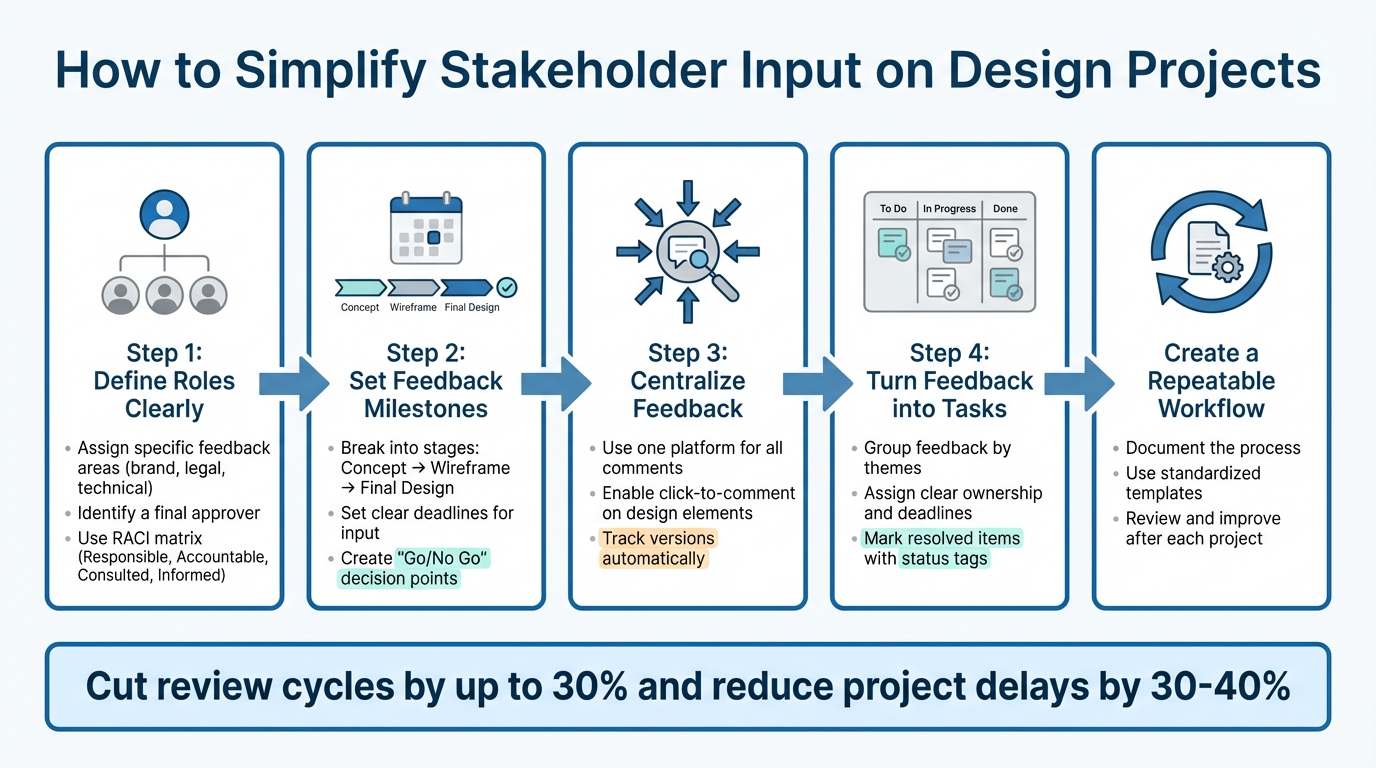
5-Step Process to Streamline Stakeholder Feedback on Design Projects
Effortless Client Feedback for Web Designers | Workflow Walkthrough
Identify Stakeholders and Define Their Feedback Roles
The first step to streamlining your design workflow is to identify all stakeholders involved. These can include internal stakeholders like project managers, designers, senior management, and operations, as well as external ones such as clients, end-users, suppliers, vendors, and regulators. Each of these groups influences your design in unique ways. Understanding your audience and what drives their decisions can help uncover hidden interests that might otherwise derail the project. Once stakeholders are identified, assign roles to ensure everyone contributes where they can be most effective.
List All Stakeholders and Their Feedback Areas
Each stakeholder should have a clear feedback focus that aligns with their expertise. For instance, a brand manager should concentrate on brand consistency, a compliance specialist on legal requirements, and developers on technical feasibility. Using centralized tools for collaboration can save time and reduce unnecessary feedback. This approach helps avoid situations where, for example, a marketing director delves into technical details, creating confusion instead of clarity.
Assign Specific Roles and Responsibilities
Clearly distinguishing between those who provide feedback and those who have final approval authority is key. Katie Dill, Head of Design at Stripe, emphasizes the importance of designing a feedback process that separates insight from decision-making authority. A RACI matrix (Responsible, Accountable, Consulted, Informed) is a useful tool to document who is handling specific tasks, who makes the final call, and who simply needs to stay in the loop. Structuring the review process in stages - starting with internal teams, moving to compliance or legal, and ending with the client - ensures feedback is timely and relevant.
Create a Stakeholder Map
Once roles are assigned, consolidate this information into a stakeholder map to clarify feedback channels and decision-making authority. A stakeholder map outlines roles, feedback priorities, and levels of influence. For example, stakeholders with high power and interest should be closely managed, while those with lower power and interest may only require occasional updates. Larry W. Smith, a Project Management Professional, cautions:
"Forgetting to meet the needs of just one influential and powerful stakeholder at a critical time can possibly ruin a project".
Identifying the "Final Approver" early in the process is crucial. This is the person whose sign-off officially ends the feedback loop and confirms the project is complete, helping to avoid endless revisions.
| Role Type | Primary Responsibility | Feedback Focus |
|---|---|---|
| Approver | Final sign-off and "Go/No Go" decisions | Project alignment and goals |
| Reviewer | Providing actionable, expert critique | Brand, legal, or technical specs |
| Contributor | Peer-level insights and collaboration | Creative execution and details |
| Observer | Staying informed on progress | General awareness |
Set Standard Feedback Timing and Format
Once you've identified who will provide feedback, the next step is to establish clear rules for when and how they'll share their input. Without a well-defined process, feedback can come at random times, causing unnecessary delays and complicating approvals. As Katie Dill, Head of Design at Stripe, explains:
"You have to design the feedback and review experience, because if you allow people to just drop in and drop out and have opinions every stage of the way, that can really slow down a process."
Disorganized feedback workflows can stretch project timelines by 30–40%. Setting clear expectations for timing and format ensures feedback is timely and organized, reducing chaos and keeping the project on track.
Define Feedback Milestones
To maintain consistency, break the project into distinct stages - such as concept, wireframe, and final design - and assign specific milestones for feedback. This approach prevents stakeholders from fixating on minor details too early or requesting major changes when deliverables are nearly complete. At each milestone, establish "Go/No Go" decision points where approval is mandatory before moving forward.
For feedback routing, use sequential reviews for critical stages that require thorough evaluation, and parallel reviews when multiple inputs can be gathered simultaneously to save time. Stick to firm deadlines for each milestone to avoid delays.
Create Feedback Guidelines
Once milestones are in place, provide a structured feedback template for reviewers to follow. This ensures their input is actionable and aligned with project goals. Start the template with the original creative brief to remind everyone of the objectives. Then, organize feedback into sections, such as general impressions, specific comments on visuals or functionality, and action items.
Encourage reviewers to explain the reasoning behind their feedback, not just the surface-level observations. Adding an approval status checklist - options like Approved, Approved with Minor Changes, Needs Major Revisions, or Rejected - can further streamline the process and minimize endless revisions.
Use One or Two Feedback Channels
Limiting feedback to one or two channels simplifies communication and eliminates conflicting requests. When feedback is scattered across multiple platforms, designers often waste time mediating between contradictory inputs instead of focusing on their work. Nearly half of employees - 49% - say poor communication significantly affects their productivity.
A dedicated visual feedback tool can centralize input, ensuring everyone reviews the same version of the work. This approach not only creates a clear audit trail but also reduces review cycles by up to 30%.
Centralize Visual Feedback in One Place
Bringing all stakeholder feedback together in one platform saves time and prevents the chaos of scattered comments. The Adobe Experience Cloud Team explains:
"Feedback can quickly become fragmented across emails, chat threads, and documents. Avoid this by using a centralized tool or platform to collect and manage all client input."
Using a single tool for visual feedback creates a unified space for design reviews. Stakeholders can view and respond to each other's comments in real time, encouraging productive discussions and resolving conflicts faster. This approach builds on the idea of using consistent timing and communication channels to make your design process smoother.
Link Comments Directly to Design Elements
Once feedback is centralized, it’s crucial to make it precise. Comments like "the header needs work" or "something feels off about the layout" leave designers guessing. Tools with click-to-comment functionality solve this by letting reviewers tag specific design elements. For example, a stakeholder can click directly on a button, image, or text block to leave their feedback. This direct connection eliminates long email explanations and cuts down on the back-and-forth needed to clarify vague remarks.
Track Design Versions
A centralized platform also simplifies version control, ensuring everyone is on the same page. With built-in version tracking, outdated files become a thing of the past. Every design iteration is automatically logged, so stakeholders always see the latest version. Tools that offer side-by-side comparisons make it easy to check whether earlier feedback was addressed. Plus, version tracking provides a clear history, which helps hold everyone accountable.
Simplify the Reviewer Experience with BoastImage
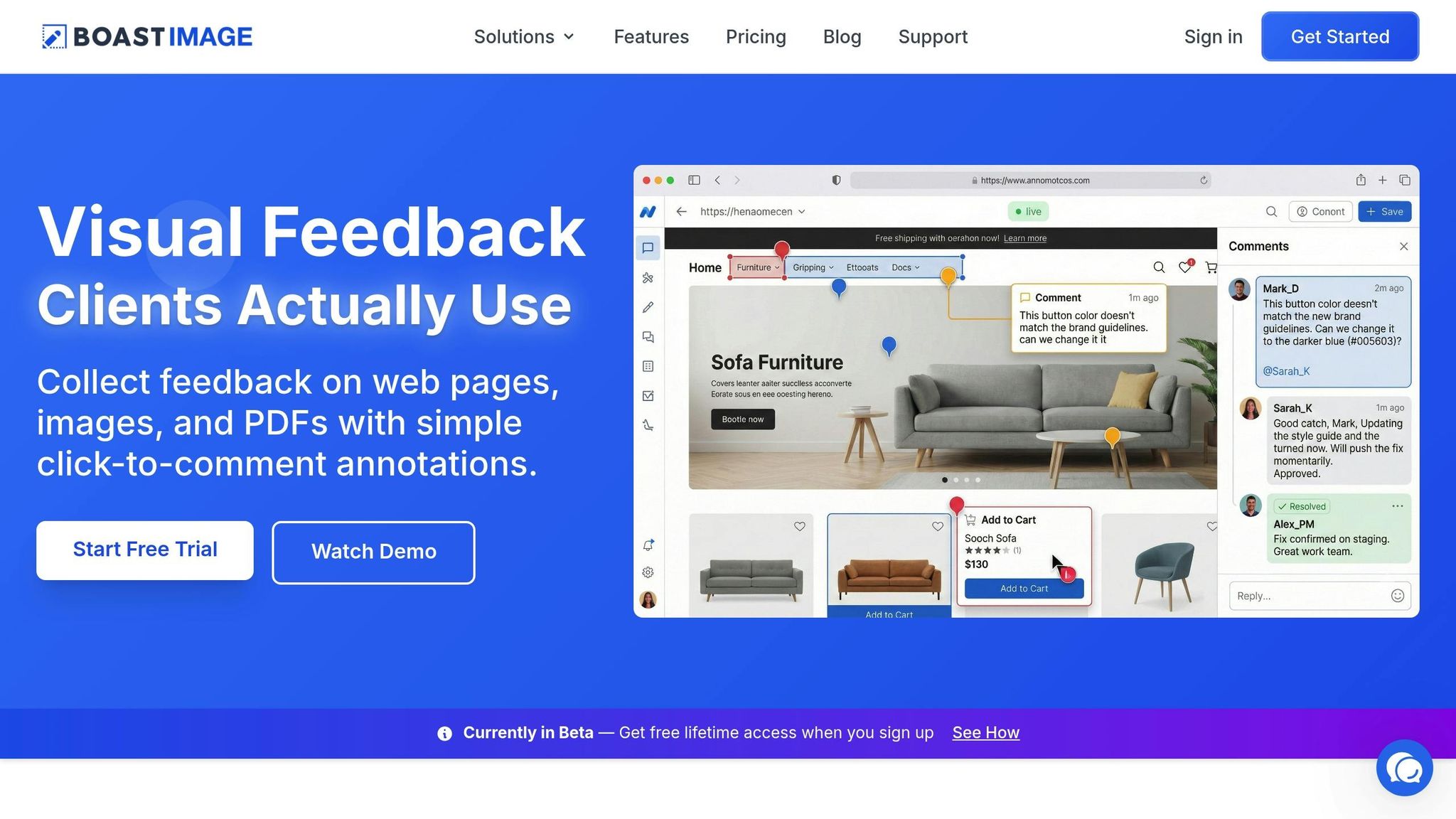
BoastImage takes the idea of a unified feedback hub one step further by making it effortless for clients to engage. Many traditional tools require clients to create accounts, manage passwords, and navigate complex systems - barriers that often result in ignored feedback requests or vague emails.
With BoastImage, there’s no need for accounts or training. Clients simply click a shared link to comment directly on web pages, images, or PDFs. This frictionless process prioritizes their convenience while offering robust team tools like version control, task management, and Kanban boards behind the scenes. Starting at $9.95/month for paid plans, BoastImage includes unlimited external collaborators, ensuring your clients can participate without stretching your budget or slowing your workflow.
sbb-itb-32f6eb2
Convert Feedback into Tasks
Gathering feedback is just the first step. The real challenge lies in turning those scattered comments into actionable steps that push your project forward. Without this transformation, even the most thoughtful stakeholder input risks being overlooked, leading to delays and confusion.
Group and Prioritize Feedback
Start by organizing feedback into themes like visual design, functionality, user experience, content, and brand alignment. Separate essential changes from optional ones. Experts emphasize that structuring feedback this way helps avoid unnecessary delays.
To streamline the process, use staged reviews. Begin with your internal team before involving external stakeholders. This keeps the focus sharp. For off-topic or less urgent items, create a "parking lot" system to document these for later discussion without derailing the current review.
Turn Comments into Tasks with Clear Ownership and Deadlines
Once feedback is sorted, turn each comment into a specific task with clear ownership. A RACI matrix can help clarify roles: define who is Responsible, Accountable, Consulted, and Informed for each task. This prevents confusion and ensures accountability. Assign firm deadlines and communicate how delays could impact the project. For high-priority tasks, set up escalation rules to reassign responsibilities if deadlines aren’t met.
Inline annotations tied directly to design elements can save time by giving designers clear, actionable steps instead of vague instructions. This level of clarity is critical - inefficient workflows can stretch creative projects by 30–40% beyond their original timelines.
Show Stakeholders How You Addressed Their Feedback
Closing the feedback loop is vital for building trust and avoiding repeated comments in future rounds. Use version comparison tools to display side-by-side views, showing how stakeholder input influenced the updated design. The Adobe Experience Cloud Team highlights:
"Securing design approval isn't just a project milestone. It's an opportunity to strengthen trust, demonstrate value, and build long-term client relationships".
Mark resolved feedback with status tags like "Done" or "Resolved" to create a transparent audit trail. For feedback that can’t be addressed immediately, acknowledge it and explain when it will be revisited. This approach reassures stakeholders while keeping your timeline intact. Teams that use centralized feedback tools report resolving design issues 50% faster compared to those relying on email-based workflows. Up next, explore how to integrate these task-driven insights into a repeatable feedback process.
Create a Repeatable Feedback Process
Great design teams thrive on workflows that are easy to repeat. When your feedback process is well-documented and consistent, it removes guesswork, speeds up timelines, and ensures everyone involved knows their role. By focusing on clear roles and centralized feedback, you can simplify approval cycles and keep projects moving.
Document Your Feedback Process
Start by organizing your feedback workflow into a single, reliable source. Use a tool like a RACI matrix to outline roles and responsibilities clearly. Define specific review criteria - covering visual elements, functionality, user experience, content accuracy, and brand alignment - so stakeholders know exactly what to assess. Decide whether your approval process should be sequential (ideal for compliance-heavy work) or parallel (allowing multiple stakeholders to review at the same time to save time). Set measurable success metrics upfront, such as key business objectives and brand keywords, to guide reviewers and reduce subjective opinions.
Create Communication Templates
Once your process is documented, the next step is to standardize communication. Develop templates for creative briefs, review requests, and feedback forms, including essential project details and links to brand guidelines. Add a clear status checkbox - Approved, Approved with Minor Changes, Needs Major Revisions, or Rejected - to avoid confusion about what happens next. Instead of asking vague questions like "What do you think?", use prompts like "Does this design align with the brand keywords we established?". As Ziflow puts it:
"A feedback form template teaches your clients how to give creative or design feedback that's actually useful. Instead of saying, 'Make it pop!', they'll learn how to identify the exact changes they want".
Review and Improve the Process After Each Project
After every project, take time to evaluate and refine your process. Use retrospectives to identify what worked and what didn’t. Audit trails from your feedback platform can help you find where delays occurred. Track metrics like how long each review stage took and the total number of revisions needed before approval. Katie Dill, Head of Design at Stripe, highlights the importance of structure:
"You have to design the feedback and review experience, because if you allow people to just drop in and drop out and have opinions every stage of the way, that can really slow down a process".
Revisit your RACI matrix to confirm whether the right people were involved at the right stages. If "unofficial" stakeholders gave feedback, consider whether they should be formally included or excluded in future reviews. Use tools like the "parking lot" technique to log off-topic comments and decide if they indicate a need for adjustments. By continuously refining your process, you turn lessons learned into actionable improvements.
Conclusion
Streamlining stakeholder input can be achieved in just five steps:
- Map stakeholders and their roles to understand who’s involved and their responsibilities.
- Set clear feedback standards so everyone knows what’s expected.
- Centralize visual feedback to keep discussions organized and accessible.
- Turn comments into actionable tasks for better clarity and execution.
- Establish a repeatable workflow to maintain consistency across projects.
These steps help smooth out the approval process and cut down on unnecessary delays.
A RACI matrix can be a game-changer when it comes to defining review and approval roles, ensuring everyone knows their part and avoiding decision-making bottlenecks. Pair this with clear deadlines, standardized feedback templates, and centralized comments to replace scattered emails with actionable, focused instructions.
To make this process even more efficient, the right tools are essential. For example, BoastImage simplifies client collaboration by allowing stakeholders to leave comments directly on designs - no sign-up, accounts, or training required. Meanwhile, your team benefits from features like version control, task management, and Kanban boards to stay organized and on track.
Did you know inefficient approval workflows can extend creative projects by 30% to 40% longer than planned? By adopting structured feedback systems and client-friendly tools, teams can cut review cycles by up to 30%. These practices not only speed up approvals but also foster smoother collaboration for every design project.
FAQs
What’s the best way to assign roles and responsibilities in design projects?
Assigning clear roles and responsibilities at the start of a design project can make the entire process smoother, cutting down on unnecessary revisions and speeding up approvals. Begin by identifying everyone involved - project sponsors, designers, developers, and external clients - and clearly outline their roles and what they’re responsible for. A framework like RACI (Responsible, Accountable, Consulted, Informed) can help clarify who makes decisions, who carries out tasks, and who provides input or feedback.
Once roles are defined, turn them into actionable tasks. For instance, appoint a design lead to guide the creative vision, a project manager to keep timelines on track, and external reviewers to offer feedback. Include all of this in a project brief that details deliverables, decision-making responsibilities, and deadlines. Tools like BoastImage can make feedback easier by letting stakeholders comment directly on design files without needing accounts or logins. This ensures feedback is tied to the right person without adding complexity to the process.
Consistent communication is key to keeping everything on track. Regular check-ins help confirm progress and tackle any challenges as they arise. When roles are clear and feedback stays organized, approvals move faster, and revisions become more targeted and efficient.
What are the advantages of using a single platform for stakeholder feedback?
Using a centralized platform makes managing stakeholder feedback much easier by bringing all comments, requests, and revisions into one place. No more digging through scattered emails, dealing with conflicting versions, or struggling with miscommunication. Everyone stays aligned, and teams can easily track who gave feedback, what changes were requested, and when they were made. This leads to quicker approvals and fewer back-and-forth revisions.
When feedback is organized in a single system, vague or duplicate comments are greatly reduced. This allows teams to focus on making meaningful updates instead of wasting time on confusion. A clear and structured process not only saves time and minimizes mistakes but also strengthens client relationships by fostering transparent and accountable communication.
BoastImage takes this a step further by allowing external collaborators to leave visual comments effortlessly - just a link, no accounts or logins needed. For internal teams, tools like version control, task management, and a streamlined workflow operate seamlessly in the background, helping speed up the approval process.
How can I streamline stakeholder feedback to keep design projects on track?
Simplifying stakeholder feedback is crucial for keeping projects on track. One effective approach is to use a visual feedback tool that allows stakeholders to comment directly on designs - no accounts or logins required. This way, feedback stays tied to the specific asset, eliminating the chaos of scattered email threads.
Once feedback is collected, organize it into categories like visual updates, copy changes, or functionality issues. Then, prioritize tasks based on their impact and the effort required. Assign clear ownership for each task, include brief but specific descriptions, and set realistic deadlines to maintain momentum. To ensure accountability, link feedback to specific design versions and mark tasks as complete only after stakeholders have given their approval.
By turning feedback into well-structured, actionable tasks, you can cut down on unnecessary revision cycles and pave the way for quicker approvals and smoother project progress.