
How Do You Handle Client Feedback Without Losing Context?
Managing client feedback effectively is all about keeping everything centralized, clear, and actionable. Scattered feedback, vague comments, and version confusion can derail projects, waste time, and lead to frustration. Here's how to fix it:
- Centralize feedback: Use a single platform where all comments, revisions, and approvals are logged and tied to specific design elements.
- Encourage clear, specific input: Replace ambiguous feedback like "make it pop" with precise, visual annotations.
- Establish version control: Ensure everyone works on the latest file version and disable comments on outdated drafts.
- Set clear expectations: Limit revision rounds and define deadlines to streamline the process.
How to get constructive Design Feedback from Clients | #RELABLIFE ep.80
Common Causes of Context Loss in Feedback
Losing context during feedback exchanges can derail projects and lead to unnecessary frustration. Identifying where things typically go wrong helps teams sidestep miscommunication and avoid endless revision cycles. Here are some common pitfalls that disrupt context in client feedback.
Unclear Comments Without Visual References
Feedback like "make it pop" or "this needs more energy" might sound straightforward, but these phrases are far from universally understood. Designers often struggle to interpret such vague directions, especially when there are no visual cues to pinpoint the exact elements needing attention. Without clear on-screen annotations, teams are left guessing - and guesses often miss the mark.
"Adjectives like 'better,' 'stronger' and 'energetic' have no universal meaning and are easily misinterpreted when also absent of purely descriptive language."
- ReviewStudio
This lack of precision forces designers to make changes based on assumptions, only to later find out they misunderstood the client's vision. The result? Wasted time, frustration, and diminished trust. In fact, enterprise creative teams spend nearly half their time simply coordinating feedback.
Version Confusion and Missing Source of Truth
When multiple versions of a file are in circulation, chaos ensues. Without a single, definitive source of truth, teams find themselves in a constant state of uncertainty. This back-and-forth can drag out approvals, and it’s no surprise that 52% of companies report missing deadlines due to these bottlenecks.
Feedback Spread Across Multiple Channels
Feedback scattered across emails, chats, and other communication tools can dilute critical details. Project managers often end up spending hours piecing together fragmented comments to form a coherent picture. This scattered approach not only wastes time but also creates room for miscommunication.
Take GroupM, for example. In 2024, this media investment firm, which manages $63 billion annually, struggled with sprawling email threads and input from multiple stakeholders. Once they centralized their feedback process, they saw a 25–30% reduction in daily email volume and a noticeable improvement in communication during approvals.
"A significant blocker for us is the scattered nature of feedback... This disjointed feedback process often results in miscommunication and delays."
- Axel Lavergne, Founder, Review Flowz
Fragmented feedback leads to conflicting directions and slows alignment. Poor workflows like these can cost businesses up to 30% of their annual revenue. Recognizing these challenges is the first step toward creating streamlined, context-rich feedback systems.
How to Maintain Context in Client Feedback
Once you’ve pinpointed where context tends to get lost, the next step is creating a system that keeps everything connected. A solid approach transforms scattered, unclear input into actionable, straightforward guidance. Here’s how you can make that happen.
Centralize Feedback in One Platform
Gather all client feedback into a single platform. When comments are scattered across emails, Slack messages, phone calls, and text messages, critical details often vanish. A centralized system acts as a single source of truth, giving everyone - designers, clients, and project managers - access to the same, up-to-date information.
Centralization also preserves the decision-making history. Teams can revisit the rationale behind every request instead of just addressing surface-level changes. For instance, with BoastImage, all comments, revisions, and discussions are directly tied to the visual assets they reference, ensuring no details are lost in translation.
The benefits are clear. Companies using centralized feedback systems for early validation testing have reported a 25% reduction in iteration cycles. Additionally, businesses with strong design processes and clear feedback loops have seen 32% faster revenue growth and 56% higher total returns to shareholders.
"Centralizing product feedback will not only allow you to revisit the critical pieces at any time, but it will also help you to mold the perception of the whole domain you manage."
- Martin Michalik, VP Product, Kontent.ai
Set up a clear feedback policy that outlines how and where feedback should be logged. You can also designate a feedback champion - someone responsible for ensuring consistency across the process. Once you’ve centralized everything, the next step is making sure feedback is both clear and connected to the design elements it addresses.
Use Visual, Specific Feedback Methods
Replace vague comments with precise, visual feedback using tools like point-and-click annotations and markup features.
In 2024, Sartorius revamped its creative review process by adopting visual feedback tools:
"Filestage saves our company a huge amount of time. Instead of writing detailed instructions over email, reviewers can just click on a file to add comments in context."
- Karina Berner, Creative Production Specialist, Sartorius
Encourage clients to focus on identifying problems rather than prescribing solutions. For example, instead of asking open-ended questions like "What do you think?" try something more specific, such as "Does this design reflect the agreed-upon brand keywords?" If a client suggests "change the blue to pink", explore whether the current color aligns with the target audience’s preferences. This approach keeps feedback constructive and tied to the project’s goals. Lastly, strict version control helps avoid confusion caused by outdated revisions.
Implement Version Control and Transparency
Use robust version control to ensure reviewers are always working on the latest file version. This system tracks every iteration and disables comments on outdated versions once a new one is uploaded.
Side-by-side comparison tools are especially helpful, allowing both creators and clients to verify that requested revisions have been implemented correctly. This reduces the risk of repetitive feedback.
Transparency also plays a crucial role. Status indicators like "Awaiting Approval" or "Request Changes" clarify responsibilities, while project dashboards provide a clear overview of each asset’s status in the review process.
"When reviewers can see the evolution between versions, they give better, more focused feedback."
- Ziflow
To avoid endless feedback loops, define revision limits in your contract. Encourage reviewers to revisit the original project brief with every new round of feedback to ensure suggestions stay aligned with the project’s objectives. Automated reminders and firm deadlines for feedback submissions help keep everyone accountable and the project on schedule. By combining these strategies, you’ll create an efficient feedback loop that keeps context intact at every stage.
sbb-itb-32f6eb2
Step-by-Step Workflow for Handling Client Feedback
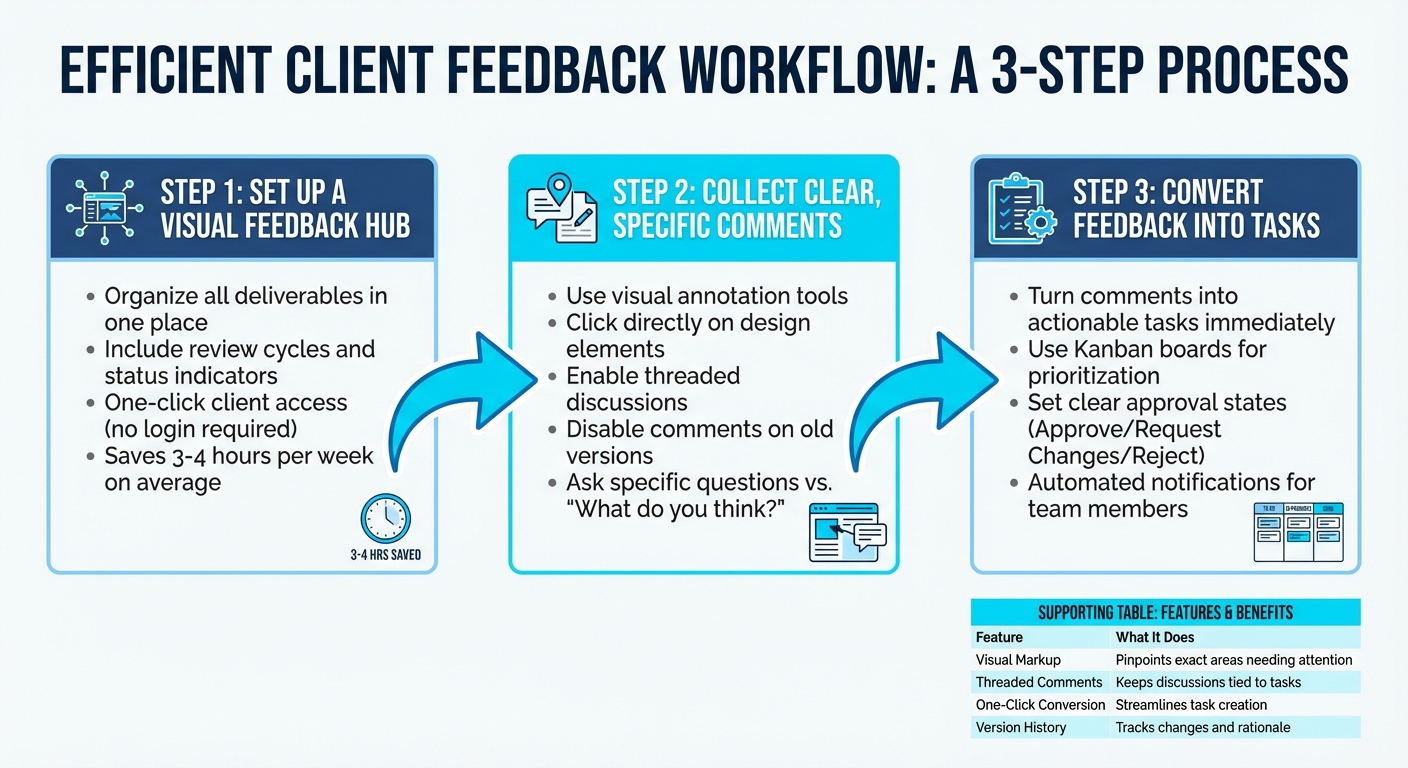
3-Step Workflow for Managing Client Feedback Without Losing Context
Follow these steps to simplify the process of managing client feedback. Whether you're a solo freelancer, part of a small agency, or working in-house with multiple stakeholders, this workflow can keep things running smoothly.
Set Up a Visual Feedback Hub
Start by creating a central hub where all project deliverables - like website designs, images, PDFs, and prototypes - are organized. This hub should make it easy for clients to review assets with features like review cycles and status indicators (e.g., "Pending Approval", "Changes Needed"). The goal? Minimize hassle. Clients should be able to access everything with a single click, without needing to set up accounts or remember passwords.
Centralized feedback tools save creative teams an average of 3–4 hours per week, and in some cases, they significantly speed up project timelines. For example, tools like BoastImage let clients add comments directly to specific design elements by sharing a simple public link. Once this hub is set up, you can focus on gathering clear, actionable feedback.
Collect Clear, Specific Comments
Forget endless email threads and vague feedback. Instead, use tools that allow clients to visually annotate designs. When clients can click directly on the element they’re referencing, there’s less risk of confusion. Threaded discussions can also help, as they let all reviewers see and respond to each other’s comments in real time.
Encourage clients to describe issues rather than suggest solutions. For example, instead of asking, "What do you think?" try something more specific, like, "Does this layout highlight the primary call to action effectively?" Once a round of feedback is complete, disable comments on that version so future input is directed to the latest iteration.
Convert Feedback Into Tasks
Turn client feedback into actionable tasks immediately. Many feedback tools allow you to convert comments into tasks while keeping the context intact. Use a Kanban board or a similar system to prioritize these tasks, assign them to team members, and set deadlines.
| Feature | What It Does |
|---|---|
| Visual Markup | Pinpoints the exact areas needing attention, saving time and avoiding guesswork. |
| Threaded Comments | Keeps all feedback discussions tied to the relevant tasks. |
| One-Click Conversion | Streamlines task creation, ensuring no feedback is overlooked. |
| Version History | Tracks changes, showing what was updated and why. |
Clear approval states like "Approve", "Request Changes", or "Reject" can help guide the team through the process. Automated notifications ensure team members are alerted when tasks are created or assets move to the next review stage, so nothing slips through the cracks.
Client-First Practices to Simplify Feedback Collection
The most advanced feedback tools won't help if your clients avoid using them. For clients who aren't tech-savvy, complicated platforms can lead them to resort to vague emails or text messages instead. The key isn’t to push for more training but to make the process as effortless as possible.
Make Feedback Tools Easy to Use
One of the biggest obstacles to feedback is account creation. Asking clients to create logins, remember passwords, or go through onboarding tutorials can drive them to look for shortcuts. Tools that allow login-free access remove this hurdle entirely. For example, BoastImage offers public sharing links that let clients review work with just one click. They can highlight changes and leave feedback without needing accounts, downloads, or extra training.
Another essential feature is mobile accessibility. Many clients review work on their phones while on the move. If your tool requires desktop software or isn’t optimized for smartphones, you’re creating unnecessary delays in their responses. By ensuring feedback tools are mobile-friendly, you provide a seamless experience and keep the review process on track.
Establish Clear Review Cycles and Expectations
Set limits on the number of review rounds upfront - three is a common standard. These typically include concept approval, layout adjustments, and final tweaks. Limiting reviews encourages clients to provide well-thought-out, consolidated feedback.
"Spelling out the feedback process sets clear boundaries... It also forces your client to use each revision wisely." - Rachel Bastarache, Video Editor at Renegade Digital Post
Include these limits in your contract, along with deadlines for feedback submission and automated reminders to keep the project moving smoothly. When clients know they have a set number of revisions, they’re more likely to gather input from all stakeholders before submitting their comments. Clear expectations ensure that everyone stays aligned and focused.
Maintain a Transparent Revision History
Confusion over versions can derail projects. When clients can’t track changes between drafts or understand why certain decisions were made, they may repeat feedback or revisit resolved issues. A centralized platform with an audit log can solve this problem. BoastImage, for instance, tracks every comment, change, and approval with timestamps and user names attached. This level of detail builds accountability and prevents misunderstandings.
To keep things organized, disable comments on older versions when a new review cycle begins. This ensures everyone focuses on the latest draft and avoids revisiting outdated feedback. Side-by-side version comparisons can also help clients see exactly what’s been updated, offering visual proof that their input has been addressed. Such transparency fosters trust and reduces the need for lengthy status meetings.
Conclusion: Simplifying Feedback While Preserving Context
Effectively managing client feedback without losing important context boils down to three key strategies: keeping all feedback in one centralized platform, using visual tools to remove ambiguity, and making the process effortless for clients. When feedback is scattered across emails, Slack, and phone calls, essential details can slip through the cracks. Without visual references, teams waste valuable time trying to interpret unclear instructions. And if clients encounter complicated systems or confusing interfaces, they’re less likely to engage at all.
Getting this right can make a big difference. Using centralized, visual tools for direct communication between designers and clients has been shown to reduce revision cycles by half and cut daily email processing time by 50%.
BoastImage tackles these pain points by prioritizing the client experience. The platform simplifies the review process with features like version control, automated task creation from comments, and transparent audit logs that document every change with timestamps and user details. This ensures feedback remains actionable and that critical context is never lost.
FAQs
How does centralized feedback help streamline project timelines?
Centralizing client feedback in a single, well-organized hub keeps everything - comments, annotations, and version history - together in one place. No more digging through endless email chains or chat logs to find that one critical note. This streamlined process creates a clear, accessible record of suggestions and decisions, helping to avoid misunderstandings and cutting down on delays caused by overlooked details.
When all feedback is centralized, project managers can easily monitor progress, spot bottlenecks, and send timely reminders to ensure tasks stay on track. Teams can implement changes with greater accuracy, reducing the number of revision cycles and keeping projects moving forward smoothly. By bringing all feedback into one system, you promote transparency, strengthen accountability, and free up more time for creative work - leaving less time wasted on administrative headaches.
How can I help clients provide clear and actionable feedback?
To help clients provide clear and useful feedback, it's important to set expectations right from the start. Use a kickoff meeting or a detailed project brief to outline the project's goals, timelines, and review process. This ensures clients know exactly what kind of input you’re looking for. Offering a structured feedback format, like a simple questionnaire or template, can also help guide their responses. For example, include questions like, "Does this align with the brand?" or "What specific changes would you suggest?" to keep their feedback focused and actionable.
Whenever possible, incorporate visual feedback tools like annotated screenshots or mock-ups. These allow clients to highlight specific elements directly, eliminating the guesswork of interpreting vague descriptions. Encourage them to refer back to the project brief and brand guidelines during reviews to ensure their suggestions align with the overall objectives. Promptly acknowledging their feedback and summarizing key points can go a long way in building trust and minimizing miscommunication throughout the project.
How does version control help manage client feedback effectively?
Version control helps keep feedback organized by linking it to a specific, clearly labeled version of the work. This way, there’s no confusion about which file is under review. Using sequential version numbers (like v1, v2, v3) and tracking changes provides a clear record of updates - who made them, what was changed, and why. This approach avoids the hassle of reviewing outdated drafts or losing important context during revisions.
It also allows reviewers to comment directly on the correct version without overwriting earlier feedback. If needed, teams can roll back to a previous version, minimizing errors and preventing conflicting edits. This structured system simplifies the feedback process, keeps everyone on the same page, and helps teams move more efficiently toward final approval.