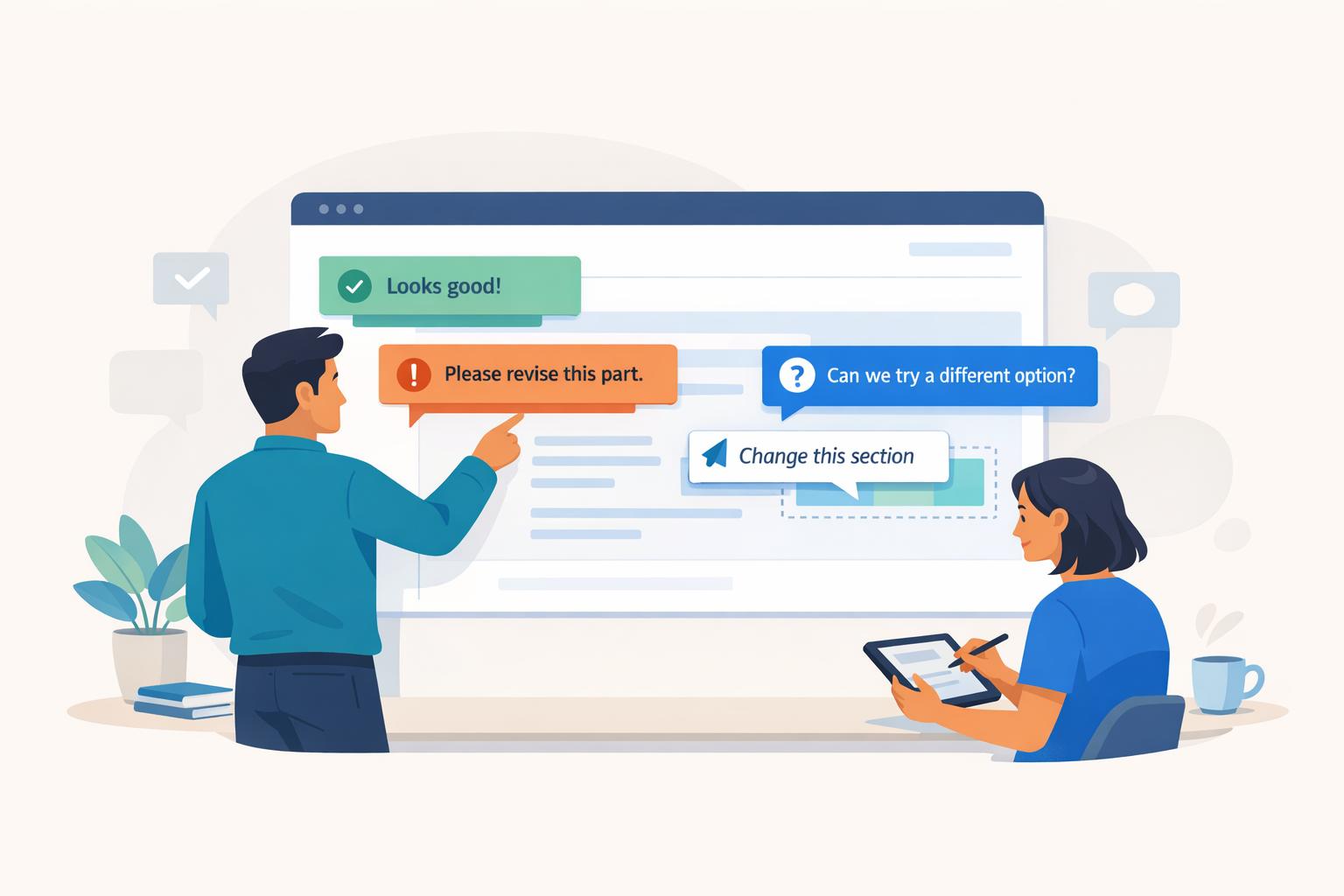
How to Handle Conflicting Stakeholder Feedback
Conflicting stakeholder feedback can derail projects, leading to delays, frustration, and subpar results. The key to managing this challenge is turning chaos into clarity with structured processes and clear communication.
Key Strategies to Resolve Conflicts:
- Define Roles and Authority: Assign a single decision-maker to avoid endless revisions and disputes.
- Align on Goals Early: Use a detailed design brief to clarify objectives, target audiences, and constraints upfront.
- Centralize Feedback: Use tools to collect and organize all comments in one place, ensuring clarity and preventing confusion.
- Group and Prioritize Feedback: Categorize input into actionable themes like "To Do", "To Persuade", and "To Clarify."
- Use Data to Resolve Disputes: When opinions clash, rely on usability tests or analytics to guide decisions.
- Establish a Review Process: Set clear feedback stages (e.g., wireframes for layout, mockups for visuals) and deadlines.
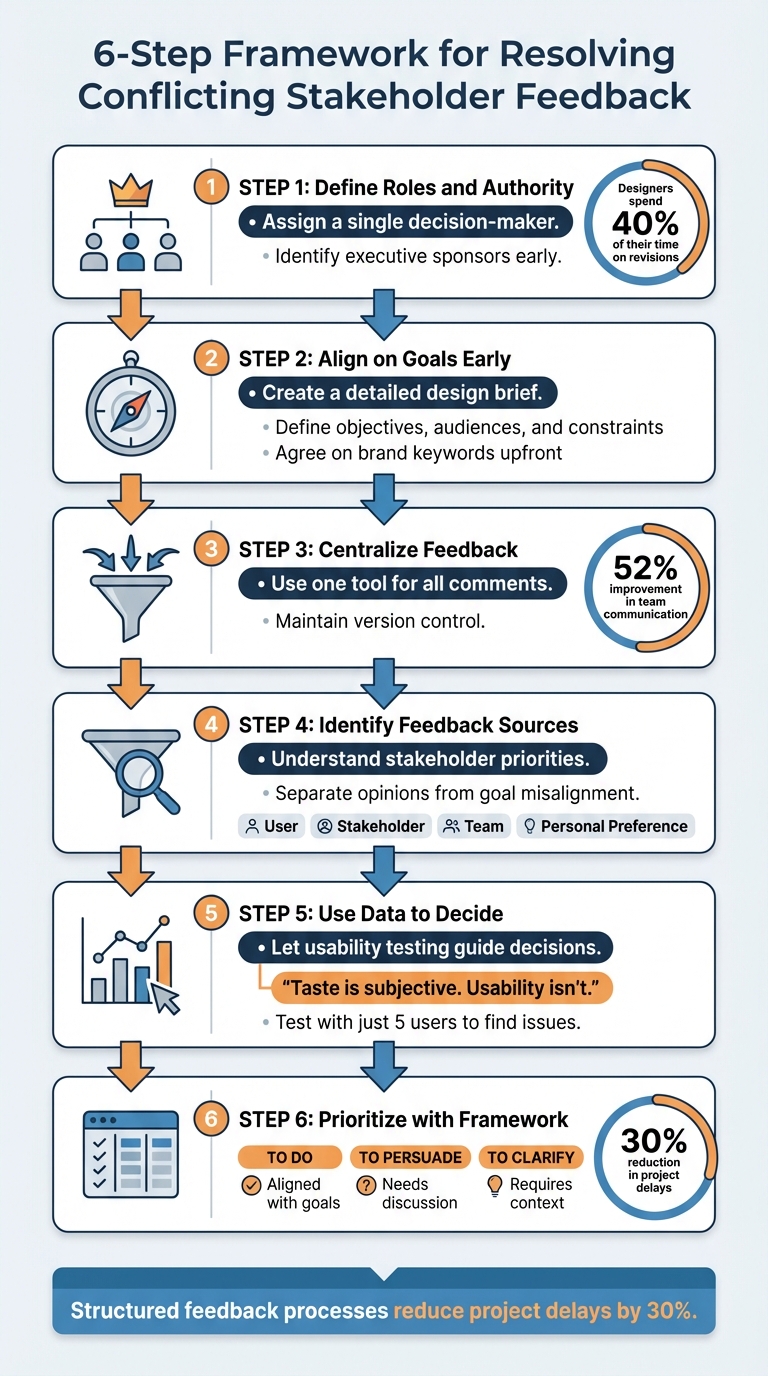
6-Step Framework for Resolving Conflicting Stakeholder Feedback
Setting Up for Better Feedback Management
Define Stakeholder Roles and Decision Authority
One of the biggest challenges in managing feedback is when multiple people assume they have the final say. This often leads to conflicting instructions - like one stakeholder wanting a design element larger while another insists it should be smaller. Without a clear decision-making structure, these contradictions can stall progress and create unnecessary frustration.
To avoid this, designate a single decision-maker who has the authority to break ties and resolve disputes. It's also important to identify executive sponsors early in the process. These high-level stakeholders can override decisions if they're not included in critical discussions.
"When the boss isn't aligned with the team's decisions, this can result in having to take several steps back in the process and not only require a change order, but add time to the overall schedule".
Clear role assignments are essential. For example, subject-matter experts should provide technical input without stepping into design-related decisions. A Single Point of Contact (SPOC) can act as the go-to person for consolidating feedback, ensuring internal conflicts are resolved before feedback reaches the design team.
"To do this, we needed them to choose just one person to represent their company... the final decision-maker, so we wouldn't get stuck waiting on someone else or have to deal with conflicting commentary".
This approach can save a lot of time. Designers currently spend about 40% of their time revising work based on feedback, but a well-structured feedback process can reduce delays by as much as 30%.
| Role | Responsibility | Impact on Conflict |
|---|---|---|
| Decision Maker | Has final approval authority; resolves disputes | Prevents endless revisions |
| Single Point of Contact | Collects and filters feedback from stakeholders | Ensures feedback is clear and actionable |
| Subject-Matter Expert | Offers technical or specialized insights | Keeps feedback focused and practical |
| Executive Sponsor | Aligns decisions with broader business goals | Avoids late-stage vetoes or major changes |
Agree on Goals, Objectives, and Constraints Up Front
Misaligned priorities among stakeholders are a common source of conflicting feedback. For example, one person might prioritize maintaining brand consistency, while another focuses on maximizing conversion rates. If these differences aren't reconciled early, they can derail the project.
A detailed design brief can help avoid this. This document outlines objectives, target audiences, milestones, and deliverables before any design work begins.
"A solid design brief will not only ensure you're happy with the end result, but it will also: Save the designer a lot of time... Set expectations for both parties... [and] Keep both sides accountable".
Your design brief should emphasize who the primary users are and clearly define any secondary audiences. Translate vague goals into specific, measurable actions. To minimize subjective debates about aesthetics, agree on brand keywords (like "luxury", "trustworthy", or "approachable") that can serve as objective design benchmarks.
Finally, document all constraints - including budget, timelines, technical limitations, and available resources - right from the start. This ensures everyone understands what's feasible and sets realistic expectations.
Once these objectives and constraints are established, the next critical step is centralizing feedback to maintain alignment.
Collect All Feedback in One Central Location
After defining roles and goals, managing feedback effectively becomes the key to staying on track. Scattered feedback - whether through emails, Slack messages, or phone calls - leads to confusion. Important comments get lost, outdated versions are mistakenly reviewed, and contradictory requests slip through.
"Your inbox is the last place you should be collecting and managing project feedback. There's just too much that can go wrong there".
A centralized feedback system solves this issue by keeping all comments in one place, complete with clear visual context. The right tool lets stakeholders directly highlight or annotate specific design elements, reducing misunderstandings. Built-in version control ensures everyone is reviewing the latest draft.
Such systems also create an audit trail of decisions, which helps prevent scope creep when someone tries to revisit a resolved issue weeks later. Teams using project management software with integrated communication features have reported a 52% improvement in overall team communication.
An example of this is BoastImage, which simplifies client feedback by allowing them to comment directly on designs - no accounts or logins required. Behind the scenes, teams benefit from structured workflows, version control, and task management. Starting at just $9.95/month, all paid plans include unlimited external collaborators, so client numbers won't inflate costs.
Design Leadership Meetup: The Art of Giving and Receiving Design Feedback
Finding the Source of Feedback Conflicts
Centralizing feedback is just the first step - understanding where it's coming from is equally important.
Identify Each Stakeholder's Role and Interests
Conflicting feedback often arises because stakeholders approach a project with different priorities. For instance, a Product Manager might focus on meeting business goals and tracking KPIs, an Engineer could be more concerned with technical feasibility and performance, while a Designer prioritizes visual harmony and accessibility. Each stakeholder is optimizing for their own objectives.
To address feedback effectively, dig into the underlying concerns behind each comment. For example, a request to change a design’s color might not indicate a design flaw but could instead reflect a need to attract a specific audience. As Paul Boag, UX Consultant at Boagworld, explains:
When a client provides feedback, they will often express a solution, rather than the underlying problem.
Some stakeholders may act as "Devil's Advocates", proposing hypothetical scenarios to test a design’s resilience. This isn’t necessarily opposition - it’s often an effort to avoid future rework. Recognizing this intent allows you to address their concerns about risk without interpreting the feedback as direct criticism.
To make sense of it all, categorize feedback based on its origin. Is it about User Feedback (usability), Stakeholder Feedback (business goals), Team Feedback (feasibility), or Personal Preference (subjective taste)? Once you identify the source, it becomes easier to distinguish between opinions and strategic misalignments.
Separate Opinion Differences from Goal Misalignment
It's crucial to separate subjective opinions from feedback tied to project goals. If a comment stems from personal taste, acknowledge it; but if it concerns audience or business outcomes, address the underlying objective. For instance, if someone suggests changing a color to pink, ask why. If the answer is "I just like pink", it's a personal opinion. If they respond, "I think pink will resonate more with our pre-teen audience", it’s a goal-driven concern tied to business strategy.
Be cautious with feedback that sounds like data but is actually speculation. For example, "We need a button here because users won’t want to search for it" might seem analytical but is often just a guess. As Krause points out:
Saying 'because' doesn't make it data.
When conflicts arise over subjective preferences, refer back to your project’s agreed-upon brand keywords and personas. If the design aligns with terms like "luxurious" or "innovative", it’s meeting the project goals, even if personal preferences differ. This approach shifts discussions from subjective opinions to measurable benchmarks.
For unresolved subjective feedback, objective data can provide clarity.
Use Data to Settle Disagreements
When opinions clash, let data take the lead. Christopher Nguyen, Founder of UX Playbook, captures this idea perfectly:
Taste is subjective. Usability isn't.
For example, if analytics show that users struggle with a particular design element, that evidence should outweigh personal preferences. Quick usability tests or existing research can validate decisions with measurable insights about user behavior or technical performance. Even testing with just five users can highlight critical usability issues. For technical concerns, performance data can reveal whether a design is affecting load times or responsiveness. Similarly, if a stakeholder insists on a change, ask how it supports the project’s key KPIs for the quarter.
To keep things organized, consider creating a Knowledge Board. Use it to track proven facts, tested assumptions, and unverified hypotheses. This tool helps transform speculative feedback into clear, data-driven decisions that align with project goals.
sbb-itb-32f6eb2
How to Resolve Conflicting Feedback
Once you’ve sorted out the sources of feedback, the next step is to handle and prioritize conflicting inputs effectively. This involves turning feedback into actionable decisions by organizing comments, prioritizing changes, and running focused discussions that keep everyone aligned with the project’s goals.
Group Feedback into Themes
Start by separating solutions from the actual problems. For instance, if a stakeholder says, “change the color to pink,” they’re suggesting a solution rather than identifying the issue - perhaps the current color doesn’t resonate with the target audience. By grouping feedback based on the underlying problem, you can evaluate alternative solutions more effectively.
Organize feedback into three actionable categories:
- To Do: Changes that clearly align with the project’s goals and are agreed upon.
- To Persuade: Suggestions that conflict with objectives and require further discussion or counter-arguments.
- To Clarify: Feedback that’s vague and needs additional context or explanation.
As Deanna Rizzo from XPLANE puts it:
Feedback should be something we can move forward with without having to loop back to you for confirmation or clarification.
To streamline the process, assign a single point of contact to consolidate similar feedback. For example, if multiple stakeholders comment on navigation issues, group these under a single theme like "Navigation clarity" instead of treating them as individual tasks.
Tools like BoastImage (https://boastimage.com) can simplify this process by allowing clients to leave comments directly on designs while tracking their status (e.g., "Needs Review", "Needs Changes", "Approved").
Prioritize Changes with a Framework
Not all feedback carries the same weight. Use a structured approach to assess suggestions by considering three factors: how likely the scenario is to occur, whether it benefits the primary user, and if it supports your business objectives. For example, if a suggestion addresses a rare edge case, ask yourself: Is this something most users will encounter? Does it serve the core audience? Does it align with our project goals? If not, it might belong in the "To Persuade" category.
Another helpful method is to prioritize feedback based on business objectives. Compare each suggestion against key project goals and measurable outcomes. Focus on feedback that directly advances these objectives. When disagreements arise, propose usability testing or A/B testing as a way to move the discussion from subjective opinions to measurable data points. Studies show that structured feedback loops can reduce project delays by 30%.
Once you’ve prioritized, hold alignment meetings to finalize decisions.
Run Alignment Meetings to Resolve Conflicts
With goals defined and feedback grouped, start alignment meetings by reviewing the project’s objectives. Before diving into specific feedback, restate the key goals and metrics to keep the discussion focused and data-driven, avoiding subjective debates.
Make sure the final decision-maker is present during these meetings so that clear decisions can be made without requiring follow-ups. Use targeted questions like, “Does this layout emphasize the primary call to action?” or “Does this align with our agreed-upon brand messaging?”
When a stakeholder suggests a change, ask, “What is the goal behind this suggestion?” This helps uncover the core issue and allows the team to explore alternative solutions rather than committing to a specific idea prematurely. Shifting the focus to the objective rather than the solution fosters more productive discussions.
To keep the meeting on track, use a “parking lot” to set aside off-topic or unrelated questions for later. For ongoing clarity, maintain a knowledge board to document recurring questions, assumptions, and key insights throughout the project. After the meeting, organize the outcomes into the three categories - "To Do", "To Persuade", and "To Clarify" - so everyone knows what’s been decided and what steps to take next.
Preventing Feedback Conflicts in Future Reviews
Avoiding conflicting feedback starts with setting up clear systems and workflows. By addressing potential misalignments before stakeholders even begin reviewing, you create a framework where disagreements can be spotted and resolved early. These steps build on solid feedback collection habits, reducing the chances of future conflicts.
Create a Standard Review Process
Establishing a clear review process can make all the difference. Define what kind of feedback is appropriate at each stage of the project. For example:
- During the research phase, focus on strategic direction and alignment with business goals.
- When reviewing wireframes, concentrate on layout, architecture, and hierarchy - not visual elements like colors or fonts.
- Save discussions about visual design for the mockup stage.
- Address functionality and feature feedback during prototype reviews.
This structured approach helps avoid premature critiques. So, if someone wants to discuss the color palette during the wireframe stage, remind them that visual design details will come later, keeping the focus on layout and structure.
To streamline feedback further, assign a dedicated contact for each department. This ensures any internal disagreements are resolved before feedback reaches your team.
Set firm deadlines for feedback - typically within 1–2 days. This discourages stakeholders from seeking second opinions from people who may not fully understand the project goals. Tools like BoastImage (https://boastimage.com) can also help by centralizing feedback. Stakeholders can leave contextual comments directly on designs without needing to create accounts, eliminating messy email chains and ensuring no insights are overlooked.
A well-defined review process works best when paired with clear and consistent communication.
Keep Stakeholders Informed Throughout the Process
Good communication can prevent surprises and last-minute changes. Share clear timelines for when stakeholders can expect deliverables and how long they’ll have to review them.
Live walkthroughs are another great way to clarify decisions and encourage consistent feedback. By explaining the reasoning behind key choices and revisiting project goals, you help stakeholders provide more thoughtful and objective input.
Use a Knowledge Board to track questions, assumptions, and hypothetical scenarios throughout the project. This living document ensures recurring concerns are addressed during later reviews.
Instead of asking open-ended questions like “What do you think?”, use targeted prompts such as “Does this layout highlight the primary call to action?” or “Does this align with our agreed-upon brand keywords?”. These specific questions guide stakeholders to evaluate designs against project objectives, steering them away from purely subjective opinions.
Review What Went Wrong After Difficult Reviews
When a review cycle goes off the rails, take the time to figure out what happened and how to fix it. Was the conflict due to unclear project objectives? Undefined personas? Or perhaps a dominant personality overshadowed the discussion? Use your Knowledge Board to check if the hypothetical scenarios raised earlier were validated or remained assumptions.
Revisit the list of discussion points from your meetings. If the same off-topic concerns keep coming up, it might signal an unmet stakeholder need that should be addressed. Sorting past feedback into categories like "To Do", "To Persuade", and "To Clarify" can also reveal communication gaps - especially if most feedback lands in the "To Clarify" pile.
If last-minute input from high-level executives derailed progress, consider involving them earlier in the process to avoid wasted effort. Document any conflicts resolved through user testing as new design principles or "proven facts" to prevent similar disagreements in the future.
Conclusion
Key Takeaways
Managing conflicting stakeholder feedback doesn't have to throw your design projects off course. The secret lies in preparation, structured resolution, and ongoing refinement. Start by defining roles clearly and assigning one decision-maker per department. This prevents disruptions caused by conflicting opinions mid-project. Align on success metrics early - agree on business goals and target audiences before any design work begins to minimize subjective disputes. Use centralized tools to gather and manage feedback, ensuring everyone works from the same source of truth.
When disagreements arise, focus on identifying the root issue rather than getting stuck on individual solutions. Organize feedback into manageable categories like "To do", "To persuade", and "To clarify", which helps you prioritize and act efficiently. When consensus feels out of reach, rely on objective data - like A/B testing or usability studies - to make decisions based on evidence rather than opinion.
Prevention matters just as much as resolving conflicts. Establish a standard review process that outlines what kind of feedback is appropriate at each stage, set firm deadlines, and keep stakeholders engaged and informed. After challenging reviews, take a step back to evaluate what went wrong, document lessons learned, and refine your approach to avoid repeat issues.
Next Steps
Now it’s time to put these strategies into action. Start by appointing decision-makers or creating a Knowledge Board to track assumptions and decisions in your next design review. Over time, these practices will help reduce conflicts and foster smoother collaboration.
Consider using BoastImage (https://boastimage.com) as your go-to feedback tool. It allows clients to comment directly on designs without needing accounts or logins, eliminating the fragmented communication that often leads to feedback chaos. With unlimited external reviewers included in paid plans starting at just $9.95/month, you can keep your stakeholders engaged without overspending - and maintain a well-organized record of every comment and decision throughout your project.
FAQs
How do I align all stakeholders on project goals from the start?
To get everyone on the same page about project goals, start by crafting a goal statement that's both clear and tied to measurable results. For example: "Increase qualified leads by 15% in Q3." Share this statement with all stakeholders and invite their feedback to confirm that it aligns with their priorities. Getting early buy-in sets the stage for smoother conversations down the road.
Make sure these goals are documented in a centralized, easy-to-access location. Tools like BoastImage can be a game-changer here. With this client-focused visual feedback tool, you can share a simple link where stakeholders can comment directly on designs - no account creation needed. This keeps all feedback organized and tied back to the original objectives, cutting down on miscommunication.
When reviewing feedback, always ask how each suggestion supports the agreed-upon goals. This keeps the project focused and helps address potential conflicts or unrealistic expectations before they derail progress.
What’s the best way to manage conflicting feedback from stakeholders?
Managing feedback from multiple stakeholders can feel like a juggling act, especially when opinions clash. But the process becomes much more manageable with tools that bring everything together in one place. Instead of wading through a sea of emails or scattered spreadsheets, consider using a visual feedback platform. These platforms let stakeholders comment directly on designs, web pages, or PDFs, keeping all input centralized, clear, and easy to act on.
Take a tool like Boast, for example. It streamlines feedback by allowing stakeholders to share their thoughts without the hassle of setting up accounts or learning complex systems. All they need to do is click a link, leave their comments, and move on. Meanwhile, your team gets a clear structure to track tasks, manage version control, and resolve conflicts with ease. By organizing feedback in one place, you cut down on miscommunication, save valuable time, and stay focused on delivering outstanding work.
How can I use data to resolve conflicting feedback from stakeholders?
Resolving conflicting stakeholder feedback is much simpler when subjective opinions are transformed into measurable data. Organizing feedback in a structured format - like using tagged comments, timestamps, and version histories - creates a transparent record that can be analyzed. This makes it easier to spot trends, prioritize suggestions, and align feedback with business goals such as improving conversion rates or hitting performance targets.
To turn feedback into actionable insights, start by categorizing it (e.g., usability, branding, SEO) and evaluating it based on factors like its potential impact, the effort required, and how well it aligns with project objectives. Metrics such as click-through rates or A/B test results can provide additional validation for which suggestions are most effective. Summarizing these insights in a clear, data-driven report allows teams to make objective decisions without being swayed by personal opinions.
Tools like BoastImage simplify the process of collecting and organizing feedback. Reviewers can leave comments directly on the design by clicking a link, and all inputs are automatically logged and aggregated. This centralized approach ties feedback to measurable goals, enabling teams to confidently move forward with solutions that deliver the best results.