Why Clients Hesitate to Give Feedback
Getting clients to provide feedback is often harder than it should be. Why? Feedback processes are riddled with friction - confusing tools, unclear instructions, and fear of being too critical. These barriers slow projects, delay timelines, and frustrate teams.
Here’s what holds clients back:
- Complex tools: Logins, extensions, or clunky platforms overwhelm clients.
- Time pressures: Busy schedules make lengthy feedback requests low priority.
- Unclear expectations: Without clear guidance, clients don’t know what feedback to give.
- Fear of offending: Many hesitate to share honest opinions to avoid conflict.
The solution? Simplify the process. Use visual feedback tools that don’t require logins, provide clear instructions, and break feedback into manageable steps. Systems like Boast let clients leave comments directly on specific elements - no accounts or downloads needed - making feedback faster and easier.
Why Clients Don't Give Feedback: Key Statistics and Barriers
How to Handle Client Feedback [Copywriting Tips for Beginners]
Why Clients Hesitate to Give Feedback
Clients often hesitate to provide feedback, not because they’re uninterested, but due to various challenges that create friction, confusion, or even fear. Let’s explore the main reasons behind this reluctance.
Complex Tools and Required Logins
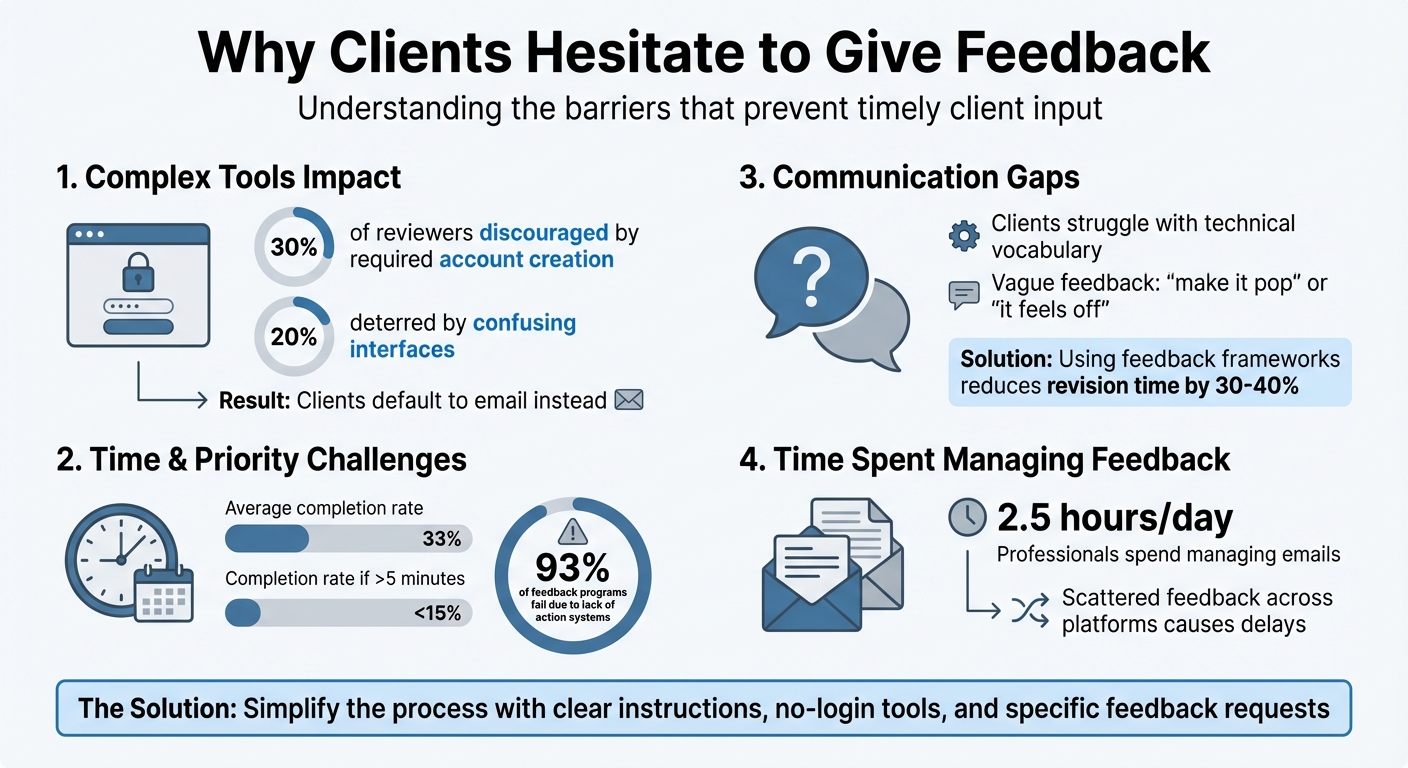
The tools used for gathering feedback can be a major hurdle. For example, requiring clients to create accounts can discourage up to 30% of potential reviewers, while confusing interfaces can deter another 20%. Add browser extensions into the mix, and non-technical or mobile users may find the process even more daunting. In many cases, clients resort to email simply because it feels easier.
Limited Time and Competing Priorities
Clients are busy, and feedback often takes a backseat to other pressing responsibilities. Statistics show that the average feedback request has a completion rate of just 33%, and this drops below 15% if the process takes more than five minutes.
Another challenge is the mental effort involved. Many clients lack the technical vocabulary to describe design issues, and being asked for feedback on an entire project can feel overwhelming.
"When faced with having to compress the entire experience into a single thought, most clients just give up." - Sean D'Souza, Founder, Psychotactics
Clients also need to believe their feedback will make a difference. When organizations fail to act on input, clients deprioritize future feedback. In fact, 93% of feedback programs fail not because of a lack of data, but because there’s no system in place to turn feedback into actionable improvements.
Confusion About What Feedback to Provide
There’s often a disconnect between creators and clients when it comes to language. Without clear guidance, clients may default to vague phrases like "make it pop" or "it feels off", struggling to articulate specific improvements. This lack of clarity can lead to revisions that focus more on personal preferences than strategic objectives.
However, teaching clients a framework for actionable design feedback—focusing on clarity, relevance, actionability, and context—can make a big difference. In fact, using such a framework can reduce revision time by 30–40%.
Fear of Being Too Critical
Clients sometimes hold back honest feedback because they don’t want to offend the creative team. This fear grows if they sense defensiveness or resistance to their earlier input. If previous feedback was met with lengthy justifications or pushback, clients may hesitate even more to share their true opinions.
Unclear Review Instructions
Ambiguity in the feedback process can leave clients unsure of what’s expected. Without clear instructions - such as specifying that feedback is due by "Friday at 5:00 PM" - the task often slips down their priority list. Similarly, asking for feedback on an entire page instead of specific elements, like the headline or hero section, can feel overwhelming.
Some clients also struggle to visualize changes without examples. Providing concrete samples can help bridge this gap. Addressing these barriers is crucial for improving how feedback is collected and used effectively.
How to Get More Client Feedback
Getting clients to share feedback can sometimes feel like pulling teeth. But understanding their hesitations and making the process as smooth as possible can change everything. Here’s how to make it easier for everyone involved.
Use Tools That Don't Require Logins
Asking clients to create an account just to give feedback can be a dealbreaker. Instead, opt for tools that allow them to jump in with a simple link - no logins, no downloads, no hassle. These tools often capture valuable technical details automatically, like browser type or screen resolution, which can save you from the dreaded "it works on my machine" debate.
Take Boast, for example. It offers a straightforward, link-based system where clients can pinpoint issues and leave comments easily. While the client enjoys a simple interface, your team gets access to advanced features like task tracking, version control, and Kanban boards to managing design feedback and revisions effectively behind the scenes.
Give Clear Instructions and Examples
Clients often struggle with feedback because they don’t know where to start or how to articulate their thoughts. To bridge this gap, provide them with a simple checklist. For instance, instead of vague feedback like "Does this look good?" ask specific questions like, "Does this align with our brand guidelines?"
If a client says, "Make the logo bigger", dig deeper. Ask if their concern is about brand visibility or recognition. This approach shifts the conversation from personal preferences to meaningful business goals. Using structured feedback methods like this has been shown to cut revision time by as much as 30–40%.
Reduce the Effort Required
Overwhelming your clients with too much at once can lead to delays or incomplete feedback. Instead, break the process into smaller, more manageable tasks. For example, ask for feedback on just the headline or hero section rather than the entire webpage.
Keep everything centralized to save time. On average, professionals spend 2.5 hours a day just managing emails. Using a single platform to store comments, files, and revision notes can eliminate the back-and-forth and keep everything organized.
Visual aids can also make a big difference. Short videos or side-by-side before/after comparisons help clients understand changes more clearly. This is especially important since about 1 in 50 people has aphantasia, meaning they can’t form mental images. Finally, set clear deadlines - like "Feedback due by Friday at 6:00 PM" - to create urgency and keep projects on track.
How Boast Solves Client Feedback Problems
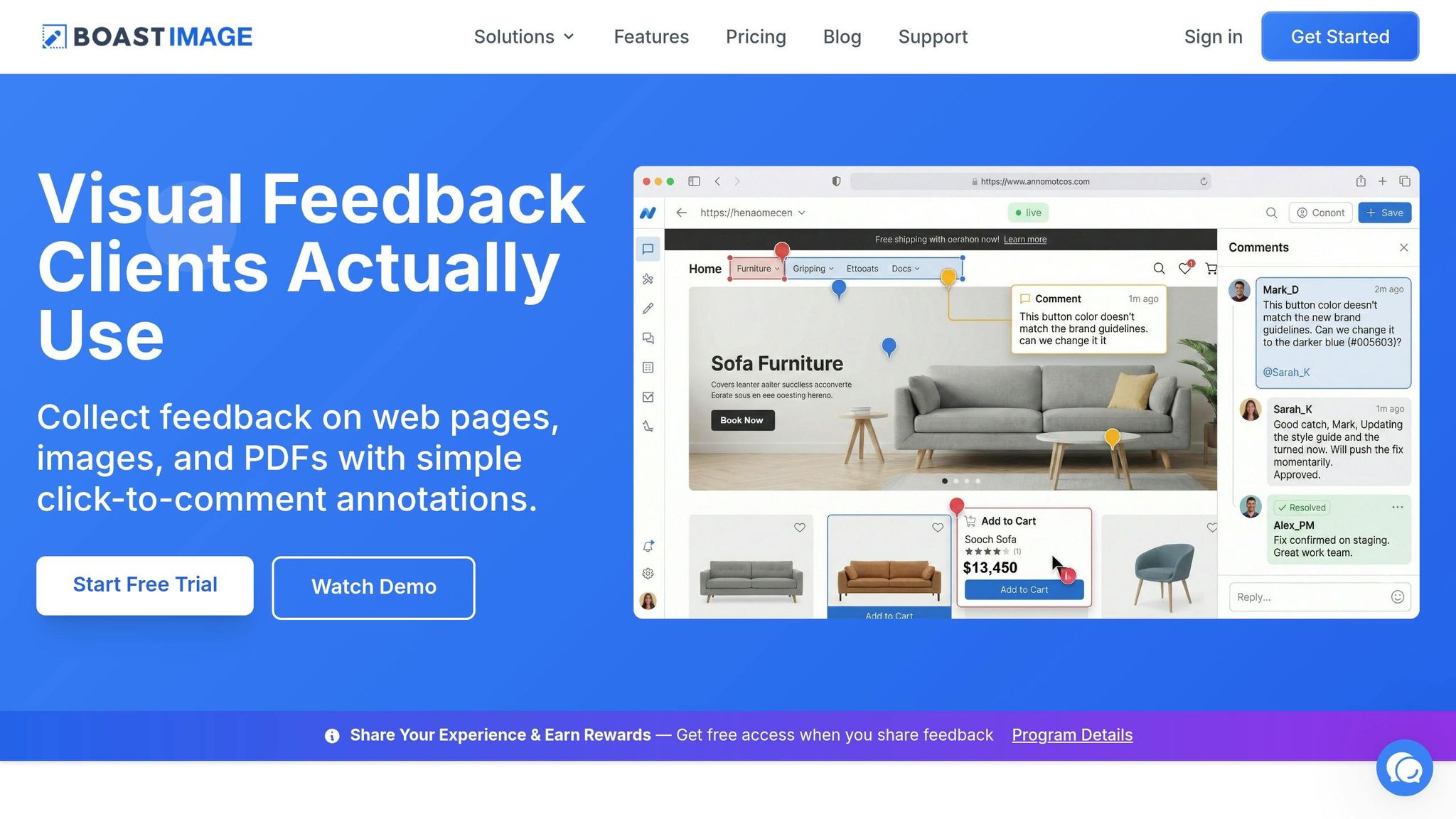
Boast eliminates the hurdles that often make clients hesitant to provide feedback. With a simple process, clients just click a feedback link, pinpoint the exact spot they want to comment on, and leave their input - no need for accounts, downloads, or tutorials. This no-fuss system paves the way for features that improve feedback accuracy and usability.
Boast's Client-First Features
Boast lets clients leave comments directly on web pages, images, or PDFs by clicking precisely where they notice an issue. This approach turns vague feedback like "the thing at the top needs work" into actionable, pinpointed comments linked to specific elements. Additionally, Boast automatically captures technical details such as browser type, operating system, and screen dimensions, enabling teams to replicate issues without needing further clarification from the client.
While clients enjoy a clean, user-friendly interface, your team gains access to advanced tools like Kanban boards, version control, and task management. These features remain behind the scenes, ensuring clients stay focused on providing feedback without distractions.
Benefits for Teams and Agencies
By making client interactions simpler, Boast helps teams work more efficiently. Its account-free system encourages higher response rates and accelerates project timelines. Teams report spending far less time on revisions when using structured, visual feedback instead of sifting through scattered email threads. Automated reminders also ensure clients provide feedback on time, reducing the need for manual follow-ups. Plus, when clients see their input being tracked and addressed in a centralized system, it reinforces a sense of professionalism and organization in your workflow.
Pricing Options
Boast's efficiency improvements come with pricing plans designed to fit various needs. There's a free tier at $0 per month for those starting out, while paid plans are available at $9.95 (Solo), $19.95 (Team), and $39.95 (Business) per month. All paid plans include unlimited external collaborators, meaning you can invite as many reviewers as needed without affecting your budget. Whether you're a solo freelancer or an agency handling multiple clients, Boast scales to match your workload.
Conclusion
Hesitation from clients when providing feedback isn’t about their personality - it’s about removing friction. The challenge lies in breaking down barriers that prevent clients from offering clear and timely input. One major issue is the communication gap between technical creators and non-technical clients, which traditional email vs. feedback tools comparisons show why email fails to address these gaps effectively. Switching to visual, low-friction systems can eliminate the endless back-and-forth and the time-draining "email archaeology."
Here’s the bottom line: tracking feedback accurately and aligning revisions builds trust with clients. For example, some agencies have found that feedback delays can stretch a $5,000 website project into a three-month ordeal.
FAQs
What’s the fastest way to get clients to respond with feedback?
The fastest way to gather feedback from clients is to remove any obstacles, like requiring logins or using overly complicated systems. Opt for easy-to-use tools that allow clients to leave comments directly on your work via a public link. This approach keeps things simple and hassle-free, making it much easier for clients to respond quickly.
How do I ask for feedback that’s specific and useful?
To gather feedback that's actually helpful, guide clients toward offering clear and actionable input. Encourage them to focus on specific aspects like layout, functionality, or design elements, rather than giving general or vague comments.
Set expectations early by explaining how their feedback should align with the project's overall goals. This not only keeps things on track but also ensures their input is meaningful.
Using tools that enable direct comments on designs - like collaborative platforms or annotation tools - can make the process smoother and help clients provide more precise feedback.
How can I reduce client fear of being too critical?
Creating a space where clients feel comfortable sharing their thoughts is key to easing concerns about being overly critical. Start by fostering open communication - make it clear that their feedback is not only welcome but essential for the project's success. Encourage them to provide specific, actionable input by guiding them with examples or prompts. This helps ensure their suggestions are clear and productive.
Set expectations early by defining the scope of revisions and emphasizing the collaborative nature of the process. Let them know that their insights play a crucial role in refining the final product. Reassure them that their involvement isn’t about being critical but about contributing to something they can be proud of. This approach helps clients feel valued and confident in sharing their perspectives.