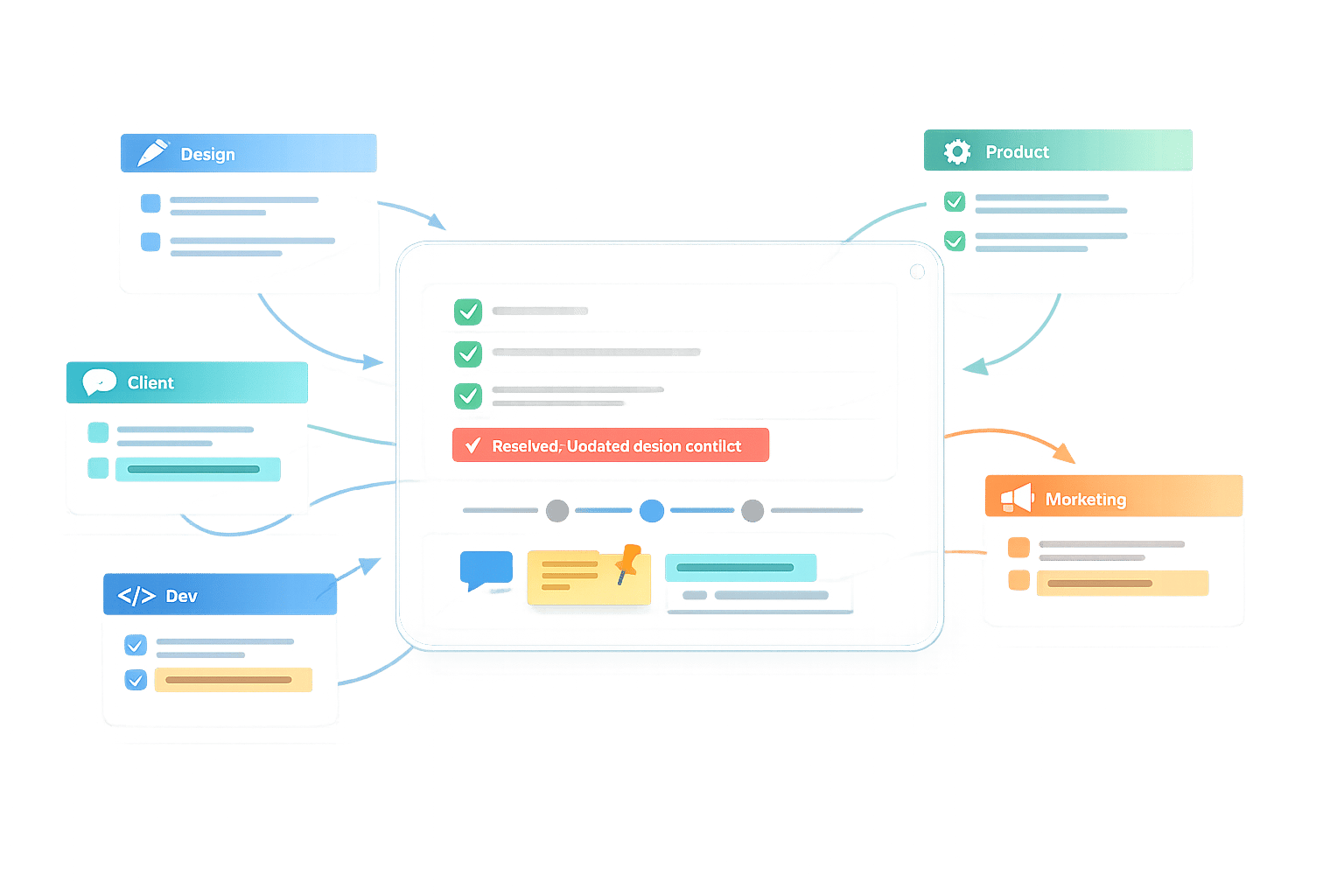
Managing Feedback from Multiple Stakeholders
When multiple stakeholders are involved in reviewing a project, chaos can quickly take over - contradictory opinions, scattered feedback, and endless revisions. The solution? Centralize and organize feedback into one platform, define clear roles, and set structured timelines. This ensures that every voice is heard without derailing the project.
Here’s how to keep feedback manageable and productive:
- Centralize Feedback: Use a single tool to collect and organize input, avoiding scattered comments across emails and chats.
- Define Roles: Assign clear responsibilities (e.g., Decision Maker, Spokesperson) to streamline approvals.
- Prioritize Feedback: Focus on feedback that aligns with the project phase and core goals.
- Set Timelines: Tie feedback deadlines to project milestones, ensuring input arrives on time.
- Resolve Conflicts: Use project goals as a guide to address conflicting feedback objectively.
- Close the Loop: Show stakeholders how their feedback was addressed to build trust and improve collaboration.
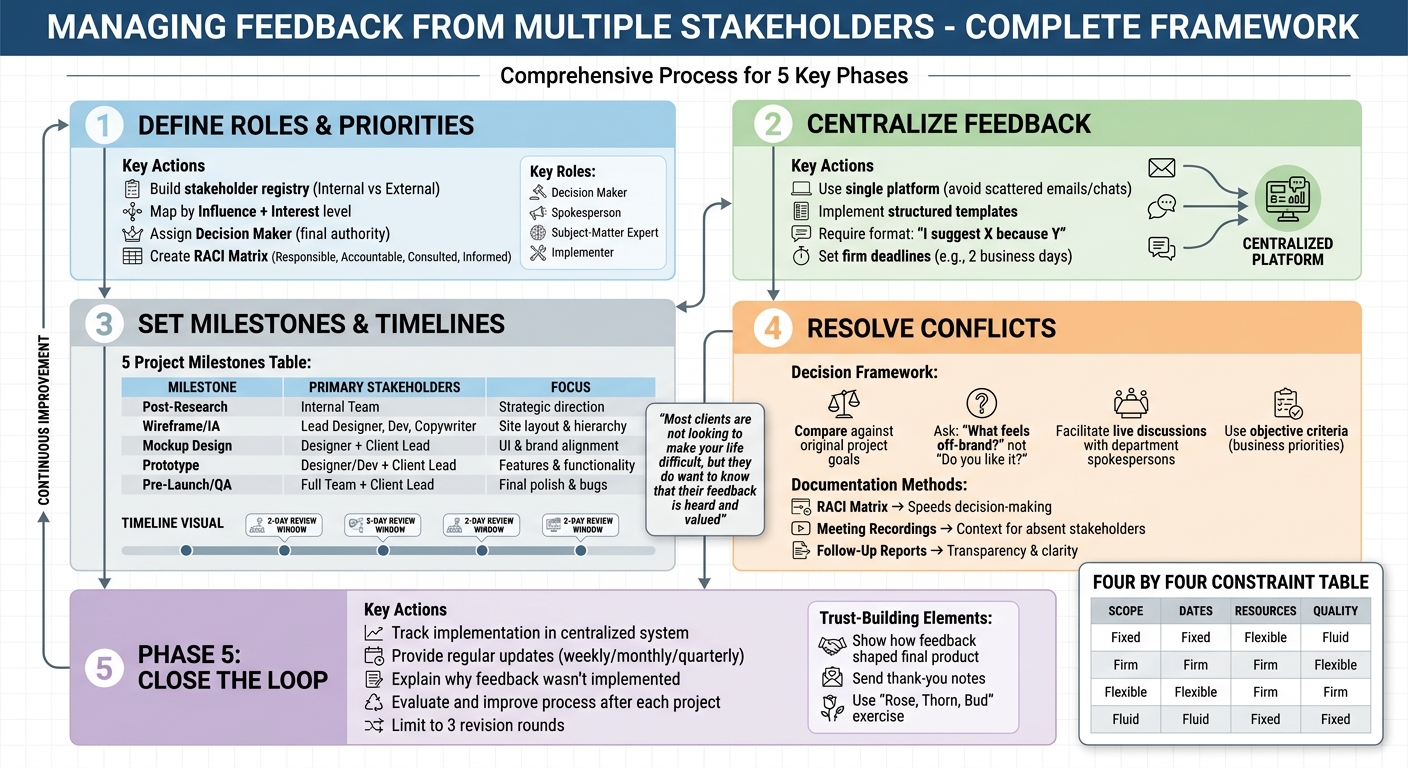
5-Phase Stakeholder Feedback Management Framework with Milestones and Roles
Episode 6: Handling Conflicting stakeholder Priorities - Essential Skills for Project Managers
Define Stakeholder Roles and Feedback Priorities
To keep projects on track and avoid confusion, it's essential to identify stakeholders, assign roles, and prioritize feedback. By mapping out who’s involved and clarifying responsibilities, you can streamline decision-making and ensure everyone’s input is appropriately weighted.
Identify Key Stakeholders
Start by building a stakeholder registry - a detailed list of everyone connected to the project. Categorize them into two groups: internal stakeholders (like employees, managers, and team leads) and external stakeholders (such as clients, partners, or end users).
Next, map each stakeholder based on their influence and interest level. For instance, a marketing director may have both high influence and high interest, while a junior copywriter might have less influence but still care deeply about the outcome. This mapping helps you understand where to focus your efforts. When unexpected changes arise mid-project, you’ll know who needs to be consulted immediately and who can simply be updated.
Assign Roles and Responsibilities
Once stakeholders are identified, assign clear roles to avoid conflicting feedback. The most critical position is the Decision Maker - the person with the final say on approvals or changes. This role prevents projects from getting bogged down in endless revisions when opinions differ.
Beyond the Decision Maker, establish other roles such as:
- Spokesperson: Consolidates feedback from a department or group.
- Subject-Matter Expert: Offers technical or specialized insights.
- Implementer: Executes approved changes.
To make roles even clearer, use a RACI matrix. This tool outlines who is Responsible, Accountable, Consulted, and Informed for every task. It eliminates confusion, speeds up decision-making, and ensures everyone knows whose input is required and whose isn’t.
After assigning roles, align feedback priorities with the project’s timeline and phases.
Prioritize Feedback Based on Project Impact
Not all feedback holds the same weight at every stage of a project. Align feedback priorities with the phase you're in. For example:
- During the research phase, internal teams focus on strategy.
- In the design phase, feedback from the design team shapes UI and branding.
- During prototyping, developers ensure user flow and functionality are on point.
Use a "Four by Four" table to guide trade-offs between Scope, Dates, Resources, and Quality. Each factor can be classified as Fixed, Firm, Flexible, or Fluid. For instance, if your timeline is fixed but your scope is flexible, you can push back on additional feature requests that would jeopardize the deadline. When stakeholders understand these constraints early on, their feedback is more likely to align with the project’s goals rather than personal preferences.
Centralize and Standardize the Feedback Process
Once roles are clarified and priorities are set, the next step is to consolidate all feedback in a single, easily accessible platform. When feedback comes through scattered channels like email, Slack, texts, or even verbal conversations, it’s easy for important details to get lost or for conflicting input to arise. Centralizing feedback eliminates this confusion by creating a single source of truth that all stakeholders can access. This approach ensures that updates remain consistent and aligned with the project’s goals.
Use a Centralized Feedback Tool
Scattered feedback slows down decision-making. By consolidating all comments into one platform, stakeholders can clearly see each other’s input. In cases where contradictions arise, they’re more likely to self-correct without requiring you to mediate.
A single platform for both internal and external feedback allows teams to address all comments systematically, saving time and reducing confusion. For visual projects, tools like BoastImage make this process even smoother. Stakeholders can simply click a link and leave comments directly on the work - no account setup needed. External collaborators can annotate freely, while your team manages tasks, versions, and organization behind the scenes. Plus, with paid plans starting at $9.95/month, you can invite unlimited external collaborators without additional costs.
Once feedback is centralized, the next step is to structure it effectively.
Implement Structured Feedback Templates
Structured templates help stakeholders provide feedback that's actionable and tied to specific goals. Vague or unorganized input often leads to unhelpful suggestions, so templates can guide stakeholders toward clarity and focus.
A good template might follow a format like, "I suggest X because Y," ensuring that all feedback includes a clear rationale. Encourage stakeholders to identify problems rather than propose solutions. For example, feedback like, "This doesn’t appeal to our target audience," is far more useful than, "Make the logo bigger." Use specific prompts such as, "How does the color palette make you feel?" or "Do you think this imagery resonates with the target audience?" to keep feedback focused and measurable.
To further improve the process, include a short video explaining key design decisions before sending out the templates. This additional context helps stakeholders provide thoughtful, objective feedback. Also, set a firm deadline - like two business days - for submissions. Require that all feedback is consolidated and represents the final input from all relevant parties for that review round.
Once structured feedback is collected, organize it to align with project priorities.
Organize Feedback by Themes and Priorities
After gathering input, categorize it to streamline the review process. Common categories include design and aesthetics, functionality, content, and layout. Grouping feedback this way allows you to address similar issues together, avoiding the inefficiency of jumping between unrelated concerns.
Visual frameworks can help you sort and prioritize suggestions. When conflicting feedback arises within a category, evaluate each suggestion against the project’s core business objectives and original brief to determine its relevance and impact. This method also clarifies which feedback aligns with the project’s goals, resolving any ambiguities.
To further streamline the process, establish thematic milestones that align with specific project phases - such as Research, Wireframes, Mockups, and Prototypes. Assign one representative from each department to consolidate and resolve internal contradictions before submitting feedback to the design team. This approach ensures that feedback is both organized and actionable, keeping the project on track.
Set Feedback Milestones and Clear Timelines
Having feedback organized and roles assigned is only half the battle. To keep a project moving smoothly, you need a structured timeline. Without it, feedback can trickle in at random, slowing everything down. By setting specific milestones, stakeholders know when their input is required and exactly what they should focus on. Combined with clear roles and centralized feedback, these timelines ensure the project stays on course.
Set Feedback Milestones
Plan feedback sessions around project milestones, not arbitrary dates. The best way to do this is by tying milestones to specific deliverables, such as after the Research phase, Wireframe/Information Architecture creation, Mockup design, Prototype development, and final QA. This ensures feedback is gathered at the most relevant stages of the project.
At each milestone, use a RACI matrix to define roles clearly. This avoids the problem of new stakeholders jumping in late and offering conflicting feedback. For instance, during the mockup stage, the lead designer might be Responsible for creating the designs, the creative director Accountable for approvals, the development team Consulted on feasibility, and the marketing team simply Informed of progress.
| Milestone Timing | Primary Stakeholders | Focus of Feedback |
|---|---|---|
| Post-Research | Internal Team | Strategic direction and project goals |
| Wireframe/IA | Lead Designer, Dev, Copywriter | Site layout, hierarchy, and architecture |
| Mockup Design | Designer + Client Lead | UI, aesthetic keywords, and brand alignment |
| Prototype | Designer/Dev + Client Lead | Features, functionality, and user flow |
| Pre-Launch/QA | Full Project Team + Client Lead | Final polish and bug identification |
Plan Review Cadences
Decide whether each milestone review should happen live or asynchronously, depending on the complexity of the feedback required. For early-stage milestones, like research and wireframes, live discussions are often better for aligning on the big picture. Later stages, like mockup reviews, can work well asynchronously, giving stakeholders the flexibility to review on their own time and leave detailed, visual feedback.
When opting for asynchronous reviews, ensure all feedback is visible to the entire stakeholder group. This transparency can help stakeholders spot and resolve conflicts among themselves before they escalate to the project team. Additionally, encourage each department to consolidate internal feedback before submitting it - this minimizes contradictory directives and keeps things streamlined. A well-planned cadence like this ensures the project progresses in a structured and predictable way.
Communicate Deadlines Clearly
Establish clear deadlines tied to each deliverable. For example, limit mockup review periods to just two business days. Longer windows can lead to stakeholders seeking opinions from unvetted sources, like friends or family, which can derail the timeline. Make it clear that these deadlines represent the final chance to give input on a particular phase.
Use your centralized feedback tool to communicate these deadlines, rather than relying on email. Prominently display deadlines alongside the deliverables to create immediate accountability. This approach avoids the confusion of buried email threads and ensures everyone is working from the same schedule.
sbb-itb-32f6eb2
Resolve Conflicting Feedback and Align Stakeholders
Even the best-laid plans can hit roadblocks when feedback clashes. Picture this: one stakeholder pushes for a bold design, while another insists on a more conservative route. Or maybe marketing wants to pile on features, but the development team argues for simplicity. The challenge lies in addressing these differences without derailing the project or creating friction. A systematic approach can help tackle these conflicts head-on while keeping everyone on the same page.
Use Objective Decision-Making Frameworks
When feedback conflicts arise, the first step is to measure every request against the project’s original goals. These goals, set during the proposal phase, act as your compass. Compare requests against core business priorities to see what aligns and what doesn’t. A centralized tool like BoastImage can be a game-changer here. By making all feedback visible in one place, stakeholders can see contradictory comments side by side. This often helps them self-correct before things escalate.
If the feedback feels vague or unclear, don’t settle for surface-level comments like "I don’t like it." Instead, dig deeper with targeted questions. Ask things like, "What about this feels off-brand?" or "How does this miss the mark for our luxury positioning?". These questions help uncover the real business concerns behind the feedback, allowing you to address the root cause instead of just the symptoms.
Facilitate Open Discussions
Sometimes, the best way to resolve conflicts is to get everyone in the same (virtual or physical) room. Host a live discussion where stakeholders can hash out their differences. Shift the focus from individual preferences to shared goals, emphasizing solutions that benefit the project as a whole.
To streamline the conversation, have each department appoint a spokesperson who can act as the final decision-maker for their group. This reduces the chances of conflicting voices dominating the discussion. During the meeting, steer the conversation with specific prompts like, "Does this design effectively highlight our main call-to-action?". Keeping the discussion focused ensures it remains productive and avoids veering off-topic.
Document and Communicate Resolutions
Once a decision is reached, it’s crucial to document it - along with the reasoning behind it - in your centralized feedback tool. This prevents unresolved issues from resurfacing later. Share a follow-up report or action plan with all stakeholders, detailing how the team addressed key feedback. For added clarity, consider recording live meetings. These recordings can serve as a reference for anyone who couldn’t attend.
Here’s a quick look at some helpful documentation methods:
| Documentation Method | Purpose | Benefit |
|---|---|---|
| RACI Matrix | Defines who has the final say at each stage | Speeds up decision-making during conflicts |
| Meeting Recordings | Captures the context and reasoning behind decisions | Provides a resource for absent stakeholders |
| Follow-Up Reports | Summarizes resolutions and next steps | Promotes transparency and avoids confusion |
This transparent approach shows stakeholders that their feedback is taken seriously - even if not every suggestion is implemented. It helps build trust and sets the stage for smoother, more effective feedback cycles in the future.
Close the Feedback Loop and Build Trust
Collecting feedback is only the first step - showing how that feedback shapes the final product is what truly builds trust. When stakeholders see their input reflected in the outcome - or even understand why certain suggestions weren’t adopted - they feel more connected to the process. This collaboration strengthens relationships and makes future feedback exchanges smoother. It’s a win-win: trust grows, and the foundation for ongoing improvement is laid.
Track Feedback Implementation and Outcomes
A centralized system for managing feedback is essential. Without it, comments scattered across emails or Slack threads can easily get lost. A dedicated feedback tool ensures every suggestion is captured and organized, preventing anything from slipping through the cracks. Tools like BoastImage can even turn feedback into actionable Kanban tasks, streamlining the process.
Transparency is critical. When stakeholders can see which feedback has been addressed and what’s still under consideration, it reduces repetitive questions and clarifies decision-making - especially when conflicting inputs arise. Tracking metrics like approval turnaround times or the number of revisions per client can also help identify bottlenecks and refine workflows.
Provide Stakeholders with Updates
Stakeholders need to know their input matters. Regular updates - whether weekly, monthly, or quarterly - help integrate feedback naturally into the project’s progression. Briefly outline what changes have been implemented and what’s next on the agenda.
For feedback that isn’t implemented, don’t leave stakeholders in the dark. Acknowledge their input and explain why a different approach was taken. This shows respect for their time and expertise. Even small gestures, like sending thank-you notes after feedback sessions, can encourage ongoing participation. Exercises like "Rose, Thorn, Bud" (highlighting what’s working, what isn’t, and where opportunities exist) can also foster engagement and constructive conversations.
Once updates are shared, take time to review your processes and identify ways to improve.
Evaluate and Improve Feedback Processes
Every project offers a chance to refine your feedback approach. After completing a project, assess what went well and what didn’t. Look for patterns in past projects - are certain review stages consistently delayed? Do some stakeholders need more guidance or time to provide input? Use these insights to adjust timelines and set clearer expectations moving forward.
Help stakeholders provide more actionable feedback. Vague comments like "I don’t like it" aren’t helpful. Instead, guide them toward offering specific, objective input tied to business goals. Structured questionnaires with prompts about brand alignment, color choices, or call-to-action effectiveness can lead to more meaningful responses. To maintain control over timelines and budgets, limit revision rounds to three.
Conclusion
This guide has walked through practical ways to keep feedback organized and aligned, even when juggling input from multiple stakeholders. By focusing on defining clear roles, centralizing the feedback process, setting structured milestones, and resolving conflicts openly, you can establish a system that keeps projects on track while fostering positive relationships. When stakeholders understand who holds decision-making authority and see how their input contributes to the final product, collaboration improves, and conflicts tend to diminish.
Centralized feedback systems make it easier to spot conflicting requests, encouraging stakeholders to resolve issues themselves while minimizing scope creep. This works because decision authority is clearly defined from the start.
Tools like BoastImage can be a game-changer for managing feedback. With features like version control, Kanban boards, and task tracking, it provides structure behind the scenes. Plus, it’s user-friendly for clients - they can leave comments via a simple link without needing to create accounts or go through a complicated onboarding process. Starting at $9.95/month for freelancers, it eliminates common roadblocks in collecting and organizing feedback.
As product designer Darragh McNicholas insightfully notes:
"Most clients are not looking to make your life difficult, but they do want to know that their feedback is heard and valued".
FAQs
How do I choose the final decision maker?
Establishing clear roles early in a project is crucial, especially when it comes to deciding who has the final say. Assign a specific individual - such as a project lead or a client representative - with the authority to approve or reject changes. This person should outline goals and criteria from the start, promoting clarity and accountability throughout the process.
By clearly communicating their role to all stakeholders, you can avoid unnecessary delays, simplify feedback loops, and ensure the project stays on track.
What’s the best way to stop feedback coming in through email and chat?
To cut down on feedback through email and chat, consider creating a centralized system that's simple for stakeholders to navigate. Tools like BoastImage offer a visual feedback board where stakeholders can leave comments directly on the work. This keeps all feedback in one place, making it easier to track and organize. Make sure to clearly explain this process to stakeholders so they adopt it consistently. This approach helps streamline collaboration and avoids the confusion caused by scattered input across informal channels.
How do I handle late or conflicting stakeholder feedback without delaying launch?
To handle late or conflicting feedback without pushing back your launch date, it's essential to have a solid plan in place from the start. Begin by setting clear deadlines for when feedback should be submitted and establish limits on the number of revisions allowed. Keeping all comments organized in a single location can help prevent confusion caused by scattered input.
When conflicting feedback comes up, focus on aligning changes with your project goals. Be transparent about what adjustments are realistic and communicate openly with stakeholders. Tools designed for visual feedback can also make the revision process smoother, reducing miscommunication and helping you stay on track.