Top 5 Problems with Login Walls for Clients
Login walls are killing your client feedback process. Here's why:
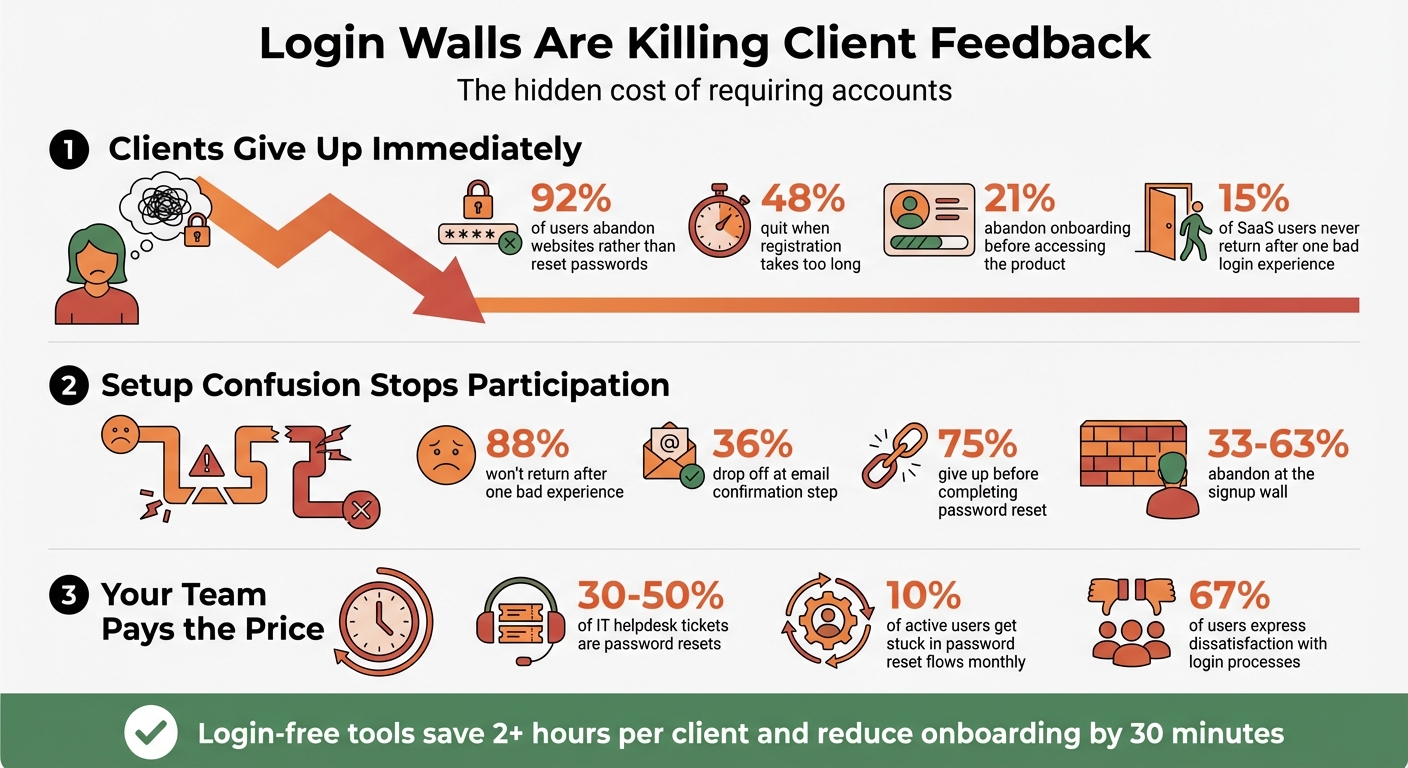
- 92% of users abandon websites rather than reset a forgotten password.
- 48% of users quit when registration takes too long.
- Non-technical clients often give up due to confusion or frustration.
- Teams waste hours troubleshooting login issues instead of focusing on projects.
- Feedback delays stretch timelines, derail schedules, and frustrate everyone involved.
The solution? Ditch the login wall. Tools like Boast let clients provide feedback instantly - no accounts, no passwords, no hassle. This makes it easier to handle client feedback without losing context. This approach saves time, improves efficiency, and removes barriers to collaboration.
Want faster feedback and fewer headaches? Skip the login walls.
Login Wall Statistics: Client Abandonment Rates and Impact on Feedback
1. Clients Abandon the Process Immediately
Impact on Client Engagement
When clients click on a feedback link and hit a login wall, most simply give up. These barriers make it harder to gather quick feedback, which is essential for keeping projects on schedule. Research shows that most users abandon login walls rather than reset forgotten passwords, and 21% of users quit onboarding before even accessing the product. This immediate drop-off can leave creative teams stuck, waiting for approvals before they can move forward.
Long registration processes only make things worse. Nearly half of users (48%) have ditched a service because signing up took too long. On top of that, 15% of SaaS users never come back after a single frustrating login experience. For marketing directors already handling multiple vendors, being asked to create yet another account feels like just another hassle. This kind of drop-off doesn’t just slow things down - it sets the tone for ongoing delays and technical headaches.
Effect on Project Timelines
These issues have often caused clients to abandon the process entirely, turning what should be a quick onboarding into a drawn-out ordeal lasting weeks. However, agencies that introduced guest access - removing the need for account creation by using no-login alternatives like BoastImage - reported saving over 2 hours of staff time per client and trimming onboarding sessions by 30 minutes. Before this change, password problems and access issues often disrupted workflows, slowing down progress for everyone involved.
Ease of Client Adoption
Even beyond the initial login, technical roadblocks continue to discourage participation. For instance, 36% of users drop off at the email confirmation step, and a staggering 75% give up before completing a password reset. Every extra step in the authentication process increases the chances that clients will abandon the tool altogether, opting instead to send feedback via email. This undermines the whole point of using a structured feedback system in the first place.
sbb-itb-32f6eb2
2. Feedback Takes Longer to Receive
Impact on Client Engagement
Login walls don't just cause immediate drop-offs - they also delay the feedback loop. When clients encounter a login screen, their attention shifts from providing feedback to dealing with technical hurdles. This interruption creates frustration, with 67% of users expressing dissatisfaction with current login processes. Many clients, unable to quickly resolve credential issues, abandon the process altogether, leading to significant delays in gathering actionable design feedback.
Effect on Project Timelines
These delays don’t just frustrate clients - they can derail project schedules. When feedback cycles stretch from days to weeks, agencies managing multiple clients face compounded challenges. The problem is even worse for mobile users. Typing usernames and passwords on smartphones is often cumbersome and error-prone, which leads to even higher abandonment rates when fast feedback is required.
Resource Efficiency for Teams
The ripple effect of login barriers extends to team productivity. Time spent helping clients with password resets or access issues detracts from more meaningful work. Studies show that eliminating login requirements can save teams over two hours of internal work per client. For clients, it saves an average of 30+ minutes, making the entire process smoother and more efficient. Instead of troubleshooting, teams can focus on delivering creative solutions while clients can provide feedback without unnecessary barriers.
3. Clients Get Confused During Setup
Impact on Client Engagement
The setup process can be a major sticking point for clients, especially when the options presented are unclear. Imagine seeing "Sign Up", "Register", and "Getting Started" all on the same page without any clear guidance - it's no wonder clients hesitate. This confusion can act as a virtual barrier, stopping external participants from even making it to the feedback stage.
Adding extra fields like "confirm password" only makes things worse. Typos in these fields lead to repeated errors, leaving users frustrated. And frustration has a cost: 88% of users won’t come back after just one bad experience. Even more alarming, 21% admit to "rage-quitting" during onboarding, never even reaching the dashboard. This kind of initial confusion doesn’t just hurt client engagement - it can derail entire project timelines.
Effect on Project Timelines
When clients struggle with the basics of setup - like choosing usernames or understanding account types - what should be a quick process can drag on for weeks. A CEO even confessed: "I shot myself in the face every single time we acquired a new customer." That says it all. Confusion at this stage doesn’t just waste time; it sets the tone for a rocky start.
Ease of Client Adoption
For clients, the login process is more than just a formality - it’s their first impression of your service. Federico Molina, Marketing Lead at Decentraland, put it perfectly:
"Login is the gateway to your whole website and your product beyond that. If customers feel like there are any roadblocks to them entering your website, they'll move on to another."
When clients rarely use a site, remembering login credentials feels like more effort than it’s worth. This added friction makes them question whether trying to log in is even worth their time. And when that happens, you’ve lost them before they’ve even started.
4. Non-Technical Clients Stop Participating
Impact on Client Engagement
For non-technical clients, the requirement to create an account often feels like an unnecessary hurdle. Many lose interest the moment they encounter a signup wall, with studies showing that 33% to 63% of users abandon the process at this point. For clients who only need to approve a design or leave a comment, this extra step can feel excessive and frustrating.
When faced with these barriers, clients often fall back on old habits, like sending feedback through email or text messages - or worse, they stop engaging altogether. Adding to the challenge, 76% of users will only use an app once before abandoning it. Occasional users, in particular, find it inconvenient to manage yet another password, leading to further disengagement. This lack of participation not only interrupts the flow of feedback but can also cause delays in the overall project timeline.
Effect on Project Timelines
When clients disengage, project timelines inevitably take a hit. For instance, 75% of users who begin a password reset process fail to complete it. This means that many clients simply give up, leaving critical feedback or approvals incomplete. In the past, these login-related issues have stretched onboarding processes from a matter of days to weeks, slowing progress significantly.
Resource Efficiency for Teams
The ripple effects of login barriers extend beyond just client engagement - they also strain team resources. Every login issue or abandoned form means more time spent troubleshooting instead of focusing on core tasks. With 67% of users abandoning forms when the experience becomes frustrating, support teams are left to pick up the slack. As Pravina, Product Design Lead at Tallyfy, aptly put it:
"Whatever we come up with will need to be something a guest user can understand and action without any training".
5. Teams Waste Time on Support and Training
Resource Efficiency for Teams
Login walls don't just frustrate clients - they also sap your team's time and energy. While client delays disrupt project timelines, the internal impact can be just as draining. Consider this: password resets make up 30% to 50% of all IT helpdesk tickets. Every "I forgot my password" email or "I can't log in" message pulls your team away from meaningful work.
When clients hit these snags, your team becomes their go-to support. Instead of focusing on creative tasks or strategic planning, you're busy guiding clients through password resets, explaining verification steps, and troubleshooting access issues. This constant cycle of support not only eats into productivity but also slows down project momentum. Removing login barriers doesn’t just help clients - it frees up your team to focus on what truly matters.
Effect on Project Timelines
These login struggles ripple through project schedules. Around 10% of active users get stuck in password reset flows every month, and 75% of them give up before finishing the process. When clients can’t access your tools, they either wait for assistance or fall back on scattered email feedback - both of which drag out timelines.
What should be quick onboarding sessions often turn into weeks-long delays when clients misplace credentials or struggle to give their teammates access. Even worse, 21% of users admit to "rage-quitting" the onboarding process because of overly complicated login requirements. Every abandoned attempt means more support tickets, slower approvals, and extended feedback cycles. Instead of smooth collaboration, you’re stuck in a loop of troubleshooting and delays.
How Login-Free Tools Fix These Problems
Boast (boastimage.com) tackles the challenge of client adoption head-on with its visual feedback board. Instead of requiring clients to create accounts and navigate complex onboarding processes, Boast flips the script. Clients simply click a link and can immediately comment on web pages, images, or PDFs - no logins, passwords, or training needed.
This straightforward, click-to-comment method eliminates the common roadblocks that often lead to client frustration or abandonment. For instance, registration processes that take too long result in a 48% abandonment rate. By removing the need for logins, Boast ensures clients can jump straight into providing feedback, cutting down on support tickets and reducing delays. When clients receive a Boast link, they gain instant access to the feedback page - no hurdles, no wasted time.
Boast also stands out with its pricing structure, which prioritizes accessibility for both teams and clients. Plans start at $9.95/month for Solo users, with options scaling to $19.95/user/month for Team and $39.95/user/month for Business. All plans include unlimited external collaborators, meaning clients can comment freely without affecting your budget. This approach eliminates the financial strain of limiting client access, allowing teams to gather unfiltered feedback without restrictions.
While clients enjoy a seamless, simplified interface, teams still have access to powerful tools like version control and task management. This balance ensures your workflows remain efficient and organized while clients experience an intuitive, hassle-free process.
The result? Faster feedback loops, fewer support tickets, and higher client engagement. By removing the login barrier, Boast makes it easier than ever for clients to participate and provide timely approvals, keeping projects on track and stress-free.
Conclusion
Login walls create unnecessary delays and frustrate clients. When faced with account creation screens, 48% of clients abandon the process entirely, and 92% will leave your site rather than deal with password resets. These hurdles lead to missed deadlines, unclear feedback, and disengaged clients.
But the impact goes beyond just the client experience. Teams end up spending hours handling support tickets and hosting training calls. Digital agencies have shown that login-free workflows can save substantial internal time. These inefficiencies slow down projects and disrupt collaboration, making it clear that a more client-friendly solution is needed.
"Login is not a reset point. It is a continuation point. If your product treats it as a reset, you are taking accessibility away from the people who need it the most." - Access * Ability
Using a login-free feedback tool like Boast can transform the collaboration process. Clients simply click a link to access their feedback tasks directly - no accounts, no passwords, no hassle. This approach respects your clients' time while streamlining your team’s workflow.
FAQs
When should I avoid using a login wall for client feedback?
Avoid requiring a login for client feedback if it creates unnecessary hurdles, slows down responses, or confuses clients. These obstacles can discourage participation, cause delays, and weaken collaboration. Streamlining the process allows clients to share their feedback quickly and effortlessly, keeping things efficient and productive.
How can we keep feedback secure without client accounts?
Using public links and click-to-comment features is a smart way to collect secure feedback without forcing clients to create accounts. These tools streamline the process, making it easier for clients to share their thoughts while keeping everything safe. Plus, they cut down on unnecessary steps, helping everyone work more efficiently.
How do login-free links prevent vague email feedback?
Login-free links make gathering feedback easier by allowing clients to comment directly - no account creation or passwords required. This eliminates obstacles, minimizes confusion, and promotes more precise, straightforward feedback.