How To Improve Client Retention With Better Workflows
Want to keep more clients and grow profits? Start by fixing your workflows.
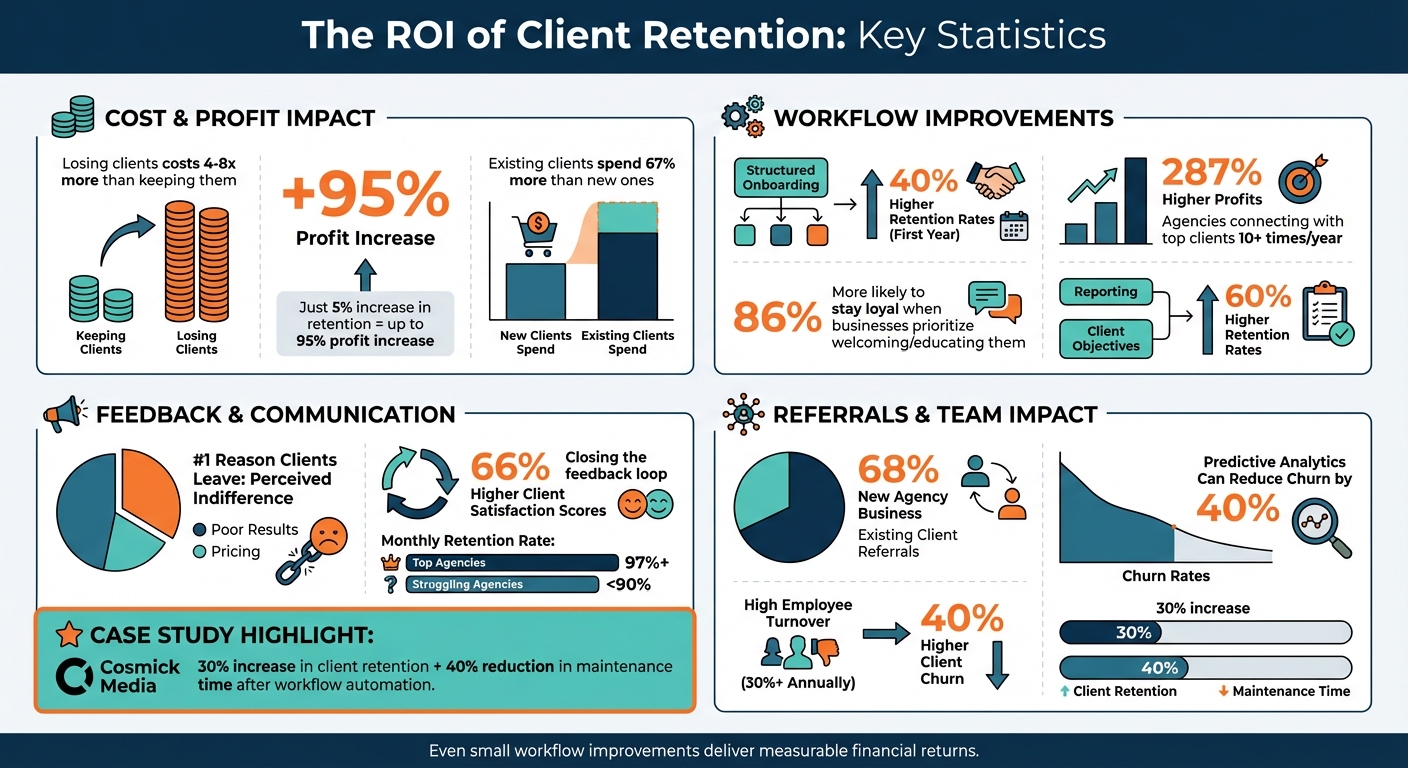
Disorganized processes make clients feel ignored, leading to churn. And losing clients costs 4–8 times more than keeping them. This guide shows you how to improve retention with simple workflow changes:
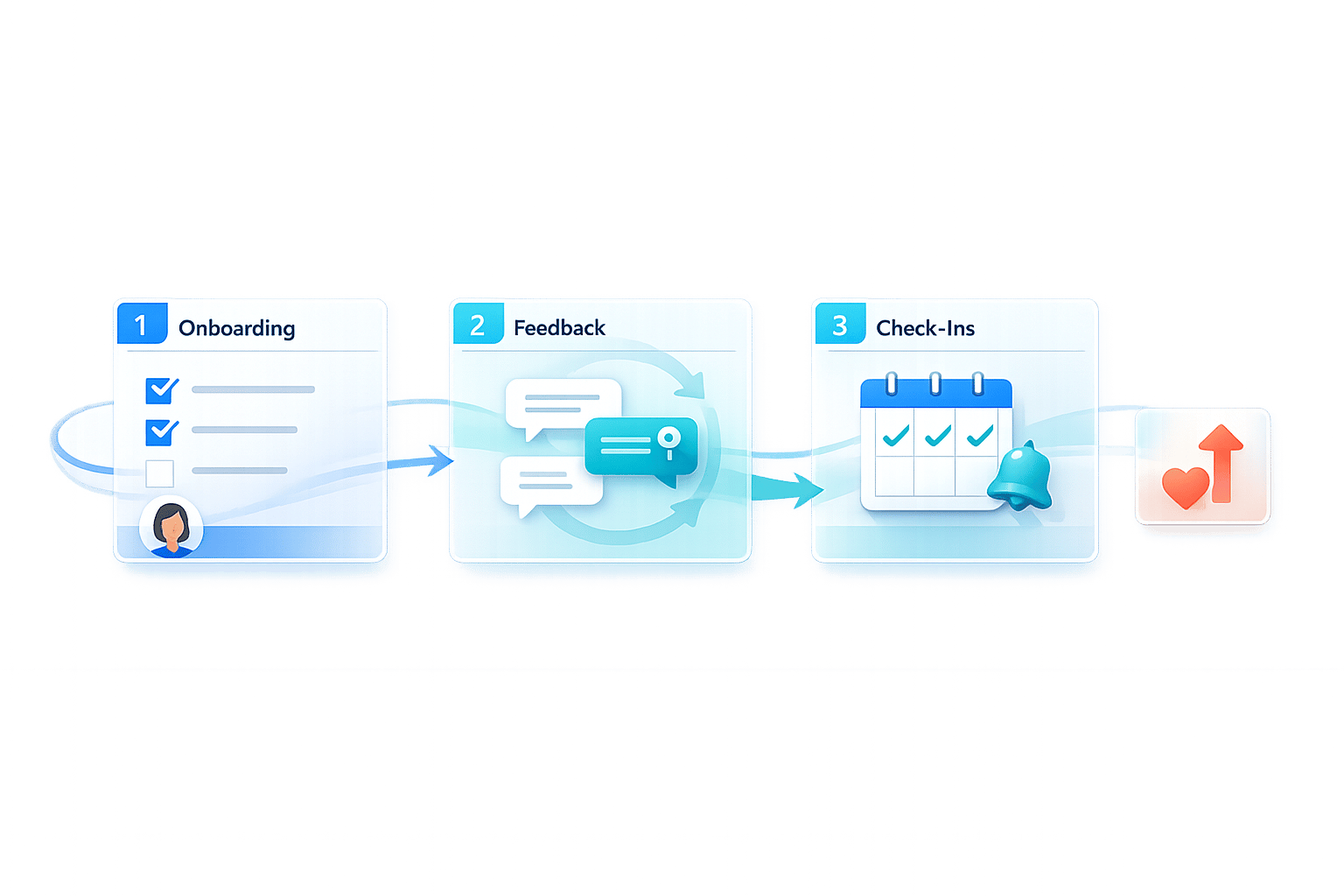
- Onboarding: First impressions matter. Structured onboarding can boost retention by 40%.
- Feedback: Make it easy for clients to share input with website feedback tools that eliminate friction.
- Check-ins: Automate regular updates to keep clients informed and engaged.
Even small improvements in retention - just 5% - can increase profits by up to 95%. Let’s dive into actionable steps to build trust and long-term relationships.
Client Retention Statistics: ROI of Better Workflows
Your 2024 Client Retention Strategy: How to reduce churn
sbb-itb-32f6eb2
Improve Client Onboarding for a Better First Impression
The first 90 days of a client relationship are critical. In fact, 86% of customers are more likely to stay loyal to businesses that prioritize welcoming and educating them after a purchase. Despite this, many agencies skip structured onboarding and dive straight into deliverables. However, agencies that embrace a structured onboarding process experience 40% higher client retention rates in the first year.
A well-designed onboarding process does more than just set expectations. It conveys professionalism, builds trust, and establishes your agency as a reliable partner. When clients feel informed and supported from the start, they’re less likely to feel neglected - an emotion that can damage the relationship before it even begins.
Build a Multi-Step Onboarding Sequence
A multi-step onboarding sequence ensures no critical tasks are overlooked. Start with a welcome message that includes a clear next step. This could be completing a client profile, scheduling a kickoff meeting, or watching a short introductory video. Following this, hold a kickoff meeting to introduce the team, review the project roadmap, and agree on communication preferences.
Next, use intake forms or questionnaires to gather essential information upfront, such as brand assets, logins, and business goals. This eliminates the need for last-minute scrambling for details later. Finally, focus on identifying "quick wins" - small, achievable goals you can deliver within the first 30–60 days. These early victories help build momentum and demonstrate your agency’s value while clients are still forming their impressions.
| Onboarding Stage | Key Activities | Purpose |
|---|---|---|
| Welcome Message | Personalized greeting and clear call-to-action | Sets the tone and guides next steps |
| Kickoff Meeting | Team introductions, roadmap review, and communication preferences | Aligns expectations and builds rapport |
| Info Gathering | Collecting assets, credentials, and objectives | Prevents delays and avoids repeated follow-ups |
| Early Wins | Achieving small milestones within 30–60 days | Builds trust and demonstrates immediate value |
Once you’ve outlined these steps, automation can help streamline the process further.
Automate Onboarding Tasks
Automation doesn’t replace the personal touch - it enhances it. Tools like DocuSign can simplify contract signing, while automated workflows ensure seamless transitions between onboarding steps. For example, when a contract is signed, an automated system can send a welcome email and trigger an intake form when the client logs into your portal, or use BoastImage vs Markup.io to compare feedback tools that simplify client reviews.
Standardized checklists help ensure no administrative or legal steps are overlooked. Additionally, a Learning Management System (LMS) can offer on-demand training materials for clients who prefer to learn at their own pace. For instance, in 2026, Cosmick Media reported a 30% increase in client retention after moving client websites to managed hosting. This change reduced site maintenance time by 40%, allowing their team to focus more on proactive client engagement. The takeaway? Automation frees up your team to focus on meaningful, relationship-building moments that truly resonate with clients.
Simplify Feedback Collection Workflows
Gathering feedback effectively is crucial for maintaining strong client relationships. When clients encounter obstacles - like sifting through email threads, grappling with complicated tools, or being unclear about the type of feedback needed - projects can grind to a halt. And here's the kicker: perceived indifference is the leading reason clients leave agencies, even more than poor results or pricing. The goal isn't just to collect feedback but to make the process so seamless that clients willingly engage.
Agencies that actively "close the feedback loop" by acting on client input report 66% higher client satisfaction scores. The secret lies in removing friction at every stage, from how feedback is submitted to how it's turned into actionable steps. When the process is simple and well-organized, projects move faster, and clients feel genuinely heard.
Use Client-First Feedback Tools
The tools you use can make or break the feedback process. The problem often isn't what clients think - it's the hoops they have to jump through to share their thoughts. Traditional project management platforms, for example, often require clients to create accounts and log in. This extra step can be enough to discourage participation, leaving you with scattered feedback across multiple emails.
A client-first approach changes everything. Tools like Boast remove the need for logins entirely. Clients can click a link, leave visual comments directly on web pages, images, or PDFs, and move on with their day. No accounts, no learning curve, no hassle. Behind the scenes, your team still gets the structure it needs - like version control and task management - but clients only see an easy, intuitive interface. This is important because when feedback is centralized and quick to give, clients are more likely to respond promptly. By simplifying the experience, you keep projects on track and communication flowing smoothly.
Create Standard Feedback Processes
Even with the right tools, feedback can still fall short if clients aren't guided properly. Vague comments like "I don't like this" or "make it pop" don't provide the clarity your team needs. That's where standardized processes come into play - they help turn client input into actionable design feedback.
Start by clearly defining the type of feedback you need at different project stages. Early in a project, focus on strategic feedback: Does this align with your brand? Does the messaging connect with your audience? Later, shift to specifics: Is this button in the right spot? Is the copy easy to understand? As Deian Isac, Head of Agency Success at Wayfront, explains:
"If you can be the kind of agency that provides guide rails to your clients, and takes the pain out of developing this competency, you'll be indispensable".
Consider implementing a "Rapid Analysis & Response" system with a 24-hour review window for feedback. This allows you to quickly sort through client input, prioritize issues, and develop action plans. Tools like automated intake forms with reminders can also keep clients accountable for providing timely feedback. By creating a structured approach, you avoid scattered, low-priority comments that bog down your team and instead focus on executing efficiently.
Convert Comments into Tasks
The final - and arguably most important - step is turning client feedback into actionable tasks. If comments remain unstructured, they can easily get lost, leading to missed opportunities and unmet expectations. Scribbl emphasizes the importance of follow-through:
"Follow up every piece of feedback with a clear summary of action items, assigned owners, and expected timelines".
Organize feedback into categories like design changes, content updates, technical fixes, or feature requests. This makes it easier to assign tasks to the right teams and ensures that no input slips through the cracks. When clients see their feedback leading to real progress, it reinforces their trust and investment in the partnership. This proactive approach helps agencies stand out, reducing the risk of losing clients to feelings of neglect or indifference.
Automate Client Check-Ins and Progress Updates
Consistent check-ins are a cornerstone of building trust with clients. By providing regular, proactive updates, you show clients they’re valued - helping to avoid the perception of indifference, which is the leading reason clients leave agencies. When combined with smooth onboarding and effective feedback processes, these updates create a seamless client experience.
Here’s an eye-opening stat: businesses that connect with their top clients more than 10 times per year see up to 287% higher profits compared to those with fewer interactions. But here’s the challenge - overloading clients with daily emails can cause fatigue, while long silences can create doubts. The solution? Automating workflows to maintain a steady flow of updates without overwhelming clients or overburdening your team.
Schedule Regular Check-Ins
A structured approach to automated updates ensures clients get the right information at the right time. Instead of sending updates randomly, adopt a tiered communication framework that caters to varying client needs:
| Communication Level | Frequency | Focus Area |
|---|---|---|
| Operational | Weekly | Progress updates, quick wins, and immediate priorities |
| Tactical | Monthly | Performance deep-dives and campaign adjustments |
| Strategic | Quarterly | Market trends, competitive intelligence, and long-term planning |
This system keeps clients informed at every level. Weekly updates focus on immediate progress, monthly reviews dive into performance metrics, and quarterly sessions tackle broader trends and future planning.
Take Cosmick Media as an example. After switching client websites to a managed hosting platform in 2025, they automated performance monitoring and maintenance tasks. The result? A 30% boost in client retention while reducing manual effort by 40%. Automation allowed the team to spend more time on meaningful client interactions, while ensuring consistent updates were delivered.
To replicate this, use tools like your CRM, project management software, or reporting platforms to schedule updates. Reporting tools such as Ahrefs or Looker Studio can automatically generate and send structured reports at set intervals. This keeps clients in the loop without requiring constant manual input.
Additionally, automate client feedback loops with monthly CSAT surveys and quarterly NPS surveys. These help identify potential issues early, giving you the chance to address them before they escalate into churn.
Personalize Client Touchpoints
Automation doesn’t mean sending generic updates. The most impactful automated check-ins are tailored to align with each client’s goals. Agencies that connect their reporting to specific client objectives report 60% higher retention rates. For example, instead of saying, "CPC decreased by 15%", frame it as, "We reduced your customer acquisition cost by 15%, saving you $3,500 this quarter". This shift from raw metrics to meaningful business outcomes makes your value crystal clear.
Segment your updates based on client priorities. A client focused on lead generation needs different insights compared to one prioritizing brand awareness. Configure automation tools to extract and present data in ways that highlight direct business benefits.
This approach worked for Matt Grill, Founder of BSharp Technology, after his team implemented automated performance tracking with Kinsta in 2025/2026. He shared:
"Since moving to Kinsta, we've seen major improvements in performance. Clients are noticing the difference, and it's made our relationships stronger".
By automating performance tracking and reporting, his team provided clients with clear, measurable results - without adding to their workload.
To further enhance the client experience, balance automated updates with self-service options. Create a client portal using platforms like Looker Studio or Databox, where clients can access real-time data whenever they want. This hybrid approach - combining scheduled updates with on-demand access - ensures clients stay informed without feeling overwhelmed.
Lastly, set up intervention triggers in your CRM to flag potential issues. For instance, if a client stops attending meetings or delays payments, your system can notify account managers to take action. Advanced AI models can even predict churn risk with 85%+ accuracy by analyzing engagement patterns. This gives you the chance to address concerns early, turning potential problems into opportunities to strengthen your client relationships.
Measure How Workflows Affect Client Retention
To make meaningful improvements, you first need to measure the impact of your workflow changes. Whether you're refining onboarding, automating check-ins, or simplifying feedback collection, having a clear evaluation framework is key. Here's why: even a modest 5% increase in client retention can lead to a profit boost of 25% to 95%. Tracking the right metrics ensures you're getting the most out of your workflow investments.
Track Key Retention Metrics
Start by establishing baseline metrics before making any workflow adjustments. One essential metric is your Customer Retention Rate (CRR). Use this formula:
[(E - N) / S] x 100
Here, E represents the number of customers at the end of a period, N is the number of new customers, and S is the starting customer count. Top-performing agencies often maintain a monthly retention rate of 97% or higher, while less successful ones may fall below 90%.
Another critical metric is the Net Promoter Score (NPS), which measures client loyalty. For instance, the IT services sector had an average NPS of 55 in 2024, providing a helpful benchmark. Pair this with Customer Satisfaction (CSAT) surveys conducted monthly to capture client sentiment in real-time. Additionally, monitor early warning signals like response times, meeting attendance, and support ticket frequency. These behavioral indicators can help you spot potential churn early. Agencies using predictive analytics have even reduced churn rates by 40%. Together, these metrics help validate the effectiveness of workflow improvements, such as streamlined onboarding and consistent check-ins.
Once you’ve established your baseline, it’s time to measure how workflow changes affect process efficiency and financial outcomes.
Measure Workflow Improvements
To understand the impact of your workflow changes, focus on specific performance indicators like time-to-feedback and task completion speed. Compare these metrics before and after implementing changes. Key areas to evaluate include:
- Time-to-feedback: How quickly clients provide input.
- Task completion time: How efficiently your team delivers results.
- Error rates: How often revisions are needed.
For example, if you introduce a client-focused feedback tool like Boast, track whether feedback turnaround times improve and whether projects are now delivered on schedule and within budget.
A simple comparison table can help visualize these improvements. Include columns for the metric name, baseline performance, current performance, and percentage improvement over a 90-day period. This format makes it easier to highlight ROI to stakeholders. But don’t stop at collecting data - use it to refine processes and share updates with your clients.
Finally, connect workflow metrics to financial outcomes. Metrics like Customer Lifetime Value (CLV) and Average Revenue per Client reveal how retention improvements translate into revenue. Remember, existing customers spend 67% more than new ones. Even small gains in retention can lead to substantial revenue growth, making a strong case for ongoing investment in client-centered workflows.
Conclusion: The ROI of Better Workflows
Improving workflows isn’t just about saving time - it’s about saving money. Retaining an existing client costs 4–8 times less than acquiring a new one. Plus, existing clients tend to spend 67% more than new ones, making retention a far more profitable strategy. Boris Leshinsky, Strategic Advisor at AgencyTech, sums it up perfectly:
"The question isn't whether you can afford to invest in client retention. The question is: Can you afford not to?"
The workflows highlighted in this guide - structured onboarding, streamlined feedback collection, and automated check-ins - tackle one of the biggest reasons clients leave: feeling ignored or undervalued. When clients sense indifference, they’re likely to leave, no matter the results. By focusing on proactive communication, these workflows show clients that their success matters to you. A client-first approach, built on consistent, meaningful actions, sends a clear message that they are a priority.
This approach doesn’t just strengthen relationships - it delivers measurable financial returns. The data backs it up: structured onboarding and regular engagement lead to higher retention rates and healthier profit margins.
Beyond direct revenue, better workflows fuel growth through referrals. With 68% of new agency business coming from existing client referrals, every retained client becomes an opportunity for expansion. At the same time, streamlined processes reduce team burnout. Agencies with high employee turnover (30%+ annually) see 40% higher client churn, so keeping your team engaged and efficient is essential.
By cutting down on repetitive tasks and focusing on strategic work, your team can dedicate their energy to solving creative challenges that make a real impact. Tools like Boast simplify feedback collection, allowing your team to stay focused on building stronger client relationships.
Ultimately, these results highlight the critical role efficient systems play in client retention. As Mariel Kilroy, Co-Founder of Sticky Digital, puts it:
"If retention depends on heroics, it's a systems problem - not a people problem".
FAQs
Which workflow change should I fix first to reduce churn fastest?
The fastest way to cut down on client churn is by refining your feedback process. A well-designed, user-friendly feedback system not only makes clients feel heard but also builds loyalty, increasing the likelihood of repeat business.
On top of that, tackle workflow issues such as miscommunication or delays. When you minimize these pain points, you create a smoother experience that boosts client satisfaction and keeps them coming back.
How do I automate client updates without sounding generic or spammy?
When automating client updates, the key is to make them feel personal and meaningful. Start with automated onboarding sequences that guide clients through the initial steps while setting the tone for your working relationship. Use customized templates for progress updates, incorporating specific project details or milestones to keep messages relevant and engaging.
To maintain a consistent yet human tone, reference past interactions or specific project details in your updates. For example, mention a recent conversation or highlight a particular achievement. This small effort makes automation feel less robotic and more like a natural extension of your communication.
By combining efficiency with a personal touch, you can streamline updates while still building trust and strengthening your connection with clients.
What metrics prove my workflow changes are improving retention?
Metrics to gauge whether your workflow changes are improving retention include keeping an eye on your monthly retention rate - aiming for a high figure like 97% is a good benchmark. Also, tracking percentage increases in client retention is crucial. Even a modest 5% improvement can have a noticeable effect on your bottom line.
Other key indicators to monitor are reductions in client churn and improvements in client satisfaction. Positive feedback from clients, especially when they feel valued and prioritized, often translates into stronger retention rates.