How to Write Feedback Requests Clients Answer
When feedback requests go unanswered or result in vague responses, projects stall, timelines stretch, and miscommunication grows. The secret to fixing this? Clear, specific, and simple requests.
Key Takeaways:
- Why Clients Ignore Requests: Overwhelm, unclear instructions, and tool fatigue are common reasons.
- Mistakes to Avoid: Vague questions, multiple communication channels, and unnecessary technical hurdles.
- What Works: Specific questions, clear context, and easy-to-use feedback tools.
- How to Simplify the Process: Use tools like BoastImage that allow direct, no-login feedback on designs.
Steps to Write Effective Feedback Requests:
- Write a Clear Subject Line: Include the project name, deliverable, and action needed.
- Provide Context: Reference past feedback and highlight updates.
- Be Specific: Ask targeted questions about particular elements.
- Make It Easy: Use simple tools and emphasize how quick it is to respond.
- Set a Deadline: Clearly state when feedback is needed and suggest a format.
How to Ask Your Clients for Feedback
sbb-itb-32f6eb2
Why Clients Don't Respond to Feedback Requests
Getting clients to respond to feedback requests often comes down to one key realization: they're not ignoring you on purpose - they're overwhelmed or unsure how to proceed. When your request shows up in their inbox, they quickly decide, "Can I handle this now, or should I deal with it later?" If the answer is "later", that email often gets buried and forgotten. Recognizing these challenges is the first step to improving how you ask for feedback.
Mistakes That Kill Response Rates
One major roadblock is friction in the tools you use. If clients are required to create accounts, remember passwords, or download extra software just to leave a comment, it often leads to delays or complete inaction. For non-technical clients, every extra step feels like extra work, and procrastination becomes inevitable.
Another common issue is vagueness. A request like "What do you think?" leaves clients unsure of how to respond, often resulting in feedback that's either unhelpful or nonexistent. On top of that, using too many communication channels - like email, Slack, WhatsApp, or shared documents - creates confusion. Clients lose track of which version they're reviewing, worry they’re wasting time on outdated drafts, and eventually disengage.
Lack of context is another big problem. If clients don’t understand the reasoning behind your design choices or how your work ties into their business goals, their feedback ends up being subjective rather than strategic. And if the primary decision-maker isn’t looped in early on, stakeholder misalignment can lead to last-minute rejections that throw your entire timeline off course.
These missteps create unnecessary friction, making your requests feel more like burdens than opportunities for collaboration.
How Clients See Your Feedback Requests
From the client’s point of view, your feedback request is just another item on their already packed to-do list. In fact, 77% of customers say that respecting their time is the most important part of good service. If your request feels complicated - requiring them to navigate unfamiliar platforms, decipher unclear instructions, or dig through multiple channels for the right file - it’s no surprise it gets pushed aside.
Tool fatigue is a real issue. Many clients are juggling multiple software platforms, and the thought of learning yet another one just to give feedback can feel overwhelming. They don’t want to spend time figuring out how to tell you if a color palette works. That’s why it’s so important to streamline your workflow and make the process as simple as possible.
When clients can just click a link, leave a comment directly on the work, and move on with their day - without needing to create accounts or watch tutorials - your chances of getting a response go way up. Keep it simple, and you'll make it easier for them to engage.
Rules for Writing Feedback Requests That Work
Once you understand why clients might not respond, you can tweak your approach to make feedback requests something they’re eager to act on. The key? Keep your requests clear, relevant, and easy to follow. The simpler and more specific your ask, the less room there is for delay or confusion.
Here’s how to avoid common pitfalls and turn your requests into actionable conversations.
Be Specific, Not General
Open-ended questions like "What do you think?" often lead to vague or unhelpful responses - or worse, no response at all. Instead, ask focused questions about particular elements to get clear, actionable feedback. For example, instead of saying, "Does this homepage work for you?" try something like, "Does the headline in the hero section clearly communicate our value proposition?" or "Is the call-to-action button placement effective, or should it be moved above the fold?"
When clients know exactly what to focus on - especially with tools that allow intuitive point-and-click annotations - they’re more likely to provide timely and confident responses. This also helps avoid those frustratingly vague comments like "make it pop", which don’t provide useful direction. After each feedback round, summarize what’s been updated and what still needs attention to keep everyone on the same page.
Tell Clients Why Their Feedback Matters
Clients are more likely to respond when they understand how their input impacts the project. Show them the connection between their feedback and the project’s success. For example: "Your input on the color palette today will allow us to finalize the brand guidelines by Friday, keeping production on schedule." This frames their feedback as a critical step toward achieving a shared goal.
Tie decisions to business objectives to steer the conversation away from personal preferences. For instance, explaining how a design choice improves conversions or enhances user experience can shift the focus to strategy rather than subjective taste. To ensure you’re aligned, restate their feedback in your own words before suggesting solutions.
Finally, eliminate any obstacles that might discourage clients from responding.
Remove Barriers to Responding
Every extra step in the feedback process is another reason for clients to put it off. Simplify the process as much as possible. Use zero-login public links so clients can provide feedback instantly, without needing to create accounts or remember passwords. This avoids the ghosting that often happens when technical hurdles get in the way.
Offer tools that allow direct annotations, so clients don’t have to download files, switch apps, or draft lengthy emails. Additionally, limit the number of feedback rounds (e.g., to three) to avoid endless revisions and scope creep. When clients know the process is simple and has clear boundaries, they’re much more likely to engage.
How to Write a Feedback Request (Step by Step)
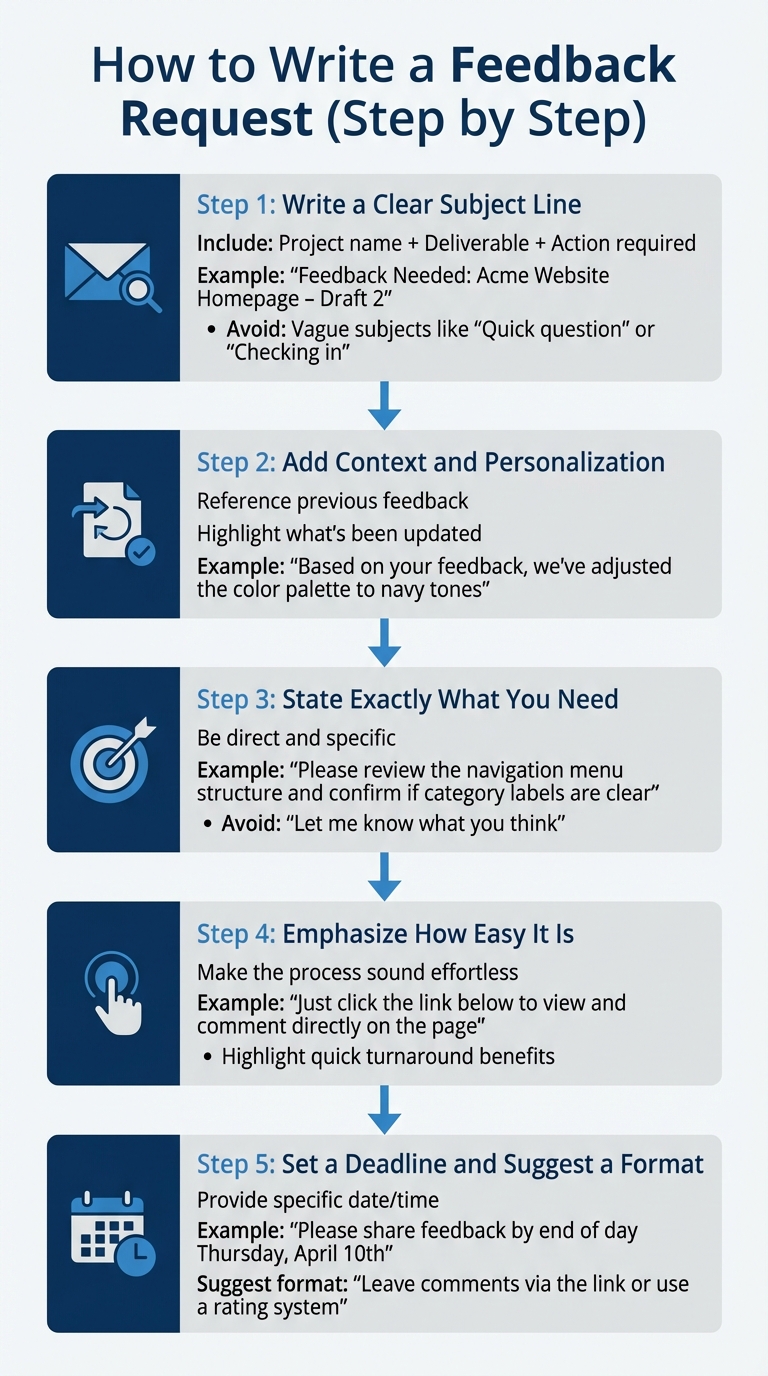
5-Step Process for Writing Effective Client Feedback Requests
Now that you understand the principles, let’s break down how to apply them. A well-structured feedback request eliminates confusion and makes it easy for clients to respond. Each step plays a key role in improving response rates.
Here’s how to structure your feedback request effectively.
Step 1: Write a Clear Subject Line
Your subject line is the first thing clients see, so it needs to grab their attention and explain the purpose. Include the project name, deliverable, and the action required. For example: "Feedback Needed: Acme Website Homepage – Draft 2" or "Action Required: Logo Concepts for Q2 Campaign."
Avoid vague subject lines like "Quick question" or "Checking in." Clients should instantly know what the email is about and why it’s important before opening it.
Step 2: Add Context and Personalization
Start by briefly referencing previous feedback and summarizing updates. Show progress by highlighting changes made based on their input. For instance: "Based on your feedback from last week, we’ve adjusted the color palette to include more navy tones and moved the testimonial section higher on the page."
This approach helps clients see what’s been addressed and what still requires their attention, making it easier for them to focus on specific areas.
Step 3: State Exactly What You Need
Be direct about what you’re asking for. Instead of saying, "Let me know what you think," try something like: "Please review the navigation menu structure and confirm whether the category labels are clear for your audience" or "Check the product images in Section 3 and let me know if the resolution looks sharp on your screen."
Specific requests lead to faster, more actionable feedback. When clients know exactly where to focus, they can avoid giving vague or overly broad responses.
Step 4: Emphasize How Easy It Is
Make the process sound effortless. For example: "Just click the link below to view the design. You can leave comments directly on the page."
You can also highlight the benefits of responding quickly. For instance: "Your feedback today means we can finalize the design by Friday and stay on track for the April 21st launch." This creates a sense of urgency while keeping the tone positive and collaborative.
Step 5: Set a Deadline and Suggest a Format
Be clear about when you need their response. For example: "Please share your feedback by end of day Thursday, April 10th, so we can incorporate changes before our production deadline."
To make things even easier, suggest a specific format for their feedback. For example: "Leave comments directly via the link, or use a simple rating system if that’s faster for you." Providing a clear structure reduces decision fatigue and makes responding feel less overwhelming.
How BoastImage Makes Client Feedback Easier
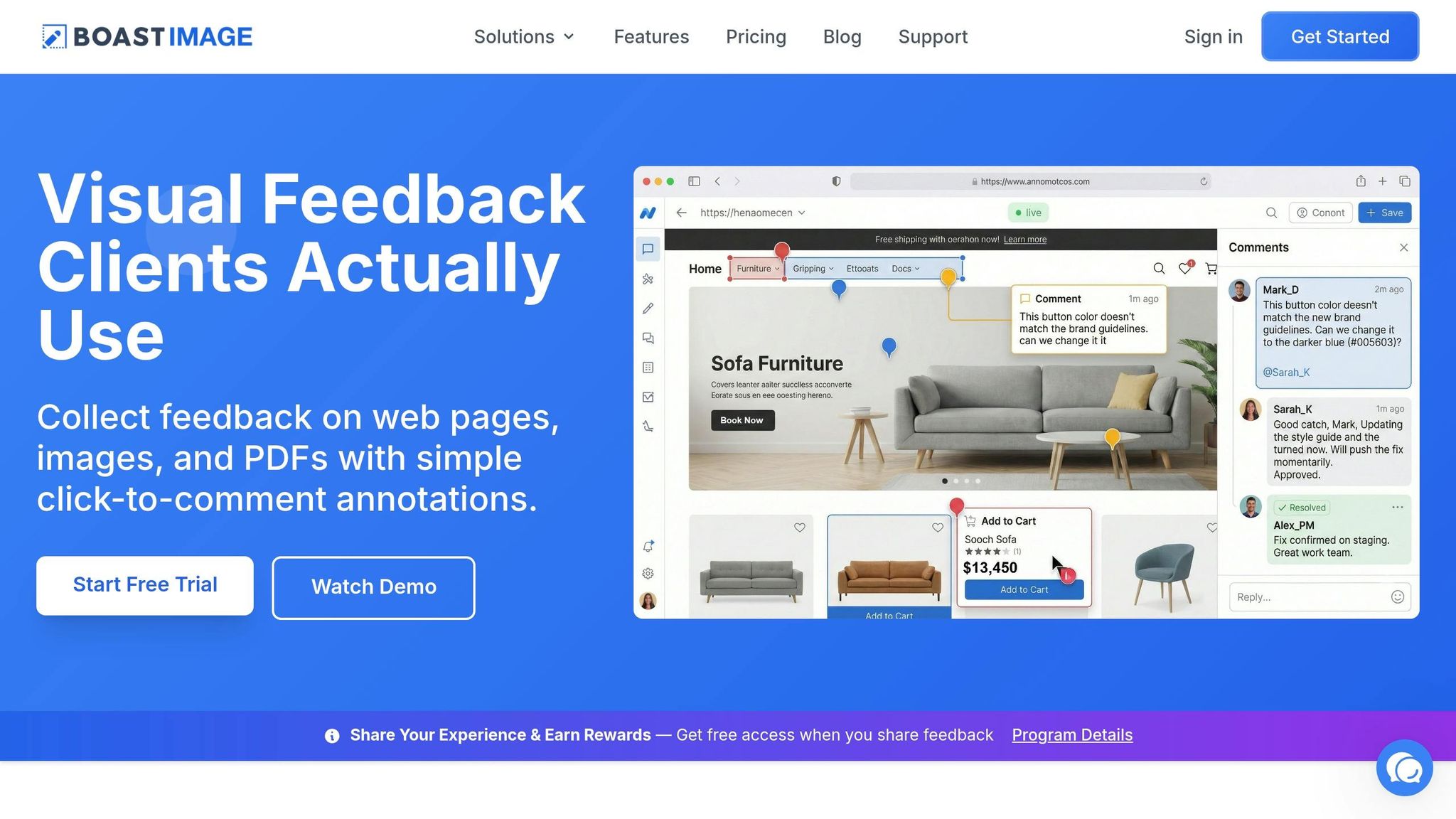
BoastImage simplifies client feedback by removing obstacles that often slow down the process. Even the most thoughtfully crafted feedback request can fall flat if the tool you’re using creates unnecessary friction. BoastImage focuses on making the feedback process as smooth as possible by prioritizing the client experience.
No Accounts, No Logins Required
One of the biggest hurdles in gathering client feedback is the hassle of accounts and passwords. BoastImage eliminates this entirely. Clients can view your work through a secure link - no signups, no logins. When you send a feedback request, clients simply click the link in your email to instantly access the design, web page, image, or PDF. They can start commenting immediately, right in their browser.
This streamlined process removes delays caused by login requirements. Clients can provide feedback as soon as they open your email, significantly speeding up the entire feedback cycle.
Features That Make Feedback Simple
BoastImage offers tools that make giving feedback straightforward and intuitive. Precise in-page comments allow clients to leave feedback exactly where it’s needed. Instead of vague emails like "Make the blue darker," they can click directly on the blue element and leave a comment there. Visual tools also help highlight requested changes, reducing the confusion that often comes with written feedback.
Automatic version control ensures that clients can easily track updates. They can compare versions side-by-side to confirm their changes were implemented, while all feedback is neatly organized into threaded discussions tied to specific design elements. On your end, comments are converted into tasks on built-in Kanban boards - but clients only see the simple, user-friendly review interface.
Another standout feature? All paid plans include unlimited external collaborators. Whether you’re on the $9.95/month Solo plan or the $39.95/month Business plan, you can invite as many clients as you need without worrying about extra costs for additional users.
These tools not only simplify feedback but also encourage clients to respond more quickly, setting the stage for better collaboration.
How to Get More Clients to Respond
BoastImage directly addresses a key challenge for 78% of agencies: client communication. Its simplicity speeds up feedback and builds trust from the very beginning of a project.
To make the most of BoastImage, introduce it to your clients early on. Include a feedback link in your request email, keeping the format clear and inviting: "Click the link below to view the design and leave comments directly on the page." Combining a clear request with an easy-to-use tool minimizes resistance and encourages faster, more reliable responses from clients.
Conclusion
What to Remember
If you want your feedback process to truly drive progress, clarity and simplicity are key. Clients respond faster when it’s easy to understand and act on your requests. For example, asking something like, “Does this color palette match your brand’s professional tone?” is far more effective than a vague, “What do you think?” Clear and specific questions eliminate confusion and give clients a clear path to respond.
Also, don’t let technical hurdles slow things down. Requiring clients to create accounts or navigate complex dashboards makes feedback feel like a chore. Instead, aim for a process that feels seamless and straightforward - something that fits easily into their day.
A client-centered approach doesn’t just make their lives easier; it also helps you. It speeds up timelines, reduces revision cycles, and makes your workflow more efficient, all while building trust with your client.
What to Do Next
It’s time to put these ideas into action. Take a moment to review your last few feedback requests. Were your questions specific? Did you explain why their input was important and how it would shape the next steps? Small tweaks like these can fix common feedback challenges. Focus on using targeted questions, setting clear deadlines, and centralizing communication to keep everything on track.
If you’re looking for tools to make this process even smoother, consider BoastImage. Starting at just $9.95/month, it lets you send clients a secure link where they can comment directly on your work - no extra accounts or complicated setups required. By simplifying the feedback process, you’ll not only move projects along faster but also create a more enjoyable experience for your clients.
FAQs
How many questions should I ask in one feedback request?
When asking for feedback, it's best to keep things straightforward and focused. Stick to 3 to 5 clear and concise questions that clients can easily understand and respond to. Overloading them with too many questions can lead to lower response rates. Focus on what truly matters to ensure the process feels manageable and encourages meaningful responses.
What should I do if a client still doesn’t respond by the deadline?
If a client misses a deadline, it’s important to follow up in a way that’s both timely and professional. Give it a couple of days before reaching out, then send a polite reminder that references the original deadline. You can also offer your support to help them complete the task if needed. Avoid contacting them immediately after the deadline passes, as it might come across as overly pushy. Striking the right balance between politeness and keeping your workflow organized is essential.
How can I prevent conflicting feedback from multiple stakeholders?
To manage feedback effectively and avoid confusion, it's crucial to have a well-organized system in place. Start by setting clear expectations from the beginning. This includes defining specific goals, such as limits on revisions and agreed-upon style guidelines, to minimize misunderstandings.
Leverage tools that allow clients to leave comments directly on designs - this streamlines communication and ensures clarity. Break down feedback into actionable steps, use version control to keep track of changes, and address unclear or vague feedback as soon as possible. This approach helps keep everyone aligned and ensures a smoother, more cohesive workflow.