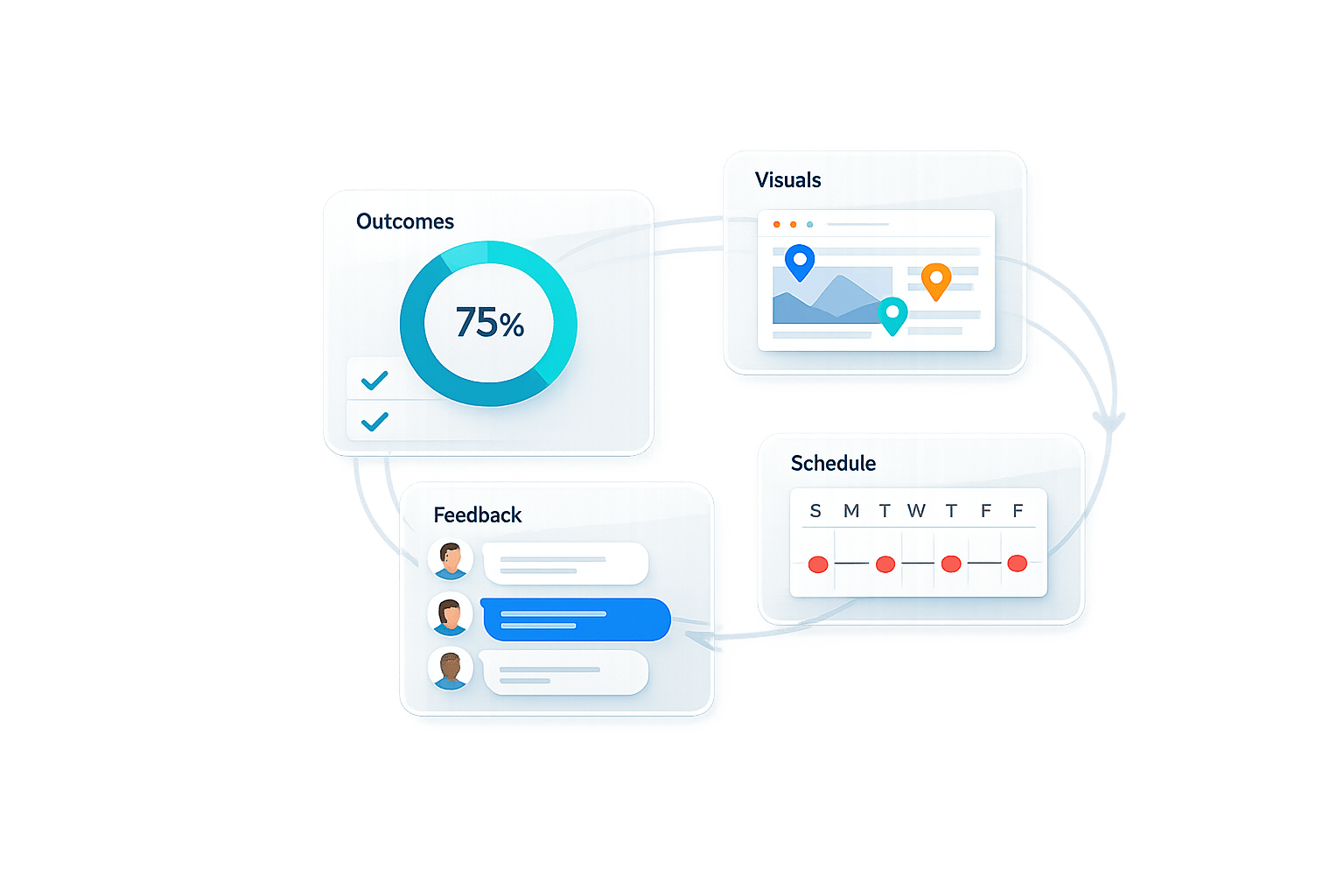
How to Share Project Updates Clients Understand
Most project updates fail because they’re written for managers, not clients. Clients don’t need technical jargon or dense reports - they need clear, concise updates that focus on outcomes they care about. Poor communication can lead to mistrust, delays, and even lost business. In fact, 73% of failed client relationships stem from communication issues, and 68% of clients switch to competitors due to unclear updates.
Here’s how to fix it:
- Focus on outcomes clients care about (e.g., faster results or cost savings).
- Ditch jargon and use plain, easy-to-understand language.
- Customize updates based on each stakeholder’s needs (e.g., executives want high-level summaries, not technical details).
- Use visual aids like progress bars or charts to simplify complex information.
- Keep communication centralized and consistent with scheduled updates.
When updates are clear, clients trust you more, respond faster, and feel confident in your work. This guide breaks down simple strategies to make your project updates easy to understand and effective.
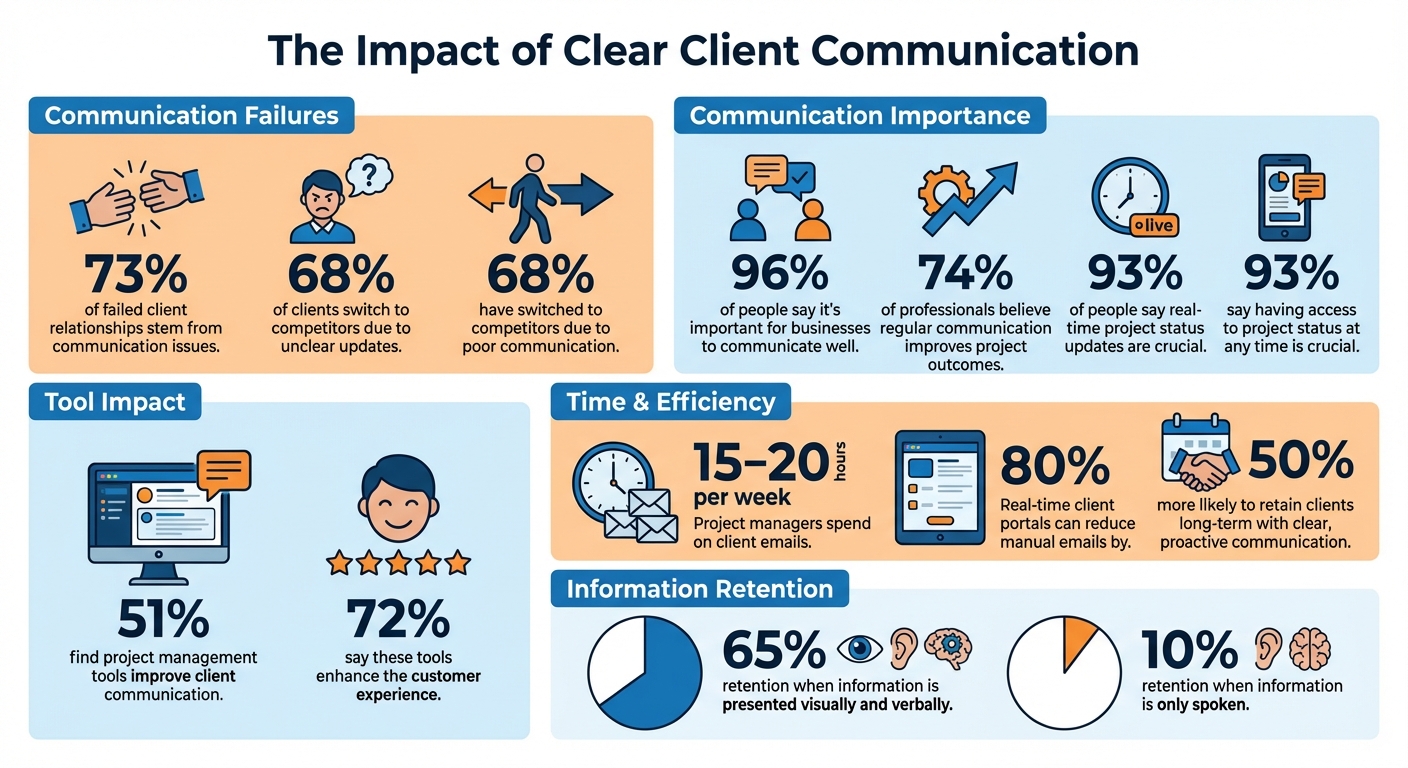
Client Communication Statistics: Impact on Project Success and Retention
Why Client Communication Breaks Projects More Than Bad Planning
sbb-itb-32f6eb2
Know Your Client's Needs and How They Prefer to Communicate
Before crafting any update, it's crucial to understand who you're addressing and how they prefer to receive updates. Different stakeholders have different priorities: executive sponsors focus on ROI and milestones, while project managers are more concerned with deadlines and blockers. Sending the same dense, technical report to everyone? That’s a surefire way to waste time - both yours and theirs.
Start by mapping out your key stakeholders. Group them into categories like internal team members, external clients (primary contacts and sponsors), and third parties such as investors or journalists. Then, assess each stakeholder's influence and interest. High-influence, high-interest stakeholders - like your main client contact - should receive frequent, detailed updates. On the other hand, high-influence but low-interest stakeholders, like C-level executives, might only need a monthly summary covering major wins and budget updates.
To make this process smoother, create a simple "client profile" for each stakeholder. This profile should document their preferred communication method (email, Slack, video call), the type of information they value (broad summaries or detailed data), and how often they expect updates. Effective communication is critical - 96% of people say it’s important for businesses to communicate well, and 68% have switched to competitors due to poor communication. Getting this right from the start can help you avoid those pitfalls.
Identify Who Your Stakeholders Are and What They Care About
Different roles require different types of information. Executives need high-level updates that focus on progress and budget health. Project managers, however, often require detailed, frequent reports on progress and blockers. Meanwhile, technical reviewers want specifics, but without unnecessary jargon.
The trick is to avoid assuming your clients share your technical knowledge. Instead, translate your work into outcomes that matter to them. For instance, rather than saying, "We refactored the authentication module using OAuth 2.0", you could say, "We improved login security and speed - users can now sign in 30% faster." That’s the kind of language that resonates.
Find Out Which Communication Formats Work Best
Figuring out the best way to communicate starts with the kickoff meeting. Ask upfront about their preferred formats - email, video calls, or live meetings - and agree on the frequency of updates. Pay attention to how they communicate and adapt your tone to match. If they’re brief and to the point in emails, keep your updates concise. If they’re more conversational, mirror that tone. Also, consider their comfort with technology. A client who’s active on Slack will appreciate quick updates there, while someone who relies on email might find constant Slack notifications overwhelming.
Finally, establish a feedback loop. After sending initial updates, ask, "Is this format working for you?" This is also the perfect time to get clear, actionable design feedback if your updates include visual assets. 74% of professionals believe regular communication improves project outcomes, but only if it’s tailored to meet the client’s needs. By regularly gathering feedback, you can refine your approach and set the stage for updates that are precise and client-focused moving forward.
Make Your Project Updates Simple and Clear
When sharing updates with clients, simplicity is key. Start by understanding your audience, then focus on delivering updates that are easy to follow. Overloading clients with complex details or technical jargon can lead to confusion and strain your relationship. This is often due to the "curse of knowledge", where experts assume their clients grasp technical details as easily as they do. If your updates are packed with dense data or unfamiliar terminology, they can waste your client’s time and erode trust.
The fix? Keep it simple and results-focused. Instead of saying, "We improved crawl depth by 15%", explain the benefit: "We made it easier for search engines to find your pages, which should boost organic traffic." Clear, concise updates not only build trust but also help clients make informed decisions quickly.
Use Plain Language and Skip the Jargon
Using too much industry-specific language can alienate clients. Terms like "agile" or "scrum" might make sense to you, but they often sound like a foreign language to clients. As brand strategist Jennifer Bourn explains:
"As a designer or developer, your job is to make the process... as easy and simple for the client as possible, which means using plain language."
Replace technical terms with everyday language, and when you do need to use a specific term, provide a quick explanation. For example, instead of saying "navigation menu", try "tabs", or use "banner" in place of "hero image." If you're unsure whether your update is clear, test it on a non-technical colleague. If they don’t understand, simplify further. Focus on what matters most - highlight the updates that impact your client’s goals directly. For instance, instead of listing 200 keyword changes, emphasize the five that drive revenue.
| Technical Term | Plain Language |
|---|---|
| Navigation Menu | Tabs |
| Hero Image | Banner |
| Agile / Scrum | Flexible work cycles |
| Crawl Depth | How easily search engines find your pages |
| Payment Link | E-commerce |
Add Visual Aids and Progress Indicators
Text-heavy updates can feel overwhelming. Many clients prefer visuals that provide a quick snapshot of progress. Studies show that people retain about 65% of information when it’s presented visually and verbally, compared to just 10% when it’s only spoken. Francesco Marcatto from Mindiply sums it up well:
"A picture is worth a thousand words, so the receivers will get the project's overview at a first glance."
Incorporate tools like progress bars, Gantt charts, or milestone timelines to make updates visually engaging and easy to understand. A simple RAG (Red-Amber-Green) system works wonders: red indicates delays, amber signals risks, and green shows everything is on track. These visuals allow clients to grasp the project’s status instantly. Using accessible tools also helps prevent clients from ghosting feedback during the review process. Use charts and graphs to show how completed tasks are advancing the project and to spotlight critical issues like budget concerns. These tools make your updates not only clear but also more impactful.
Use Tools That Make Client Communication Easier
The right tools can completely change how you manage client updates. Research highlights that 51% of people find project management tools improve client communication, while 72% say these tools enhance the customer experience. The focus should always be on tools that simplify things for your clients - not just your internal team.
Marin Jurčić from Productive.io puts it perfectly:
"Communication lets clients gauge your control and competence."
When tools are too complicated, clients tend to fall back on vague emails. This scatters communication across multiple platforms and often leads to those dreaded "any update?" emails. These interruptions can cost project managers a staggering 15–20 hours every week. Clearly, there’s a need for tools that make collaboration seamless for clients.
Simplify Feedback with BoastImage
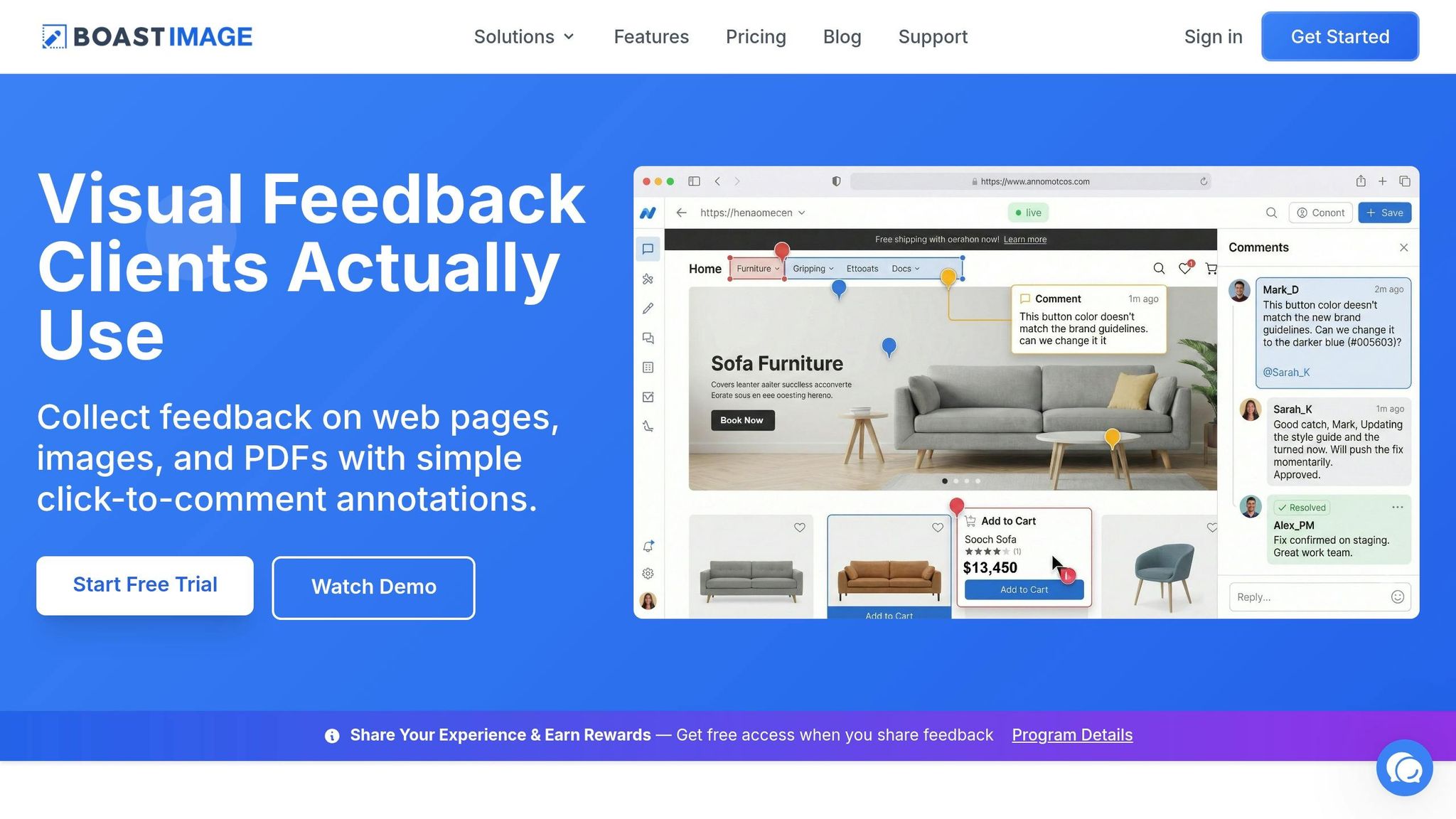
BoastImage is designed to remove the usual adoption hurdles clients face. Instead of requiring logins, accounts, or training, BoastImage makes it as simple as clicking a link to leave feedback directly on web pages, PDFs, or images. For instance, a client can click on a homepage mockup and leave a comment like, "move this logo up 10 pixels." Meanwhile, your team gets access to advanced features like version control, task management, and even Kanban boards.
This streamlined, client-friendly process eliminates confusion and keeps feedback clear. Plus, BoastImage includes unlimited external collaborators in all paid plans, so you never have to worry about client participation inflating your costs. Pricing starts at $9.95/month for solo professionals, $19.95/user/month for teams and agencies, and $39.95/user/month for larger organizations needing extras like white-label branding and audit logs.
By centralizing feedback and reducing ambiguity, BoastImage makes collaboration smoother for everyone involved.
Keep Updates in One Central Location
Centralizing communication ensures that updates, files, and feedback don’t get lost in a sea of emails, Slack messages, and texts. When everything - timelines, approvals, and key documents - lives in one place, you create a single source of truth that’s easy for everyone to access. This is especially important because 93% of people say real-time project status updates are crucial.
Centralization also protects you during scope changes. With a clear audit trail documenting decisions, file versions, and approvals, there’s no confusion about what was agreed upon or when. This transparency helps keep everyone aligned and avoids the chaos of fragmented information. As the Moxo team wisely notes:
"Client-facing project management rarely fails because of execution. It fails in the gaps between conversations, approvals, and decisions."
When you prioritize clarity and accessibility, you build stronger relationships and keep projects running smoothly.
Set a Regular Schedule for Updates
Having a predictable schedule for updates does more than just inform clients - it builds trust and reduces those repetitive “just checking in” inquiries that can eat up your workweek. When clients know exactly when to expect updates, it reassures them that progress is steady and on track.
The rhythm of updates should match the pace of your project. For most active projects, weekly updates help maintain momentum and catch risks early. For longer-term efforts, like SEO campaigns, monthly updates make sense when tracking measurable trends. During critical phases - such as a website migration or a Black Friday campaign - you might need to temporarily switch to bi-weekly check-ins to keep everyone aligned and responsive.
Decide How Often to Send Updates and Which Channels to Use
Agreeing on the frequency and communication channels during your kickoff meeting ensures everyone is on the same page from the start. Different types of updates require different approaches: email is ideal for straightforward status summaries, while video calls are better suited for complex discussions or decisions that need real-time input.
You might also consider setting up "office hours" - a recurring 30-minute weekly slot where clients can address quick questions or minor tasks.
| Update Frequency | Use Case |
|---|---|
| Weekly | Keeps momentum for active projects and flags risks early |
| Bi-weekly | Works well for seasonal campaigns or medium-paced projects |
| Monthly | Tracks measurable results (e.g., SEO growth) and long-term trends |
| Quarterly | Best for high-level strategy reviews and resource planning |
| Ad-hoc | For major milestones, unexpected delays, or urgent scope changes |
Automate Routine Updates to Save Time
Did you know project managers spend an average of 15–20 hours a week just on client emails? That’s a lot of time that could be better spent elsewhere. Automation can significantly cut down this workload. In fact, real-time client portals can reduce manual emails by as much as 80%, freeing you up to focus on higher-value tasks.
The trick is automating what’s repetitive while keeping the personal touch where it counts. For example, you can use automated milestone notifications to remind clients about pending approvals or upcoming deadlines. Real-time client portals can also display task progress and timelines, so clients can check updates anytime they want. This is especially important since 93% of people say having access to project status at any time is crucial. Just be sure to organize your portal carefully - keep internal tasks separate from client-facing updates to avoid overwhelming them.
Track and Improve How You Communicate
Sending updates is only part of the job - you also need to ensure those updates are effective. Great communication thrives on measuring outcomes and adjusting based on feedback. Keeping your clients engaged and informed isn't just helpful - it’s a core part of maintaining strong relationships.
Tracking how your communication lands is about more than just metrics. It’s the foundation for ongoing improvement throughout a project.
Monitor Client Feedback and Engagement
Start by focusing on response rates. If clients aren’t replying to your update emails or portal notifications, that’s a warning sign. The updates might be too long, overly complicated, or not addressing their priorities. Similarly, delayed responses could indicate that the format isn’t working for them.
But don’t stop at response times - pay attention to subtle engagement cues. Portal analytics can provide valuable real-time data. Using a dedicated website feedback tool can further streamline this process by centralizing comments directly on project assets. For instance, if clients aren’t opening your updates, it’s a clear signal to rethink your approach. On the other hand, if they’re frequently asking for details you’ve already provided, it might be time to simplify your language or revise how you present information.
Structured feedback is key. At the end of every project update, include a specific question, like: “Does this format give you the level of detail you need?” Avoid vague prompts like “Any thoughts?”. During status meetings, create opportunities for clients to share their concerns or uncertainties. As Marin Jurčić from Productive.io notes:
"Communication works when it reduces the need for clarification, not when it creates more of it".
These insights will guide how you refine your communication strategy.
Adjust Your Communication Methods Over Time
Once you’ve gathered feedback, use it to fine-tune your approach. If you notice repeated questions or delays tied to certain communication methods, it’s time to try something new. For example, if your weekly email updates are too text-heavy, consider switching to visual tools like progress bars or timelines to make the information easier to digest.
Matching your tone to the client’s communication style can also make a big difference. Adapting in this way - sometimes called the “chameleon effect” - helps build trust and enhances how professional you appear. After long discussions, follow up with a concise summary that highlights key points and next steps.
These adjustments help ensure your updates remain both clear and useful. And here’s a bonus: agencies that communicate clearly and proactively are 50% more likely to retain clients in the long run.
Conclusion
Clear communication builds trust and keeps clients engaged. Using simple language, visual tools, and a regular schedule helps eliminate confusion, making it easier to foster the kind of transparency that turns occasional clients into loyal partners.
By focusing on stakeholder needs, simplifying updates, centralizing communication, and tracking engagement, you can dramatically improve the client experience. Tools like BoastImage make this even easier by removing common barriers - clients can simply click a link to leave feedback without needing accounts, logins, or training. This streamlines the process, leading to faster approvals and fewer back-and-forth revisions. These practical strategies tie directly to the communication principles discussed earlier.
Start small. For your next update, experiment with a visual timeline instead of a lengthy email. Or try consolidating feedback into one platform instead of juggling multiple channels. Even minor adjustments can make a big difference - agencies that prioritize clear and proactive communication are 50% more likely to retain clients long-term.
FAQs
What should I include in a client update?
A client update needs to be straightforward and easy to understand. It should include the project's current status, highlight recent milestones, outline upcoming tasks, and address any potential issues or delays. Avoid using overly technical terms - simple language works best. Adding visual aids like timelines or summaries can make the update clearer and more engaging. Lastly, make sure to set clear expectations for the next steps and deadlines to keep everyone aligned and on track.
How do I explain technical work in plain English?
When breaking down technical work, it’s all about using clear, simple language that anyone can follow. Avoid drowning your clients in technical jargon - they don’t need to know every complex term. Instead, focus on building a shared vocabulary that makes sense to both you and them.
Tailor your explanations to match their level of understanding. If they’re new to the subject, start with the basics. Need to emphasize a point? Visual aids like charts or diagrams can work wonders. These tools make abstract ideas more concrete and easier to grasp.
Sometimes, technical terms are unavoidable. In those cases, don’t just throw the term out there - pair it with a straightforward explanation. The goal is to keep communication open, clear, and accessible. And when providing updates, make sure they’re relevant and transparent, so clients always know what’s going on without feeling overwhelmed.
What’s the best update schedule for my project?
The most effective update schedule is consistent, straightforward, and aligned with your client’s preferences. Weekly or bi-weekly updates strike a good balance - they keep clients informed without bombarding them with too much information. Stick to brief updates that focus on the essentials: key progress made, upcoming tasks, and any obstacles that need attention. By understanding how your client prefers to communicate and establishing clear expectations upfront, you can ensure your updates are both useful and engaging.