
How to Handle Clients Who Delay Feedback
Waiting on client feedback can derail your entire project timeline. It disrupts schedules, kills momentum, and complicates communication. But the good news? You can avoid these headaches with a few simple strategies:
- Set clear expectations upfront: Add feedback deadlines to contracts, include "silence equals approval" clauses, and explain how delays impact the timeline.
- Use tools that simplify feedback: Platforms like Boast let clients comment directly on deliverables without sign-ups or complex processes.
- Improve communication: Automate reminders and establish clear communication protocols to ensure clients stay on track.
- Encourage timely responses: Use delay fees or build buffer time into your schedule to mitigate the effects of late feedback.
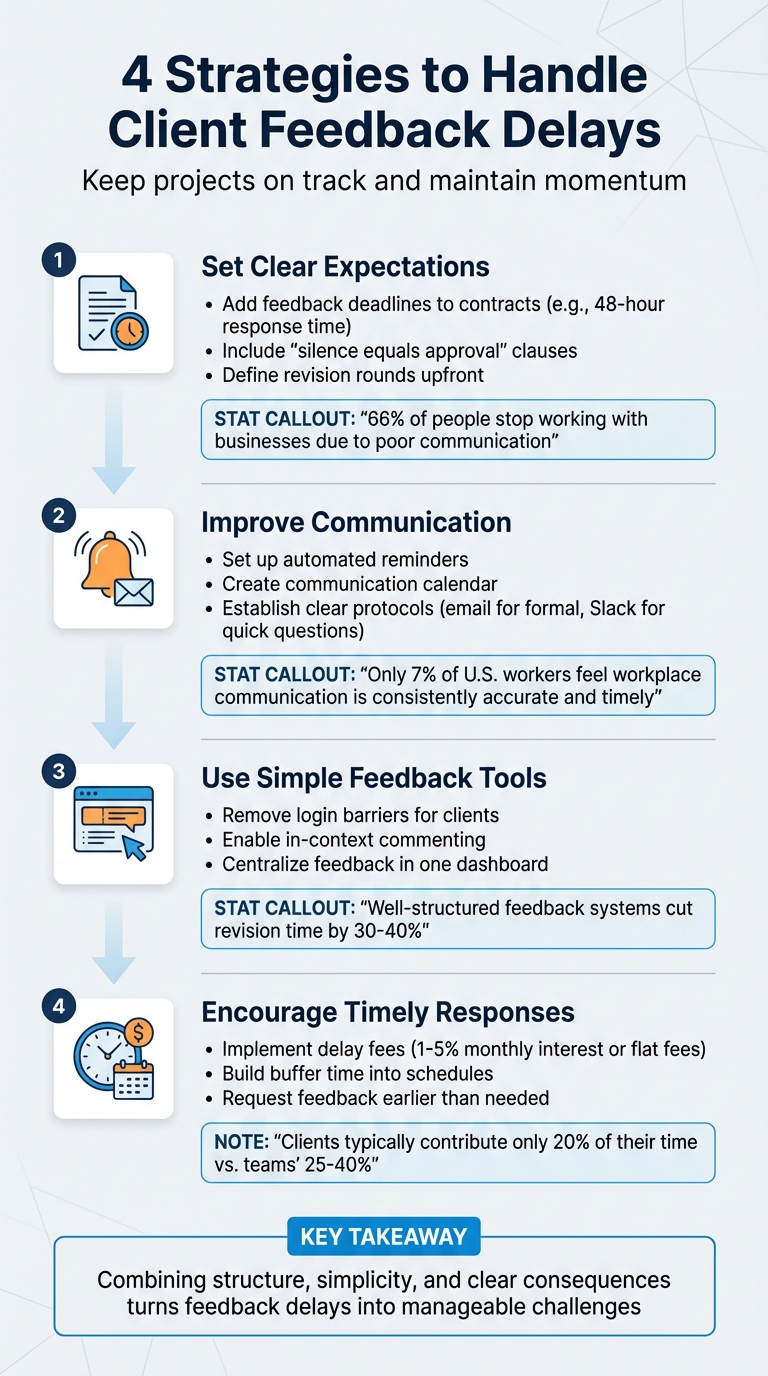
4-Step Strategy to Handle Client Feedback Delays
Fix Client Decision Delays at Your Creative Agency (Fast!)
sbb-itb-32f6eb2
Set Clear Expectations from the Start
Avoid chasing down clients for feedback by clearly defining expectations upfront. When clients know their responsibilities, deadlines, and the impact of missed timelines, projects tend to stay on track.
Add Feedback Deadlines to Your Contracts
Your contract should go beyond deliverables and payment terms - it should include clear deadlines for client feedback. For example, specify that feedback is required within 48 hours or by a set date to avoid delays in the schedule. A simple clause like this can make a big difference: "Client agrees to provide feedback within three business days of receiving each deliverable."
Consider adding a "silence equals approval" clause for non-critical decisions. This means that if feedback isn’t received by the deadline, the project proceeds with the current version or your recommended option. As StellaPop advises:
If I don't hear back by Friday at 4 pm, I'm proceeding with option A.
Additionally, define how many revision rounds are included in your fee to avoid endless back-and-forth that could eat into your time and profits. Include these details in a brief project overview that outlines communication timelines, required feedback, and what happens if deadlines are missed. Clear communication is crucial - 66% of people have stopped working with a business due to poor communication.
Explain the Impact of Delayed Feedback
During the kickoff meeting, take the time to explain how delays can derail the project. Highlight that late feedback can cause a ripple effect, disrupting your schedule and potentially delaying other clients’ projects. UX consultant Paul Boag points out:
Endless iterations without clear management doesn't just cost time and money; it also undermines the client's confidence in your ability to deliver.
Setting boundaries is key. Let clients know that repeated delays might result in their project being put on hold to prioritize others who are actively engaged. This approach not only ensures smoother project management but also fosters a respectful and professional working relationship.
Improve Communication and Follow-Ups
After setting expectations, the next step is keeping the project on track. Effective communication and timely follow-ups are key to maintaining momentum and ensuring the professional relationship stays strong. By combining structured communication with clear follow-up strategies, you can keep things running smoothly.
Set Up Automated Reminders
Automated reminders are a practical way to complement your initial efforts to set clear expectations and define contract terms. Unlike manual follow-ups, which can feel intrusive and time-consuming, automated reminders ensure that updates and nudges are sent consistently.
Create a communication calendar to outline when feedback requests, milestone updates, and follow-up reminders should go out. Many project management tools can handle this for you, automatically notifying stakeholders when reviews or approvals are due. Using a dedicated website feedback tool can further streamline this by allowing clients to leave comments directly on the work. To make these reminders more effective, personalize them with project-specific details, like the names of key deliverables or recent milestones.
Here’s an example: In 2021, BizCover used Salesforce Marketing Cloud to automate their feedback process. By addressing client concerns in real time - often within 24 hours - they achieved an impressive Net Promoter Score (NPS) of +74. As Ronn Torossian, Founder of 5WPR, explains:
Transparency, consistency, and proactive communication form the foundation of successful delay management.
Create a Communication Protocol
While automation helps with consistency, a clear communication protocol ensures efficiency. Without a structured approach, feedback can get scattered across multiple channels, causing delays and confusion. From the start, establish how and when clients should communicate. For example, use email for formal feedback and Slack for quick, informal questions.
Your protocol should also include response timelines and steps to handle missed deadlines. For instance, feedback requests sent on Tuesday mornings - when people are more focused - often get better responses than those sent late on Friday afternoons. You could also implement tiered follow-ups: a nudge after three to four days, a second reminder after a week, and a final alert 24–48 hours before the deadline.
Consider this: only 7% of U.S. workers feel workplace communication is consistently accurate, open, and timely. A clear communication protocol bridges this gap, ensuring everyone stays aligned and the project progresses as planned.
Use Tools That Make Feedback Easy for Clients
The tools you choose can either streamline or complicate the feedback process. If clients face hurdles like creating accounts or navigating complex interfaces, their feedback might be delayed - or worse, never come at all. The best tools prioritize simplicity and ease for your clients.
Simplify Feedback with Boast

Friction is the biggest enemy of timely feedback. When clients are forced to sign up for accounts, remember passwords, or learn new software just to share their thoughts, they often give up. That's where Boast comes in. It eliminates these obstacles by letting clients comment directly on web pages, images, or PDFs - no login required.
This approach helps tackle a common issue: vague feedback. Phrases like "make it pop" or "this part needs work" can leave you guessing. With Boast’s in-context commenting, clients can click directly on the area they’re referencing and leave detailed, precise feedback.
"When clients see that you track their feedback properly, respond with clarity, and deliver revisions that match their expectations, they view you as a professional who understands their needs and respects their vision."
– Tymora
The benefits are clear. A well-structured feedback system can cut revision time by 30–40%. Removing technical barriers isn't just convenient - it's essential for maintaining strong client relationships.
Keep Feedback and Versions Organized
Once you've simplified the feedback process, the next step is keeping everything organized. Scattered comments across emails, chats, and documents can lead to confusion and missed revisions. Boast solves this by consolidating all feedback, files, and revision notes in one centralized dashboard. It tracks versions so clients always review the most up-to-date iteration. Plus, visual indicators show which feedback has been addressed and what still needs attention, giving you a clear picture of project progress.
For teams, Boast offers tools like Kanban boards, task tracking, and version control, making it easier to manage complex projects without complicating the client experience. And with pricing starting at $9.95/month, it’s both accessible and capable of supporting unlimited external collaboration.
Encourage Clients to Respond on Time
Even with the best communication tools, some clients may need a little extra push to meet feedback deadlines. To keep your project on track and protect profitability, it's important to set clear boundaries that encourage timely responses without harming the client relationship. Two effective strategies for this are implementing delay fees and building buffer periods into your schedule.
Add Delay Fees to Your Contracts
Delay fees work by tapping into clients' natural desire to avoid extra costs. As Britany Wentz from CoConstruct explains:
When properly communicated these charges can be implemented as guardrails to help your client's project be completed on time and on budget instead of an additional fee to be paid.
Here are some common ways to structure delay fees:
- Charge a 1% to 5% monthly interest for late responses.
- Apply flat fees, such as $100 for each missed deadline.
- Include a ghosting clause that adds a fee if a client goes unresponsive for 30 days.
- Use project hold fees to cover the cost of restarting a delayed project.
To ensure clients take these fees seriously, highlight the clause in your contract using a signature line or digital comments during the review process. Automated reminders mentioning the potential fee as deadlines approach can also encourage quicker responses.
Add Buffer Time to Project Schedules
Buffer time acts as a safety cushion for unexpected delays. While your team might dedicate 25% to 40% of their time to a project, clients often contribute only about 20%. Since clients are juggling other priorities, they may not always realize how their delays affect your timeline. To account for this, request feedback earlier than necessary - if you need it by Friday, ask for it by Wednesday. This approach protects your schedule from minor setbacks.
It’s also important to clearly outline the consequences of missed deadlines. As Punchlist explains:
If we can't get that feedback before the end of the week, we'll need to readjust the timeline and push back the completion date.
If delays become a pattern, make it clear that repeated missed deadlines will require rescheduling the project entirely to maintain overall productivity.
Conclusion
Delayed feedback doesn’t have to throw your projects off track. The secret lies in planning ahead: setting clear success criteria, defining deadlines, and explaining how delays can affect timelines. This groundwork helps avoid confusion and keeps everything moving forward.
Communication plays a huge role here. Instead of asking broad questions like "What do you think?", focus on specific areas that need approval. Breaking feedback requests into smaller, manageable pieces also makes it easier for clients to respond.
The right tools can also make a big difference. When clients can simply click a link and provide comments without needing to log in or download anything, they’re far more likely to engage. Tools like Boast remove these barriers - clients can leave comments with just a few clicks, no training required. At the same time, your team gets the benefits of version control, task tracking, and streamlined workflows, while clients enjoy a hassle-free experience.
This approach not only speeds up revisions but also accounts for the fact that clients often have limited time. While creative teams might dedicate 25% to 40% of their time to a project, clients typically contribute only about 20%. They’re often juggling multiple responsibilities, which is why automated reminders, built-in buffer time, and even delay fees can help keep feedback on schedule without straining relationships.
In short, combining structure, simplicity, and clear consequences turns feedback delays into manageable challenges. By planning ahead and using tools that make feedback easy for clients, you can protect your timelines, maintain a professional reputation, and build trust - laying the foundation for long-term partnerships.
FAQs
What do I do if a client keeps missing feedback deadlines?
Managing clients who miss feedback deadlines can be tricky, but setting clear expectations from the start makes a big difference. Be upfront about deadlines and establish limits on revisions to keep things on track. Tools like BoastImage can help streamline the feedback process, making it easier for clients to provide their input on time.
When delays happen, don’t hesitate to send polite follow-up emails as reminders about overdue feedback. Consistent communication is key here. Gently emphasize how staying on schedule is essential for keeping the project moving forward smoothly.
How do I ask for feedback so clients respond faster?
If you're looking to speed up client feedback, it's all about setting expectations and making the process as effortless as possible. Start by giving clear instructions on what kind of feedback you need and when you need it. This helps clients know exactly what’s expected of them.
Another tip? Make it easy for clients to leave actionable and visual comments directly on the work. Tools like BoastImage can be a game-changer here. It lets clients provide input without the hassle of creating accounts or logging in, which means fewer delays and smoother communication.
When should I put a delayed project on hold?
If a client consistently provides late or no feedback, it might be time to pause the project. When delays start interfering with your workflow or threaten your deadlines, taking a break can be a smart move. Setting clear boundaries and sending follow-ups is important, but if the issue continues, pausing ensures your schedule doesn’t spiral out of control. This way, you can pick back up once the client is ready, avoiding further disruptions to your progress.