5 Feedback Request Email Templates for Agencies
Client feedback is critical for improving your agency’s services and maintaining strong client relationships. However, getting clients to engage can be a challenge. The key lies in timing, tone, and personalization. Below are five email templates designed to help you gather actionable feedback efficiently:
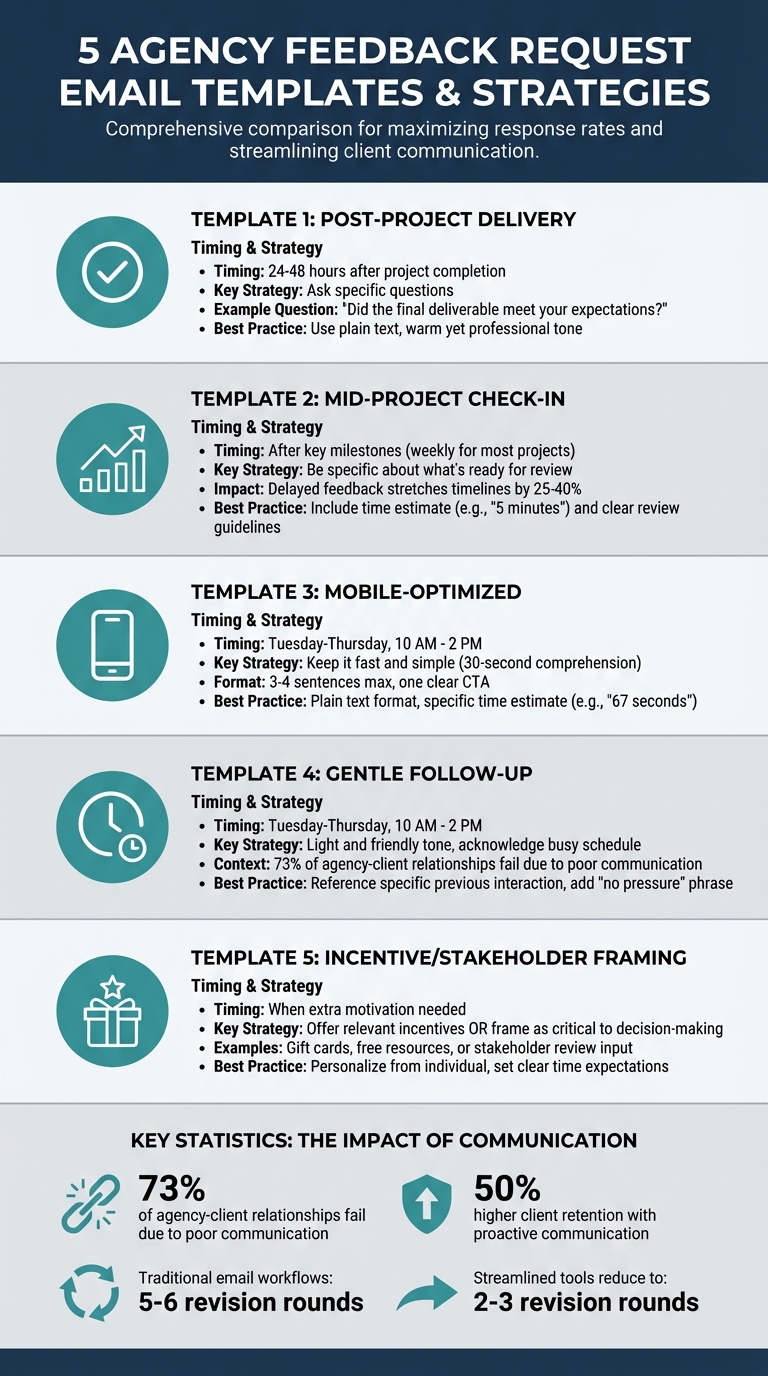
- Post-Project Delivery: Send within 24–48 hours after project completion. Ask specific, clear questions like, "Did the final deliverable meet your expectations?"
- Mid-Project Check-In: Use after key milestones to catch issues early. Focus on specific deliverables and provide clear review guidelines.
- Mobile-Optimized Requests: Keep emails short and simple for mobile users. Include one clear action and avoid complex layouts.
- Gentle Follow-Ups: If feedback is delayed, send a friendly reminder acknowledging the client’s busy schedule.
- Feedback with Incentives: Offer rewards or frame feedback as a key part of decision-making to boost engagement.
Each template ensures clarity, saves time, and improves response rates. For more efficiency, consider tools like BoastImage, which simplify feedback collection with visual feedback tools and streamlined workflows.
5 Feedback Request Email Templates for Agencies: Timing and Best Practices
How to Write a Customer Feedback Email That Stands Out
Writing a great email is only half the battle; you also need a system to get clear actionable feedback so you aren't left guessing what the client wants.
sbb-itb-32f6eb2
1. Post-Project Delivery Feedback Request
Timing is everything when requesting feedback. Aim to send your email within 24–48 hours of completing the project. At this point, the experience is still fresh in your client’s mind, making it easier for them to provide detailed and actionable responses. Waiting too long could result in your request being forgotten or deprioritized.
When crafting your email, focus on personalization, set clear expectations for the time required, and include a single, clear call-to-action. Avoid generic prompts like "Any feedback?" Instead, ask specific questions such as, "What part of the design process felt most collaborative?" or "Did the final deliverable align with your expectations?" Using a website feedback tool can help streamline this process by allowing clients to leave comments directly on the work.
For a more personal touch, stick to plain text emails. Keep your tone warm yet professional, and make it easy for clients to respond. Offer options like replying directly to your email or scheduling a quick 5-minute call for feedback.
Here’s an adaptable email template:
Subject: Quick feedback on [Project Name]?
Hi [Client Name],
We just wrapped up [specific project or deliverable] and wanted to check in while everything’s still fresh. Your input helps us refine our process and deliver even better results in the future.
Could you take about 60 seconds to answer two quick questions?
- What worked well during this project?
- What’s one thing we could have done better?
You can reply directly to this email or [book a 5-minute call here]. Either option works!
Thanks again for trusting us with this project.
[Your Name]
It’s important to match the tone of your email to your client’s communication style. For corporate clients, a straightforward and professional tone works best. On the other hand, creative brands might respond better to a more relaxed and conversational approach. If your client tends to focus on details, reference specific milestones or deliverables. For those who prefer a broader perspective, keep your questions high-level.
Up next, we’ll look at a mid-project check-in template to help you gather insights before the project concludes.
2. Mid-Project Checkpoint Feedback Request
Catching potential issues during the project can save both time and money. The best time to send a checkpoint email is right after completing a major milestone - like finalizing wireframes, delivering initial design drafts, or setting up an essential feature. For most agency projects, a weekly check-in works well. It keeps the project moving forward without overwhelming your client. These proactive check-ins fit seamlessly into your feedback process, ensuring that any concerns are addressed early.
The strength of a mid-project email lies in its specificity. Be clear about what’s ready for review and what stage the project is at. For instance, instead of a vague, "Please review the files", try something like: "The homepage wireframes are ready. At this stage, we’re focusing on layout and navigation flow - not finalizing the copy." Providing this context helps prevent clients from getting sidetracked by elements that aren’t finalized yet.
Including a time estimate for the review is another game-changer. A note like, "This will take about 5 minutes", can significantly improve response rates. Combine this with clear review guidelines, such as asking clients to focus on user experience and layout rather than minor text edits.
Here’s a template you can use or tweak:
Subject: Your review needed: [Specific Deliverable] for [Project Name]
Hi [Client Name],
We’ve just completed the [specific milestone, e.g., homepage wireframes] and would appreciate your input before moving forward.
Project Status: 30% complete | Timeline: 2 days ahead of schedule
What’s ready: [Brief description of deliverable]
Time needed: About 5 minutes
Focus areas: Review the layout and navigation; we’ll tackle copy refinements next.
Key question to consider: Will your customers find this navigation intuitive?
[Link to review]
Next steps: Once approved, we’ll move into interior page designs by [specific date].
Let me know if you have any questions!
[Your Name]
Mid-project feedback is just as crucial as post-project input. It provides actionable insights that can directly impact the project’s success. Keep in mind that delayed feedback cycles can stretch project timelines by 25% to 40% , often because clients ghost feedback tools that are too complex to use. By making your checkpoint requests clear and easy to follow, you protect your schedule and strengthen your client relationship.
3. Mobile-Optimized Feedback Request
With most clients checking emails on their phones, it's crucial to design feedback requests that work seamlessly on small screens. The secret? Keep it fast and simple - your client should understand your request within 30 seconds of opening the email. Strip away anything unnecessary, like client feedback login requirements that create friction.
Begin with a subject line that clearly states the purpose and the time commitment, like: "Quick feedback (60s)". This kind of subject line sets clear expectations and encourages prompt attention. Inside the email, stick to a clean, text-only format. Complex layouts can display poorly on mobile devices and may come across as impersonal. A plain-text approach often works better because it feels like a genuine message from a real person.
Keep the body of your email concise - three to four sentences max. Clearly outline what needs to be reviewed, how long it will take (be specific: "roughly 67 seconds" is more effective than "a few minutes"), and include just one call-to-action button or link. Too many links or buttons can confuse the recipient and reduce response rates. Keep paragraphs brief and focused.
Timing is just as important as format. Send these emails between Tuesday and Thursday, ideally between 10 AM and 2 PM, when open rates tend to be highest. Avoid sending on Mondays when inboxes are flooded or Fridays when people are winding down for the weekend. To make the email feel less automated, include your name and role at the top (e.g., "Sarah, Project Manager").
Here’s a simple template tailored for mobile users:
Subject: Quick feedback (60s) – [Project Name]
Hi [Client Name],
The [specific deliverable] is ready for review. It’ll take about 60 seconds on your phone.
What to review: [One specific element, e.g., color scheme and button placement]
[Review Link]
Reply with concerns or click approve.
Thanks,
[Your Name]
[Your Role]
4. Gentle Follow-Up Feedback Request
If your first feedback request goes unanswered, it's important to give your client enough time before following up. Timing is everything here - being persistent without coming across as pushy. Communication is crucial, especially since 73% of agency–client relationships fail due to poor communication rather than the quality of work or the tools used, such as MarkUp.io alternatives.
When you do follow up, keep the tone light and friendly. Make it feel like a casual check-in rather than a complaint. Start by acknowledging that your client has a busy schedule, and offer flexibility if the timing isn't convenient. Always sign off with your name and role, such as "Mike, Creative Director", to keep things personal. A simple phrase like "But no pressure" can go a long way in easing any guilt they might feel about the delay.
Adding a personal touch is key. Reference something specific from your last interaction - maybe a project milestone, a concern they mentioned, or a detail from a recent conversation. This shows you're paying attention and ensures your message feels authentic, not automated. If your client prefers high-level updates instead of technical jargon, tailor your language to match their style.
For the best results, send your follow-up between Tuesday and Thursday, ideally between 10 AM and 2 PM, when email open rates are highest. Including a quick visual cue, like "Step 3 of 5 complete", can also highlight project progress and emphasize the importance of their feedback. Here's a template that incorporates these strategies:
Subject: Following up – [Project Name] Feedback
Hi [Client Name],
I know you're swamped. I'm just circling back on the [specific deliverable] I sent last [day of week].
What I need: Your thoughts on [one specific element]. It'll take roughly 60 seconds.
[Review Link]
If now isn't the best time, just let me know when would work better. But no pressure.
Thanks,
[Your Name]
[Your Role]
5. Feedback Request with Incentive or Stakeholder Framing
Sometimes, a little extra motivation can make all the difference when requesting client feedback. By using incentives or framing the request as critical to decision-making, you can make your email more appealing and effective.
Using Incentives
Incentives work best when they’re directly relevant to your audience. For instance, Rev sent out a Valentine’s Day-themed feedback request to 200,000 users, offering a chance to win a gift card. This resulted in over 3,000 completed responses. Another example is Peppertype, which offered a $25 gift card to the first 250 users who left honest reviews on Capterra. Similarly, Instamojo provided a free ebook designed specifically for business owners. The takeaway? Incentives should feel either immediately valuable or professionally useful to drive engagement.
Stakeholder Framing
If an incentive isn’t the right fit, stakeholder framing can be just as effective. This approach highlights the importance of the client’s feedback in shaping future decisions, such as product roadmaps or industry-focused improvements. As Danielle Isbell from Odd Dog explains:
"Most customers don't care about you – they care about themselves. So, if you make the ask around them, you're sure to get better follow-through".
For example, you might position the feedback as critical for an upcoming Quarterly Business Review, a meeting where their input could directly influence the next phase of deliverables. This makes the request feel more personal and aligned with their interests.
Key Tips for Success
- Set clear expectations about the time required to complete the feedback.
- Personalize the request by sending it from an individual (e.g., "Sarah, Account Manager") rather than a generic email address. This small touch can make the outreach feel more genuine.
Here’s a template that blends both strategies effectively:
Subject: Quick favor – your input shapes our roadmap
Hi [Client Name],
I’m preparing for our upcoming stakeholder review and want to ensure your team’s priorities are front and center.
What I need: 7 minutes to answer three questions about [deliverable]. Your insights will directly influence how we approach Phase 2.
[Feedback Link]
As a thank you, the first 50 responses will receive a [relevant resource/gift card]. Your feedback will shape our next quarter.
Available this week?
Thanks,
[Your Name]
[Your Role]
This approach combines motivation with relevance, ensuring your feedback requests are not only noticed but acted upon.
Streamlining Feedback Collection Beyond Email
Even with perfectly crafted email templates, the feedback process can hit roadblocks if clients find it hard to communicate their thoughts clearly. Often, feedback via email is vague or scattered, leading to confusion and, ultimately, more revision cycles. On average, traditional email workflows result in 5–6 rounds of revisions, mostly because feedback gets buried in threads or lacks the clarity needed to move forward. Clearly, there’s a need for a more streamlined, client-friendly approach - this is where BoastImage comes in.
BoastImage simplifies the process by cutting out unnecessary steps. By pairing your email communication with this feedback tool, you can remove one of the biggest obstacles: the need for clients to create an account. With BoastImage, clients can simply click a link and provide feedback directly - no login required. This hassle-free system allows clients to use point-and-click annotations, shapes, emojis, or even freehand drawings to comment on specific design elements. Instead of deciphering vague emails, you’ll have actionable, visual feedback right from the start.
For agencies, BoastImage provides the structure needed to manage projects efficiently without overwhelming clients. Features like threaded discussions, version control, Kanban boards, and design testing across different resolutions ensure that feedback is precise and easy to act on.
- Threaded discussions stay linked to specific design elements, so feedback doesn’t get lost in endless email chains.
- Version control automatically tracks every iteration, ensuring you always know which version you’re working on.
- Kanban boards turn approved feedback into clear, actionable tasks, keeping the workflow organized.
The pricing model reflects its focus on simplicity and usability. Plans start at $9.95/month for Solo and $19.95/user/month for Team, both of which include unlimited external reviewers. Importantly, clients don’t count toward your budget, which is a big deal when managing projects with multiple stakeholders.
Instead of attaching a static PDF to your email, include a BoastImage link. This small change can reduce design revision cycles down to just 2–3 rounds, compared to the usual 5–6. Why? Because clients can show you exactly what they mean the first time around.
Learn more about BoastImage here.
Conclusion
Gathering feedback from clients doesn’t have to be complicated. By customizing your email templates to match different project phases - such as post-delivery, mid-project reviews, mobile-specific feedback, gentle reminders, or even incentivized requests - you create a clear path for clients to share their thoughts.
Interestingly, 73% of agency-client relationships falter due to poor communication, while agencies that prioritize proactive communication see a 50% higher client retention rate. Pairing thoughtfully written emails with a structured feedback system transforms feedback requests into opportunities to strengthen your role as a trusted partner. This approach not only builds trust but also encourages smoother, more productive feedback exchanges.
That said, even the best email templates can’t fix unclear or disorganized feedback. This is where tools like BoastImage make a difference: clients can click, comment directly on the visuals, and provide feedback that’s both immediate and actionable.
FAQs
How do I choose which feedback email template to use?
When crafting a feedback email, choose a template that aligns with your project's stage and the purpose of your communication. For instance:
- Use a clear and detailed format when requesting feedback on deliverables, ensuring your client has all the necessary information to provide constructive input.
- Opt for a personalized and conversational tone for follow-ups, especially if you're building rapport or seeking clarification.
Also, consider the tone of your email - whether it should be professional, approachable, or even lighthearted - based on the nature of your relationship with the client. Tailoring your template to fit your goals not only makes your message more effective but also encourages actionable and meaningful feedback.
What should I do if a client keeps ignoring feedback requests?
If a client isn't responding to feedback requests, it’s important to stay professional and proactive in your communication. Send polite reminders that highlight why their input is crucial. Make the process as simple as possible for them - tools like BoastImage can help by allowing clients to leave comments directly without the hassle of creating an account.
Be upfront about deadlines and how delays in feedback could impact the project timeline. If the silence continues, consider increasing the frequency of your reminders or trying different communication methods, like email, phone calls, or even scheduling a brief meeting to address any concerns directly.
How can I get clearer, more actionable feedback than email replies?
Using structured visual feedback tools is a game-changer for clearer, actionable input. These tools allow clients to comment directly on specific parts of a design, cutting down on ambiguity and making revisions much easier. Pair this with clear goal-setting, version control, and breaking down feedback into manageable tasks, and you can transform vague suggestions into concrete steps. Visual tools not only simplify communication but also help reduce misunderstandings, ensuring feedback is precise and actionable.