
What are Visual Feedback Tools?
Visual feedback tools let you and your team collect clear, precise feedback on designs, images, PDFs, or websites. Reviewers can comment directly on specific elements, eliminating vague emails or unclear screenshots. These tools simplify collaboration, save time, and keep feedback organized in one place.
Key Features:
- Pin comments directly to elements for clarity.
- Automatically gather technical details (e.g., browser, OS) with each comment.
- Share feedback links - no logins or accounts required.
- Manage feedback in a central dashboard with task tracking features.
Why They Matter:
- Avoid scattered feedback and back-and-forth emails.
- Streamline client approvals and stakeholder input.
- Ideal for design reviews, staging site approvals, and responsive testing.
The Problem with Most Visual Feedback Tools
Most visual feedback tools optimize for internal teams and bolt on client access as a feature. This creates friction: clients must create accounts, learn dashboards, and navigate complexity meant for designers and developers.
The result? 40-60% of clients ghost feedback requests. The bottleneck isn't your workflow—it's client adoption. Learn more about why clients ghost feedback tools and what actually works.
Client-First vs. Team-First: What's the Difference?
Visual feedback tools fall into two categories based on who they're designed for:
- Team-First Tools: Designed for internal teams, often requiring logins and offering advanced project management features. They prioritize internal efficiency but treat external reviewers as secondary users.
- Client-First Tools: Focused on external reviewers, offering simple, no-login feedback processes. They optimize for client completion rates while keeping team workflow tools behind the scenes.
The distinction matters because the real challenge isn't organizing feedback—it's getting clients to give it in the first place. When 24% of users abandon account creation flows and another 36% quit if registration feels complicated, your feedback tool becomes a barrier instead of a solution.
Tools like BoastImage stand out by prioritizing ease of use for clients, offering unlimited reviewers, and making feedback collection effortless. Whether you're working with clients, stakeholders, or contractors, visual feedback tools ensure smoother collaboration and faster approvals.
Design Feedback Tool Loved by Designers and Reviewers
Using visual feedback tools is simple: upload your design or share a website link, and reviewers can click directly on specific elements to leave comments. No training or complicated setup is required. This straightforward process ensures precise feedback and smooth collaboration.
Pinning Comments to Specific Elements
When reviewers click on an element, their comment is pinned right to that spot. Even if the content changes, the comment stays anchored to the original element. This eliminates unclear instructions like “that thing near the button” or “the image at the top.” Additionally, the tool automatically captures technical details, giving developers all the context they need to address the issue without back-and-forth clarification. This level of precision is a game-changer for streamlining feedback.
Share a Link, Get Instant Feedback
Most tools generate a unique link that can be shared through any channel. Once the link is clicked, reviewers can start commenting immediately - no account setup, passwords, or complicated dashboards required. For video files or live web pages, comments can be linked to specific timestamps or frames. This makes it easy for reviewers to point out exactly where something needs attention, whether it’s a design tweak or a functionality issue.
Capture Any Web Page Instantly
Get our free Chrome extension to capture full pages, visible areas, or selected regions—all without leaving your browser.
Install Chrome ExtensionManaging Feedback and Turning It Into Tasks
As feedback rolls in, teams can track everything in a central dashboard. This hub organizes comments, helping teams distinguish between resolved and pending issues. Many tools include features like Kanban boards or table views to replace scattered email chains or Slack messages. Comments can often be converted into tasks with a single click, complete with assignees, deadlines, and priorities. Threaded discussions with @mentions keep conversations focused and ensure quick conflict resolution. Plus, version control guarantees reviewers always see the latest design while maintaining a full history of previous feedback for reference.
Team-First vs. Client-First Tools
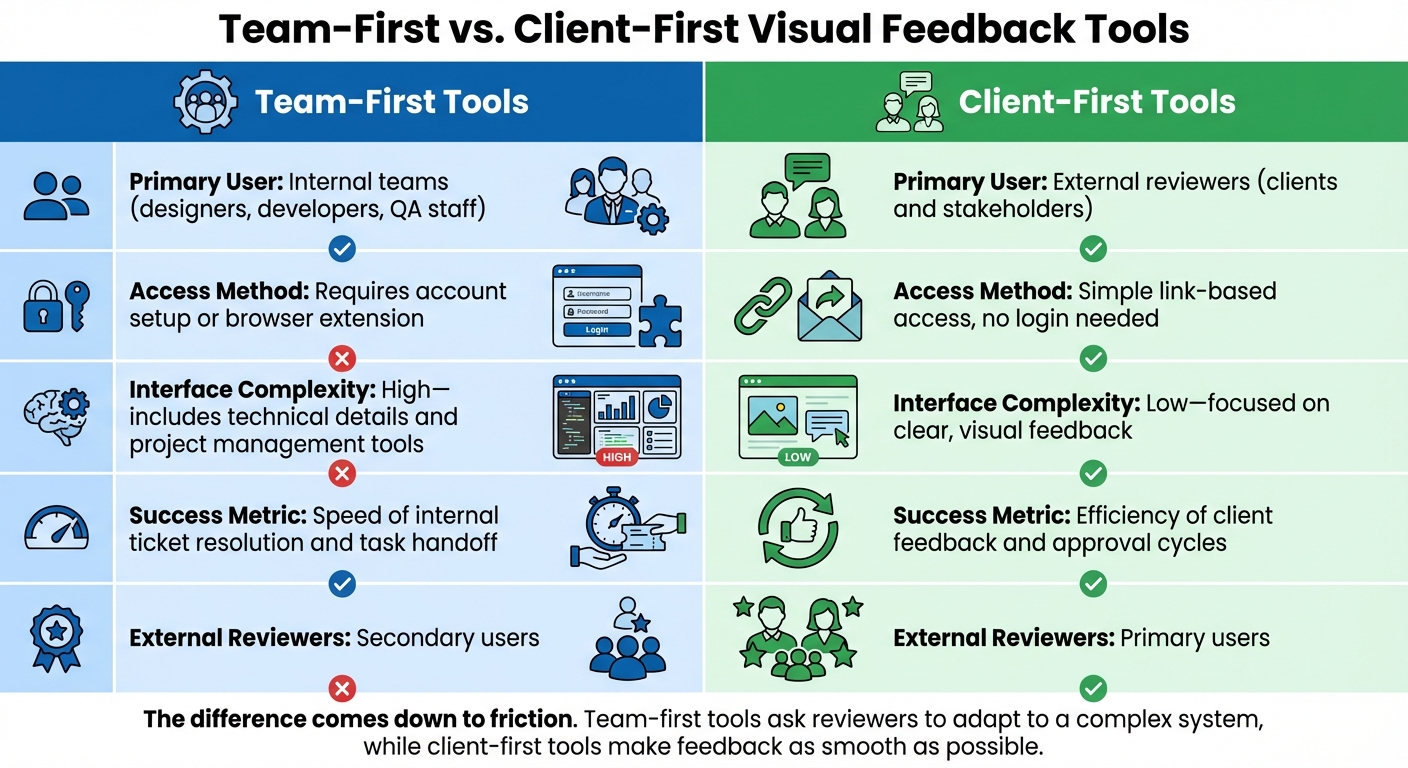
Team-First vs Client-First Visual Feedback Tools Comparison
Visual feedback tools are designed with either internal teams or external reviewers in mind, and this focus significantly impacts workflow efficiency. Let’s break down how these two approaches shape the feedback and review process.
Team-First Tools
Team-first tools prioritize the needs of internal teams - designers, developers, and project managers. These tools are packed with features like Kanban boards and detailed task management systems, making them ideal for handling complex workflows. However, external reviewers, such as clients or stakeholders, are treated as secondary users.
To participate, external reviewers often need to create accounts or install browser extensions. The interface leans heavily toward technical users, displaying information like task assignments and developer logs. The primary goal here is efficiency for the internal team: resolving tickets quickly and smoothly transitioning tasks to developers. The client experience, however, is not the main focus.
Client-First Tools
On the flip side, client-first tools are all about creating a seamless experience for external reviewers - clients, stakeholders, and contractors. These tools aim to eliminate barriers, allowing reviewers to provide feedback without needing accounts or additional software. The process is as simple as sharing a link.
While internal teams still benefit from features like version control and task tracking, these tools keep the complexity behind the scenes. For clients, the interface is stripped down to the essentials: click, comment, and move on. Success is measured by how easily and quickly external reviewers can provide feedback, minimizing any obstacles in their way.
Key Differences Between Approaches
Here’s a side-by-side comparison to highlight the main differences:
| Feature | Team-First Tools | Client-First Tools |
|---|---|---|
| Primary User | Internal teams: designers, developers, and QA staff | External reviewers: clients and stakeholders |
| Access Method | Requires account setup or browser extension | Simple link-based access, no login needed |
| Interface Complexity | High - includes technical details and project management tools | Low - focused on clear, visual feedback |
| Success Metric | Speed of internal ticket resolution and task handoff | Efficiency of client feedback and approval cycles |
| External Reviewers | Secondary users | Primary users |
In short, the difference comes down to friction. Team-first tools ask reviewers to adapt to a complex system, while client-first tools aim to make the feedback process as smooth and straightforward as possible.
sbb-itb-32f6eb2
When You Need a Visual Feedback Tool
Best Use Cases
Visual feedback tools are perfect for gathering clear, actionable input from team members, clients, or stakeholders who aren't deeply involved in your internal systems. They simplify the feedback process, especially when working with people who might not be familiar with your tools.
One of the most common scenarios is client approvals on staging sites. Agencies can share a live design link, allowing clients to click directly on elements and leave specific comments - avoiding the confusion of vague email feedback.
These tools are also helpful for subject matter expert reviews. For example, in projects like eLearning or technical documentation, experts or non-technical stakeholders (such as marketing or legal teams) can easily annotate screens to highlight unclear icons or layout issues. Additionally, for responsive testing, external reviewers can switch between desktop and mobile views, leaving feedback precisely where it's needed.
This design-focused workflow emphasizes the importance of capturing input from external stakeholders, as noted earlier.
When You Don't Need One
While visual feedback tools can be incredibly useful, they're not always necessary.
If you're working solo and don’t have external reviewers, using one of these tools might just add unnecessary complexity. Without feedback to collect, it's an extra step you don't need. Similarly, if your team already collaborates effectively within your design tool, introducing another system for feedback could lead to redundant processes.
For projects that require multiple people editing in real time, a co-editing tool is a better fit. And if your project involves more extensive project management needs - like Gantt charts, resource allocation, or budget tracking - a visual feedback tool isn't designed to replace a full-fledged PM platform. Instead, it works best as a way to streamline visual reviews and approvals.
Ultimately, the value of these tools depends on how well they align with your specific workflow and feedback needs.
How BoastImage Works Differently
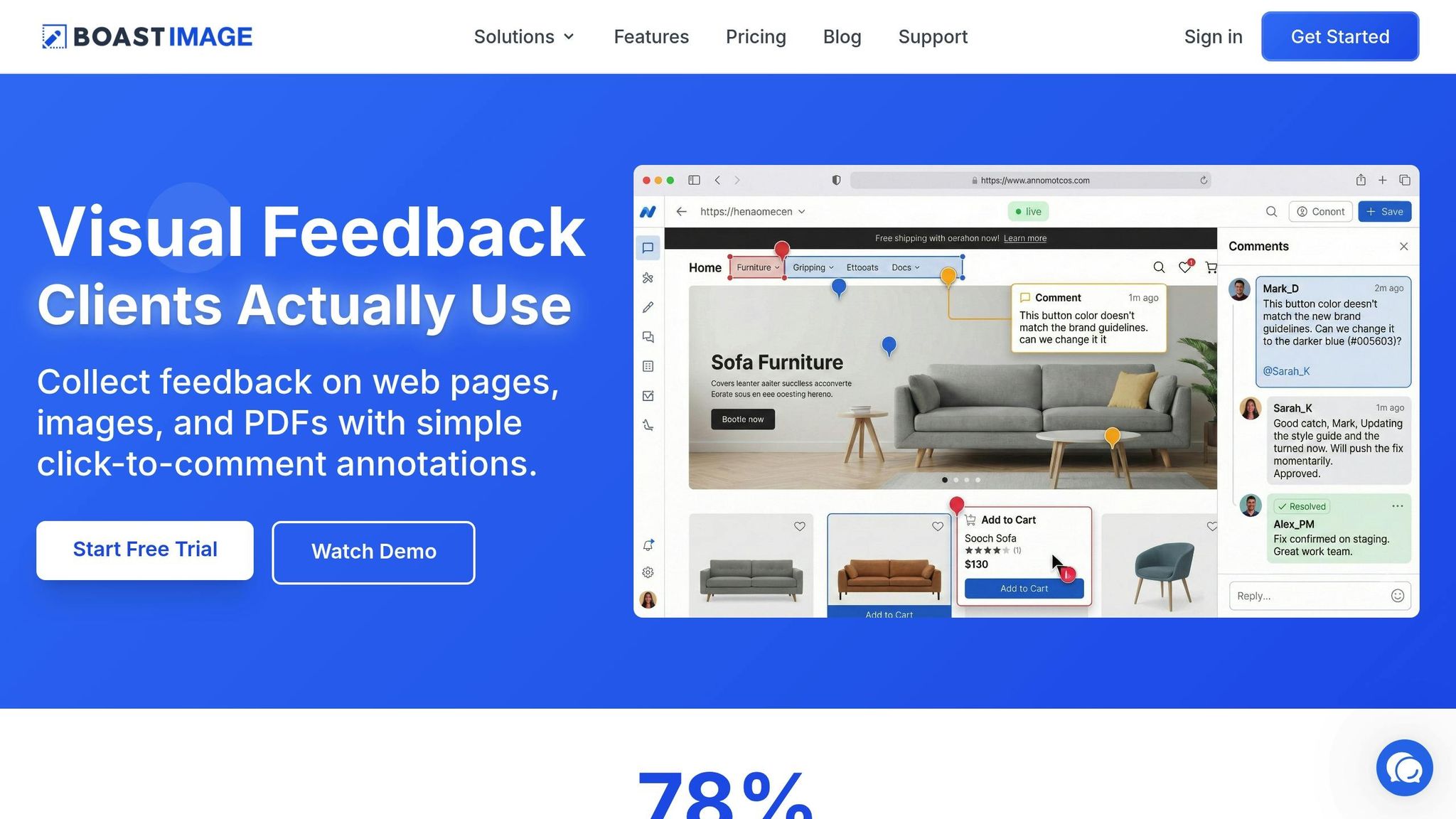
BoastImage takes a fresh approach to client collaboration by introducing features that simplify feedback and make the process seamless for everyone involved.
Clients Never Need Accounts
With BoastImage, clients don’t have to deal with the hassle of creating accounts. All they need is a project link - click it, and they can start leaving comments immediately. No usernames, no passwords, no registration forms. This eliminates a common frustration for clients who only need to provide feedback occasionally, making the entire process quicker and easier.
While other tools may offer guest access as an afterthought, BoastImage puts client convenience front and center. The interface is clean and intuitive, allowing reviewers to focus on their feedback without distractions, so they can get back to their day without unnecessary steps.
Unlimited External Reviewers
BoastImage includes unlimited external reviewers with every paid plan, ensuring your costs stay predictable no matter how much feedback you need. Unlike traditional tools that charge per user or restrict guest access, BoastImage ensures that your clients don’t take up seats in your account. This pricing model removes financial barriers, letting you gather as much feedback as necessary without worrying about escalating costs.
This approach reflects a simple idea: collecting client feedback shouldn’t come with extra fees. By prioritizing unlimited access for external reviewers, BoastImage supports a smoother, more efficient workflow.
Simple for Clients, Powerful for Teams
BoastImage is designed with two distinct user experiences in mind. For clients, it offers a straightforward commenting interface. They can view the design, click on specific areas, and leave their feedback without wading through unnecessary features. On the other hand, your team gets access to advanced tools like Kanban boards, version control, and task management - features that clients never see.
With just one click, client comments can be converted into actionable tasks, assigned to team members, and tracked to completion. Beth Epperson, QA Manager & Accessibility SME at ELM Learning, highlights the benefits of this separation:
"The client and the internal team can both access the data while still preserving the integrity and security of internal information".
This dual-layer system ensures that clients experience a simple, user-friendly interface, while your team benefits from the robust tools needed to manage and act on feedback effectively. It’s a system that adapts to the needs of both groups, making collaboration smoother and more productive.
Conclusion
Visual feedback tools address a straightforward yet critical challenge: getting clear, actionable feedback from people outside your internal team. Without them, you’re left deciphering vague emails or trying to make sense of screenshots marked with arrows that don’t clearly identify issues. This lack of clarity slows projects down, causes feedback to get lost, and drags out revision cycles. These tools solve that problem by allowing reviewers to click directly on specific parts of the work and leave comments tied to exact locations, complete with the technical details your team needs to move forward.
The distinction between a team-first and client-first approach is more important than many teams realize. Traditional tools often treat external reviewers as an afterthought, requiring them to create accounts or navigate dashboards designed for internal use. A client-first approach flips this script. The real obstacle isn’t the tool itself - it’s getting clients to engage. When clients can simply click a link and start commenting immediately, without dealing with logins or complicated interfaces, they’re far more likely to provide the feedback you need.
Structured visual feedback systems don’t just save time - they transform the entire review process. They can cut review cycles by up to 40%, and real-time collaboration can reduce design review cycles by 50%. That’s not just about speeding things up; it’s about eliminating the frustrating back-and-forth that wears down both teams and clients. This streamlined approach highlights the value of adopting tools designed with a client-first mindset.
For projects that depend on external approvals - whether from clients, stakeholders, or contractors - choosing the right visual feedback tool can completely change how feedback is given and acted upon. As discussed, client-first tools not only bring clarity to the process but also help secure faster approvals, keeping projects on track and everyone involved far less frustrated.
FAQs
How can visual feedback tools enhance team collaboration?
Visual feedback tools replace unclear, text-only feedback with precise, actionable input by letting reviewers attach comments directly to specific parts of a design, mockup, or image. Instead of vague messages like "the logo looks off," feedback becomes clear, targeted, and tied to the exact element being discussed.
These tools centralize all comments into one shareable link, simplifying communication for designers, developers, clients, and contractors. No more juggling scattered screenshots, endless email threads, or Slack conversations. Instead, everyone gets a clear picture of who said what, what needs attention, and what’s already resolved. This means quicker decisions, better alignment, and smoother workflows.
With features like link sharing and pinpointed annotations, teams spend less time deciphering feedback and more time enhancing their work. Plus, the centralized setup supports version control and task tracking, keeping projects on schedule and ensuring higher-quality results with fewer revisions.
What’s the difference between team-first and client-first visual feedback tools?
Team-first visual feedback tools are built with internal collaboration in mind. They cater to teams like designers, developers, and project managers, offering features such as real-time annotations, task tracking, and bug assignment. These tools streamline workflows within the team, but external reviewers - like clients or stakeholders - are often treated as secondary users. In most cases, they need to create accounts to participate, which can add a layer of complexity.
Client-first visual feedback tools take a different approach by prioritizing the experience of external reviewers. These tools simplify the process for clients or stakeholders by allowing them to provide feedback through shareable links and pinned comments on specific areas of a design - no login required. The focus here is on making feedback and approvals as quick and straightforward as possible, while keeping the internal team's workflow behind the scenes.
To put it simply, team-first tools are all about boosting internal efficiency, while client-first tools aim to create a seamless, user-friendly feedback experience for external collaborators.
When should I use a visual feedback tool?
When working on designs, mockups, or other visual projects, a visual feedback tool is a game-changer for gathering input from external reviewers like clients, stakeholders, or contractors. These tools let reviewers leave location-specific comments directly on the asset, keeping feedback tied to the exact part of the work being discussed.
They’re especially handy for tasks like client approvals, sign-offs, or any scenario where you need feedback without requiring reviewers to create accounts or deal with complicated systems. If your process relies on external input for creative projects, using a visual feedback tool can help you save time, minimize misunderstandings, and make collaboration smoother.
Related Blog Posts
Ready to streamline your feedback workflow?
Try Boast free for 14 days. No credit card required.
Start Free Trial