
Why Feedback Fails in Handoff
Feedback during project handoffs often fails because of vague comments, scattered communication, and tools that frustrate clients. These issues lead to delays, missed deadlines, and rushed outputs that harm brand perception. Here’s what you need to know:
- Vague Feedback: Clients often use unclear phrases like "make it pop", leaving teams guessing.
- Scattered Channels: Feedback spread across email, Slack, and spreadsheets causes confusion and version control problems.
- Complex Tools: Overly complicated platforms discourage client participation, slowing projects.
To fix this, focus on simpler tools that are easy for clients to use, centralize all feedback in one place, and establish clear processes. For example, tools like Boast allow clients to leave comments without logins or training, cutting approval times by up to 60%. Combine this with structured workflows - like targeted questions and defined roles - to ensure feedback is actionable and tied to business goals.
The result? Faster approvals, fewer revisions, and better outcomes for your projects.
Design “handoff” is changing forever
sbb-itb-32f6eb2
Why Feedback Breaks Down During Handoffs
The handoff process often disrupts feedback flow, turning clear requests into vague comments, scattered messages, and inaccessible tools. Let’s dive into some common pitfalls that contribute to this breakdown.
Vague Client Comments
Clients and creative teams often speak different "languages", which can lead to miscommunication. For example, when a designer asks, "What do you think?" without tying the question to a specific business problem, the feedback they receive is often subjective rather than strategic. A client might respond with phrases like "make it pop", which could mean anything from improving brand visibility to driving revenue. This disconnect creates a “broken telephone” effect, where the true intent behind feedback gets lost.
The issue is compounded when designers present their work as a step-by-step process rather than focusing on results. Many clients lack the visual vocabulary to describe design issues clearly. To complicate matters further, about 1 in 50 people experience aphantasia, a condition that makes it difficult to form mental images. This makes it even harder for some clients to provide precise visual feedback.
Feedback Spread Across Multiple Channels
When feedback is scattered across emails, Slack messages, phone calls, and spreadsheets, it creates silos that make it nearly impossible to consolidate information effectively. Katie Walsh from Brandfolder highlights the problem:
"Information is relayed quickly, passed along to multiple team members, and along the way details are misconstrued, misinterpreted, or left out entirely."
This fragmentation leads to version control nightmares. Stakeholders might end up commenting on outdated files, while project managers waste valuable time piecing together scattered notes instead of focusing on project delivery. Without a clear record of who approved what and when, teams struggle to track decisions and changes.
Complex Tools That Block Client Participation
Overly complicated client feedback tools with no login requirements can alienate clients, especially non-technical stakeholders. IT permissions, operating system conflicts, and plugin requirements often create barriers, delaying projects. When clients face these hurdles, they tend to revert to email or skip providing feedback altogether.
Using spreadsheets to describe visual issues is another common approach, but it’s prone to miscommunication. Tools designed for visual website reviews, on the other hand, can streamline the process. These tools have been shown to cut feedback and approval time by at least 30%.
What Causes Feedback to Get Misinterpreted
Even when feedback is shared, it often becomes unusable because the tools designers rely on don’t align with how clients naturally communicate. Let’s explore how tool design and the absence of visual context lead to these misunderstandings.
Tools Built for Teams, Not Clients
Many feedback tools are crafted with internal teams in mind, not clients. This mismatch creates unnecessary hurdles since clients often speak in business terms, not design jargon. Todd Zaki Warfel, an author and leadership coach, explains it well:
"Clients – they're more of an occasional traveler. They don't know the system; they don't know the ins and outs. They're less likely to share your language. I mean, you're probably speaking design. They speak business."
This language barrier becomes a bigger issue when clients are forced into systems designed for internal workflows. Features like login requirements, IT permissions, or overly complex navigation can overwhelm clients, causing delays in feedback. As a result, the feedback they provide often lacks strategic value and remains vague.
When these tools create friction, clients either avoid the process altogether or fall back on less efficient methods like email.
Feedback Without Visual Context
Another major challenge arises when feedback isn’t tied directly to the deliverable. ReviewStudio describes this as the feedback-to-reference disconnect:
"There's a feedback-to-reference disconnect that makes both giving and receiving feedback - without the right technology - unnecessarily complicated and lacking in clarity."
For instance, a client might email, “the submit button is broken,” but without visual context, the developer has no idea which button, page, or browser is causing the issue. This lack of clarity forces teams to spend valuable time piecing together feedback instead of resolving problems. Even worse, clients often describe the symptom (like “it doesn’t feel right”) rather than the actual issue, leading to what's known as the subjectivity spiral - a cycle of endless revisions based on guesswork.
To avoid this, feedback needs to be tied directly to specific design elements. Visual annotation tools make it easier for clients to pinpoint exactly what they’re referencing, reducing confusion and creating a more client-friendly feedback process. This approach helps simplify stakeholder input by turning visual comments into actionable tasks.
How to Prevent Feedback Loss During Handoff
Preserving feedback clarity during handoffs requires thoughtful systems and tools. By addressing common breakdowns, you can streamline the process and ensure feedback remains actionable.
Use Client-First Visual Feedback Tools
Choose tools that prioritize ease of use for clients, not just internal teams. Many traditional platforms overwhelm external reviewers with account setups, onboarding, and complicated dashboards, leading to disengagement.
Boast offers a more straightforward solution. Clients simply click a link and leave comments - no accounts, logins, or training required. Behind the scenes, your team benefits from features like version control, task management, and Kanban boards, but clients are spared the complexity. This client-first design eliminates barriers that often cause feedback to scatter across emails and other channels.
Reducing friction boosts engagement. For example, when managers provide regular feedback through accessible tools, employees are 5.2x more likely to feel they receive meaningful input and 3.2x more likely to be motivated to excel. The same principle applies to clients: simplifying the process encourages consistent participation and better-quality feedback.
Create Standard Feedback Collection Processes
The right tool is only part of the solution - you also need a clear, structured workflow. Vague questions like "What do you think?" can result in subjective feedback. Instead, ask targeted questions tied to specific goals, such as: "Does this align with our brand keywords?" or "Does this address the primary audience's needs?".
Educate clients early on how to evaluate designs based on business objectives rather than personal taste. For instance, if a client struggles with vague feedback like "make it pop", encourage them to share examples of designs they admire. This approach establishes a shared visual language and aligns expectations before feedback begins.
Centralize all feedback within a single platform where comments are directly linked to specific design elements. Tools that automatically capture metadata - such as browser type, screen resolution, and device - help reduce back-and-forth clarifications, saving valuable development time.
An organized workflow naturally supports better version control and task management, reducing design revision cycles for smoother handoffs.
Use Version Control and Task Management
Version control guarantees that feedback is based on the most current iteration, avoiding wasted effort on outdated designs. For example, one B2B tech company reduced its revision rounds from four to two and cut cycle times by 60% using version control systems.
Maintaining a record of who requested changes, the reasons behind them, and who approved them prevents decisions from getting lost in email threads or Slack messages. In one case, a creative agency used a "Delay Impact Calculator" to show a client how a two-week feedback delay resulted in a $30,000+ impact. This data-driven approach led to feedback arriving within 24 hours and reduced overall waiting time by over 40%.
The secret is keeping this complexity invisible to clients. They should only interact with a simple interface for leaving comments, while your team manages version tracking, task assignments, and deadlines. This balance of simplicity for clients and robust systems for teams ensures effective feedback without overwhelming anyone - a key principle of a well-designed feedback process.
How to Measure Feedback Integration Success
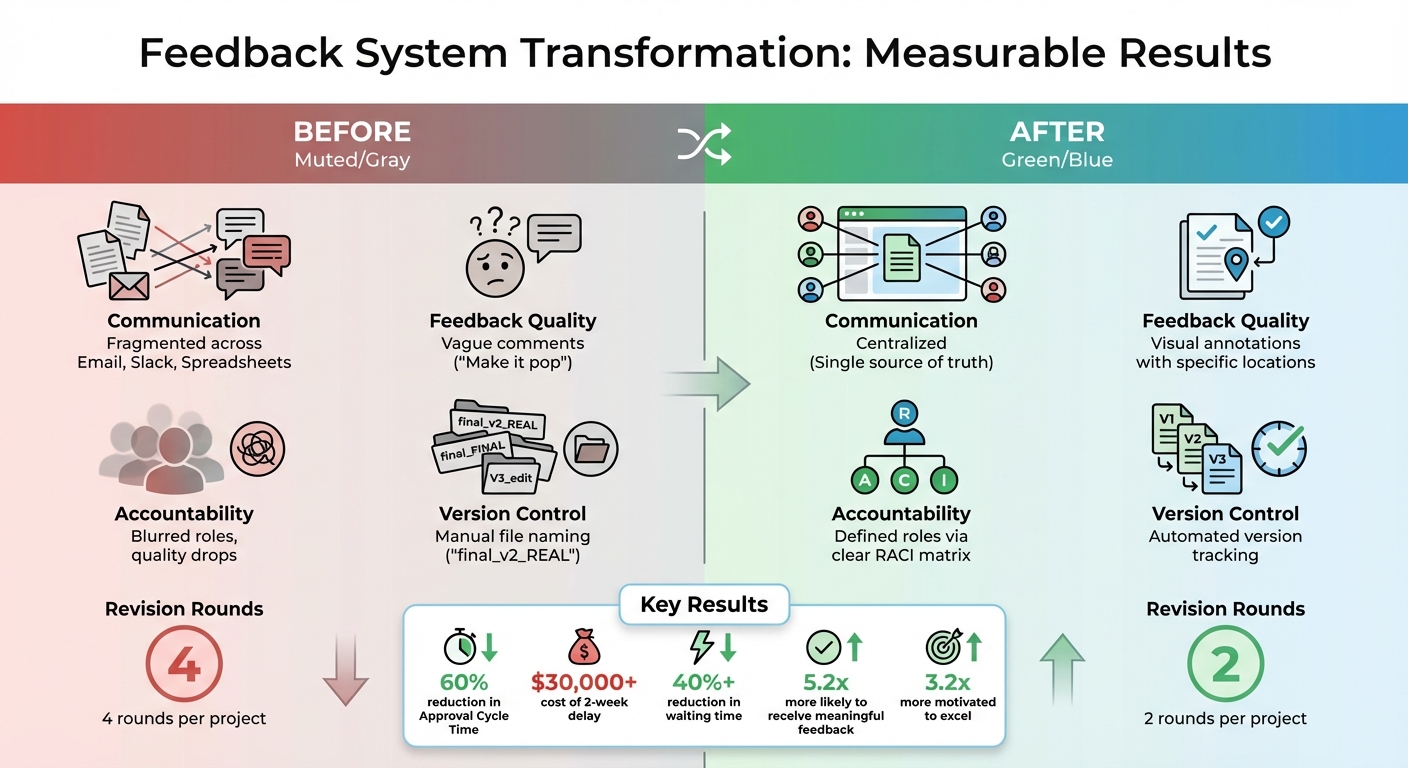
Before vs After: Feedback System Improvements and Impact Metrics
Improved feedback systems only matter if you can measure their impact. Metrics should confirm progress and highlight areas that still need work.
Track Key Metrics
Start by calculating a Feedback Velocity Index (FVI), which blends several critical indicators:
- Approval Cycle Time: The time it takes from submission to final approval.
- Revision Frequency: The average number of revision rounds per project.
- First-Pass Yield: The percentage of work approved on the first try.
These metrics tell a story. High revision frequency often points to communication gaps, while long approval cycles suggest delays in stakeholder responses.
You can also calculate the Cost of Delay (CoD) to translate wasted time into dollars. Include direct labor costs, indirect overhead (usually 20–30% of project costs), and missed revenue opportunities. For instance, one creative agency found that a two-week feedback delay caused a $30,000+ loss, leading the client to commit to providing feedback within 24 hours. This change reduced waiting time by over 40%.
Finally, review post-handoff sessions to uncover workflow bottlenecks.
Run Post-Handoff Review Sessions
Post-handoff reviews are essential for identifying spikes in metrics and pinpointing inefficiencies. These sessions help uncover issues like scattered communication across emails, Slack, and spreadsheets. They also shed light on approval workflow problems, such as the "N Pattern", where internal hierarchies or unclear roles in the RACI matrix cause quality to drop.
Amanda Spence, Service Design Principal at Slalom, captures the challenge well:
"The true value that designers bring to an organization is often thwarted by challenges such as navigating internal politics… or not having a clear path to getting their work approved".
These insights set the stage for comparing results before and after implementing changes.
Compare Results Before and After Changes
First, gather data from current projects to create a baseline. Then, after introducing new tools or workflows, compare the results side by side. Here's an example:
| Metric | Before Changes | After Changes |
|---|---|---|
| Communication Channel | Fragmented (Email, Slack, Spreadsheets) | Centralized (Single source of truth) |
| Feedback Clarity | Vague ("Make it pop") | Visual feedback tools with specific locations |
| Accountability | Blurred roles; quality drops | Defined roles via a clear RACI matrix |
| Version Control | Manual file naming ("final_v2_REAL") | Automated version tracking |
One B2B tech company saw impressive results: a 60% reduction in Approval Cycle Time and a drop in revision rounds from four to two. This was achieved by introducing a Structured Feedback Protocol and assigning a single point of contact.
Tools like Boast make tracking these improvements easier. Boast automatically captures metadata - like browser type and device details - while maintaining clean version histories. This allows for easy before-and-after comparisons. Plus, with unlimited external collaborators included in all paid plans (starting at $9.95/month for Solo), you can track client engagement without worrying about extra user fees.
Conclusion
Feedback often falters during handoff when systems cater more to internal workflows than to client needs. When stakeholders face overly complex tools, scattered communication channels, or unclear feedback requests, they may delay responses - or worse, disengage entirely. The fallout? Stalled projects, endless revision cycles, and wasted time chasing clarity.
The fix is straightforward: client-first visual feedback tools. These tools eliminate the hurdles that discourage participation. By allowing clients to simply click a link and comment directly - without requiring accounts or training - they provide a seamless way to gather feedback. Meanwhile, teams benefit from built-in features like version control, task tracking, and clear accountability. For example, Boast offers this functionality, enabling clients to comment effortlessly while teams manage everything with automated version histories and Kanban boards. Plans start at $9.95/month and include unlimited external collaborators.
However, tools alone won’t solve the problem. Clear processes are equally important. Structuring workflows - such as designating a single point of contact and setting formal feedback deadlines - can turn vague input into actionable guidance. One B2B tech company, for instance, cut approval cycle times by 60% just by adopting these strategies.
Timely feedback doesn’t just keep projects on track - it directly impacts revenue. As Maria Chen, VP of Marketing, put it:
"It wasn't about their timeline anymore; it was about our revenue".
The client-first approach discussed here is the cornerstone of overcoming handoff challenges. Successful handoffs aren’t about luck - they’re about systems that prioritize client involvement, enforce clear processes, and prove their worth with measurable results. By removing barriers to feedback, teams can accelerate timelines and deliver higher-quality outcomes right from the start.
FAQs
How can I make feedback clear and effective during project handoffs?
When handing off a project, specificity and context are your best friends. Instead of vague comments, clearly explain what needs to be improved and, whenever possible, include examples or visual references. This approach reduces misunderstandings and ensures everyone is aligned.
Using tools that let clients or team members comment directly on specific elements - like a visual feedback board - can make communication much clearer. These tools cut down on ambiguity and make it easier to address feedback efficiently. Also, gathering input at key milestones keeps the process on track, ensuring feedback is timely and actionable, which helps avoid last-minute surprises.
To encourage constructive feedback, ask targeted questions such as:
- "What specific changes would improve this?"
- "Which part of this process felt unclear?"
By framing feedback this way, you shift the focus toward solutions and outcomes, turning feedback into a powerful tool for project success.
How can I simplify client feedback without making it complicated for them?
Simplifying client feedback starts with tools that focus on clarity and simplicity. Take BoastImage, for example - it lets clients share their thoughts directly on designs, web pages, or PDFs without requiring them to log in or create an account. This straightforward approach saves time and avoids the hassle of complex dashboards.
To make the process even smoother, consider tools that include features like version control, task management, and organized comment threads. These tools help ensure feedback is easy to follow, actionable, and well-documented, cutting down on miscommunication and boosting collaboration. By keeping things simple and structured, you can create a feedback process that works efficiently for both you and your clients.
How does version control streamline the feedback process?
Version control simplifies the feedback process by maintaining a clear record of all edits and comments throughout a project. It ensures that everyone is working with the latest version, cutting down on confusion and potential miscommunication. When feedback is tied to specific versions, teams can easily track changes, understand the context of suggestions, and avoid overlapping or redundant input.
This system encourages transparency and accountability, giving both teams and clients a clear view of progress while enabling more targeted feedback. By reducing delays and misunderstandings, version control enhances the quality of revisions and keeps the workflow running smoothly.