
Reduce Revision Rounds with Clear Feedback
Clear feedback saves time, money, and frustration during design projects. Unclear or scattered input leads to endless revisions, missed deadlines, and budget overruns. Here's how to avoid these issues:
- Start with a solid creative brief: Define objectives, audience, style, deliverables, deadlines, and scope upfront.
- Managing client revision requests: Set clear boundaries (e.g., 2-3 rounds) to encourage focused client feedback.
- Centralize feedback: Use one platform for all comments to avoid confusion and outdated versions.
- Present work in stages: Share rough drafts early to catch issues before finalizing designs.
- Track and share metrics: Monitor revision rounds and timelines to improve processes and align client expectations.
Home Page Design, Presentation & Feedback Processes for Clients
sbb-itb-32f6eb2
How Unclear Feedback Creates Problems
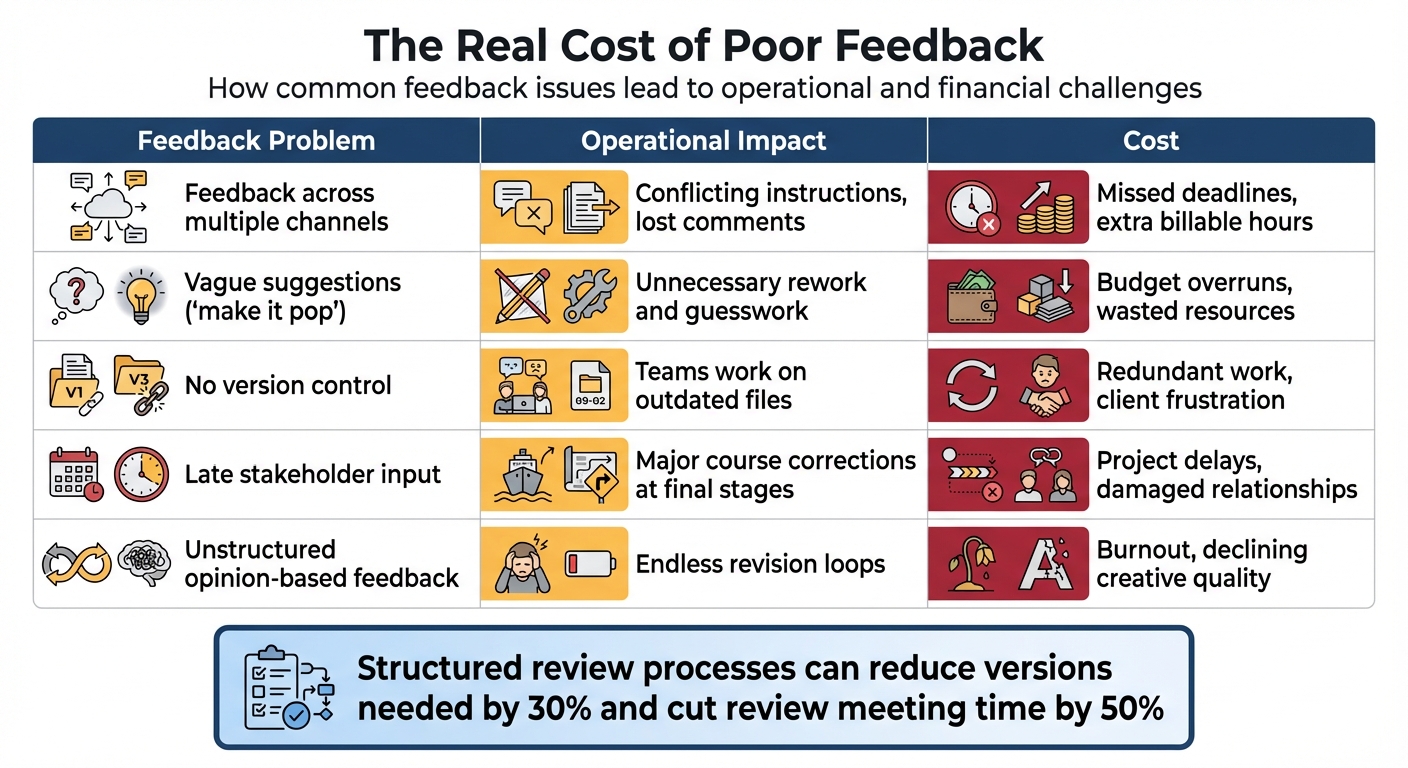
How Feedback Problems Impact Design Projects: Costs and Operational Consequences
Clear and actionable feedback is essential for keeping projects on track and minimizing endless revisions. When feedback is vague - like a client saying, "make it pop" or simply "I don't like it" - designers are left guessing. This lack of direction often leads to revisions that still fail to meet expectations, creating a frustrating cycle of rework.
"Revision rounds are the silent killer of creative projects. They stretch timelines, drain budgets, and wear down designers." – Dave Greene
Feedback Across Multiple Channels
The situation gets even messier when feedback comes from multiple sources and platforms. For example, a client might email comments, a stakeholder could leave notes in a Slack thread, and someone else might annotate a PDF - all for the same project. This fragmented communication leads to conflicting instructions and makes it hard to hold anyone accountable. Designers end up trying to reconcile scattered opinions instead of working toward a unified vision.
Another common issue is version confusion. Without a centralized system, stakeholders may review outdated files and request changes that have already been implemented. This redundancy not only wastes time but also delays project progress, directly increasing costs.
The Real Cost of Too Many Revisions
Ambiguous feedback doesn’t just waste time - it wastes money. Every unclear comment or late suggestion can stretch timelines, blow through budgets, and even force expensive last-minute changes. These inefficiencies can turn a well-planned project into a financial and operational headache.
For designers, disorganized feedback is particularly demoralizing. It stifles creativity and reduces their role to simply executing instructions. The table below highlights how common feedback issues lead to both operational and financial challenges:
| Feedback Problem | Operational Impact | Cost |
|---|---|---|
| Feedback across multiple channels | Conflicting instructions, lost comments | Missed deadlines, extra billable hours |
| Vague suggestions ("make it pop") | Unnecessary rework and guesswork | Budget overruns, wasted resources |
| No version control | Teams work on outdated files | Redundant work, client frustration |
| Late stakeholder input | Major course corrections at final stages | Project delays, damaged relationships |
| Unstructured opinion-based feedback | Endless revision loops | Burnout, declining creative quality |
Implementing a structured review and approval process can make a huge difference. It can reduce the number of versions needed by 30% and cut time spent in review meetings by half. The bottom line? A streamlined feedback process can mean the difference between a project that runs smoothly and one that spirals out of control.
Start With a Detailed Creative Brief
Starting a project without a clear creative brief is like building a house without a blueprint - it’s a recipe for confusion and endless back-and-forth. When instructions are vague, everyone interprets them differently. By the time the first draft is ready, the client might have envisioned one thing, while the designer created something entirely different. A solid creative brief bridges that gap from the outset.
"Most revision rounds aren't about design at all – they're about misalignment. If the starting point is vague, the endpoint will be too." – Dave Greene, ThisIsPerpetual
Think of the brief as the project’s guiding document. It lays out what success looks like before any design work begins. Later, when feedback starts coming in, the brief becomes the go-to tool for discussions. Instead of subjective comments like “I don’t like this,” the conversation shifts to objective questions like “Does this align with the goals we set?” This approach can save everyone from unnecessary revisions and keep the project on track. A clear, agreed-upon brief paves the way for more focused and productive feedback.
What to Include in Your Creative Brief
A creative brief doesn’t need to be lengthy. In fact, keeping it to one page increases the chances that everyone will actually read it. The key is to cover the essentials in a straightforward way:
| Element | What to Define |
|---|---|
| Project objectives | What the project needs to achieve for the business |
| Target audience | Who the creative work is intended to reach and connect with |
| Tone & brand guidelines | The visual and stylistic boundaries, including voice and overall direction |
| Deliverables checklist | A clear list of all required assets |
| Timeline & deadlines | Key milestones and the final delivery date |
| Technical requirements | Any specific formats, dimensions, or platform constraints |
| Written Sign-Off | Client agreement to lock in the project’s scope |
By addressing these elements, the brief minimizes vague feedback and keeps everyone aligned.
Use Kickoff Meetings to Confirm Details
Once the brief is ready, a quick kickoff meeting helps solidify the foundation. A short call - around 10 minutes - ensures that everyone is on the same page. This is the time to clarify any uncertainties, confirm the project scope, and address assumptions before diving into production.
Kickoff meetings also help prevent scope creep. When stakeholders have the chance to ask questions upfront, they’re less likely to introduce major changes down the line. The brief lays the groundwork, and the kickoff meeting ensures it stays intact.
Set Clear Limits on Revision Rounds
A solid creative brief lays the groundwork, but setting clear limits on revision rounds keeps the workflow efficient. Without boundaries, revisions can spiral out of control. A single tweak might lead to a cascade of minor changes, dragging out timelines and pulling focus away from the bigger picture. Limiting revision rounds isn’t about restricting creativity - it’s about protecting the project from endless tweaks that overshadow its main objectives.
When clients have unlimited revisions, they’re less likely to provide thoughtful, consolidated feedback upfront. By capping the number of rounds, you encourage clients to review more deliberately. This approach can reduce the number of versions needed to reach final approval by up to 30%.
To avoid confusion, include these limits in your contract or creative brief from the start. Most projects run smoothly with a maximum of two to three rounds of revisions. Any additional changes beyond this should be treated as scope adjustments.
Structure Your Revision Process
Each revision round should have a defined purpose. For example:
- Round 1: Confirm the overall direction based on the brief.
- Round 2: Refine specific design elements.
- Round 3: Finalize details and prepare for sign-off.
This structured approach keeps the process focused and avoids the “just one more change” cycle by clearly outlining the goals for each round.
Lock Down Feedback at Key Stages
Once feedback for a round is collected, lock it in to prevent backtracking. Before moving forward, ask the client, "Is there anything else you’d like to add?" This extra step ensures all feedback is gathered before closing the round. Any new requests that arise later should either wait for the next round or be treated as additional scope - avoiding last-minute changes that disrupt the schedule.
Centralize All Feedback in One Place
Once you’ve established boundaries for revision rounds, the next step is to gather all feedback in one place. Relying on email, Slack messages, texts, or voice notes can lead to lost details and confusion. A centralized platform serves as a single, reliable repository for all feedback, ensuring nothing gets overlooked and outdated versions don’t cause unnecessary backtracking. This setup lays the groundwork for smoother, more structured revision rounds later on.
One creative agency abandoned email-based feedback in favor of an online proofing system to handle their fast-paced workflow. The results were impressive:
"GoProof cut our turnaround times significantly. Clients give clearer feedback, and our designers stay in their tools."
By streamlining their workflows with defined roles and timelines, the agency not only reduced turnaround times but also cut down on the number of revision rounds required for each project.
Centralizing feedback also highlights patterns you might otherwise miss. When all client input is stored in one place, recurring issues become easier to spot. For instance, if several clients struggle with a particular aspect of your deliverables, these insights can help you refine your overall creative process.
Assign Owners and Set Deadlines
Once feedback is centralized, assigning clear ownership ensures that every task has a responsible party. Without a designated owner, group emails can spiral into endless feedback loops. Often, the loudest voice dominates, even if that person isn’t the final decision-maker. To avoid this, assign one client representative to consolidate and deliver feedback for each round.
Deadlines are equally important. Without them, feedback can linger unaddressed because no one knows when - or if - it should be acted upon. For example, setting a deadline like "feedback due by 5:00 PM on March 3, 2026" and assigning responsibility to a specific person creates accountability. Automated reminders can help reviewers stay on track.
To maintain momentum, lock the asset once the designated owner approves it. This prevents last-minute comments from derailing your timeline and keeps the project from expanding beyond its original scope.
Comment Directly on Files for Clarity
With ownership and deadlines in place, the next step is to ensure feedback is precise. Vague comments like "make it pop" or "this doesn’t feel right" leave designers guessing. Direct annotations - where clients can add comments to specific pixels, frames, or text - eliminate this guesswork. Instead of drafting lengthy emails, clients can simply click on the exact element they want changed.
Threaded comments add another layer of clarity by preserving the context of the discussion and creating a record of what’s already been addressed.
"Having all files that require feedback in one place is essential to reducing miscommunication, versioning issues, and transparency." – Joey Tanny, ThirdWunder
How BoastImage Makes Client Feedback Easy
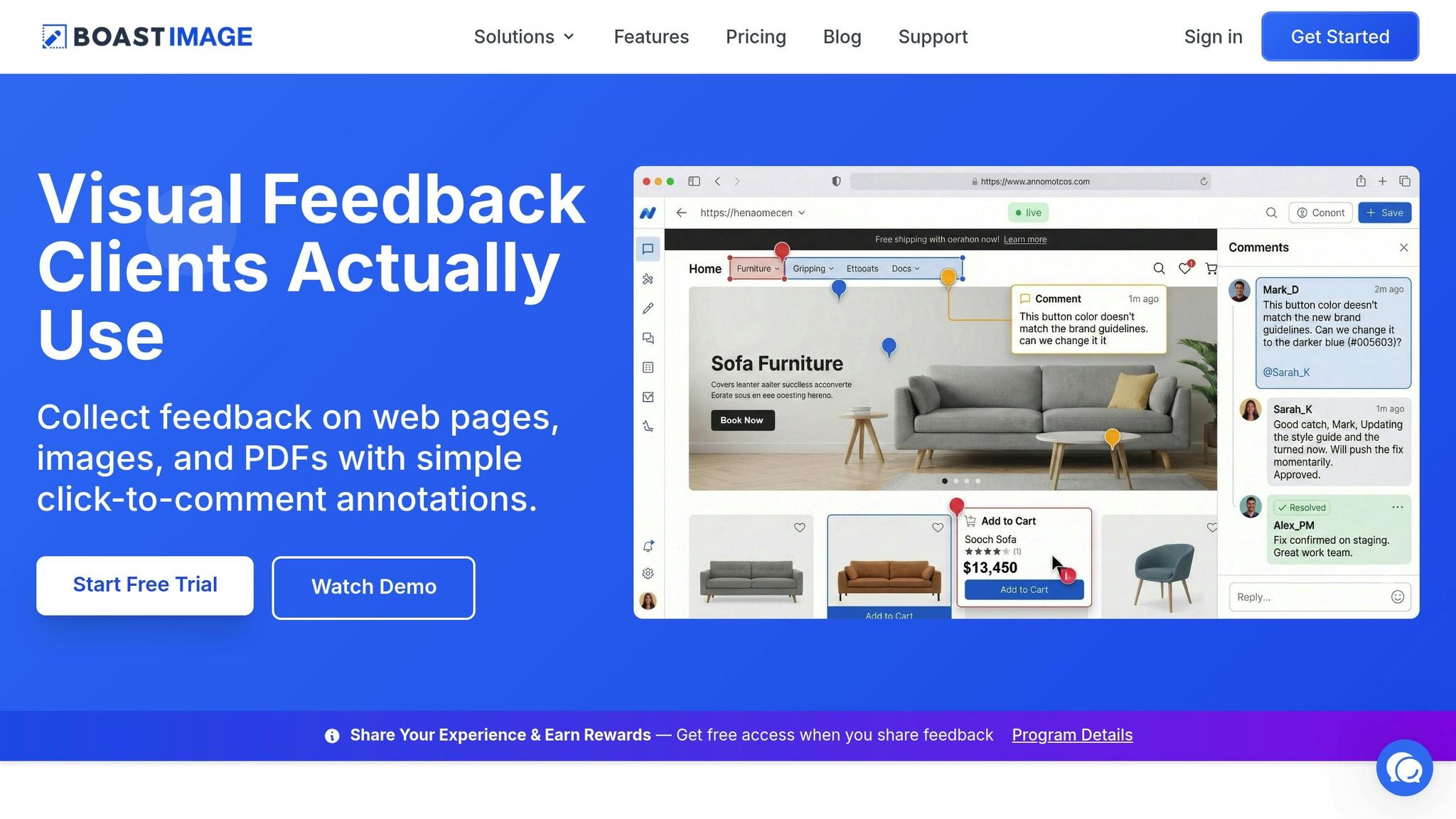
The biggest challenge with centralized feedback isn’t the idea itself - it’s convincing clients to use the system. Many tools require clients to create accounts, go through onboarding, or learn new workflows, which can be a dealbreaker for non-technical users. BoastImage solves this problem by removing all the barriers. Clients can simply click a link and comment directly - no logins, passwords, or tutorials needed.
This simple, click-to-comment approach makes it much easier for clients to provide timely, specific feedback, helping you stay on schedule. Meanwhile, behind the scenes, your team benefits from features like version control, task tracking, and Kanban boards. Clients, on the other hand, enjoy a seamless experience.
BoastImage also stands out with its pricing. Paid plans start at $9.95/month and include unlimited external collaborators, so you don’t have to worry about budget constraints or awkward discussions about who counts as a "seat." This allows you to focus on your creative work without unnecessary distractions.
Present Work in Stages
Using centralized feedback tools like MarkUp.io or its alternatives is a great start, but presenting work in stages takes it a step further by catching potential issues early. Jumping straight to a finalized design without seeking early feedback can be risky. If the initial concept misses the mark, you could end up wasting time on something the client rejects. By showing progress in stages, you can address concerns early, avoiding the need for major last-minute changes.
Start With Rough Concepts
Kick things off with wireframes, sketches, or low-fidelity drafts instead of diving into polished designs right away. This method helps clients quickly identify what they like - and don’t like - before too much time and effort are spent. For instance, presenting three rough layout ideas early on might reveal that the client dislikes horizontal navigation or prefers a single-column format. These insights are much easier to address when you're still in the early stages of the project.
"Rather than waiting until you've reached perfection, get comfortable showing work in progress - initial rough drafts you know are going to solicit feedback." - Andy Budd, Design Founder
Understanding what the client doesn't want can be just as valuable as knowing what they do. At this stage, focus on gathering feedback about layout and structure, leaving details like typography or color for later. Once the basic direction is clear, you can move on to refining the work and gathering feedback at key points.
Collect Feedback at Each Milestone
After the direction is set, collect feedback at specific project milestones rather than waiting until the end. This phased approach allows for adjustments along the way and prevents a deluge of changes at the final stage. Setting clear deadlines - like wireframes by March 5, initial designs by March 12, and final revisions by March 19 - keeps the project on track and can reduce the number of review meetings by as much as 50%. Once a milestone is approved, lock that stage to avoid late-stage changes that could derail your timeline.
Use Data to Improve Feedback Quality
Once you’ve established a centralized feedback process, incorporating data into your workflow can help you minimize revision rounds even further. Tracking revision metrics transforms frustration into actionable insights. For instance, by measuring the number of rounds a project takes versus what was initially planned, you can uncover patterns - like which stakeholders consistently provide late feedback or where communication tends to falter across different channels.
Track Revision Rounds and Their Impact
Start by keeping tabs on how many versions each project goes through before final approval. Typically, design projects should require just two or three revision rounds. If a project consistently exceeds this range, it could point to issues like unclear project briefs, scope creep, or feedback arriving too late to act on effectively. Connecting these metrics to your timeline reveals how much time is lost in approvals rather than spent on actual creative work.
A centralized review system can make a big difference - helping reduce revision rounds by 30% and cutting review meetings in half. This level of efficiency not only saves creative time but also ensures deadlines are met. Plus, detailed audit trails create accountability, offering a clear record of every step in the process.
Share Metrics With Clients
Data doesn’t just help your internal team - it’s also a powerful tool for client communication. Sharing these metrics with clients highlights the importance of clear and timely feedback. For example, comparing planned versus actual revision rounds can reveal opportunities to streamline collaboration.
"It's possible to see a 30% reduction in versions required to get to approvals. Or cut down 50% of review meetings." – Joey Tanny, ThirdWunder
Side-by-side version comparisons can also show clients how their previous feedback was implemented, fostering trust and reducing the likelihood of repeated requests for the same changes. When clients see how delays impact launch dates or budgets, they’re more likely to provide concise, actionable feedback upfront. These insights not only simplify the revision process but also lay the groundwork for future improvements.
Conclusion
A structured feedback process is the backbone of project efficiency, and the final steps are where everything comes together. Cutting down on endless revision cycles starts with setting clear expectations from the beginning. When communication is well-organized, feedback becomes a tool that moves projects forward instead of holding them back.
To keep feedback on track, start with a thorough creative brief that gets everyone's approval upfront. Limit revision rounds and gather feedback at key milestones to avoid unnecessary back-and-forth exchanges. Present work in stages so stakeholders can align with the direction early on. Additionally, use data tracking to spot bottlenecks before they escalate into recurring issues.
Centralizing feedback is another game-changer. Scattered comments - whether in emails, Slack messages, or PDFs - lead to lost details and version confusion. Tools like BoastImage solve this by allowing clients to comment directly on your work through a simple link - no accounts or logins needed. For your team, built-in version control and task management ensure that feedback is not only captured but also actionable and organized. Data-backed insights reinforce that streamlined feedback processes speed up approvals and keep projects moving smoothly.
FAQs
What does “clear, actionable feedback” look like?
Clear, actionable feedback focuses on outlining the specific changes needed, pointing to particular parts of the work, and ensuring those changes align with the project's objectives. This approach minimizes confusion and cuts down on the back-and-forth of multiple revisions.
How do I push back on unlimited revision requests?
When working on revisions, it's crucial to set clear boundaries from the start. Specify how many rounds of revisions are included in your service, clearly define what qualifies as a revision, and outline how additional revisions will be charged. To streamline the process, use structured feedback tools that help gather all client comments in one place. Encourage clients to provide specific, actionable feedback rather than vague suggestions. This approach keeps revisions focused, prevents scope creep, and avoids the frustration of endless revision cycles.
How can I get clients to use one feedback link?
Making feedback collection easy and hassle-free starts with providing clients a single, accessible feedback link. Share this link at the beginning of the project, clearly explain its purpose, and stress the importance of using it for all feedback. Highlight how simple it is to click the link and leave comments - no need for account creation or extra steps.
Using tools like BoastImage can make this process even smoother. These tools eliminate common obstacles, prevent feedback from being scattered across multiple channels, and cut down on endless revision cycles. The result? A more efficient and collaborative workflow for everyone involved.