
How to Handle Vague Client Feedback
Struggling with unclear client feedback? Whether it's "make it pop" or "jazz it up", vague comments can stall projects, waste time, and increase costs. Here’s how to deal with it effectively:
- Understand why it happens: Clients often lack the language to articulate design concerns and feel pressured to contribute, leading to unclear input.
- Respond calmly and ask targeted questions: Acknowledge their feedback, dig deeper with specific questions, and tie their input to project goals.
- Provide visual options: Show multiple mockups to help clients clarify their preferences.
- Use tools like Boast: Simplify feedback collection with tools that let clients comment directly on design elements.
- Prevent issues upfront: Set clear feedback guidelines, agree on brand keywords, and limit revision rounds.
What client feedback REALLY means | CharliMarieTV
Why Clients Give Vague Feedback
Understanding why clients provide unclear feedback can help reduce the frustrating back-and-forth that often results from it.
Examples of Vague Feedback
Clients often use phrases like "jazz it up" without explaining what they want to be enhanced. They might say, "it doesn't wow me" or "it feels flat" but fail to pinpoint what’s missing. Similarly, terms like "fun", "modern", or "cool" get thrown around without any connection to specific design elements like colors, fonts, or layouts.
Another common challenge is the "mind-reader" scenario. Some clients say, "I'll know what I like when I see it" or "just keep designing", leaving you to guess their preferences. Suzanne Scaccia captures this perfectly:
I'm not sure why I don't like it, but I'll know what I like when I see it.
Sometimes, feedback is overly specific in the wrong way. For example, a client might demand, "make the logo bigger" when the real issue is that the brand doesn’t stand out enough. Or they might say, "change the blue to pink", even though the problem goes beyond just color. Angelika Bergerioux, a freelance graphic designer, shares her frustration:
Some of the worst cases are being given no direction and the client expecting you to read their minds.
These types of comments often point to deeper communication issues.
Reasons Behind Unclear Feedback
The root of vague feedback often lies in a lack of design vocabulary and a desire to contribute. Many clients don’t have the language to articulate their design concerns. Instead, they fall back on instinctive reactions like asking for more "sparkle" or a stronger "wow factor." Sherry Holub, Creative Director at JV Media Design, explains:
Most clients are personally invested and very attached when it comes to their business. They may have trouble separating their personal likes from what will work for their audience.
Additionally, there’s a psychological need to participate. When you need to simplify stakeholder input because multiple people are involved, people often feel obligated to provide input, even if they don’t have much to say. Andy Duke, Head of Design & Development at Stickyeyes, puts it this way:
When presented with a blank canvas request for 'their feedback' most people will force themselves to think of something... simply because the alternative feels like they're saying... 'I'm useless really.'
This pressure to contribute can lead to feedback that’s more about being part of the process than offering meaningful suggestions.
How to Handle Vague Feedback
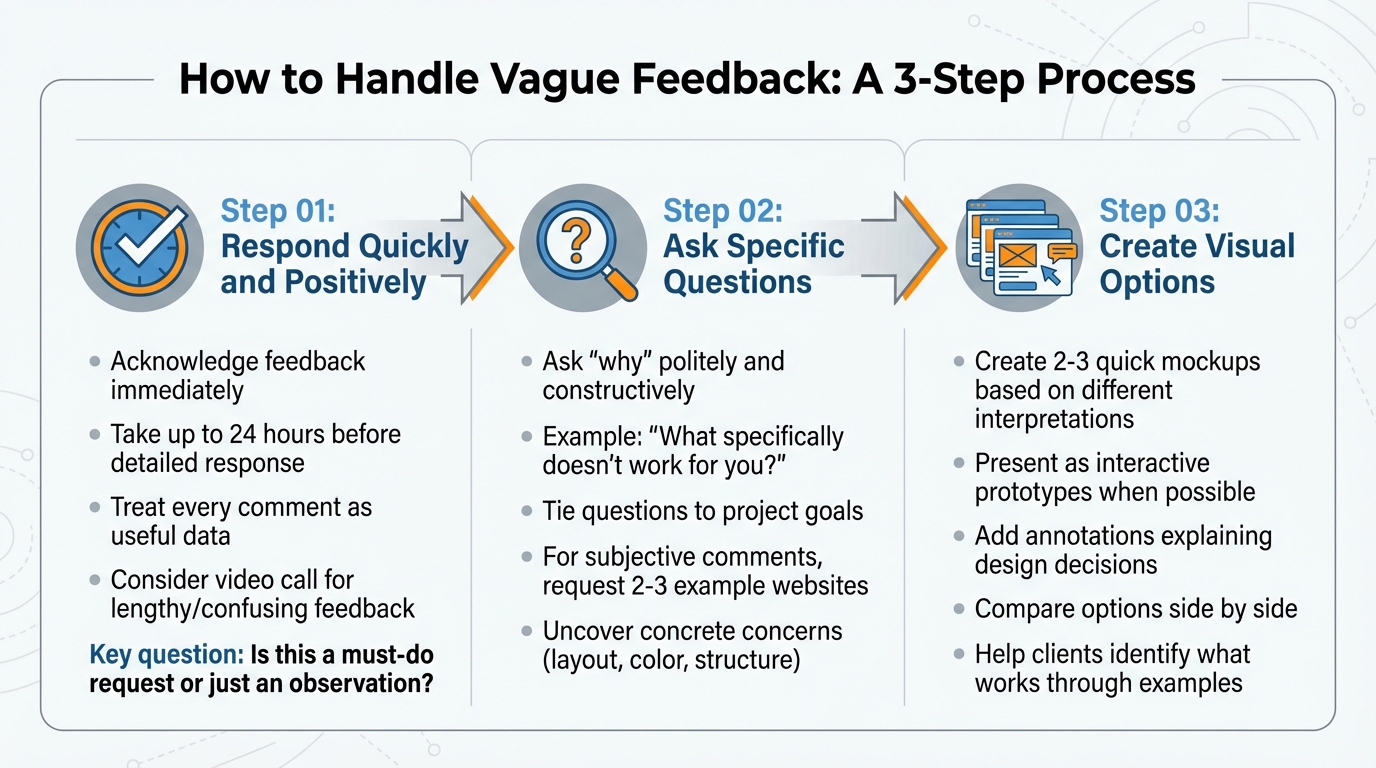
3-Step Process for Handling Vague Client Feedback
Understanding your clients' challenges is key to managing design feedback and revisions effectively. The aim isn't to criticize their input but to steer the conversation toward specifics that help move the project forward.
Step 1: Respond Quickly and Positively
When vague feedback shows up in your inbox, acknowledge it right away. A simple reply like "Thanks for your input; I'll review it soon" works well. Take up to 24 hours before sending a detailed response. This short pause helps you avoid sounding overly emotional, especially if the feedback feels frustrating.
Treat every comment as a piece of useful data. As Winston Churchill wisely said:
Criticism may not be agreeable, but it is necessary.
Focus on the project, not personal feelings. Not all feedback requires a design change - sometimes clients are just brainstorming out loud. Before jumping into revisions, ask yourself if the comment is a must-do request or simply an observation.
If the feedback is lengthy or confusing, consider moving the conversation to a video call. Real-time discussions allow clients to point out specific issues, and recording the session ensures you can revisit their input later.
From there, the next step is to ask precise, targeted questions.
Step 2: Ask Specific Questions
When feedback feels vague, dig deeper by asking "why" in a polite and constructive way. If a client says, "I just don’t like it", try asking, "What specifically doesn’t work for you?". This approach - sometimes called the "Why" game - helps uncover concrete concerns, like issues with layout, color, or structure.
Tie your questions to the project’s goals. For instance, ask if the design aligns with brand keywords or highlights key calls to action. If a client suggests something specific like "make the logo bigger", follow up with, "What are you hoping to achieve with that change?" Mindy Wagner, Former Design Director at Viget, puts it this way:
If you say things like 'make that button green,' you're giving me the solution to the problem without telling me what the problem actually is.
For subjective comments like "make it more exciting", ask for examples. Request two or three websites that match the mood they’re aiming for. This gives you visual references to better understand their preferences.
If direct questions still leave room for interpretation, offering visual options can help clarify their vision.
Step 3: Create Visual Options
Sometimes, clients need to see examples to articulate what they want. When feedback isn’t clear, create 2–3 quick mockups based on different interpretations of their comments. For instance, if they say, "It needs more energy", you could present one version with bold colors, another with dynamic layouts, and a third featuring animated elements. Comparing these side by side makes it easier for clients to identify what works for them.
Share early drafts to encourage collaboration and reduce defensiveness. Whenever possible, present designs as interactive prototypes rather than static files. Seeing the design in action often helps clients provide clearer feedback on layout and usability.
For more complex projects, add annotations to your mockups. Explain why you made certain decisions, like choosing a specific color or placing a component in a particular spot. This proactive approach can address questions before they arise and minimize unclear feedback.
sbb-itb-32f6eb2
Using Tools to Get Better Feedback
A client-first visual feedback board can simplify communication and keep your project moving forward. Traditional feedback methods, like email, often lead to vague comments such as "it doesn't feel right" or "make it pop." These phrases can be frustratingly unclear. A visual feedback board changes this dynamic by allowing clients to pinpoint specific issues directly on the design, eliminating the guesswork. This approach creates a smoother process and aligns perfectly with Boast's intuitive feedback tools.
How Boast Makes Feedback Easier
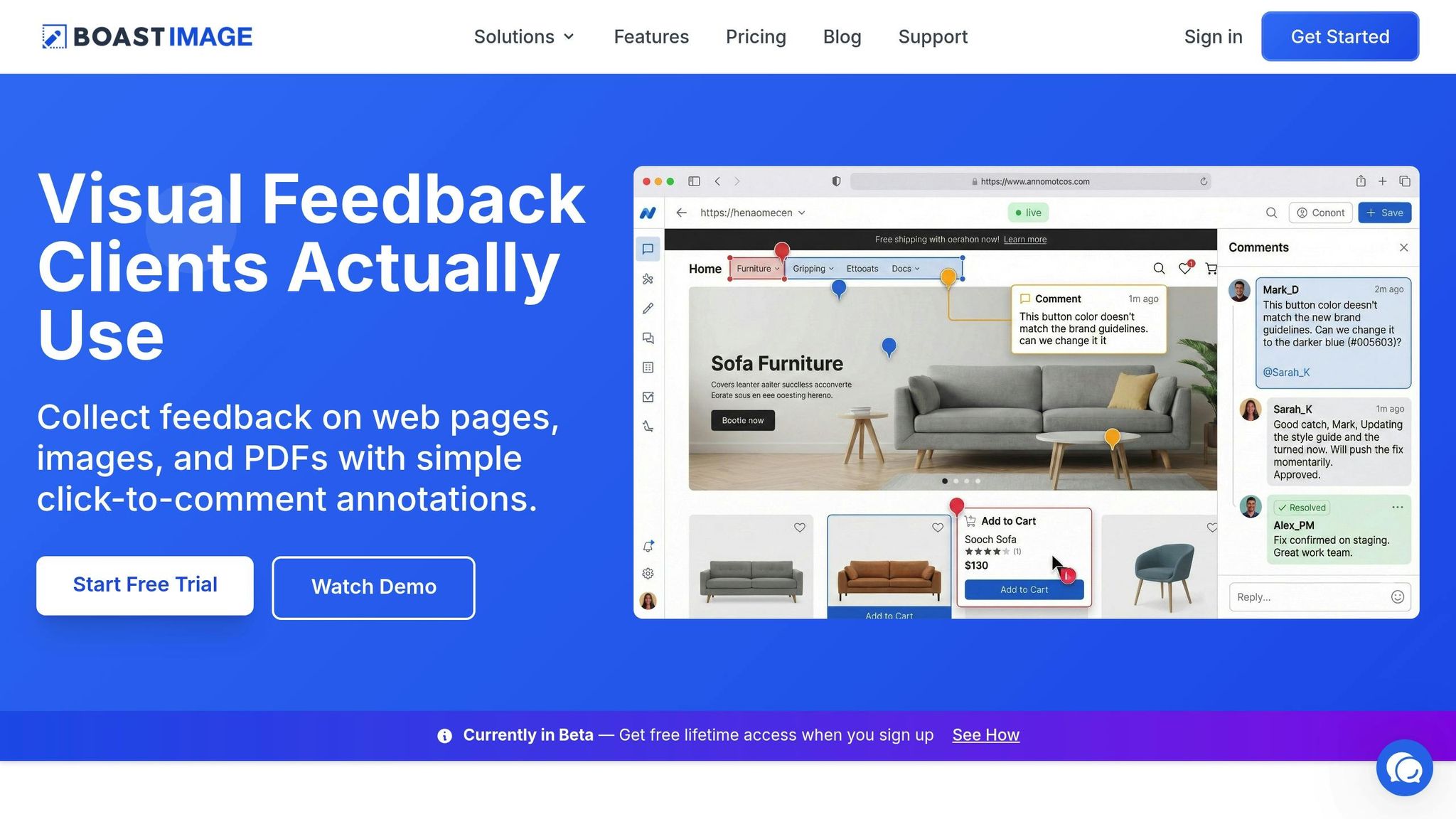
Boast takes the hassle out of gathering client feedback by removing the need for new software training. It overlays your design with a transparent feedback layer, enabling clients to click on any element and leave comments. No accounts, no complicated setup - just straightforward input. For instance, if a client feels the navigation bar needs improvement, they can click on that exact section and leave their note, making their concern immediately understandable.
This method transforms unclear feedback into clear, actionable tasks. Plus, the login-free system ensures clients can jump in and provide input without delays, keeping your project on track. While clients enjoy a smooth experience, Boast’s backend tools ensure your team stays organized and efficient.
Boast Features for Managing Feedback
Boast doesn’t just simplify feedback - it organizes it. Its built-in version control tracks every design iteration, and integrated Kanban boards turn client comments into prioritized tasks. If a client changes direction, you can easily revisit earlier designs, avoiding endless revisions and confusion.
Boast’s pricing is straightforward and flexible. For $9.95 per month, the Solo plan offers unlimited external collaborators - ideal for projects with multiple stakeholders. The Team plan, priced at $19.95 per user per month, adds project-level permissions and custom branding. For larger needs, the Business plan at $39.95 per user per month includes full white-label options and dedicated support. These tools ensure your team can handle even the most complex projects while offering clients a seamless and professional experience.
How to Prevent Vague Feedback
Streamlining your review process starts with preventing unclear feedback. The key? Setting clear expectations from the beginning and learning from past experiences to improve your approach.
Set Feedback Guidelines Early
Before presenting any design, establish clear feedback guidelines. Paul Boag, a UX consultant, points out that asking, "What do you think?" is a common mistake when seeking client input. This question often leads to subjective opinions rather than constructive, objective feedback.
Instead, agree on specific brand keywords - such as "professional" or "energetic" - during the kickoff meeting. These keywords act as a shared reference point. So, if a client later says something "doesn't feel right", you can check if it aligns with the agreed terms rather than getting caught up in subjective debates. Similarly, tie feedback to measurable business goals and translate those into actionable steps.
Encourage clients to focus on identifying problems rather than proposing solutions. Jennifer Bourn emphasizes the importance of evaluating designs from the target audience's perspective. For example, feedback like "this doesn't appeal to our audience" is much more actionable than prescribing specific design changes. Erik Larsson, a UX designer, highlights that successful designers collaborate with their clients, helping them understand that they’re contributing as stakeholders, not as designers themselves.
To avoid conflicting feedback, designate one point of contact for consolidating input. This ensures consistency and avoids contradictory comments from multiple team members. Additionally, set limits on revision rounds upfront and explain how excessive changes can impact both time and budget.
By establishing these guidelines, you create a framework that helps address vague feedback before it becomes a problem.
Track Feedback Patterns
Take the time to review past projects to identify recurring issues. Keep a log of vague phrases like "make it pop" to refine your feedback process. For instance, if clients frequently provide unclear comments about placeholder text, consider securing final content before starting the design phase. Similarly, if certain design elements lead to endless revisions, clarify early on which decisions - like layout - should be finalized upfront and which - like typography - can remain flexible.
Andy Duke, Head of Design at Stickyeyes, reminds us that the goal isn’t to determine if a client "likes" a design but to ensure it meets their business objectives.
When feedback loops get bogged down by too many stakeholders, try separating them into smaller, focused groups. For example, group legal reviewers separately from the branding team to avoid conflicting input. This approach helps prevent the "too many cooks in the kitchen" scenario, where contradictory feedback derails progress. If clients consistently request changes that conflict with design best practices, suggest usability testing. This provides data-backed insights that can guide future decisions.
Conclusion
Vague feedback doesn’t have to throw your projects off course. Here’s a quick rundown: respond quickly, ask focused questions, and provide clear visual options. Asking specific questions helps turn unclear feedback into actionable tasks. By digging into the "why" and requesting concrete examples, you can turn abstract comments into precise design changes.
Using visual feedback tools can make this process even smoother. Tools that let clients click directly on design elements and leave comments take the guesswork out of feedback. For instance, Boast simplifies this with its click-and-comment interface. It’s easy for clients to use, while you gain access to features like version control, task management, and Kanban boards. With plans starting at $9.95/month and unlimited external collaborators on all paid tiers, it’s an efficient and budget-friendly solution.
To avoid issues altogether, set clear feedback guidelines, establish brand-specific keywords, and appoint a single point of contact. Keep an eye on recurring vague phrases across projects to improve your process over time. By combining proactive strategies with the right tools, you can reduce revisions, speed up approvals, and ensure client feedback is meaningful.
FAQs
How can I get clients to provide clearer feedback?
Getting clients to offer clearer feedback starts with making the process straightforward. Ask specific, open-ended questions like "What particular changes do you have in mind?" or "Are there any areas you feel could be improved?" to help steer their responses toward actionable insights.
It’s also helpful to set expectations upfront. Explain why detailed feedback matters and share examples of what good feedback looks like. This not only clarifies what you need but also shows clients how their input directly impacts the outcome. Additionally, fostering a welcoming atmosphere where clients feel heard and valued can encourage them to provide more thoughtful responses.
To streamline this further, tools like BoastImage come in handy. They allow clients to leave comments directly on specific parts of a project without the hassle of creating accounts or dealing with complicated systems. This makes it easier for everyone to focus on delivering precise, actionable feedback.
How can I clarify unclear client feedback?
When faced with vague client feedback, the first step is to ask specific, targeted questions. For example, if a client says, "Make it pop", dig deeper by asking what specific elements they want to emphasize or what "pop" means to them. This helps you uncover their true intentions and avoids guesswork.
Another helpful tactic is to restate their feedback in your own words. This not only confirms your understanding but also gives the client a chance to correct or refine their input, reducing the risk of miscommunication.
You can also use visual examples or mock-ups to guide the discussion. Presenting options based on their initial input often helps clients articulate their preferences more clearly. Finally, creating a relaxed, collaborative environment encourages clients to elaborate on their ideas, turning unclear feedback into actionable steps.
How can Boast make client feedback easier and more effective?
Boast streamlines the feedback process by allowing clients to comment directly on specific parts of a website, image, or PDF - no accounts or training required. This straightforward approach helps clients provide clear, actionable input without any hassle.
By eliminating obstacles like logins and complicated tools, Boast fosters smoother communication, minimizes misunderstandings, and keeps projects on track. While clients enjoy an easy, frictionless experience, teams benefit from organized workflows working quietly in the background.