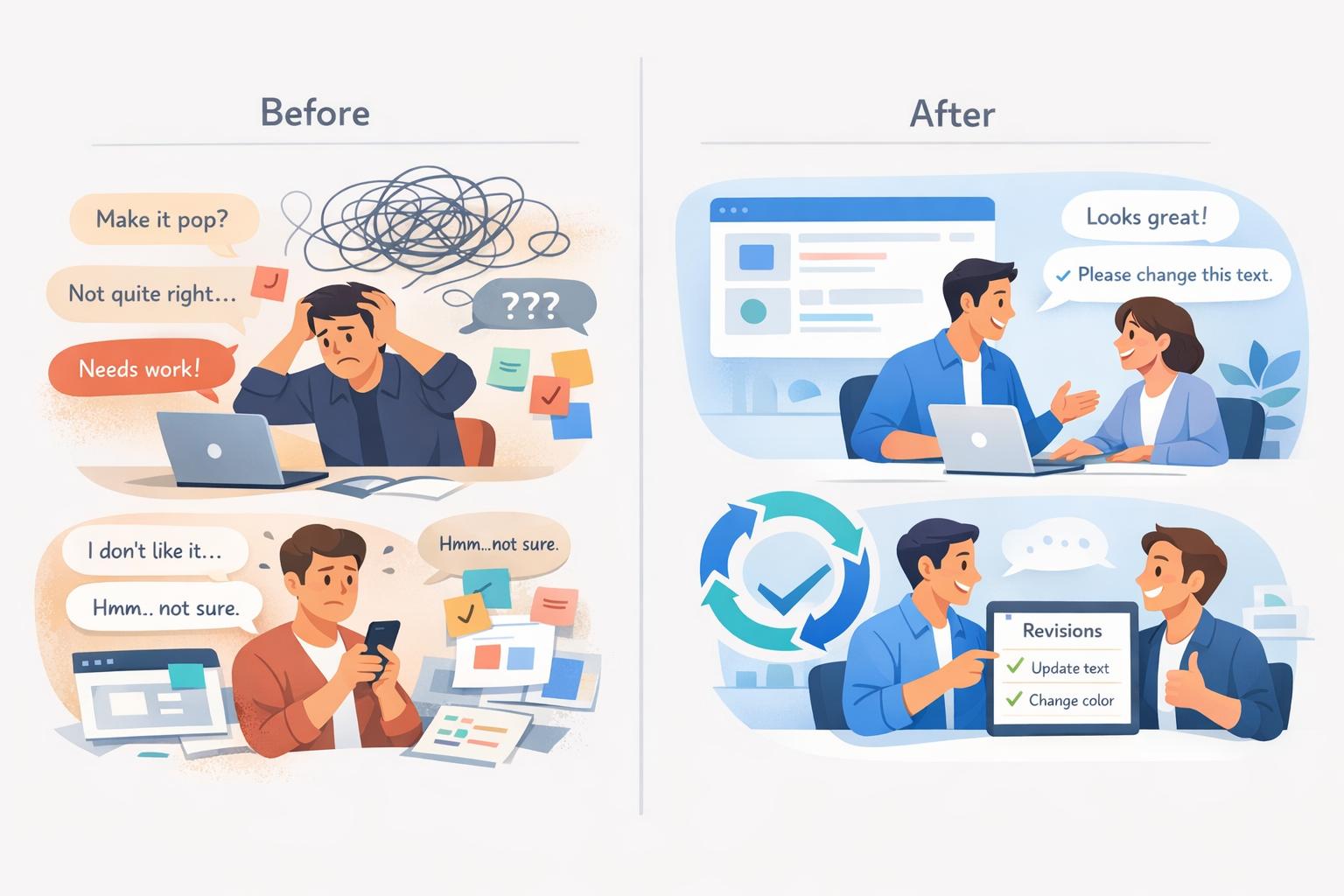
Why Clients Give Vague Feedback and How to Prevent It
Ever heard phrases like "Make it pop" or "It’s missing something"? These vague comments waste time, stall progress, and frustrate both clients and professionals. Here’s why it happens and how to fix it:
- Why it happens:
- Clients avoid direct criticism to prevent conflict.
- They lack the vocabulary to express specific ideas.
- Time constraints lead to rushed or unclear guidance.
- The impact:
- Endless revisions, delayed deadlines, and strained relationships.
- Miscommunication leads to wasted effort and emotional stress.
- Solutions:
- Ask specific follow-up questions to get clear, actionable feedback.
- Use visual website feedback tools to pinpoint and address concerns.
- Provide multiple options for clients to choose from.
- Adopt tools like BoastImage to simplify and organize feedback.
Clear, actionable feedback saves time, reduces frustration, and improves outcomes. By addressing vague feedback head-on and using the right tools, you can avoid unnecessary revisions and build stronger client relationships.
Chasing Clients - The Feedback Void: How to Stay Sane and on Track
sbb-itb-32f6eb2
Why Clients Give Vague Feedback
Getting to the root of why clients often provide unclear feedback is key to addressing the issue. It’s rarely intentional - these challenges stem from psychological tendencies, communication hurdles, and the everyday time crunch that shapes how people process and express their thoughts. By understanding these underlying factors, you can turn ambiguous feedback into something you can actually work with. Let’s break it down into three main areas: psychological factors, communication struggles, and time-related pressures.
Psychological Barriers
Clients often avoid direct criticism because they don’t want to risk confrontation or hurt feelings. This hesitation leads to overly soft feedback like “maybe try something different” instead of something specific like “the headline doesn’t align with our brand voice”. Another issue is the curse of knowledge - clients may assume you already understand their context, leaving out critical details that would make their feedback more actionable.
Communication Challenges
Even if clients want to be clear, they often lack the vocabulary to articulate their thoughts. Instead, they use vague terms like “make it pop,” “jazz it up,” or “clean”. As 99designs aptly puts it: "The three worst words a designer can hear: 'Make it pop.' It just doesn't mean anything".
"Most clients are personally invested and very attached when it comes to their business. They may have trouble separating their personal likes from what will work for their audience." - Sherry Holub, Creative Director, JV Media Design
There’s also a tendency for people to overestimate how clearly they communicate, which explains why some clients assume their feedback is self-explanatory. Another common issue is prescriptive feedback - clients offering solutions like “make the logo bigger” - instead of descriptive feedback that identifies the problem, such as “the logo feels too small to stand out on the page”. This approach limits your ability to apply your expertise to solve the issue effectively.
Time Constraints and Prioritization
Sometimes overly positive feedback is a red flag - it could mean the client is too busy to dive into the details. This often leads to last-minute requests for changes later in the project.
"Overly positive feedback could indicate a client is too busy to provide thoughtful feedback and that there might be some last-minute changes down the road." - Secret Stache
When pressed for time, clients may disengage during presentations and later offer generic comments like “it doesn’t feel right”. Additionally, tight deadlines leave little room for clients to develop the technical language needed to express their concerns, forcing them to rely on vague descriptions. In high-pressure situations, they may abandon collaboration altogether, opting for rushed, prescriptive feedback just to keep the project moving.
The Consequences of Vague Feedback
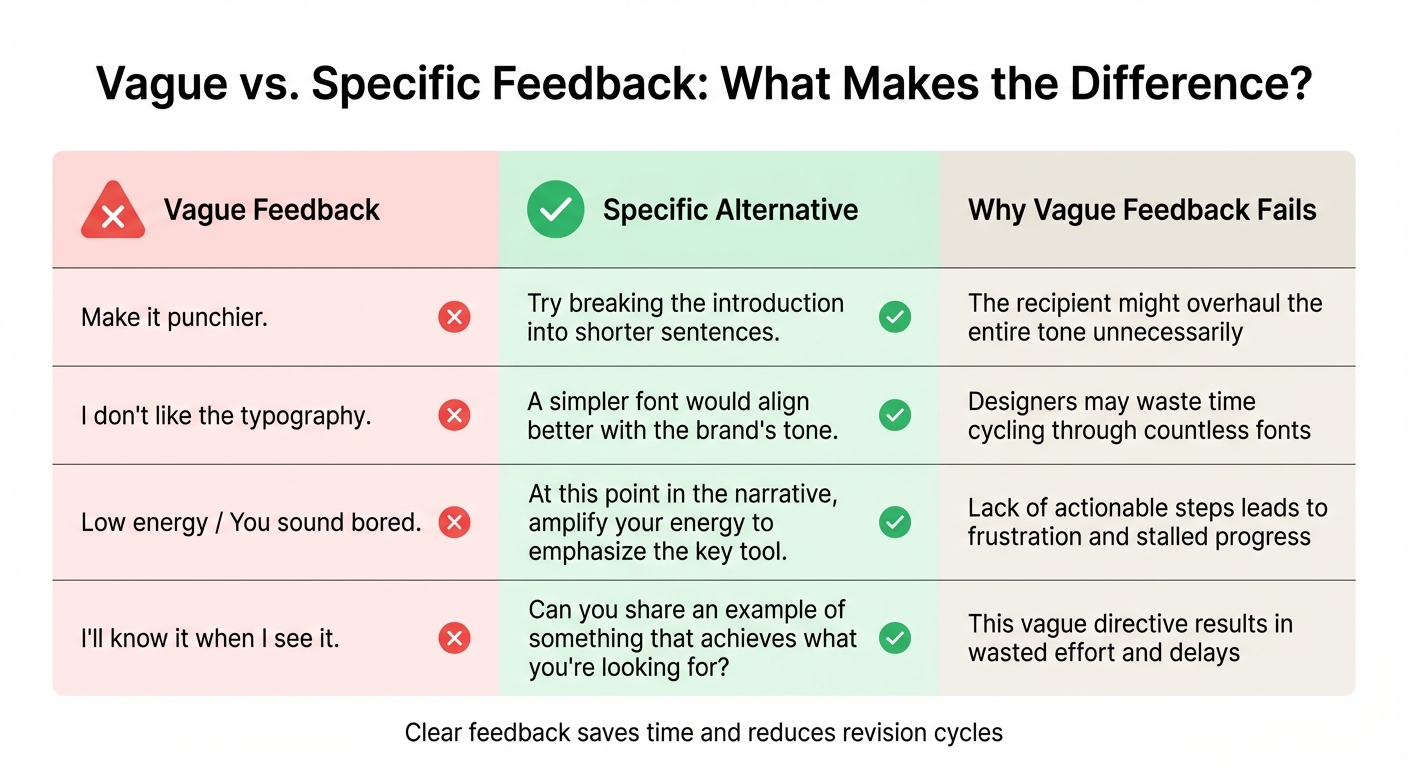
Vague vs Specific Client Feedback Examples
When feedback lacks clarity, the ripple effects go far beyond just one round of revisions. Hours can be wasted tweaking elements that were never the actual issue in the first place. This is what Art Petty refers to as the "running in place" effect - where frustration with unclear guidance grinds progress to a halt.
Delays and Revisions
Phrases like "I'll know it when I see it" are a recipe for endless revision cycles. Without clear criteria for success, the process spirals into chaos. One experiment demonstrated this disconnect perfectly: participants could correctly identify only 2.5% of tapped songs, despite the tappers believing their instructions were clear. This highlights how overconfidence in vague directives can derail projects.
When multiple stakeholders chime in with poorly coordinated, ambiguous suggestions, the result is a patchwork of conflicting revisions. This not only leaves everyone dissatisfied but also necessitates additional rounds of adjustments to untangle the contradictions. The sheer volume of follow-up - meetings, email threads, and attempts to interpret unclear comments - drains time, energy, and resources. These drawn-out revisions don’t just slow progress; they can also harm working relationships.
Strained Client Relationships
The confusion caused by vague feedback often erodes trust between clients and creatives.
"Vague feedback creates communication and relationship strain. Everyone feels they have a point and the parties grow frustrated with each other based on the disagreement. The receiver doesn't get it, and the giver feels unheard and even devalued." – Art Petty
Professionals who care deeply about their work often take unclear feedback to heart, leading to an "emotional nosedive" as they struggle to decode what’s actually wrong. On top of that, vague criticism can trigger a "fight or flight" response, where team members become more focused on protecting themselves or avoiding blame than delivering quality work. A study spanning 11,471 days of creative work across seven companies found that feedback often left a lingering negative emotional impact.
Example: Vague vs. Specific Feedback
| Vague Feedback | Specific Alternative | Why Vague Feedback Fails |
|---|---|---|
| "Make it punchier." | "Try breaking the introduction into shorter sentences." | The recipient might overhaul the entire tone unnecessarily. |
| "I don't like the typography." | "A simpler font would align better with the brand’s tone." | Designers may waste time cycling through countless fonts. |
| "Low energy / You sound bored." | "At this point in the narrative, amplify your energy to emphasize the key tool." | Lack of actionable steps leads to frustration and stalled progress. |
| "I'll know it when I see it." | "Can you share an example of something that achieves what you're looking for?" | This vague directive results in wasted effort and delays. |
These examples illustrate how unclear feedback derails projects and underscores the importance of turning vague comments into precise, actionable guidance.
How to Clarify Vague Feedback in Real Time
When feedback feels unclear, think of yourself as less of a designer and more of a detective. The aim isn’t to guess what your client means but to turn abstract comments into clear, actionable guidance. By asking the right questions and using visual aids, you can transform vague feedback into meaningful direction, making your revisions more effective.
Ask Specific Questions
Start by asking direct, targeted questions. Often, clients don’t have the technical vocabulary to describe exactly what they want. For instance, when someone says a design should feel "more modern", they’re likely expressing a vibe or emotion rather than a concrete solution. Instead of guessing, ask for examples: "Can you share a website or image that feels 'modern' to you?" This shifts the conversation from abstract terms to tangible references.
If the client still struggles to articulate their thoughts, try offering your own interpretation to confirm their concerns. For example, you might say, "I feel this design might come across as a bit flat - maybe adding a case study could bring it to life?" Then, gauge their reaction. This strategy helps clients pinpoint the issue without requiring them to have a designer’s expertise.
Provide Options for Interpretation
Another effective way to clarify feedback is by presenting multiple options. If a client says they want something "more energetic", create a few quick mockups that interpret this differently - perhaps one with bold colors, another with dynamic typography, and a third with motion elements. This forces the client to make a choice, revealing their preferences more clearly.
"Just giving a client a choice can head off a lot of feedback problems: submit 2 ideas, and the client can pick one or the other, and thereby exert some control." – Mark, Creative Professional
When presenting these options, focus on explaining their impact rather than just their appearance. For instance, instead of saying, "Option A uses a blue gradient", explain, "Option A conveys trust and stability, while Option B emphasizes urgency and action." This keeps the feedback aligned with the project’s goals rather than subjective tastes.
Use Visual Comparisons
Visual comparisons can remove much of the guesswork. Show your client a side-by-side view of the previous version and your updated design. This "before-and-after" approach makes it easier for them to see the changes and confirm whether their feedback has been addressed.
Preventing Vague Feedback with Visual Feedback Tools
Eliminate vague feedback by addressing its root causes. When clients face overly complex tools or feel lost in technical jargon, their feedback often turns into ambiguous phrases like "make it pop" or "it doesn't feel right." Visual feedback tools tackle this issue head-on by allowing clients to pinpoint exactly what they mean. These tools take the guesswork out of the process and make real-time feedback much clearer by breaking down common barriers.
Simplify Client Feedback with Login-Free Access
The real hurdle to clear feedback isn’t your client’s ability to express themselves - it’s the friction caused by complicated feedback systems. Requiring logins and passwords often discourages clients from engaging with structured feedback tools. BoastImage (https://boastimage.com) solves this problem by offering a seamless, login-free experience. Clients simply click a link, view the work, click on specific elements, and leave comments directly on web pages, images, or PDFs.
This approach speeds up the feedback process and provides you with precise, visually contextualized input. Instead of vague comments like "the header feels off", you’ll see a comment pinned directly to the exact element in question. Plus, technical details like browser type and screen resolution are automatically captured, making it easier to address any issues.
Structure Feedback with Built-In Features
Once clients have easy access, the next step is ensuring their feedback is actionable. BoastImage combines simplicity for clients with powerful tools for you. While clients use an intuitive point-and-click interface, you benefit from features like Kanban boards, version control, and task management - all seamlessly integrated. Clients don’t see the backend complexity; they simply comment, while you stay organized.
This setup minimizes miscommunication and ensures every piece of feedback is accounted for. All comments are consolidated into a single discussion thread, creating a clear audit trail of decisions. You can track changes across versions, compare iterations side-by-side, and ensure no feedback gets overlooked - all without requiring clients to navigate complicated project management software.
Unlimited Collaborators for Client Input
Feedback shouldn’t be limited by budget. Many tools charge per external reviewer, which often forces teams to restrict access to just one or two client contacts. These individuals then act as "middlemen", manually gathering and filtering feedback from their colleagues - leading to secondhand, unclear input.
BoastImage removes this limitation by allowing unlimited external collaborators on all paid plans. Starting at just $9.95/month for the Solo plan, $19.95/month for Team, and $39.95/month for Business, every stakeholder can provide direct feedback. This means you can hear directly from the marketing director, CEO, and product manager in one place. Their real-time discussions and differing perspectives are visible to you, helping you resolve conflicting instructions before they escalate into bigger issues.
Building Long-Term Habits for Clearer Feedback
While real-time clarification is crucial, creating long-term habits ensures consistent and clear client feedback over time. The best creative teams don't just respond to unclear comments - they proactively build systems to prevent them. This involves training clients early, meticulously documenting decisions, and fostering clear communication throughout the project.
Send Follow-Up Summaries
After every feedback session, send a detailed recap to confirm alignment. This ensures that both you and your client are on the same page. For example, instead of saying, "fix header", clarify with something like, "The header's contrast between the logo and mobile background needs adjustment".
Tools like BoastImage (https://boastimage.com) make this process easier by integrating follow-up summaries directly into the feedback system. Clients can see their comments within the context of the project, and you can reference specific annotation threads when questions arise. This keeps all feedback centralized in one visual record.
Train Clients on Feedback Tools
Introduce clients to your feedback tools during onboarding - before the project begins. As Sherry Holub, Creative Director at JV Media Design, puts it: "It's really the designer's job to be able to guide a client and extract proper feedback". Show clients examples of effective feedback, like descriptive comments that explain the reasoning behind their concerns, rather than vague statements such as "make the logo bigger."
Setting these expectations early, using BoastImage’s intuitive interface, can significantly reduce unnecessary revisions and redundant questions. When clients understand they can click directly on an element and describe their concerns in plain language, they’re far less likely to rely on unclear emails or skip the feedback process entirely.
Document and Audit Feedback
Keep a record of all feedback and decisions to establish a foundation for future communication. This documentation helps identify recurring patterns in vague feedback. For instance, if a client frequently says, "make it pop", reviewing past comments might reveal they’re actually concerned about brand recognition or visual hierarchy - not the design’s energy level.
BoastImage’s version control feature ensures stakeholders aren’t commenting on outdated iterations, which is a common source of confusion. With all comments threaded and stored alongside each version, you can easily track what was said, when it was said, and which version it applies to. Detailed records like these promote precise communication and strengthen collaboration throughout the project lifecycle.
Conclusion
Vague feedback can be a silent killer of both morale and performance. As Art Petty, Founder and Author of the Art Petty Group, aptly states:
"Vague feedback is incredibly destructive to morale and performance. When feedback is not specific and behavioral, it's not actionable. Heck, it's not even comprehensible".
Clients often struggle to communicate their thoughts clearly. Psychological barriers, communication gaps, and time pressures all contribute to this challenge. The result? Endless revision cycles, increased costs, and a breakdown in trust.
The key to overcoming this issue lies in addressing unclear feedback as it happens and implementing systems to prevent it from recurring. This means asking targeted questions, providing clear visual comparisons, and using tools that make the feedback process straightforward for clients. When clients can easily click on a specific design element and express their thoughts - without having to navigate complicated software or account logins - feedback becomes more precise and actionable. Tools that simplify and organize real-time feedback are essential for achieving this clarity.
BoastImage (https://boastimage.com) tackles this problem head-on. It allows clients to leave comments with a single click while offering your team features like version control, task management, and centralized communication. This creates a seamless experience for both teams and clients, directly addressing the creative roadblocks mentioned earlier.
The numbers speak for themselves: 80% of employees say that meaningful feedback boosts their engagement at work. Clear, visual feedback not only speeds up project timelines but also strengthens relationships and improves creative results. Investing in a system that promotes clarity saves time, reduces revisions, and builds trust with clients - delivering better outcomes for everyone involved.
FAQs
How can I help clients provide clearer feedback?
To help clients provide clear and useful feedback, start by revisiting the project goals. This ensures their input stays focused on what truly matters. Encourage them to zero in on specific aspects, like color choices, typography, layout, or the copy. Ask for detailed explanations using "what-and-why" language. For example: "The font feels too formal; a more casual style might better match the tone."
Make the process even smoother with a visual feedback tool like BoastImage. Tools like this allow clients to leave comments directly on specific sections of the work - no need for logins or complicated systems. You can also simplify things further with a basic feedback template. Ask questions like: What works? What doesn’t? What changes would you suggest? This structure helps eliminate vague responses and keeps feedback actionable.
By combining clear guidance, a simple framework, and user-friendly tools, you’ll cut down on back-and-forth revisions and make the entire process more efficient for everyone involved.
How can I prevent vague client feedback from delaying my projects?
Vague feedback can derail projects, leading to confusion and avoidable revisions. To keep things on track, connect every feedback request to the original project brief. For example, guide clients with specific questions like, “How would you rate the headline on a scale of 1 to 5? What changes could make it better?” or “Does anything feel off - color, typography, copy, or layout?” This way, clients can focus their feedback on specific elements and clearly reference the part of the design they’re addressing.
A client-first visual feedback tool like BoastImage can make this process even smoother. With tools like this, clients can leave comments directly on a web page, image, or PDF - no accounts or training required. This method ensures feedback is both visual and actionable, cutting down on unnecessary back-and-forth, keeping projects on schedule, and helping teams hit their deadlines.
How do visual feedback tools improve client feedback?
Visual feedback tools transform client feedback into something far more precise and actionable. Instead of vague comments like "this doesn't feel right", these tools let reviewers directly annotate designs, web pages, images, or PDFs. Clients can click on specific elements, highlight areas, or add notes to pinpoint exactly what needs to be addressed. This cuts out the guesswork and reduces back-and-forth clarification.
By linking comments directly to visuals, feedback becomes clearer and more actionable, with notes like "make this font larger" or "try a darker shade for this button." This kind of targeted input helps teams quickly translate feedback into tasks, speeding up revisions and keeping projects on track.
BoastImage takes this to the next level with its login-free, click-to-comment interface. Clients can provide input effortlessly - no accounts needed - while teams receive organized, versioned tasks in the background. It’s a win-win, making the feedback process smooth and efficient for everyone.