
Best Tools for Faster Approvals 2026
Managing feedback across emails, Slack, and spreadsheets is a hassle. It slows projects, causes errors, and wastes time. Visual feedback tools solve this by letting clients annotate directly on websites, designs, or videos. These tools also capture technical details automatically, cutting approval times by up to 50%. Here's a quick look at the best options for 2026:
- BoastImage: Simple login-free client access, click-to-comment tools, and affordable plans starting at $9.95/month.
- BugHerd: Focused on web development QA with point-and-click feedback and integrations like Jira and Trello. Plans start at $42/month.
- Marker.io: Developer-friendly with technical data capture and session replays. Pricing starts at $59/month.
- Usersnap: Combines bug tracking with surveys and session replays. Plans start at $53/month.
- Hotjar: Behavior analytics with heatmaps and session recordings. Free basic plan; paid tiers start at $39/month.
- GoVisually: Ideal for design and video reviews with frame-accurate commenting. Pricing starts at $15/month.
These tools streamline collaboration, reduce revision cycles, and help teams meet deadlines faster. Below is a detailed breakdown of each option and its features.
BugHerd Review: Is It Worth It?
sbb-itb-32f6eb2
1. BoastImage
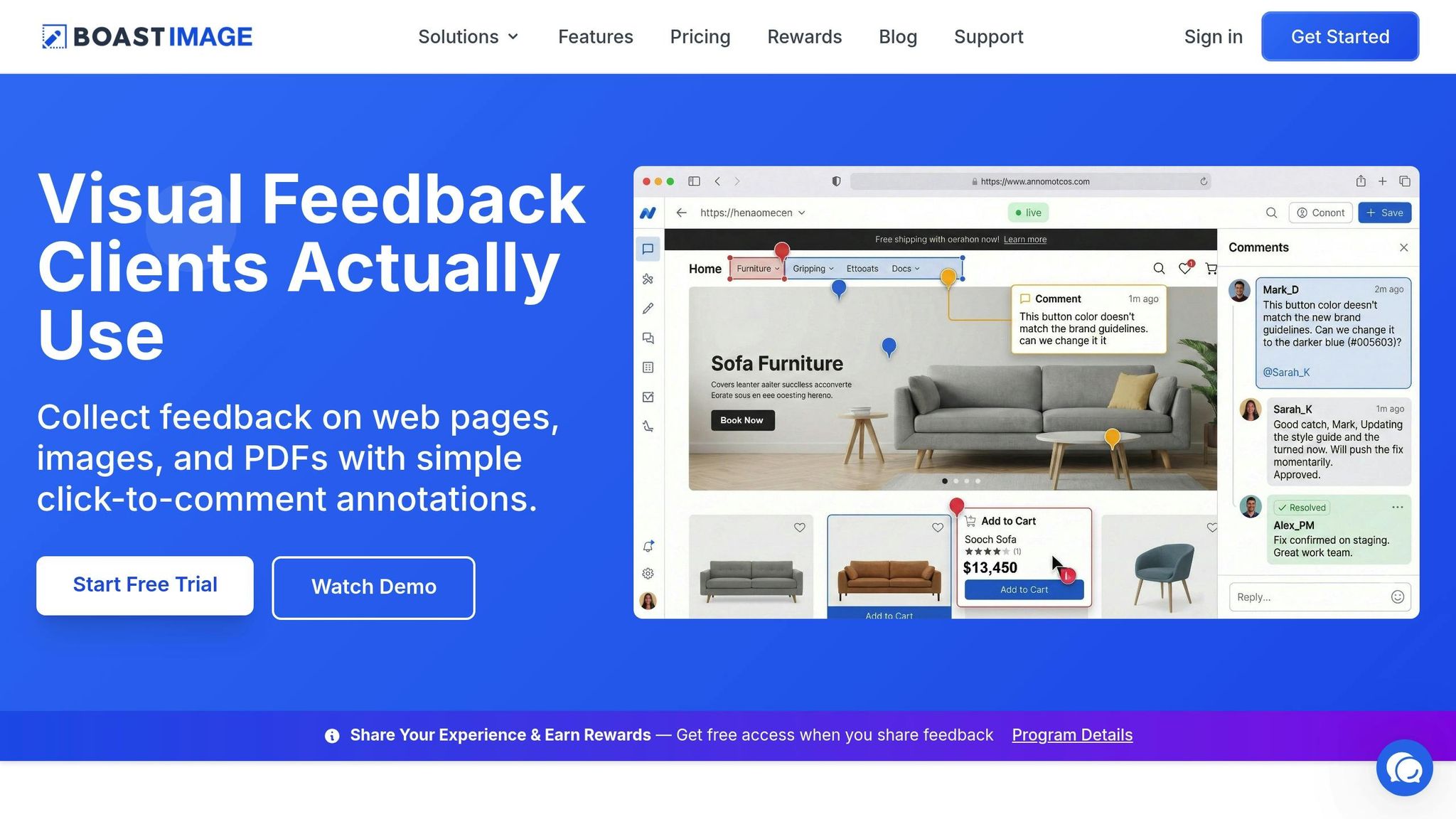
BoastImage (boastimage.com) tackles a common challenge in creative workflows: low client engagement. Unlike many platforms that focus heavily on internal team features, BoastImage zeroes in on making the client experience as smooth as possible.
Login-free client access
BoastImage makes it easy for clients to jump right in. Instead of creating accounts or setting up passwords, clients simply click a link to start providing feedback on web pages, images, or PDFs. This eliminates the usual hurdles - no need for tutorials or complicated setups. For non-technical clients, this intuitive approach feels effortless, making collaboration much more effective.
Annotation and feedback tools
Once clients are in, the platform offers a range of feedback tools to simplify the review process. Features include click-to-comment annotations, threaded conversations, version control, and even Kanban boards for tracking progress. A browser extension lets you grab live websites for review, and multi-project management ensures that different client workflows stay organized and separate.
Pricing and plans
BoastImage offers a free plan with 1 active project, 5 items per project, and 3 external collaborators. For more robust needs, paid plans start at $9.95/month (Solo) with 5 projects and 10 collaborators. The Team plan costs $19.95/user/month, offering unlimited projects and collaborators, while the Business plan at $39.95/user/month adds unlimited storage and white-label branding. Importantly, all paid plans allow unlimited external collaborators, so growing your client base won’t increase monthly costs.
2. BugHerd
BugHerd is designed specifically for the QA and UAT phases of web development. It helps teams capture clear, developer-ready issues directly from live or staging sites. With over 10,000 companies and 350,000 users across 172 countries, BugHerd transforms unorganized feedback into actionable tasks.
Login-free client access
Clients can provide feedback effortlessly through a shareable link. No login is required - just click, highlight the issue, and leave a comment. Sasha Shevelev, Co-founder of Webcoda, explained the impact of this feature:
"Before BugHerd, clients would try to send screenshots with scribbles we couldn't decipher or dozens of emails with issues we were often unable to recreate."
This streamlined approach is supported by powerful annotation tools.
Annotation and feedback features
BugHerd’s intuitive point-and-click interface allows users to place digital sticky notes directly on page elements. Along with the feedback, the platform automatically captures essential technical details like browser type, operating system, screen resolution, and the specific URL. This eliminates the need for back-and-forth clarifications, speeding up project approvals. For more complex issues, such as animations or multi-step interactions, users can record video feedback with audio narration. All feedback is organized in a built-in Kanban board, where teams can assign tasks, set priorities, and monitor progress.
Integration capabilities
BugHerd integrates seamlessly with popular project management tools like Jira, Asana, Trello, ClickUp, and monday.com, offering two-way synchronization. Feedback collected from the website instantly becomes a task within your existing workflow, eliminating the hassle of manual data entry. For developers, the platform captures critical details like CSS selectors and console logs, making troubleshooting faster and easier. Emily VonSydow, Web Development Director, shared her experience:
"BugHerd probably saves us at least 3-4hrs per week."
These integrations make BugHerd a time-saving tool that fits smoothly into existing workflows.
Pricing and scalability
BugHerd offers pricing plans starting at $42/month for the Standard tier (up to 5 members), $67/month for Studio (10 members), and $125/month for Premium (25 members). All plans include unlimited projects and unlimited guest reviewers, making it an affordable option for agencies juggling multiple clients. A 7-day free trial is available with no credit card required. With a 4.8/5 rating on G2, users praise BugHerd for eliminating lengthy email chains and simplifying feedback management.
3. Marker.io
Marker.io is designed for teams that need actionable, developer-ready feedback without the hassle of constant back-and-forth communication. It simplifies issue reporting by automatically gathering technical data, allowing clients to submit feedback without needing technical expertise. With an impressive 4.8/5 rating on G2, it's a trusted tool for teams looking to integrate feedback seamlessly into their project management workflows.
Login-free client access
Clients can provide feedback effortlessly - just click a link, annotate, and submit. No account setup or onboarding is required. This simplicity makes it easier to gather input, even from non-technical stakeholders who might otherwise avoid the process.
Annotation and feedback features
Marker.io builds on its ease of access by offering tools that make feedback precise and actionable. Its visual annotation suite includes arrows, text, shapes, emojis, and a blur tool to hide sensitive details directly on screenshots. Each report automatically captures essential technical data like the reporter's URL, browser version, operating system, screen resolution, and viewport. Developers also receive console logs and network requests attached to every report, removing the need to chase clients for technical information they may not know.
One standout feature is session replay, which records the user's last 30 seconds before submitting feedback. This allows teams to replicate bugs instantly without guesswork. Additionally, customizable Guest and Member Forms let teams tailor the feedback process for different scenarios.
Integration capabilities
Marker.io excels in integrating with popular project management tools like Jira, Trello, Asana, ClickUp, GitHub, GitLab, and Linear. Its 2-way synchronization ensures that when a developer marks a task as "Done" in a tool like Jira or Trello, the status is automatically updated to "Resolved" in Marker.io, notifying the client without manual intervention. Comments and attachments sync seamlessly across platforms, keeping developers in their preferred environment while maintaining clear communication with clients. Installation is straightforward, with options like a JavaScript snippet, WordPress plugin, or browser extension, all designed to avoid impacting performance.
Pricing and scalability
Marker.io offers a Starter Plan priced at $59/month for 3 members and 5 projects, while the Team Plan costs $199/month for larger teams. For organizations needing advanced features and higher limits, custom Enterprise plans are available. A 15-day free trial is included, requiring no credit card. While the pricing might seem higher, teams value its integrations that effortlessly channel feedback into their project management systems.
4. Usersnap

Usersnap is a tool designed for teams managing live web applications and digital products, where technical precision is a must. It simplifies client feedback, helping teams speed up approvals and improve ROI. Usersnap captures visual feedback while automatically recording technical details like console logs, network requests, browser version, operating system, and URL. This eliminates the need to chase down environment specifics, making bug reproduction faster and easier. With a 4.8/5 rating on G2, it's a trusted choice for software teams, QA departments, and product managers who need actionable input from users.
Login-Free Client Access
Usersnap offers a feedback widget embedded directly into your site or app, allowing users to submit screenshots and comments without needing an account. Public feedback boards also let community members vote on features and share opinions without requiring a login. This streamlined process encourages participation and ensures external stakeholders can provide detailed input with minimal friction.
Annotation and Feedback Tools
The platform includes tools for screenshot annotation, such as drawing and screen recording features, which help capture multi-step issues effectively. It also gathers crucial technical metadata automatically. Beyond bug reporting, Usersnap provides microsurveys and NPS tools to measure customer sentiment, along with session replays to give teams deeper insights into user behavior.
Integration Options
Usersnap works with popular tools like Jira, GitHub, Slack, Azure DevOps, Trello, and Asana, ensuring feedback flows smoothly into your existing workflows.
Pricing and Plans
Usersnap offers tiered pricing, starting at $53/month for the Startup plan (2 users), $121/month for the Growth plan (5 users), $216/month for the Professional plan, and $432/month for the Premium plan (10 users). For larger organizations, custom-priced Enterprise plans are available. A 15-day free trial is also offered. However, strict user limits in the lower tiers mean that growing teams may need to upgrade quickly, making Usersnap a better fit for established product teams rather than smaller agencies or freelancers.
5. Hotjar
Hotjar, with a strong user rating of 4.6/5 on Capterra, provides an inside look at how real users interact with websites and digital products. Unlike standard design annotation tools, it backs up design decisions with visual proof of actual user behavior. This makes it a go-to tool for marketing teams aiming to boost conversions and UX researchers who rely on data to refine user experiences.
Annotation and Feedback Features
Hotjar tracks user behavior through tools like heatmaps (showing clicks, mouse movements, and scrolling patterns), session recordings, and funnel analysis. Its Incoming Feedback widget allows users to leave comments and share their sentiments directly on live pages - no account required. These features, especially heatmaps and session replays, provide a clear picture of where users might struggle, helping teams address pain points effectively. Plus, all these tools integrate smoothly into existing workflows.
Integration Capabilities
Hotjar connects with widely-used platforms like Slack, Jira, HubSpot, Google Analytics, Zapier, and Microsoft Teams. By integrating user behavior data into these tools, teams can seamlessly incorporate insights into their processes. For creative teams, Hotjar serves as an analytics layer, helping identify user challenges and refine solutions without disrupting their workflow.
Pricing and Scalability
Hotjar splits its offerings into three products - Observe, Ask, and Engage - with pricing designed to fit various needs. The Basic tier for Observe is free, while paid plans start at $39/month (Plus), $99/month (Business), and $213/month (Scale). Choosing annual billing trims costs by 20%.
That said, pricing can become a concern for high-traffic sites. As Wallis L., Product Manager, points out:
"I dislike the new pricing model and the separation of the various analytics across Observe, Ask, etc. They are all important for product analytics. It would have been much better to keep an option for bundled deals".
This tiered pricing model is better suited for established marketing teams with steady traffic rather than agencies juggling multiple client sites.
6. GoVisually
GoVisually (rated 4.8/5 on G2) focuses on simplifying static creative asset reviews - like designs, PDFs, and videos. It’s designed to streamline client feedback and speed up approvals, making it a go-to tool for design agencies and in-house creative teams.
Login-Free Client Access
One standout feature is its login-free guest access. This alone can cut revision cycles by 50% and save up to 20% of the time spent managing feedback.
Annotation and Feedback Tools
GoVisually makes feedback straightforward with point-and-click annotations, allowing reviewers to comment directly on specific parts of an asset. For video projects, its frame-accurate commenting ties feedback to exact timestamps. The platform also offers SmartNotes for gathering project documentation and tools for comparing versions, making it easy to track changes across updates. These features integrate smoothly with broader workflows, keeping everything organized.
Workflow Integrations
GoVisually integrates with tools like Slack and Zapier to automate notifications and keep workflows efficient. Its pricing options are flexible, making it adaptable to teams of different sizes.
Pricing Options
Plans start at $15/month for solo users (up to 10 projects). For larger teams, the $30/month per user plan offers unlimited projects. Custom pricing is available for agencies.
Feature Comparison Table
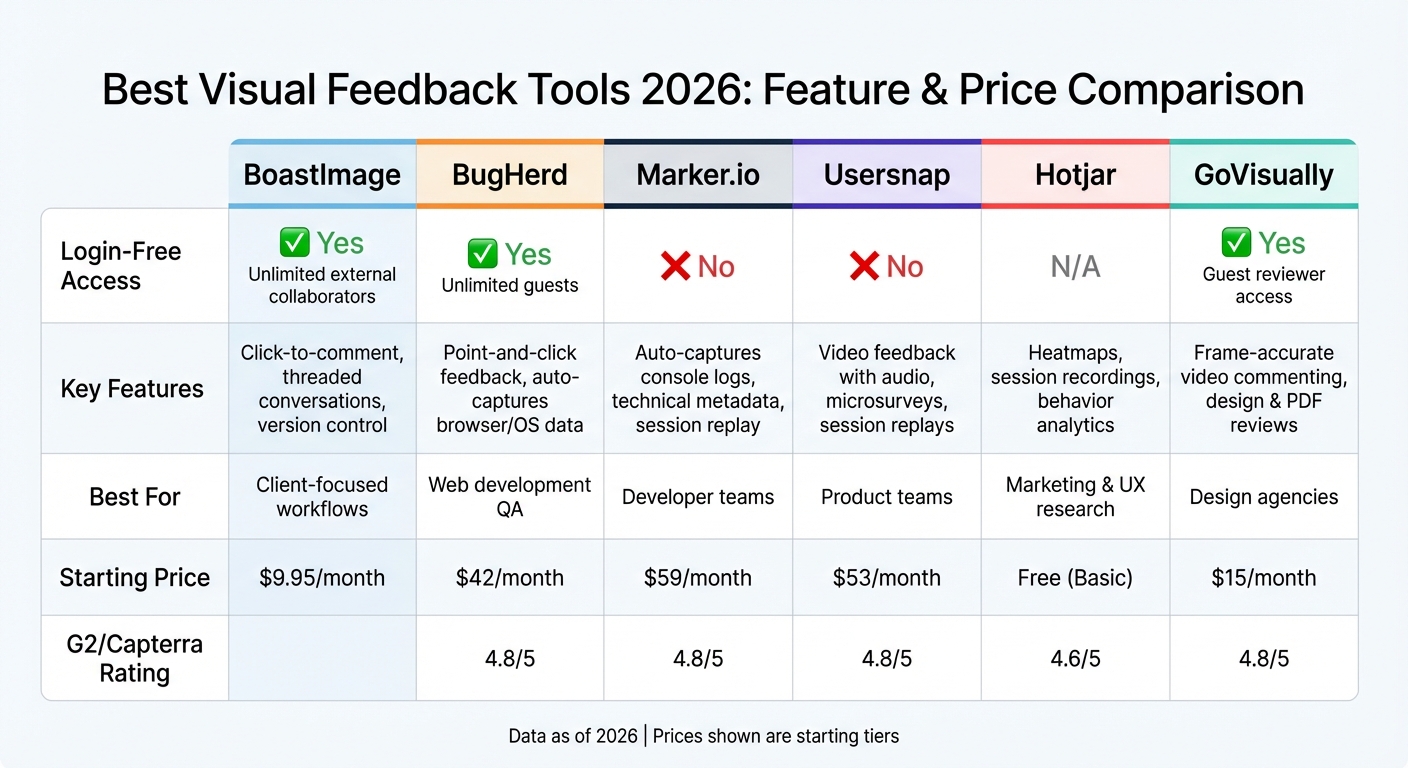
Visual Feedback Tools Comparison 2026: Features and Pricing
Here's a breakdown of six tools focusing on login-free access, annotation capabilities, integrations, and pricing. This comparison can help you identify the best fit for your workflow and budget.
| Tool | Login-Free Access | Key Annotation Features | Top Integrations | Starting Price |
|---|---|---|---|---|
| BoastImage | ✓ Yes (unlimited external collaborators) | Click-to-comment on web pages, images, PDFs; threaded conversations; version control | Browser extension, public sharing links | $9.95/month (Solo) |
| BugHerd | ✓ Yes (unlimited guests) | Point-and-click feedback on live sites; auto-captures browser, OS, screen resolution | Built-in Kanban board, unlimited projects | $39–$42/month (Standard, 5 users) |
| Marker.io | No login-free access | Pins comments to page elements; auto-captures console logs and technical metadata | Developer-focused workflow tools | $49–$59/month (Starter, 3–5 users) |
| Usersnap | No login-free access | Video feedback with audio; combines bug tracking with microsurveys | SaaS product feedback tools | $39–$69/month (Startup, 2 users) |
| Hotjar | N/A (behavior analytics) | Heatmaps and session recordings (not annotation-based) | Marketing and analytics platforms | Free (Basic) |
| GoVisually | ✓ Yes (guest reviewer access) | Frame-accurate video commenting; point-and-click on designs and PDFs | Slack, Zapier | $15/month (Solo, 10 projects) |
This table highlights how these tools differ across features that directly impact workflow efficiency.
Why Login-Free Access Matters
Tools with login-free access can significantly speed up feedback cycles. By removing the need for account creation, clients can provide input more consistently, cutting revision times by up to 50%. This feature is particularly useful for teams working with external collaborators or clients who may not use the tool regularly.
Pricing Models and Value
Pricing structures vary widely to suit different needs. BugHerd, for example, offers unlimited projects across all tiers, making it an appealing choice for agencies managing multiple clients. On the other hand, BoastImage provides unlimited external collaborators on all paid plans, ensuring your clients don’t add to your costs. Choosing the right tool often comes down to balancing cost with the time it saves. For instance, a $20/month tool that saves five hours of admin work weekly may be a better deal than a $99/month platform with advanced automation.
Technical Metadata Capture: A Game-Changer for Developers
For teams focused on website QA, tools like Marker.io and Usersnap stand out by automatically attaching technical details - such as browser versions, OS, and console logs - to every comment. This feature eliminates the need for developers to chase clients for these critical details, streamlining the debugging process. If most of your feedback involves live websites, consider tools with these capabilities. Conversely, if your focus is on creative assets like design files, platforms optimized for those workflows will serve you better.
Conclusion
Choose a feedback tool that works seamlessly with your workflow - and BoastImage is designed to make client collaboration as smooth as possible. With its zero-friction access, clients can simply click a link and provide focused feedback, skipping the hassle of account setups or complicated onboarding. This approach tackles one of the biggest challenges creative teams face: losing valuable time managing feedback. By removing barriers for external stakeholders, you can redirect that time toward billable tasks.
The benefits go beyond convenience. Teams using contextual proofing tools report 50% fewer revision rounds compared to email-based feedback. Plus, the average creative review process, which often drags on for eight days, can be significantly shortened with the right tool. By consolidating feedback into one clear, visual platform, you streamline revisions and deliver projects faster.
BoastImage combines simplicity for clients with robust workflow tools for teams. Features like version control, task tracking, and Kanban boards ensure smooth project management. Even better, all paid plans include unlimited external collaborators, so your growing client base won’t inflate monthly costs. Whether you're a freelancer, part of an agency, or in-house, BoastImage scales effortlessly with your needs.
When feedback flows without friction, projects move faster - and with BoastImage, that’s exactly what you get.
FAQs
How do I choose the right approval tool for my team?
To pick the best approval tool, start by assessing your workflow, the types of assets you review, and how your team collaborates. Prioritize features like in-context commenting, version tracking, and real-time feedback to streamline the process. Tools that simplify client involvement - such as BoastImage, which lets external reviewers participate without needing to create an account - can make approvals much quicker. Align the tool’s capabilities with your team’s specific needs to ensure approval cycles are smooth, efficient, and hassle-free.
What should I look for in login-free client review?
When choosing tools, focus on those that make it easy for clients to use. Ideally, clients should be able to review and leave comments without needing to sign up or log in. The simpler the process, the better - clients should be able to give feedback directly on the work with as little hassle as possible.
How much time can visual feedback tools really save?
Visual feedback tools can drastically shorten review and approval timelines, often slashing the number of revision rounds by nearly half. These tools make the process smoother by delivering feedback that's faster, clearer, and more context-specific. This approach fosters better collaboration between teams and clients, ensuring everyone stays aligned efficiently.