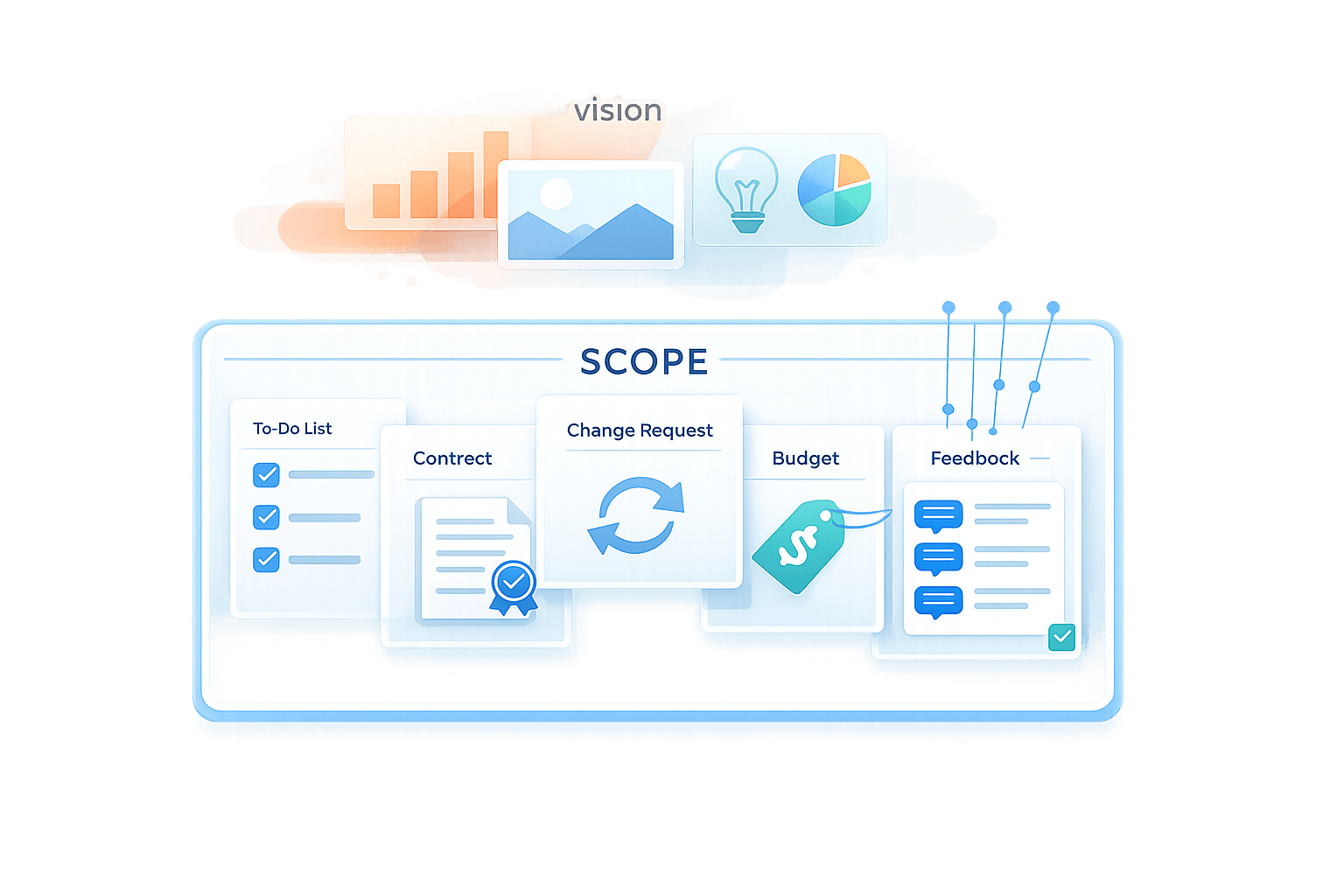
Balancing Client Vision with Project Scope
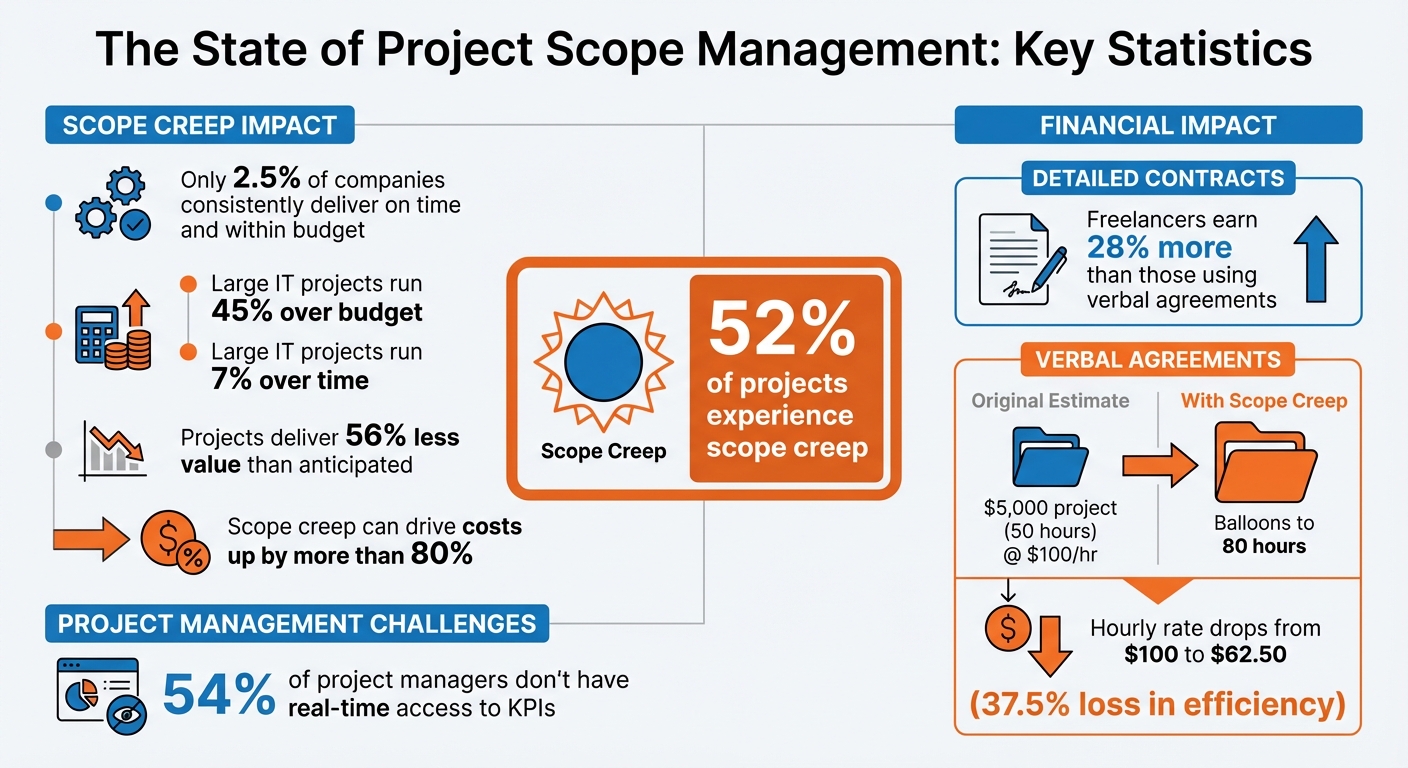
Projects often fail when client expectations and project scope don’t align. Over 52% of projects experience scope creep, leading to cost overruns and missed deadlines. Only 2.5% of companies consistently deliver on time and within budget. Why? Unclear boundaries, vague deliverables, and unmanaged change requests derail progress.
To avoid these pitfalls, you need to:
- Define clear project boundaries: Spell out what’s included and excluded upfront.
- Document deliverables: Be specific - e.g., a 5-page website with detailed formats.
- Break tasks into smaller steps: Use a Work Breakdown Structure (WBS) for better estimates.
- Create a Statement of Work (SOW): Outline scope, milestones, and a process for handling changes.
- Set realistic expectations: Use the “Pick Two” rule for scope, time, and cost.
- Handle scope changes professionally: Log, evaluate, and formalize every request.
- Streamline client feedback: Use tools like BoastImage to centralize input and avoid confusion.
Project Scope Management Statistics and Key Metrics
How to Deal With SCOPE CREEP in Project Management - The Right Way!
To help manage these expectations, you can use a visual project analyzer to evaluate your project's goals and visual appeal.
sbb-itb-32f6eb2
Setting Clear Project Boundaries from the Start
Starting a project without defined boundaries is like building a house without a blueprint - chaos is almost guaranteed. Think of the project scope as a fence: everything inside gets done, while anything outside requires a formal change process to move across that boundary. Setting these limits upfront is essential for defining deliverables in detail and avoiding future confusion.
One common pitfall is assuming clients know what’s not included in the project. A vague disclaimer like "anything not mentioned is out of scope" isn’t enough to protect you. Instead, create an explicit exclusions list that spells out what’s not part of the deal - things like copywriting, sourcing stock images, logo redesigns, or SEO optimization. This approach minimizes misunderstandings that can derail timelines and budgets. Interestingly, freelancers who use detailed contracts earn about 28% more than those who rely on verbal agreements.
Writing Down What's Included and What's Not
Ambiguity is the enemy of smooth projects. Terms like "website design" can mean different things to different people. To avoid confusion, document deliverables with specific details. For example, instead of saying "website design", clarify: "a 5-page responsive website including Home, About, Services, Portfolio, and Contact pages." If you’re delivering a logo, specify the formats (e.g., SVG and PNG), color variations (full-color and black-and-white), and the number of initial concepts included.
A scope chart can make these boundaries even clearer. Use a three-column table to outline your responsibilities, the client’s tasks, and what’s excluded. For instance, you might handle website development, the client provides the text, and logo redesign is explicitly excluded. This visual tool helps prevent early misunderstandings.
Be sure to define revision limits - typically two or three rounds - and include the cost for additional changes. This ensures feedback is consolidated and keeps the project aligned with reality.
Breaking the Project into Smaller Tasks
Big projects can feel overwhelming, but breaking them into smaller, actionable tasks can help. A Work Breakdown Structure (WBS) does exactly that. Instead of a vague deliverable like "build website", break it into tasks like "create homepage wireframe", "design navigation menu", and "develop contact form." This level of detail makes it immediately obvious if a client request falls outside the original scope.
Breaking tasks down also improves your estimates. When you know exactly what needs to be done, you can better predict the budget, timeline, and resources required. Formal sign-offs at each milestone help keep the project on track. Once a phase is approved, it should be locked in, ensuring the project stays aligned with its core structure, or what some call its "load-bearing pillars".
After tasks are clearly defined, formalizing them in a Statement of Work ensures everyone is on the same page.
Creating a Statement of Work
A Statement of Work (SOW) is your project’s roadmap, outlining its goals, deadlines, deliverables, and responsibilities. While an initial proposal might give a high-level overview, the SOW dives into the details of how you’ll execute the plan.
Your SOW should include the project objectives, detailed deliverables (with formats), exclusions, key milestones with deadlines, revision policies, and a process for managing changes. It’s also essential to identify a Single Point of Truth (SPOT) - one client-side person with the authority to make final decisions. This avoids conflicting input from multiple stakeholders, which can derail progress.
The SOW should also establish a change control process. If a request falls outside the documented scope, acknowledge its value but immediately present a Change Order. This document outlines how the request will impact the budget and timeline. By doing so, you protect the project from the scope creep that often leads to cost overruns. For context, large IT projects frequently run 45% over budget and 7% over time when requirements shift mid-project.
Setting Realistic Expectations with Clients
Once boundaries are established, it's crucial to clearly communicate what outcomes are achievable. Many projects run into trouble - not because the scope is undefined, but because clients often misunderstand how scope, time, and cost are interconnected. Honest discussions about these limitations upfront can help avoid frustration later. These conversations also set the stage for defining measurable results and visual deliverables early in the process.
Explaining the Scope-Time-Cost Relationship
Every project is a balancing act between scope (what needs to be done), time (how long it will take), and cost (the resources and budget available). If one of these factors changes, at least one of the others will need to adjust. For example, if a client wants to add more features (increasing scope), you’ll need additional time or a higher budget to accommodate the changes. Similarly, if the client needs the project completed sooner (shortening the timeline), you might have to reduce the scope or increase the budget to speed things up.
A helpful way to explain this is using the "Pick Two" rule. Clients can prioritize two of the three factors - scope, time, or cost - but not all three simultaneously. As 37signals famously puts it:
"Pick two: fixed scope, fixed timeframe, or fixed budget. Having all three is a myth. Pick three and you'll end up with a lot of unsatisfied people and subpar results".
When a client requests a mid-project change, don’t outright reject it. Instead, explain how the change affects the other constraints. For instance, you could inform them that adding a new feature might delay the launch by two weeks and ask if they’d like to proceed with a formal change order. This keeps the conversation collaborative while maintaining the project’s structure.
Defining Clear Success Metrics
Unclear goals often lead to disappointing results. Instead of simply agreeing to vague requests like "a modern website", use the "5 Whys" technique to dig deeper and understand the real business need. For example, you might find that "modern" actually means the site should handle more online transactions because the current version struggles with payment processing. This transforms an ambiguous idea into a concrete objective.
Once the underlying issue is identified, set specific and measurable success metrics that align with business goals. For instance, instead of saying "redesign the homepage", aim for something like "increase homepage-to-contact-form conversions by 25% within three months of launch." These metrics should be documented in the project plan and revisited when evaluating feedback or addressing change requests.
The OST Framework can also help prioritize feedback:
- Objective: Feedback that aligns with the project’s goals should be implemented.
- Subjective: Personal preferences should be weighed against the overall strategy.
- Technical: Constraints or challenges should be addressed with problem-solving or adjustments.
Unfortunately, 54% of project managers don’t have real-time access to key performance indicators (KPIs), which makes tracking success more difficult.
Showing What's Possible with Visual Examples
Words alone can often be misunderstood, but visuals can bridge the gap. Mockups, wireframes, and prototypes give clients a tangible preview of what they’ll receive, helping to eliminate confusion and reduce costly revisions. For example, presenting a wireframe of the navigation menu ensures everyone has the same understanding of its layout and functionality.
Be precise about deliverables. A vague commitment like "logo design" can lead to mismatched expectations. Instead, specify exactly what’s included: "one logo delivered in SVG and PNG formats with three color variations (full-color, black-and-white, and reversed)". When presenting visuals, explain the reasoning behind each decision - whether through a video call or in-person meeting. Clients who understand the strategy behind a design choice are less likely to request subjective changes that veer off course.
It’s also important to secure approvals at key stages. For instance, getting explicit sign-offs for milestones like "Homepage design: approved" prevents clients from revisiting completed work later and helps keep the project on track.
Handling Scope Changes Without Losing Control
Change requests are a given in any project. What separates a well-managed project from one that spirals out of control is how those changes are handled. A structured change management process doesn’t mean rejecting every new idea - it’s about making changes transparent, deliberate, and properly accounted for in terms of time and budget. Without this structure, you risk falling into scope creep, which affects roughly 52% of projects and can drive costs up by more than 80% if left unchecked.
Here’s the key difference: scope changes are managed, approved, and budgeted; scope creep is not - it’s untracked, unbilled, and chaotic. Consider this: large IT projects typically run 45% over budget, 7% behind schedule, and deliver 56% less value than anticipated. For example, a $5,000 project estimated at 50 hours can balloon to 80 hours due to creep, dropping your hourly rate from $100 to $62.50 - a 37.5% loss in efficiency.
Setting Up a Change Request Process
When a client suggests a new idea, start by acknowledging it, then guide them to your established process. Reference the original Scope of Work to frame the discussion: “Let me check this against what we agreed upon and evaluate the impact on the timeline and budget.”
Every change request should follow a consistent process:
- Log the request: Document the details without committing immediately.
- Evaluate the impact: Determine the time, cost, and effect on milestones.
- Communicate clearly: For example, “This change adds 24 hours of work and will delay the launch by one week”.
- Offer options: Present choices such as implementing now with adjusted costs, deferring to a later phase, swapping for a similar task, or simplifying the request to fit the current scope.
- Formal approval: Require a signed Change Order before starting any new work, and update your project plan accordingly.
A handy tip? Use the "15-Minute Rule." Log any task that takes longer than 15 minutes. If these small tasks add up to a significant amount - like two hours in a month - issue a change order or invoice.
This structured approach ensures every change is addressed professionally, with clear communication and accountability.
Explaining the Impact of Changes to Clients
When discussing the effects of a change request, be specific and factual. Instead of saying, “This will be tough,” say, “This will add three days to the timeline and $1,200 to the budget.” Clients respond better to objective data. Using a “Yes, and...” approach - rather than a flat “no” - keeps the conversation collaborative.
Highlight trade-offs. For instance, adding a new feature might mean removing another deliverable or increasing the budget. If the client wants to maintain the original deadline, explain the extra costs required to speed up the work.
"The goal isn't to eliminate change - that's impossible. The goal is to control change so it doesn't control you."
Include a "Material Change" clause in your contract. This ensures any request that alters approved designs or functionality pauses the timeline for a proper budget evaluation.
By presenting the trade-offs and impacts clearly, you help clients make informed decisions, keeping the project on track without unnecessary stress.
Stopping Scope Creep Before It Starts
The best way to combat scope creep? Start with a rock-solid contract. Clearly outline exclusions - what’s NOT included - to avoid misunderstandings. For example: “This project does not include copywriting, stock photography, or ongoing maintenance”.
Use the OST Framework (outlined earlier) to filter and prioritize client feedback.
Watch out for phrases like “Can you just…” or “It’s just a small change…” These seemingly minor requests often mask the beginnings of scope creep.
Clients who value quality work will respect clear boundaries. A structured change process isn’t about being rigid - it’s about professionalism. By focusing on trade-offs rather than emotions, you empower clients to prioritize their needs while keeping the project under control.
Making Client Feedback Easier to Collect and Use
Centralizing feedback can keep projects moving smoothly. When clients send comments through emails, texts, or phone calls, teams often waste time piecing together scattered input. By consolidating all feedback into one system, you eliminate confusion and ensure everyone stays on the same page.
The real challenge lies in getting clear, actionable feedback from clients. Non-technical clients may delay responses or provide vague input because the tools feel too complicated. Instead of forcing them to adapt to your workflow, it’s better to meet them halfway. This is where dedicated tools designed to streamline the review process come into play.
Using Tools to Collect Visual Feedback
Visual feedback tools let clients comment directly on deliverables - whether it’s a web page, design, or PDF - by clicking on specific areas of the work. This approach removes ambiguity and avoids endless back-and-forth email chains. However, requiring clients to create accounts can discourage participation. A no-login guest access feature makes it easier for clients to jump in, leave comments, and move the project forward.
Take BoastImage (https://boastimage.com), for example. It’s built to ensure teams benefit from structured workflows, while clients enjoy a seamless, hassle-free experience. Modern tools like this also automatically capture technical details like browser version, operating system, screen resolution, and URL. These details turn feedback into actionable tasks. While tools can streamline feedback collection, timely follow-ups and open communication are crucial to maintaining progress.
Keeping Feedback Loops Moving
Even with the best tools, projects can stall if clients aren’t clear about what’s expected or when feedback is due. Setting specific timeframes - such as a 3-to-5 business day window - helps keep things on track. Instead of asking vague questions like "What do you think?", guide clients with targeted questions like "Does this layout highlight the value proposition effectively?" This encourages more focused, objective feedback.
Using revision counters (e.g., "1 of 2 rounds used") can also prompt clients to consolidate their thoughts rather than submitting changes in bits and pieces. Before starting any revisions, confirm with the client that their feedback represents their complete input for that round.
Converting Feedback into Team Tasks
After feedback is collected, it needs to be translated into actionable tasks. The OST Framework helps categorize feedback into:
- Objective (e.g., "The CTA isn’t visible"), which should be addressed immediately.
- Subjective (e.g., "I prefer teal over blue"), which needs to be weighed against the brand strategy.
- Technical (e.g., "Our server won’t support this"), which requires problem-solving within existing constraints.
"Feedback is a data point, not a mandate."
- Stuart L. Crawford, Creative Director, Inkbot Design
To avoid conflicting directions, designate a single point of contact on the client’s side to consolidate their internal feedback. If input is unclear or contradictory, use the "5 Whys" technique to uncover the root issue. For instance, if a client asks to "make the logo bigger", asking why might reveal concerns about brand visibility that could be addressed through changes in color contrast.
Additionally, feedback that goes beyond the original scope should trigger a formal Change Order. This ensures any cost or timeline impacts are documented before new tasks are added to the queue.
Conclusion
Balancing a client's vision with the realities of project scope requires defined boundaries, open communication, structured change management, and efficient feedback processes. Without clearly marking what’s included - and excluded - in your project scope, misunderstandings can quickly lead to scope creep.
A well-organized change management system turns potential scope creep into manageable, billable work. Every change request should trigger a formal review of how it affects the project’s timeline and budget. This not only safeguards your profit margins but also keeps the process transparent for your clients. As Stuart L. Crawford, Creative Director at Inkbot Design, aptly states:
"Client management is the art of project preservation".
Once change requests are under control, the focus shifts to gathering clear and actionable feedback. This step is where many projects hit delays. Non-technical clients often struggle with traditional tools, leading to vague or scattered feedback - or even no response at all. That’s where BoastImage (https://boastimage.com) steps in. The platform simplifies the process: clients click a link, leave their comments, and move on - no accounts, logins, or training required. Its revision counters encourage clients to consolidate their feedback, while teams benefit from organized workflows in the background.
When feedback does come in, the OST Framework can help you manage it effectively. Categorize feedback into Objective (functional requirements), Subjective (personal preferences weighed against the strategy), or Technical (constraints requiring problem-solving). This method ensures you’re addressing real project needs rather than chasing every opinion. Additionally, designating a single client contact prevents conflicting directions from multiple stakeholders.
Successful project management treats boundaries as non-negotiable - just like deliverables. By combining clear scope definition, honest dialogue, and a streamlined feedback process, you can align creative vision with practical execution, ensuring client satisfaction without sacrificing efficiency or profitability.
FAQs
What should I include in a project exclusions list?
A project exclusions list is essential for clearly outlining any work, tasks, or deliverables that are not part of the project scope. This clarity helps set realistic expectations, minimizes misunderstandings, and keeps scope creep in check. By defining these exclusions upfront, stakeholders gain a clear understanding of the project's limits and can concentrate on what’s actually included in the scope.
When should I issue a change order?
When unexpected changes or additions to a project’s scope come up - things that weren’t part of the original agreement - you need to issue a change order. This could include client requests for new tasks, revisions, or added features that affect the project’s timeline, budget, or resource allocation. A change order serves as a formal record of these updates, helping to maintain clear communication and ensuring you avoid unpaid work or delays caused by scope creep.
How do I get faster, clearer client feedback?
To make client feedback quicker and more straightforward, consider using tools like BoastImage. These platforms let clients provide comments directly on visual content without the hassle of creating accounts or dealing with complicated interfaces.
Another key step is to clearly outline and communicate the project scope from the start. By setting clear expectations, you minimize unclear feedback and encourage input that is specific, timely, and actionable - making the entire review process smoother.