How to Automate Design Feedback Workflows
Automating design feedback can save time, reduce chaos, and improve collaboration. Traditional processes often lead to scattered feedback, version confusion, and project delays, making it difficult to manage design feedback and revisions effectively. Automation tools solve these issues by centralizing communication, sending timely reminders, and simplifying client input. Here's how to streamline your workflow:
- Centralize Feedback: Use tools to store comments, markups, and annotations in one shared workspace.
- Simplify Client Input: Choose login-free platforms like BoastImage for easy client access.
- Automate Notifications: Set reminders and alerts for deadlines and approvals.
- Enable Version Control: Track changes and ensure everyone works from the latest version.
- Integrate Tools: Sync with project management apps like Asana or Jira for actionable tasks.
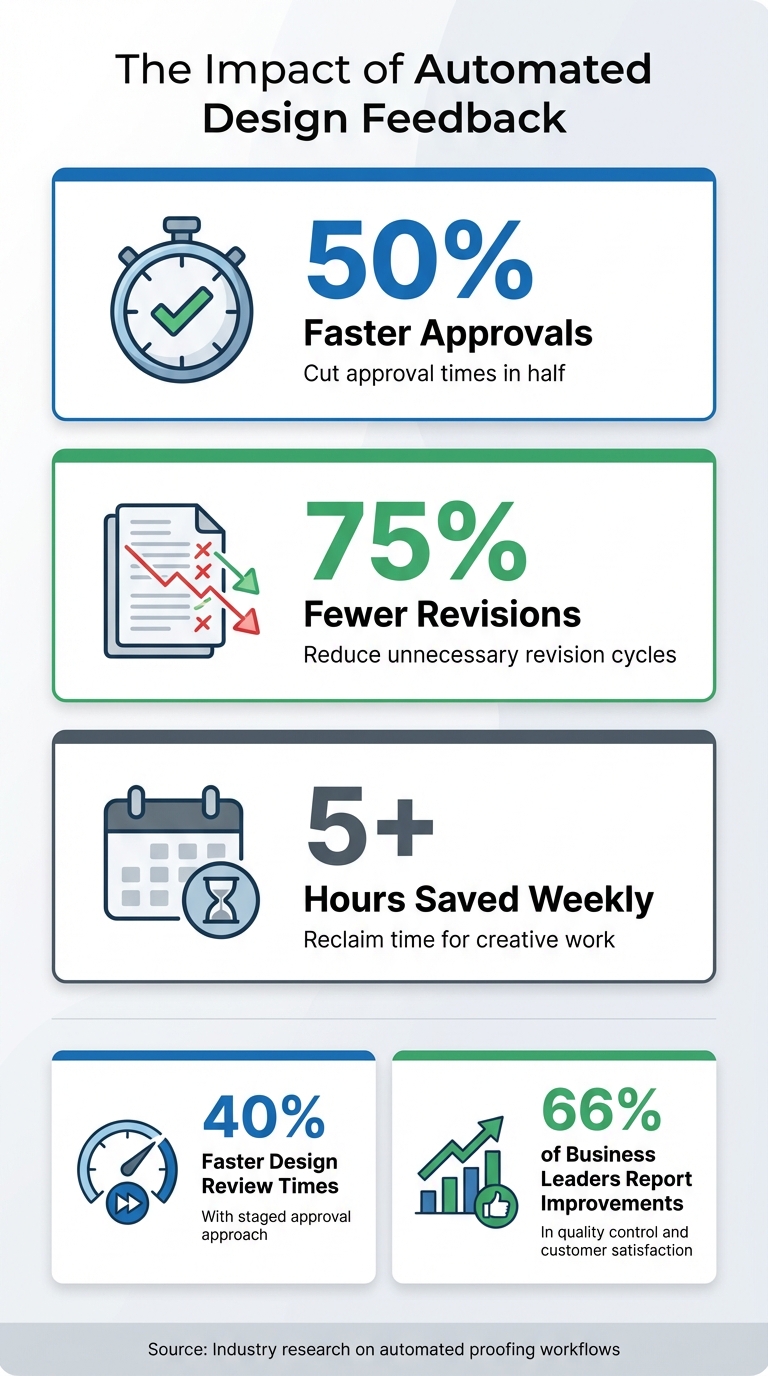
Automation can cut approval times by 50%, reduce revisions by 75%, and reclaim 5+ hours weekly. Focus on tools that support annotations, task integrations, and multi-asset types for a smoother process. Start with a client-first platform to eliminate barriers and keep projects on track.
Benefits of Automating Design Feedback Workflows: Key Statistics
Automate Approval Workflows in Miro | Workflows for Miro Tutorial 🚀
Step 1: Choose Your Feedback Tool
Picking the right tool for client feedback is crucial. It should simplify the feedback process for your clients while keeping your team organized. Many tools focus too much on internal workflows, which can lead to clients ignoring review requests or sending unclear feedback. A well-chosen tool bridges this gap, creating a system that's easy for clients to use and effective for your team.
Why Use a Client-First Tool Like BoastImage
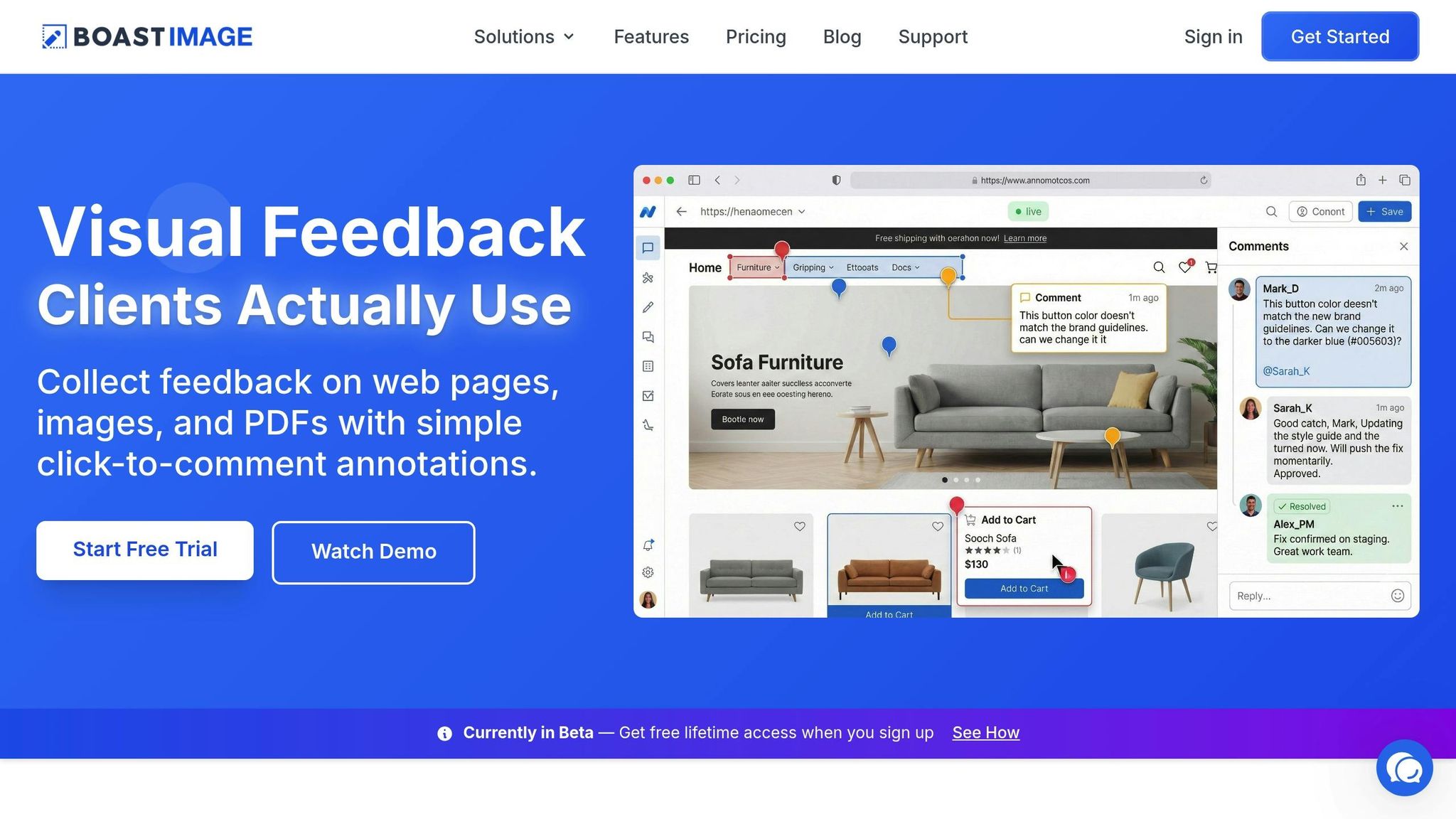
One of the biggest challenges in managing design feedback is getting clients to actually engage. If clients are required to create accounts, navigate complex dashboards, or go through lengthy onboarding steps, they’re likely to disengage. BoastImage addresses this issue by allowing clients to provide feedback with just a simple link. No account creation, no hassle - clients can click the link and comment directly on the assets.
"I never had to onboard my clients into the Workflow. It's just me sending them an invite link." - Johnny Lam, Formfactor Design
On the backend, your team can take advantage of features like version control, task management, and Kanban boards to stay on top of feedback cycles and approvals. This setup ensures that clients can focus on leaving clear, actionable comments while your team efficiently manages revisions. Another bonus? BoastImage offers unlimited external collaborators on paid plans starting at $9.95/month, so you can bring in new stakeholders without worrying about extra costs.
Features You Need
Your feedback tool should do more than just collect comments - it needs to make the entire process smoother and more efficient. Look for tools that support visual and contextual feedback through features like annotations, drawing tools, and on-page comments. These features help pinpoint exactly what needs to change, saving time and reducing design revision cycles.
A good tool should also automatically capture technical details, which can save developers from hunting down specs. Integration with platforms like Asana, Jira, or ClickUp is another must-have, allowing you to turn client comments into actionable tasks and send automated notifications when tasks are completed. Features like deadline reminders and escalation options help keep everyone on schedule. Lastly, ensure the tool supports multiple asset types - whether it’s live websites, PDFs, videos, or design files - so clients only need to learn one interface for all their feedback needs.
Step 2: Set Up Your Automated Feedback Workflow
Streamline your review process by building an automated workflow. This approach eliminates manual handoffs and speeds up approvals, ensuring projects move smoothly through each review stage. Plus, these workflows integrate effortlessly with your existing design processes.
Create Projects and Upload Design Assets
Start by creating a new project and uploading your design files. With tools like BoastImage, you can upload web pages, images, or PDFs and generate a shareable link that clients can access without needing an account. For projects that repeat, workflow templates let you predefine reviewers, roles, and notifications, saving time and effort.
Structure your workflow into distinct stages that match your review process. For instance, you might include an "Internal Review" stage before moving to "Client Approval." You can configure stages to activate automatically once the previous stage is completed or at specific times. Use private stages to gather internal feedback so clients only see polished work.
Configure Notifications and Task Assignments
Automated notifications take the hassle out of follow-ups. Set your tool to send alerts - via email or Slack - when comments are added, deadlines are approaching, or a stage is ready for review. Notify reviewers only when their stage is active, ensuring they’re looped in at the right time, not from the start of the entire project.
When assigning tasks, designate a primary decision maker for each stage. Their approval ensures the project advances without delays caused by multiple stakeholders. To keep things on track, set deadlines for each stage - for example, two business days from activation. This method accounts for earlier delays while still providing ample time for review. Studies show that automated proofing workflows can cut approval times in half and reduce revisions by 75%.
"Automating can give you back the time you need to experiment, and time to do the thing I see as sort of sacred - guide and shape the creative spark." - Brian Yip, Creative Director, Adobe
Use Kanban Boards to Manage Feedback Rounds
Kanban boards provide a clear, visual way to track your project's progress. Create columns that reflect your workflow stages, such as "In Review", "Revisions Needed", and "Approved." Automate triggers to move task cards when feedback is received. For example, if a client approves a design in BoastImage, the task card can automatically shift to the "Approved" column.
Add color-coded indicators to highlight project status - green for on track, orange for nearing deadline, and red for overdue. Once a primary decision maker gives their approval, lock the stage and automatically advance the task card. This prevents last-minute feedback from derailing production and keeps your team focused on the next steps.
sbb-itb-32f6eb2
Step 3: Add Version Control and Approval Routing
Version control is essential for keeping track of changes and ensuring everyone is on the same page. It provides an audit trail, showing who made updates and when, which is especially helpful when dealing with client feedback without losing context or team collaboration. Named versions act as checkpoints, signaling when an asset is ready for review.
Track Changes With Version History
Each time you publish a new version, a searchable log is created. This log is incredibly useful for resolving disputes or clarifying what changes were made. Named versions can even trigger automated updates. For instance, publishing Version 2.0 in your design tool could automatically update your project management system - like moving a task in Asana to "Ready for QA" or shifting a Trello card to "Approved".
With BoastImage, version control happens seamlessly in the background. Clients only see the most up-to-date version, while you retain the full version history. You can compare changes side-by-side without overwhelming external reviewers - they simply click a link and comment on the current version. Additionally, you can integrate tools like Zapier to set up automated workflows. For example, you can notify your Slack channel or update a Google Sheet whenever a new file version is created, keeping your team in sync without the need for manual updates.
This detailed version history not only simplifies collaboration but also sets the foundation for automating the review process.
Automate Approvals and Notifications
Streamlining your workflow with automation can save time and reduce bottlenecks. Set up triggers so specific actions automatically move tasks to the next phase. For instance, you can use keyword filters to detect comments like "approve" or even a thumbs-up emoji to signal approval and advance the task. Assigning a primary approver ensures decisions are made efficiently.
To maintain order, you can lock stages once decisions are finalized, preventing last-minute feedback from disrupting progress. When a version is approved, automation can post details - such as the version name and author - to linked issues, effectively closing the feedback loop.
| Activation Trigger | When It Happens |
|---|---|
| On Proof Creation | The stage begins as soon as the asset is uploaded. |
| All Decisions Are Approved | Moves forward only after every reviewer has signed off. |
| When All Decisions Are Made | Advances regardless of whether the decision was "Approved" or "Changes Required." |
| After Previous Deadline | Automatically triggers the next phase once the current stage's deadline passes. |
Best Practices for Automating Design Feedback
Automation is just one piece of the puzzle. To truly streamline your workflow, you need smart strategies that prevent delays, minimize unnecessary revisions, and keep everyone - team members and clients - on the same page. Here’s how you can fine-tune your automated design feedback process.
Use Standard Feedback and Review Templates
Having reusable workflows with pre-set roles, notifications, and approval stages can save your team from repetitive setup tasks. These templates help focus feedback on what matters most. For instance, a sales manager should review for data accuracy, not weigh in on font choices. This clarity keeps feedback targeted and avoids conflicting opinions.
"Your internal team in particular should understand how all content moves from start to finish beyond just their role."
- Daniel Perez, Head of Aquent's SaaS division
A structured approach to feedback, like the SBI (Situation-Behavior-Impact) model, can also improve communication. Instead of vague comments like, "This looks weird", a template might guide reviewers to write, "The spacing between the headline and subtext feels inconsistent with our style guide". Teams using automated feedback systems with templates have reported up to 75% fewer revisions and 50% faster approvals. Templates not only streamline repetitive tasks but also integrate seamlessly into automated workflows.
Limit Feedback Rounds to Keep Projects Moving
Unlimited revision cycles can derail even the best projects. To avoid this, divide feedback into clear stages - such as internal review, client review, and a final compliance check. Assign a primary decision-maker to resolve conflicting feedback and provide a unified direction. Once a stage is approved, lock it to prevent late-stage comments from causing setbacks.
"Try to give feedback when people can actually do something about it, not when everything is in full swing."
- Chethan Chandrahasan, Senior Product Designer, Lyssna
You can also set triggers to move to the next stage only when all conditions are met. Teams using this staged approach have cut their design review times by up to 40%. For added efficiency, use private internal review rounds to clean up designs before presenting them to clients.
Use Browser Extensions for Quick Web Captures
When gathering feedback on live websites or staging environments, browser extensions can save you from the hassle of taking screenshots or drafting long email threads. Tools like BoastImage’s browser extension let you capture an entire webpage instantly and share a link for on-page commenting. It’s a quick and efficient way to collect actionable feedback without unnecessary back-and-forth.
Conclusion
Bringing automation into design feedback doesn’t just save time - it changes the way teams and clients work together. By cutting out endless email chains, vague comments, and repetitive revision cycles, you create more room for creativity. Automated systems can deliver real results, like speeding up approvals by as much as 50% and reclaiming up to 5 extra hours of productivity every week. That’s time you can dedicate to what truly matters: the creative process.
This streamlined approach benefits client relationships too. Clients don’t want to wrestle with new tools or remember yet another password - they just want to share their thoughts quickly and move on. BoastImage makes this easy by allowing clients to comment directly on your work through a simple link, with no accounts or logins required. While clients enjoy a hassle-free experience, you gain powerful tools behind the scenes, like version control, task management, and Kanban boards, to keep everything organized.
"Automating can give you back the time you need to experiment, and time to do the thing I see as sort of sacred - guide and shape the creative spark."
- Brian Yip, Creative Director, Adobe
By prioritizing simplicity for clients and structure for teams, automation ensures clarity and accountability. Everyone works from the same version of a project, and you build a searchable record of every decision made. In fact, two-thirds of business leaders who have adopted automation report improvements in quality control and customer satisfaction. When clients can track progress in real time and share feedback effortlessly, they stay engaged, and you avoid unnecessary delays. This approach keeps your workflow efficient while maintaining a seamless experience for everyone involved.
Ready to stop chasing feedback through email and start completing projects faster? Try BoastImage with a free plan that offers unlimited annotations and login-free access. Organize your team, keep your clients engaged, and focus more on creating great work.
FAQs
How can automating design feedback streamline collaboration?
Automating design feedback takes the hassle out of collaboration by simplifying communication, cutting down delays, and making sure feedback is both clear and actionable. With automated workflows, teams and clients can share comments and revisions instantly, avoiding confusion and those endless back-and-forth email threads.
These tools bring all feedback into one central hub, making it easy to track changes, manage file versions, and assign tasks to the right people. The result? Less wasted time, smoother alignment across the team, and quicker approvals. Plus, it helps boost the overall quality of the final product. By automating this process, you're setting up a more efficient, transparent, and productive way to work together.
What should I look for in a design feedback tool?
When picking a design feedback tool, prioritize features that simplify collaboration and make it more efficient. Choose tools that let external reviewers leave comments directly on specific sections of your designs - without needing them to create accounts or go through a complicated setup. This makes the feedback process faster, clearer, and more accessible for everyone.
Key features to look for include version control, task management, and structured workflows. These help keep feedback organized and avoid miscommunication. Tools with automation, like sending reminders to reviewers at critical stages or deadlines, can save time and minimize mistakes by handling repetitive tasks. The ideal tools balance ease of use for clients with powerful organizational features for your team.
How can I make it easier for clients to provide feedback?
To get clients actively involved in the feedback process, focus on keeping things simple and stress-free. Use tools that let them share their thoughts directly on your work without needing to sign up, log in, or go through any complicated steps. The easier it is for them, the more likely they are to participate.
It’s also important to establish clear workflows. Lay out specific review stages and provide easy-to-follow instructions so clients know exactly when and how to share their feedback. Tools like version history and real-time commenting can help build trust by showing that their input is both valued and tracked.
By removing unnecessary obstacles and putting clients' needs first, you can create a feedback process that feels natural and encourages meaningful engagement.