5 Steps To Align Client Deadlines
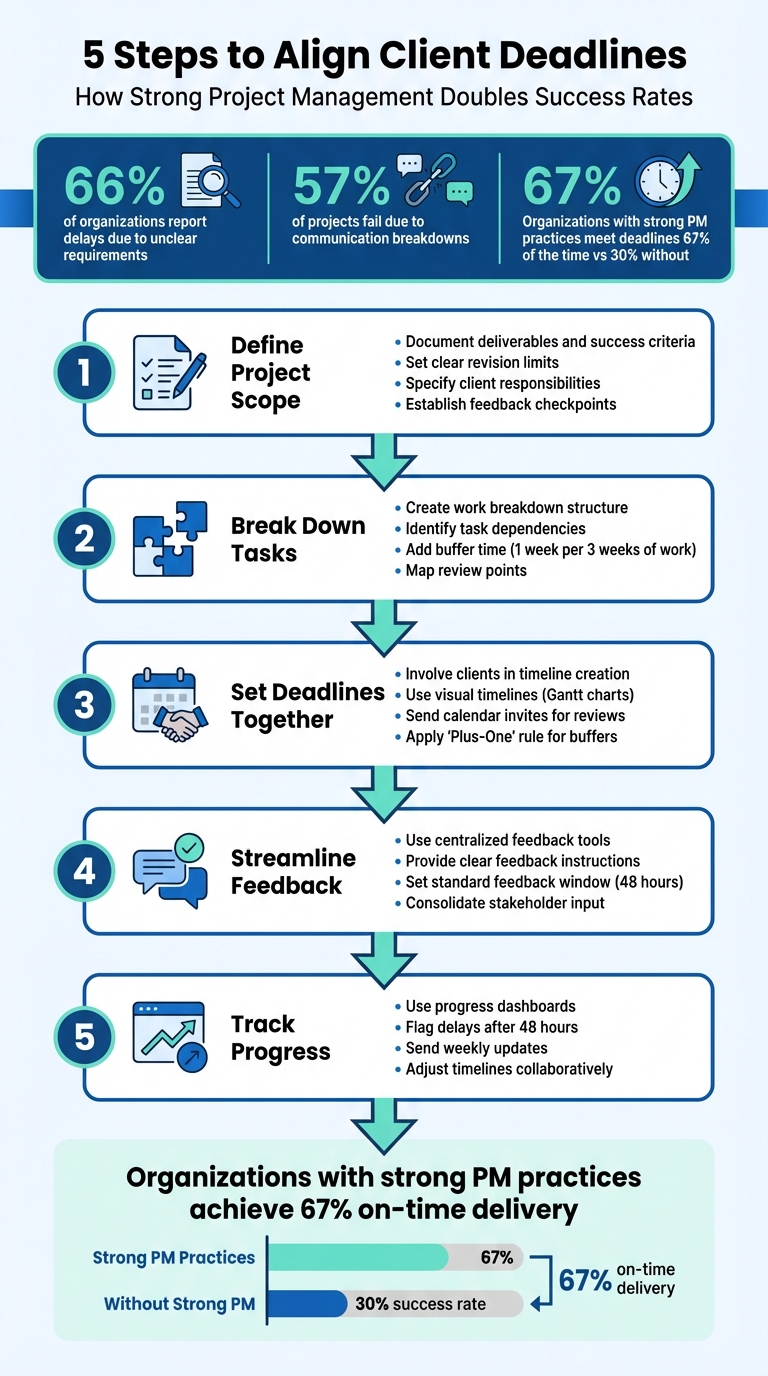
Meeting deadlines is a challenge for many teams. In fact, 66% of organizations report delays due to unclear requirements or late client input, and 57% of projects fail due to communication breakdowns. The solution? Clear communication, structured timelines, and strong project management practices. This guide covers five steps to keep projects on track:
- Define project scope: Set clear deliverables, success criteria, and client responsibilities upfront to avoid confusion.
- Break tasks into steps: Outline tasks, add review points, and include buffer time to absorb delays.
- Collaborate on deadlines: Involve clients in setting timelines to ensure accountability and identify potential roadblocks.
- Streamline feedback: Use centralized tools for organized, actionable feedback and set clear revision limits.
- Track progress regularly: Use dashboards and adjust timelines proactively to address delays early.
Organizations with strong project management practices meet deadlines 67% of the time - more than double the success rate of those without. Follow these steps to improve client relationships and deliver on time.
5 Steps to Align Client Deadlines and Improve Project Success
How to Push Back on Unrealistic Deadlines
sbb-itb-32f6eb2
Step 1: Define Project Scope and Set Expectations
The first conversation with your client is where you lay the groundwork for success. Before diving into design or writing a single line of code, both parties need to have a shared understanding of what "done" means. This step avoids confusion and keeps the project on track.
Document Deliverables and Success Criteria
Create a detailed list of all deliverables - whether it's homepage designs, blog posts, or brand guidelines - and be precise about what’s not included. This helps prevent scope creep, which can derail timelines and budgets.
"Write your main points in your proposal or contract... This written outline becomes your safety net when the client asks for things outside the plan." - Tymora
Be specific about what "finished" looks like. For example, you might require that all pages pass accessibility tests or load in under two seconds. Clearly outline how many revision rounds are included and what happens if additional revisions are needed. Also, specify what the client must provide - like brand assets, content, or login credentials - and set deadlines for these items. This ensures everyone stays on schedule.
Once deliverables are nailed down, establish feedback checkpoints to keep things moving smoothly.
Set Feedback Milestones Early
Plan clear milestones for feedback, like "First design draft submitted" or "Discovery document delivered." Avoid including internal deadlines that clients don’t need to see.
Set a standard feedback window, such as 48 business hours, and make it clear that delays will push back final delivery dates. Use calendar invites to formalize deadlines and ensure everyone is on the same page.
"A 4-week project with a single deadline and no intermediate checkpoints can be two weeks behind schedule before anyone notices." - Plutio
Step 2: Break Down Tasks and Map Review Points
Once you've defined your project scope, the next step is to break it into manageable tasks and establish review points. This approach ensures a steady, organized workflow and provides clarity for both you and your client.
Create a Work Breakdown Structure
Start by dividing the project into clear phases: discovery, design, development, testing, and handover. Within each phase, outline specific tasks. For example, in a website project, tasks might include creating wireframes, designing mockups, coding, integrating tools, setting up SEO, and conducting quality assurance checks.
"Breaking tasks down helps us to see large tasks as more approachable and doable, and reduces our propensity to procrastinate or defer tasks because we simply don't know where to begin." - Melissa Gratias, Productivity Specialist
Identify task dependencies to plan work efficiently. For instance, designing a homepage might rely on receiving brand assets from the client first. If you handle similar projects often, consider creating reusable templates with predefined tasks to save time.
To account for unexpected delays, include a buffer of one week for every three weeks of work. This extra time can help absorb unforeseen challenges without derailing the schedule.
Add Feedback Points to Your Timeline
Incorporate fixed feedback points into your timeline based on the task breakdown. These checkpoints ensure both teams stay aligned and provide opportunities for client approvals before moving forward. Typical review stages include strategy approval after discovery, design sign-off before development, functional reviews during testing, and final acceptance before launch.
For example, allocate seven days for clients to review design mockups. Formalize this period with a calendar invite to set clear expectations. Defined feedback windows help maintain momentum and avoid delays.
Use data from past projects to set realistic timelines for reviews. If clients usually take five business days to approve designs, build that time into your schedule instead of assuming a faster turnaround. This approach keeps your plan grounded in reality and avoids unnecessary stress.
Step 3: Set Deadlines with Client Input
Getting clients involved in setting deadlines turns them into active participants in the process rather than passive bystanders. This collaboration helps avoid common pitfalls - 57% of projects fail due to communication breakdowns, often linked to clients feeling out of the loop with timelines.
When clients help establish deadlines, they’re more likely to stick to them. For instance, if a client agrees to review design mockups by a specific date, they take ownership of that commitment. This shared responsibility fosters trust and reduces the need for constant follow-ups or micromanagement.
Jointly setting deadlines can also reveal potential roadblocks. For example, a client might mention that their CEO will be unavailable during a critical review period. This insight allows you to adjust timelines proactively to accommodate internal approvals or other dependencies.
Use Visual Timelines
Visual timelines transform abstract schedules into something tangible and easy to follow. Instead of sending a list of dates in an email, offer a visual representation of the project’s phases, tasks, and key review points. This approach helps clients quickly identify potential scheduling conflicts.
For complex projects, tools like Gantt charts can effectively outline dependencies and milestones. For simpler workflows, a shared calendar or a straightforward timeline graphic often works just as well.
When gathering visual feedback, platforms like Boast (boastimage.com) simplify the process. These tools allow clients to view timelines and provide comments on designs without needing to create accounts or learn new software. A quick link is all they need to stay engaged and accountable.
Another tip? Send calendar invites for review dates. This blocks time on your client’s schedule and treats each deadline as a formal appointment, reinforcing its importance.
By combining visual timelines with clear expectations, you set the stage for smoother collaboration while leaving room for inevitable adjustments.
Add Buffer Time for Delays
Even with the best planning, delays are bound to happen. Late content submissions, unexpected revisions, or technical hiccups can throw timelines off course. That’s why building buffer time into your schedule is critical.
The "Plus-One" rule is a simple yet effective strategy: if a task is estimated to take three days, schedule it for four. These small, built-in buffers after key client reviews help absorb minor delays without jeopardizing the final deadline.
Position buffer time as a safeguard for the client’s launch date, not as extra padding for your convenience. When clients see how this extra time protects their key milestones, they’re more likely to appreciate and respect the overall schedule. It’s worth noting that organizations with strong project management practices deliver on time 67% of the time, compared to just 30% for those without.
Step 4: Set Up Clear Feedback Channels
When feedback is scattered across multiple channels, it’s easy for important details to get lost, causing delays. Centralizing communication in one system ensures feedback stays clear and organized. This is especially important when you consider that 57% of projects fail due to communication breakdowns.
Use Dedicated Feedback Tools
Email and messaging platforms might work for quick exchanges, but they’re not ideal for handling design reviews or content approvals. Feedback can quickly get buried in long threads, making it hard to find that one crucial comment.
Dedicated feedback tools simplify this process. These platforms allow clients to comment directly on designs, web pages, or PDFs without the hassle of creating accounts or logging in. Tools like Boast (boastimage.com) make it easy - clients just click a link and leave their feedback directly on the visual. Meanwhile, your team benefits from features like version history, task tracking, and organized comment threads.
This streamlined approach reduces "approval lag", a common cause of project delays when clients take days to respond. When clients can review and comment with a single click, instead of wading through downloads or vague email chains, they’re more likely to provide timely feedback. Pairing these tools with clear instructions ensures that the feedback is actionable and effective.
Give Clients Clear Feedback Instructions
Clients don’t always know how to give helpful feedback. Asking a broad question like "What do you think?" often leads to vague responses like "I don’t love it" or "Can we make it pop more?" - which aren’t useful for making improvements.
Instead, guide them with specific prompts. For example, ask, "What works well here?" or "Which elements need changes, and why?" This approach encourages clients to shift from subjective opinions to actionable input. You can also request that they consolidate feedback from all internal stakeholders before submitting it. This helps you handle conflicting stakeholder feedback and keeps the process smooth.
Set expectations early by clearly outlining revision limits in your agreement. Define how many rounds of feedback are included and explain the process for handling additional revisions if needed. When clients know the boundaries upfront, they tend to provide more thoughtful feedback from the start.
Finally, treat feedback deadlines like appointments. Send calendar invites for review dates labeled with clear tasks, like "Website Design Review Due". This creates a sense of commitment and ensures the review stays on their radar.
Step 5: Track Progress and Adjust Timelines Together
Timelines aren’t meant to be set in stone. Catching a two-day delay early in the process is manageable, but discovering setbacks halfway through can throw the entire project off course. Regular monitoring and real-time updates help maintain the alignment built during earlier stages.
Use Progress Dashboards
A centralized dashboard is a great way to keep everyone on the same page and avoid the "out of sight, out of mind" problem. When clients can easily see where the project stands and when their input is required, it minimizes confusion and unnecessary follow-ups. This kind of transparency keeps communication clear and expectations realistic.
Tools like Boast (boastimage.com) offer dashboards that track project feedback and flag delays early. These platforms combine features like version control, task tracking, and Kanban boards to streamline workflows. For clients, the interface is simple: they can view the latest version of a project and leave feedback with just one click.
If a task stays "In Review" for more than 48 hours or client feedback is overdue, notify your client right away. Weekly updates comparing actual progress to the original plan can also help keep the project front and center.
Review and Adjust Timelines When Needed
Dashboards provide valuable insights, but the real key is acting on them quickly. If delays arise, communicate with your client immediately. Just as with the initial timeline discussions, addressing setbacks promptly helps maintain momentum. Research shows that well-structured processes can achieve a 67% on-time delivery rate.
If your project falls 4–7 days behind, inform the client right away. Be specific about the cause and propose a new, firm delivery date. For instance, you might explain, "Client feedback took 10 days instead of 2, which delayed development by a week." This level of detail helps the client understand the situation and makes it easier to adjust expectations.
For more substantial delays (1–2 weeks), consider offering collaborative solutions: extend the overall deadline, reduce the project scope to meet the original date, or deprioritize less critical tasks to focus on urgent needs. A real-world example comes from November 2025, when PixelCrayons faced a tight deadline for a mobile app launch with unfinished integrations. By using a rescue RACI chart and holding daily 15-minute stand-up meetings, they managed to parallelize QA and development, meeting the launch date without any critical issues in the first 72 hours post-release.
Make sure to update timelines weekly to reflect actual progress. Keep a detailed log of any changes or adjustments. This not only helps build trust but also provides valuable data for improving future project planning.
Conclusion
Meeting client deadlines isn't just about setting dates - it's about creating a system that ensures those dates are achievable. This involves defining a clear project scope, setting milestones together, establishing structured feedback processes, and consistently tracking progress. When done right, deadlines become reliable commitments that benefit both the team and the client.
Data highlights the common pitfalls: communication breakdowns and missed deadlines account for 57% and 37% of project failures, respectively. These issues often arise from unclear expectations, unrealistic timelines, and inefficient feedback systems. On the flip side, organizations with strong project management practices meet their deadlines 67% of the time, compared to just 30% for those without structured approaches. These numbers point to the importance of refining how feedback and timelines are managed.
One solution is to simplify client interactions. When teams clearly document deliverables, involve clients in planning timelines, and use tools that streamline feedback, projects are far more likely to stay on track. For example, tools like Boast (boastimage.com) allow clients to comment directly on designs, PDFs, or web pages via a simple link - no accounts or complicated systems needed. This eliminates delays, keeps expectations clear, and ensures momentum isn't lost.
"Every project lives or dies by its deadlines"
– Atlassian
This quote drives home the critical role deadlines play in project success. Transparency is key: build in buffer time, address delays as they arise, and adjust timelines collaboratively. When expectations are clear and shared, projects run more smoothly, creative work thrives, and client relationships grow stronger.
FAQs
What should I include in a project scope?
When defining a project scope, make sure to cover the following key elements:
- Specific deliverables and tasks: Clearly outline what the project will deliver and the tasks required to achieve those outcomes.
- What is excluded from the scope: Specify what is not included to avoid any misunderstandings later.
- Revision limits: Set boundaries for the number of revisions to prevent scope creep.
- Communication and update procedures: Establish how and when updates will be shared and how communication will flow between team members and clients.
- Team availability and response times: Define when the team will be available and expected response times for inquiries or feedback.
These details ensure everyone is on the same page, align the project with client expectations, and keep the workflow organized and smooth.
How much buffer time should I add to deadlines?
Adding a bit of extra time to your deadlines can make a huge difference in managing unforeseen delays and keeping projects on track. A good rule of thumb? Add 10-20% of the total project timeline as a buffer. This cushion helps handle unexpected setbacks, like delays in client feedback or slower-than-expected decision-making. By reviewing your project scope carefully, you can decide how much buffer time fits best within this range, ensuring you stay on schedule without unnecessary stress.
How can I get faster client feedback?
To make client feedback faster and smoother, focus on removing barriers. Use tools that don’t require logins, centralize all feedback, and allow clients to provide comments directly on the work. Be upfront about how many feedback rounds will happen and communicate clearly to avoid a flood of scattered emails. Before moving forward, double-check that you’ve understood the feedback correctly. Tools like BoastImage can simplify this process by letting clients give detailed, quick responses without the need for login credentials.