Feedback tools rarely connect stakeholders with designers, leading to a vast gap between actual needs and implemented visual changes. BoastImage and UsePastel bridge that gap with smart annotations and markup.
BoastImage improves upon the client-facing aspects of feedback to improve satisfaction and connections, while UsePastel focuses on more intricate annotation features for internal design teams. Which one should you choose?
- Choose BoastImage if: You are a growing agency that needs to stay organized. With built-in project management and unlimited canvases for just $9.95/month, you get 18x the value per project compared to the competition. It's the zero-friction choice for keeping clients happy and projects moving.
- Choose UsePastel if: You require a live-sync overlay for technical website reviews and have the budget for the higher tiers (starting at $119/mo) required to unlock unlimited canvases and native PM integrations like Jira or Asana.
Should You Choose BoastImage or UsePastel?
Choose BoastImage if you want to integrate client feedback seamlessly and affordably into your workflow. Boast Image makes the feedback process effortless for all external collaborators and internal team members. Get real-time insights, accurate visual feedback, and collaborate in the web app.
Boast Image is a cost-effective and help you get those shy clients onboard more easily. UsePastel is better for internal design teams who need multi-format support. While the tool offers great website feedback processes, it's also 12x to 18x more expensive than BoastImage.
Quick Verdict: Choose BoastImage for affordable annotations and zero-friction client onboarding. UsePastel is better for in-depth feedback and collaboration across internal teams.
Quick Overview of BoastImage vs UsePastel
How does BoastImage compare to UsePastel? Let's find out:
| Feature / Detail | BoastImage | Pastel (UsePastel) |
|---|---|---|
| Best Fit | Agencies and marketing teams who need structured task management and multi-asset project organization. | Designers and developers who need the fastest possible way to get feedback on a live URL. |
| External Reviewer Access | Share a link; clients can comment without an account. Includes private reviewer views. | Share a link; clients comment without signup. Known for its extremely frictionless invite process. |
| Client Friction | Very Low. Clean, modern interface designed to look professional for high-end clients. | Minimal. The "zero-install" pioneer; clients just click and type directly on the site. |
| Supported Asset Types | Websites (via extension), Images, PDFs, and Videos. Strong multi-media support. | Live Websites (main focus), PDFs, and static image files. |
| Website Feedback | Capture-based. High-fidelity snapshots of the site at a specific moment to ensure "version lock." | Live URL overlay. You comment on the actual live elements. It stays "live" as the site changes. |
| Workflow Complexity | Integrated PM. Built for teams who want their feedback to live inside a Kanban board or task list. | Light & Linear. Focused on the review session itself. Best for quick iterations. |
| Tasks & Accountability | Advanced. Features built-in status (In Progress, Done), assignees, and a task-first dashboard. | Standard. You can resolve comments, but it lacks a full-scale Kanban/Project Management view. |
| Versioning | Clear versioning for images and PDFs; handles "before and after" very well. | Canvas-based. You create new "canvases" for different rounds of feedback to keep history separate. |
| Integrations | Streamlined internal workflow with Slack and email-to-task notifications. | Deep PM Sync. Native exports to Jira, Trello, Asana, Monday.com, and ClickUp. |
| Pricing Posture | $9.95/Month. Allows for unlimited clients/reviewers without "per-seat" bloat. | Scale-based. Free tier, with first paid plan at $35/Month to $450/Month; Pro plans scale per user or active canvas. |
| Security | Password protection, expiration dates on links, and private internal-only comments. | Shareable canvas links, pause-commenting mode, and enterprise-grade SSO (on top plans). |
BoastImage is a project management, client conversion, and visual feedback tool. You can test all of these features with our free plan. There are no upfront payments, credit cards, or hidden catches. Sign up now and steamroll through feedback with zero-friction workflows.
Pastel vs BoastImage: Features Compared
BoastImage is the go-to tool for managing feedback, implementing changes, and assigning design tasks. But does that mean it's a viable alternative to UsePastel? Yes, and here's the brief version of why we're the best:
| Feature / Outcome | BoastImage | UsePastel |
|---|---|---|
| Clients leave feedback without an account | ✅ | ✅ |
| Pinned, contextual comments | ✅ | ✅ |
| Integrated Kanban Task Board (Built-in PM) | ✅ | ✕ |
| Review Images, PDFs, and Video | ✅ | ✅ |
| Capture-based Review (Version Lock) | ✅ | ✕ |
| Live Website Overlay | ✕ | ✅ |
| No-Code / Zero Learning Curve for Clients | ✅ | ✕ |
| Unlimited Canvases on Base Plan | ✅ | ✕ |
| Custom Branding / White Labeling | ✅ | ✕ |
| Responsive Screen Testing (Custom Sizes) | ✅ | ✕ |
Does our word hold credence? You can judge it for yourself through our free plan. Sign up today and get a 14-day free trial of our basic plan. You don't have to pay any hidden fees and the plan switches automatically to our free plan after 14 days.
Live Websites and Annotation
UsePastel is great at live viewing, with a smooth commenting and browsing function. You can switch between both modes easily. The best thing about UsePastel is that it breaks down the front-end view based on HTML sections and containers. What does this mean? You can annotate specific modular functions. Unfortunately, it can feel overwhelming, especially if you aren't tech-savvy. External clients want simplicity in annotation tools, which some Pastel alternatives like Ruttl and BoastImage accomplish.
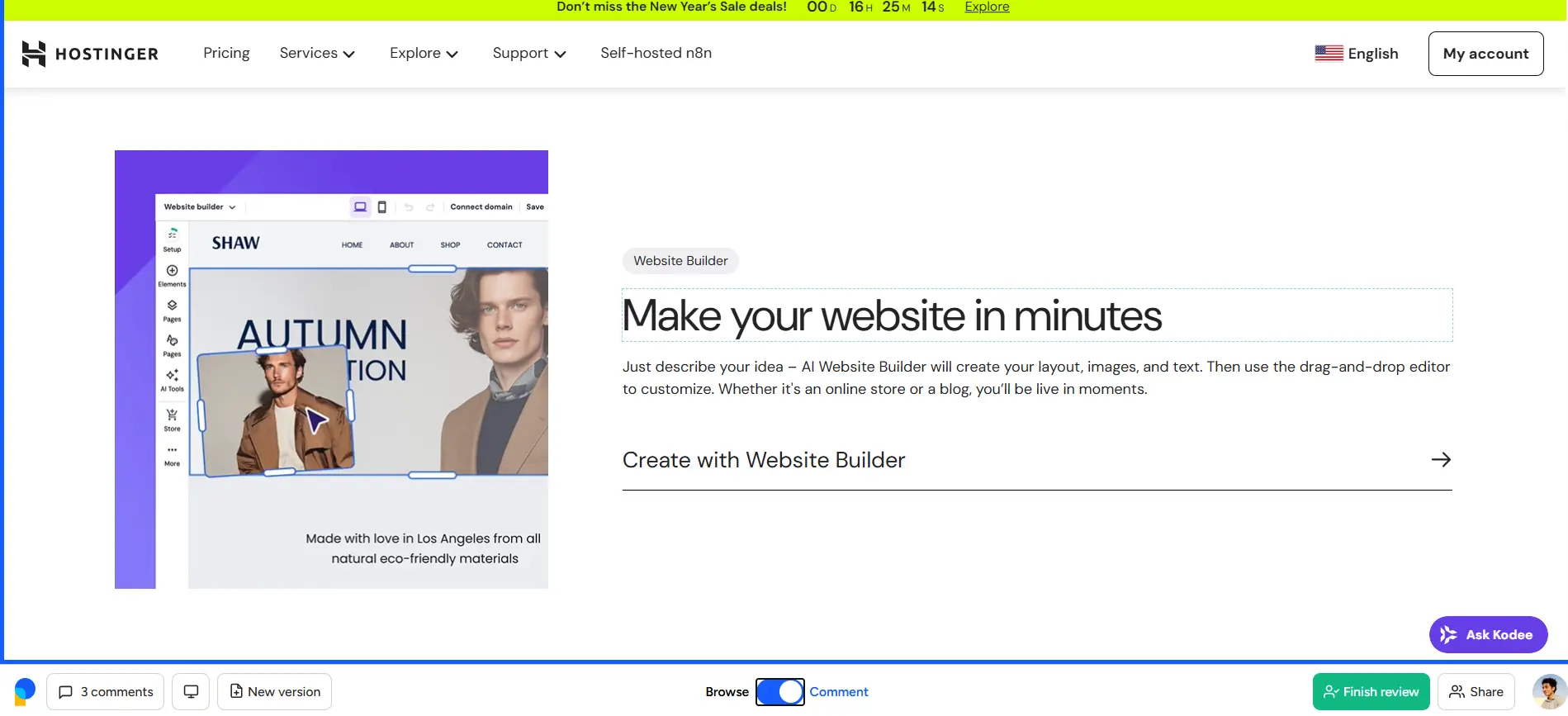
At BoastImage, we offer responsive annotation through simplistic grabs. You get an exact canvas painted with the live version of your site. Your client doesn't have to experiment for hours to understand the tool!
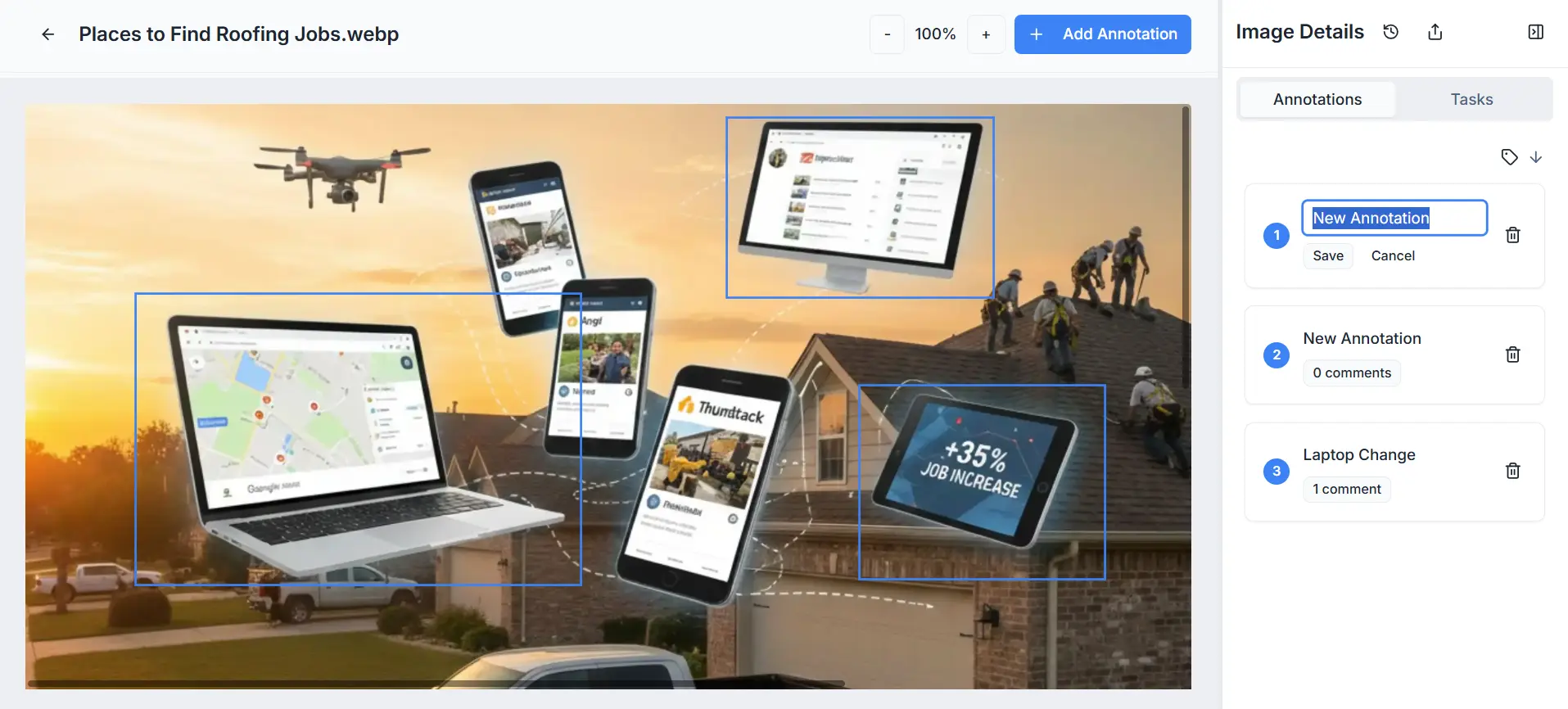
Screen Sizes and Responsiveness
UsePastel offers two broad presets for desktop and mobile screens. You get 9 screen render options for mobile, including iPhone XR, iPad, and Samsung Galaxy S22 Ultra. The desktop render is one standard preset for all desktop devices. While this is neat, it often leaves lapses in screen options. For example, an ultrawide screen or a more compact Dell Latitude screen could render a website very differently. So, your client could be seeing something entirely different compared to you.
Boast Image doesn't cap you with screen sizes because our live capture is different. You can adjust your screen in any way, shape, or form and our plugin will grab an exact render. Want a render of 320x960 or 1920x1080? BoastImage won't stop you!
Project Management Functionality
UsePastel doesn't give you built-in project management. Instead, you must integrate UsePastel with third-party tools like Jira, ClickUp, or Asana to assign tasks. It still doesn't sound bad until you see the fine print.
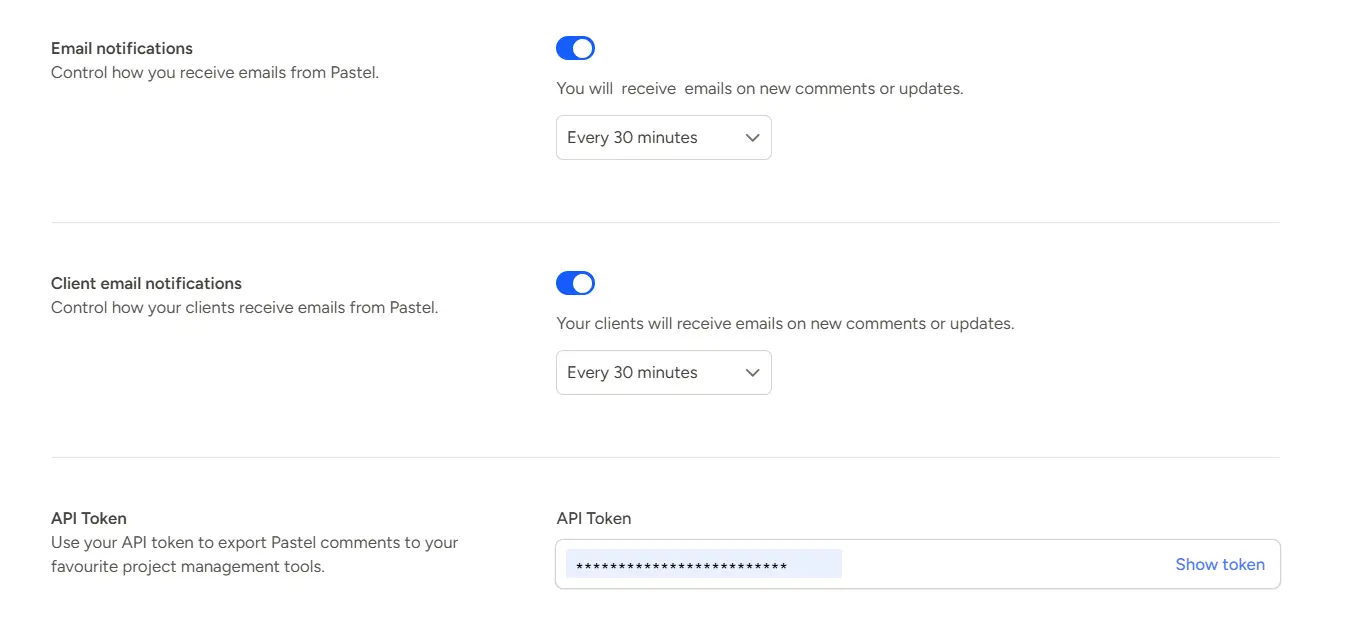
You cannot export comments or integrate any of these tools on the Free or Pro UsePastel plans. What? Yes, you must subscribe to the Team Plan ($119/Month) just to integrate your website feedback tool with a PMS.
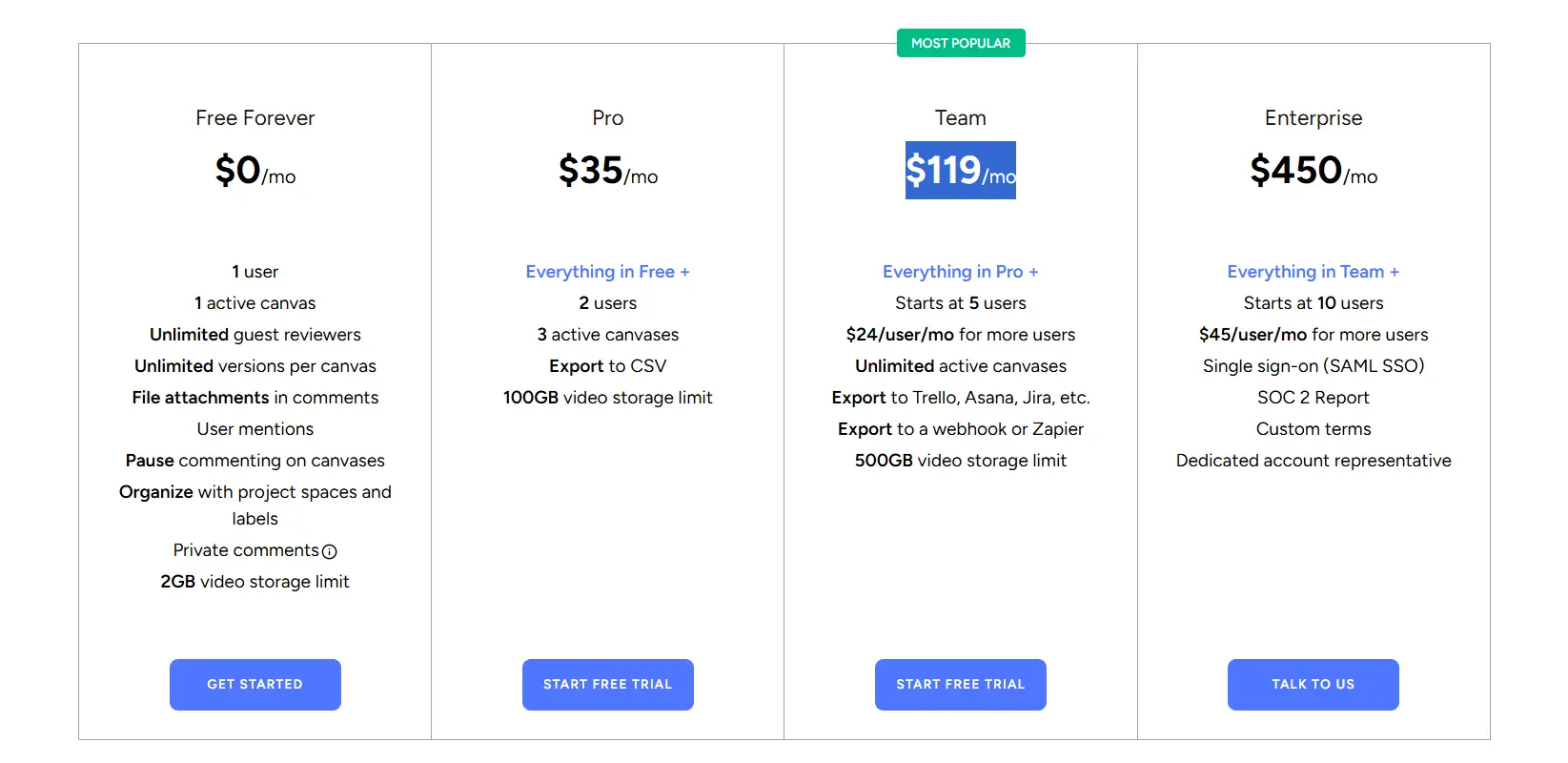
With BoastImage, you can get client feedback and manage projects all within the web app. Switch between annotation and our project management tool seamlessly.
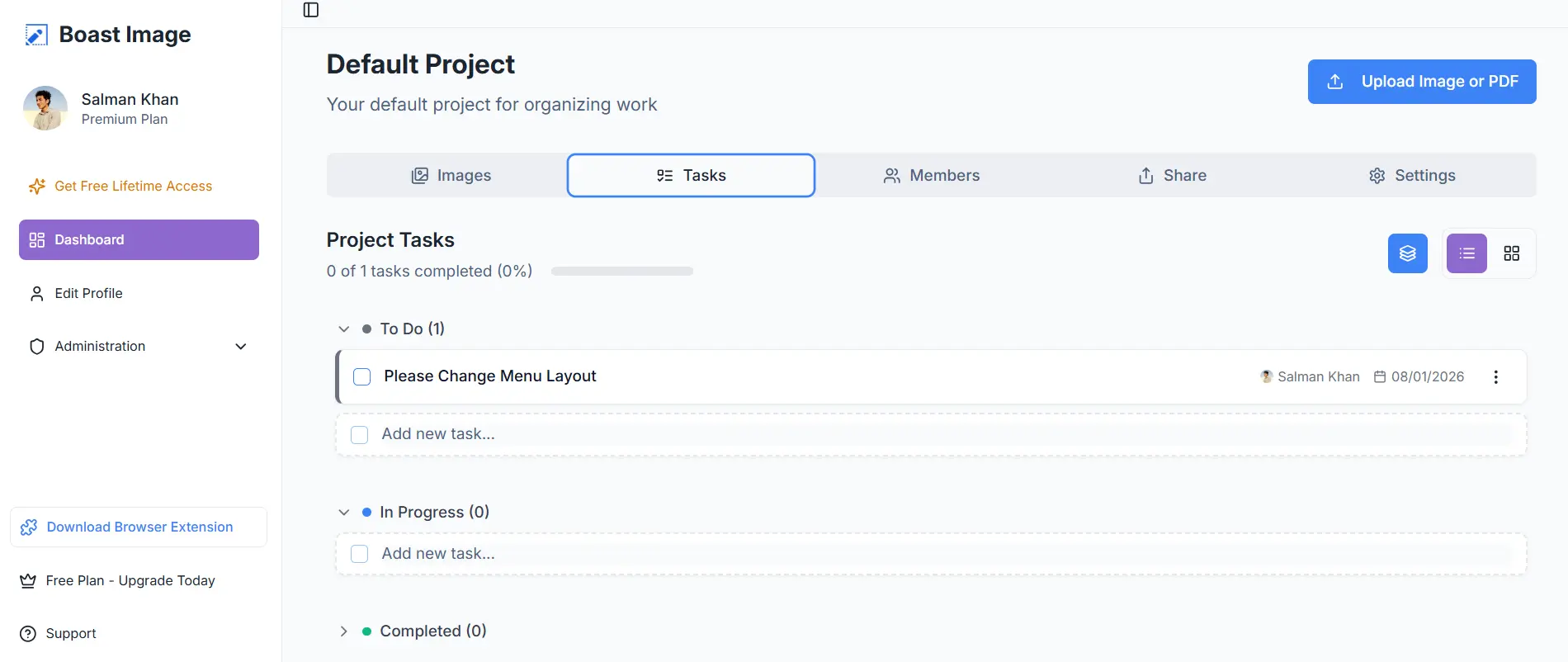
Invite team members, assign tasks, and ship client-ready projects without unnecessary friction. Why pay for extra services when you can have it all for $9.95 per month?
File Support of UsePastel vs BoastImage
BoastImage supports all image formats and PDFs, which is enough for onboarding clients and design feedback. You can upload, render, and leave feedback on files as necessary during the review process.
UsePastel supports a diverse category of files, including videos, emails, PDFs, and live web pages. The tool is geared for internal web designers, teams, and creative departments. It's perfect for internal teams who are well acquainted with designs and other creatives.
Projects and Cost-Value Tiers
Like every annotation tool, UsePastel and BoastImage offer a limited number of projects per plan. How do they stack up against each other? Let's find out:
| Aspects | BoastImage | UsePastel |
|---|---|---|
| Lowest Tier Plan | $9.95 Per Month | $35 Per Month |
| Active Projects On Plan | 5 | 1 |
| Active Canvases | Unlimited | 3 |
| Guest Reviewers | Unlimited | Unlimited |
| Team Members | 1 | 2 |
| Cost Per Project | $1.99 Per Month | $35 Per Month |
Boast Image gives professionals the ability to collaborate at an affordable cost. Based on a simple cost-value analysis, BoastImage gives you 18x the value on project costs alone. We offers unlimited canvases, while UsePastel offers only three per plan.
You'd have to get the $119 Per Month UsePastel plan to get Unlimited Canvases, which is 12x more expensive than our base plan.
You know the funniest bit? You can get six of our team plans for $119, and each plan gives you Unlimited Projects & Canvases, Logo Customization, and 50 GB storage (Per Plan).
BoastImage vs UsePastel Affordability
At BoastImage we focus on affordability, so our application remains accessible for both teams and freelancers. Our base plan starts at $9.95 per month, and it gives you unlimited external reviewers. With BoastImage, there are no bottlenecks on client feedback.
UsePastel offers in-depth features but at a steep price tag. The base plan starts at $35 per month and goes all the way up to $450 per month. You get unlimited external reviewers, but capped team seats, which scale with your plan.
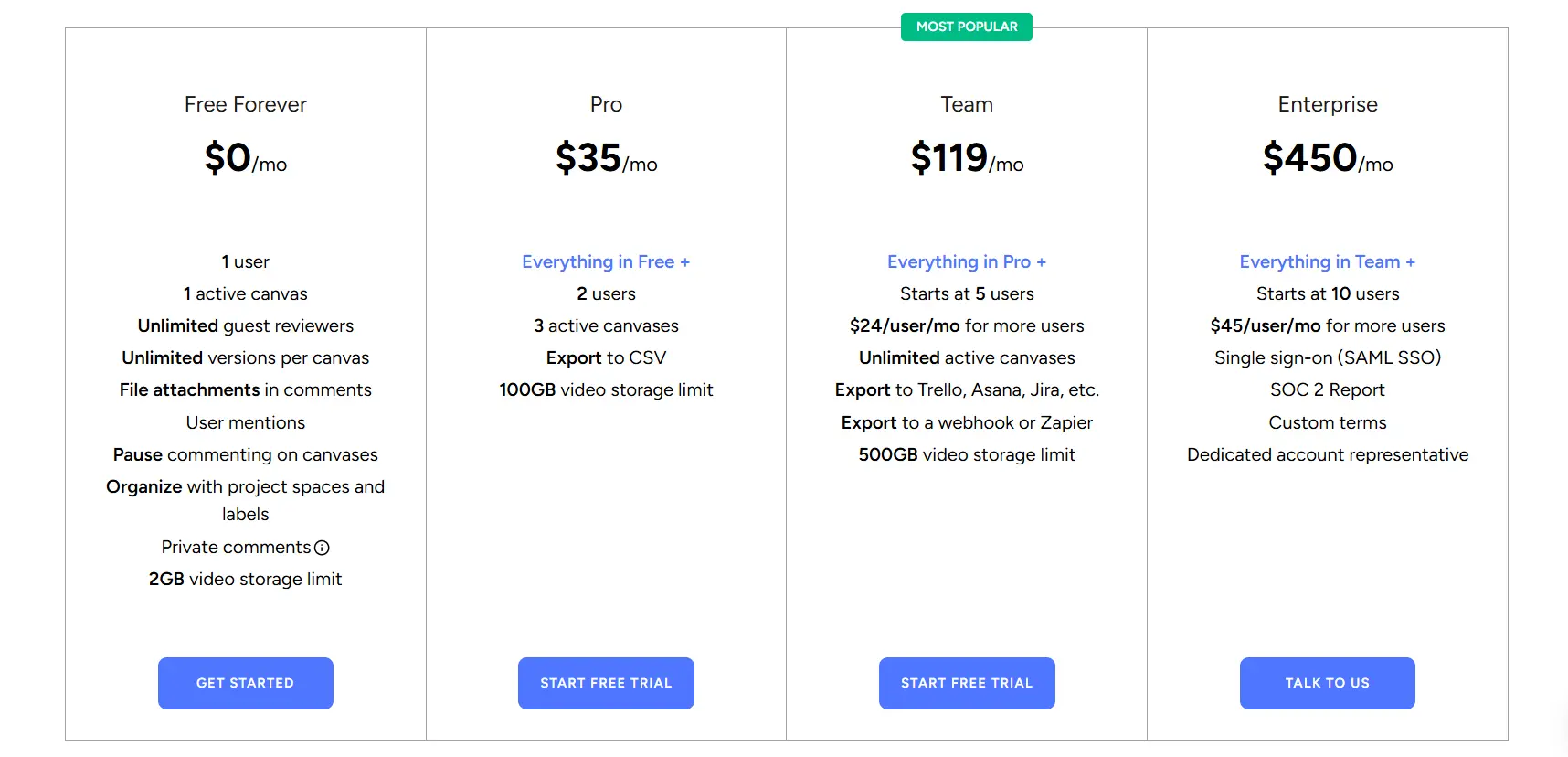
The most expensive UsePastel plan (Enterprise, $450/month) gives you 10 team seats. In comparison, Boast Image gives you unlimited collaborators at $9.95 per month. Collect feedback, collaborate, implement, without breaking your bank!
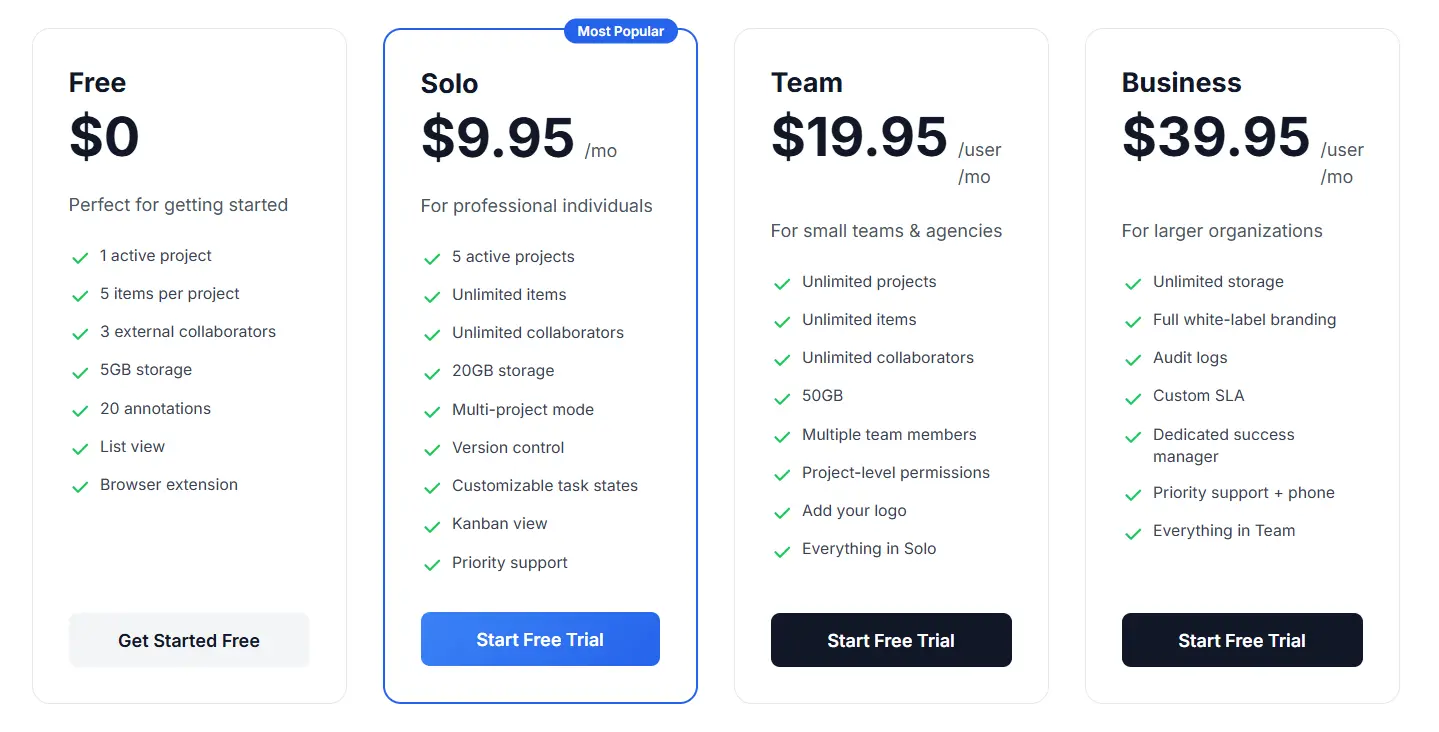
Note: Boast Image also offer a free trial and plan that gives you 1 project and 5 canvases. You can sign up for the free plan now without providing any credit card details.
Usability of BoastImage vs UsePastel
Boast Image make everything easy, with responsive, one-click visual feedback. There is absolutely no learning curve because the functions are intuitive. The process feels like you're chatting, which makes the process zero-friction and seamless.
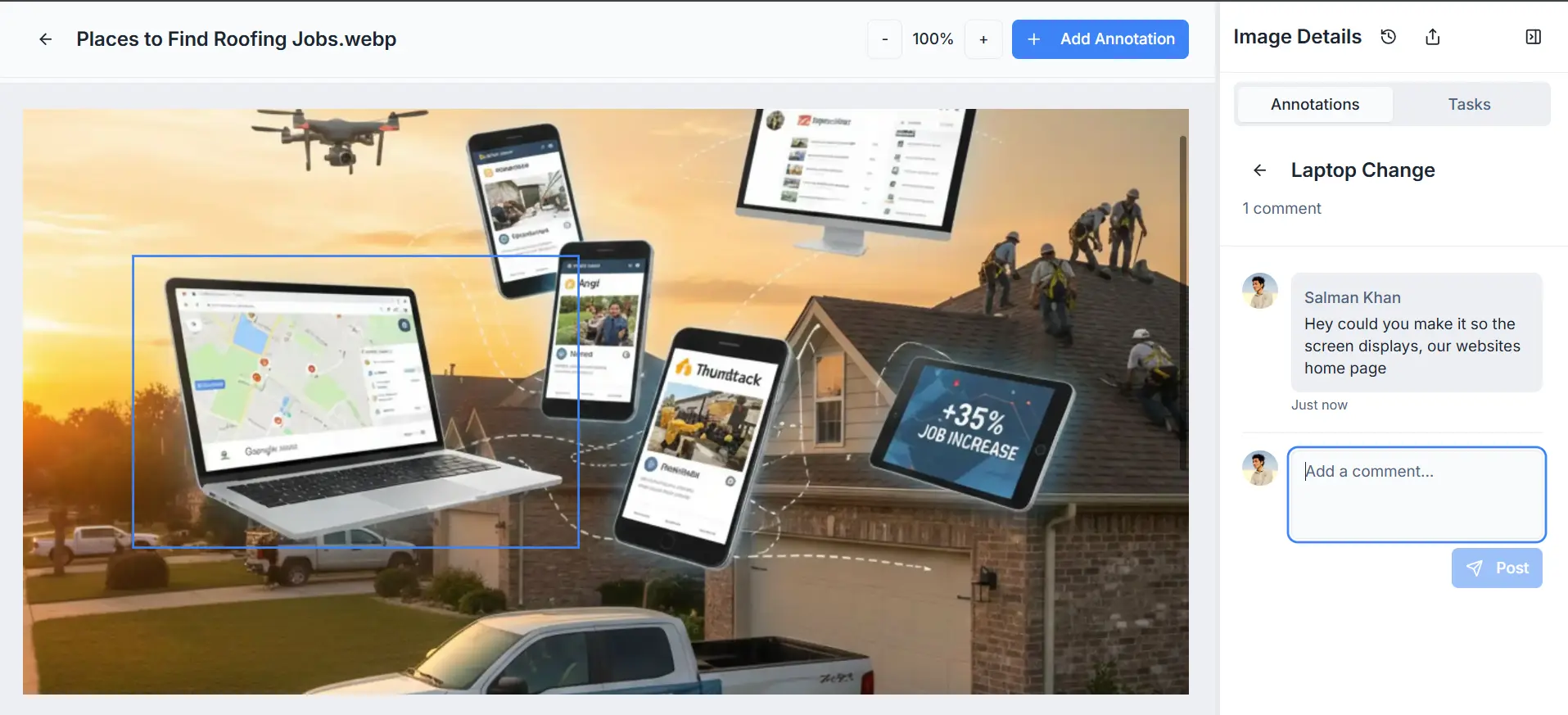
Here's how anyone can use BoastImage to get feedback directly on live websites or digital assets:
- Upload your file or capture it with our extension.
- Share the link with team members and stakeholders.
- Annotate or leave comments directly and assign team members.
- Work, refine, and ship.
UsePastel offers the same feedback capabilities and initial ease of use. Unfortunately, it trades in extra functions with a strong learning curve. While you can set up a live render easily, annotation, replying, and finding the right functions can take a while.
An old-fashioned client could very well spend hours finding out a way to delete a comment. It took us about 10 minutes, and we've been using annotation tools like our life depends on it. That's why we offer simplicity with BoastImage.
Which Website Feedback Tool Should You Choose?
BoastImage is built for the agency that wants to bridge the gap between feedback and action without juggling five different subscriptions. UsePastel is built for the technical designer who needs to see feedback directly on a living, breathing website.
Is the simplicity and built-in task management of BoastImage your priority, or do you need the live-site interaction of UsePastel? Let's look at the best fit for your specific situations:
| Scenario | Ideal Fit & Rationale |
|---|---|
| High-Volume Client Approval | BoastImage: Optimized for zero-friction. It uses high-fidelity captures to ensure clients see a stable version of the site, preventing confusion caused by elements shifting while they try to comment. |
| Technical Front-End Debugging | UsePastel: Best for teams who need to see how comments interact with live HTML/CSS. Its ability to browse the site while in "comment mode" is perfect for spotting bugs across multiple pages. |
| End-to-End Task Management | BoastImage: Ideal if you want to skip the "exporting" phase. Comments are automatically treated as tasks in a built-in Kanban board, removing the need for third-party project management subscriptions. |
| Rapid Iteration on Live URLs | UsePastel: Excellent for the early development builds where the site is changing hourly. Since it's a live overlay, you don't have to keep taking new "captures" as the code updates. |
| Budget-Conscious Scaling | BoastImage: At $9.95/month for unlimited canvases and built-in PM tools, it offers significantly more value for freelancers and small agencies compared to UsePastel's higher entry price. |
FAQs on BoastImage vs UsePastel
What is the tool to annotate screenshots?
BoastImage is a great screenshot annotation tool. It lets users capture screenshots and add arrows, text, highlights, and shapes. Other popular screenshot annotation tools include UsePastel, Ruttl, Markup.io, and GoVisually.
How do you annotate a website?
Capturing the page with a screenshot or the BoastImage browser extension. Log in to your BoastImage account and annotate the page with notes, arrows, highlights, and comments. It is much easier than doing it manually through Chrome Dev tools and Paint.
How to annotate for free?
You can annotate for free with BoastImage's Free Plan. It gives you multiple canvases to upload images, screenshots, or PDF files and a host of annotation functions. The web app also comes with a built-in project management tool for ease-of-use and smooth workflows.
BoastImage Makes Visual Feedback Simple: Try It Now
BoastImage is a client-centric, affordable feedback tool for individuals, agencies, and companies. Our tool is designed to get clients onboard and engaged in the feedback process with zero-friction.
What makes us the best? We doesn't hide crucial functions behind paywalls. You get unlimited canvases, one-click external shares, project management, and more across every plan. Try BoastImage's free plan now and get a markup tool that converts!
Also compare:
Ready to streamline your feedback workflow?
Try Boast free for 14 days. No credit card required.
Start Free Trial