
A good annotation tool can streamline feedback and implementation workflows, but a great one can do that while giving stakeholders a voice. Markup.io is a great example of this, but we believe BoastImage does it even better.
Markup.io gives teams in-depth choices and advanced features. But what about clients? They want simplicity, easy communication, and quick changes. BoastImage gives clients that satisfaction and more.
How? We'll explain that and why we can transform your feedback loops to angry clients into happy, lifelong patrons. The short version of it all is that:
- BoastImage is an affordable ($0 to $39.95), zero-friction client-centric tool for agencies, freelancers, and stakeholders. The tool collects their feedback and smoothens the workflow through the built-in project management function.
- Markup.io is an expensive ($79+) tool specifically for internal communication, design changes, and implementation. It offers more in-depth annotation features like Live Website feedback, rendering, and external sharing, but has a steep learning curve.
Should You Choose BoastImage or Markup.io?
The answer depends on your needs and choices. Choose BoastImage if you need a minimalistic client-centric tool that minimizes friction in feedback collection. BoastImage also offers a built-in project management tool for quick assignments and maximum impact.
Choose Markup.io if you want better engagement between team members and in-depth annotation. Markup.io has a steeper learning curve and requires third-party integrations like Jira and Trello for task assignment.
Quick Verdict: BoastImage is an improved markup alternative to markup.io for teams and agencies who want zero-friction client feedback. It's easier to use, offers real-time team collaboration, and works well in both front-end and back-end settings.
Quick Overview of BoastImage & Markup.io
Here's how BoastImage and Markup.io define the feedback process:
| Feature / Detail | BoastImage | Markup.io |
|---|---|---|
| Best Fit | Agencies, freelancers, and marketing teams who need fast client approvals. | Product, design, and QA teams reviewing live sites or web apps. |
| External Reviewer Access | Share a link; clients can comment without creating an account. | Shareable links support guest commenting (no signup required). |
| Client Friction | Optimized for "open link → click → comment" with minimal explanation. | Powerful, but can feel heavier for some external stakeholders. |
| Supported Asset Types | Web page captures, images, and PDFs (mixed projects supported). | Live websites, images, PDFs. |
| Website Feedback | Capture-based via browser extension (full page, visible area, or selection). | Comment directly on live websites with dedicated review modes. |
| Workflow Complexity | Client-first by design; simple for reviewers, structured enough for teams. | More modes and workflow depth; best when reviewers are internal. |
| Tasks & Accountability | Built-in tasks (list + Kanban), customizable states, and assignable. | Issue/ticket workflows with assignment and resolution. |
| Versions | Upload new versions and keep history; reduces "version confusion." | Version history preserved across live website feedback projects. |
| Integrations | Email notifications and a streamlined in-app workflow. | Integrates with tools like Slack, Jira, Trello, Asana, and Zapier. |
| Pricing Posture | Designed to stay simple as you scale (clients don't "cost seats"). | Pricing varies by team size and workflow complexity. |
| Security | Public read-only links, loginless collaborators, and optional access codes. | Granular permissions and sharing controls (plan-dependent). |
With BoastImage, you only have to create an account, upload or grab a picture, annotate, and ship. There are no complex steps; you see, you do, and you finish. Invite team members as necessary, assign tasks, and get things done!
Boast Image vs Markup.io Features
Now you know about the necessary features, but do BoastImage and Markup.io have all of them? Here's your sneak peek into what each tool offers:
| Outcome / Feature | BoastImage | Markup.io |
|---|---|---|
| Clients can leave feedback without learning the tool | ✅ | ✕ |
| Pinned, contextual comments (click → comment on exact spot) | ✅ | ✅ |
| Threaded discussions to keep context clean | ✅ | ✅ |
| Review images and PDFs | ✅ | ✅ |
| Support multi-round revisions | ✅ | ✅ |
| Browser extension to capture web pages | ✅ | ✅ |
| Website feedback (capture-based review) | ✅ | ✅ |
| Turn feedback into trackable work (tasks / Kanban) | ✅ | ✕ |
| Designed specifically to maximize client completion rate | ✅ | ✕ |
| Capture-only review (no staging access needed) | ✅ | ✕ |
| Optional access codes for external sharing | ✅ | ✕ |
| Website feedback via live URL review | ✕ | ✅ |
| Review dynamic website behavior (hover, states, interactions) | ✕ | ✅ |
| Third-party integrations | ✕ | ✅ |
Still not sure? Try out BoastImage for free or watch our demo. There is no hidden fine print. Sign up, use, and make a decision. That's how your clients think, and that's how you should do things!
Markup.io vs BoastImage: Features Compared
We've been boasting about our features, but how do they stack up against Markup.io? Don't worry because we've compared every important feature down to the most minute detail.
Responsive Viewing (Website Feedback)
Annotation tools must render each version correctly so stakeholders can provide accurate visual feedback. With BoastImage, you:
- Upload the image or capture it with our extension.
- Share the link with the necessary people.
- Annotate it and assign team members.
- Work, refine, and ship.
No extra steps, no weird settings, just upload a file or use the extension, grab a screenshot, share the link, and annotate. Markup.io offers the same features, with one major difference: you can annotate live websites.
- Add the URLs of the websites or pages.
- Wait for the renders to load.
- Annotate sections, modals, or links.
- Assign the work by connecting a project management tool.
- Add fixes, and then add comments to announce fixes.
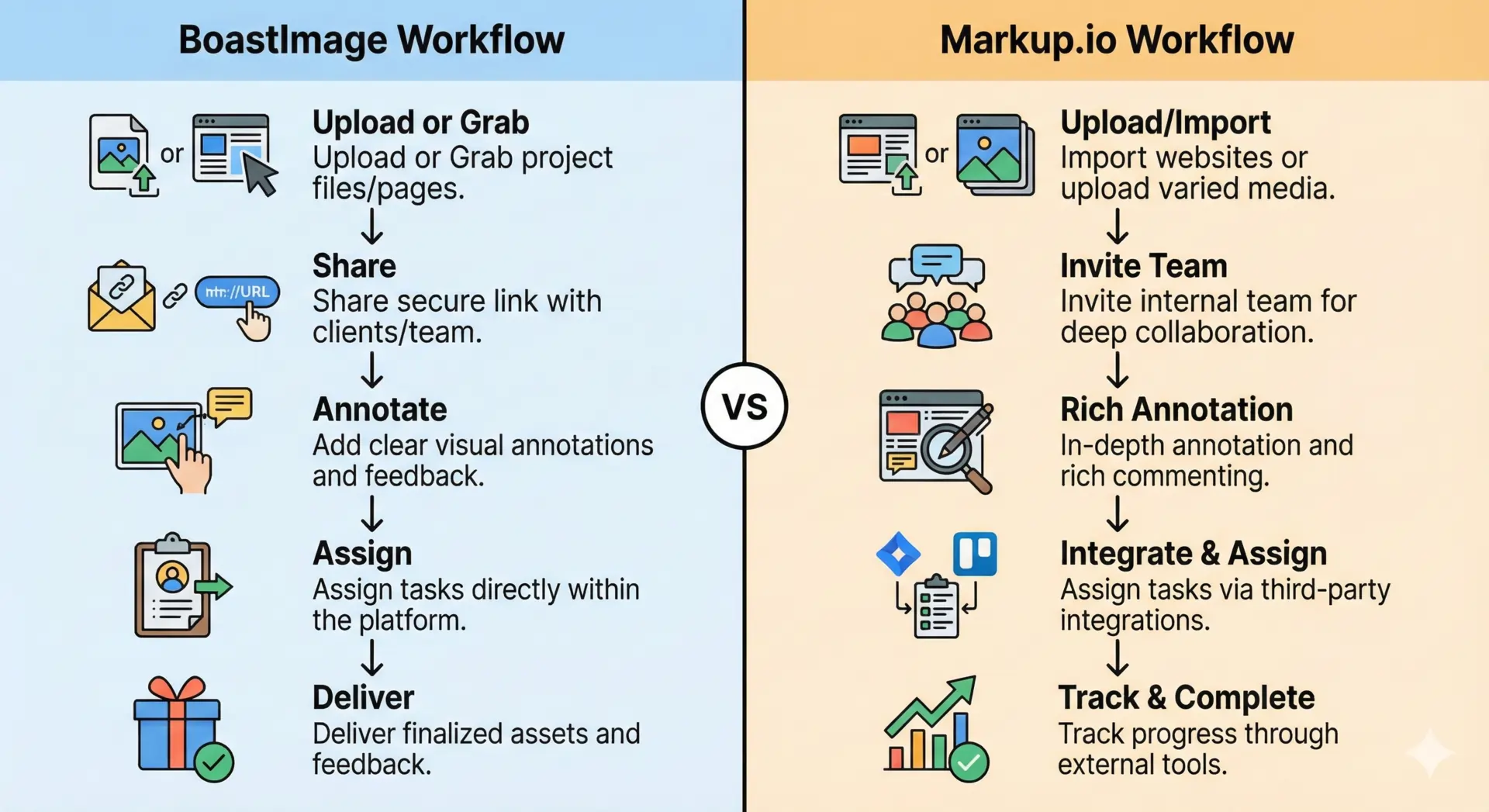
The Friction Gap
Overall, Markup.io has a great responsive viewing feature. Unfortunately, some of the hitches can increase client friction.

How? We created separate trial accounts for 5 different websites. On each account, Markup.io defaulted to mobile view even when explicitly on the desktop version. Sounds like mumbo jumbo? Let us explain.
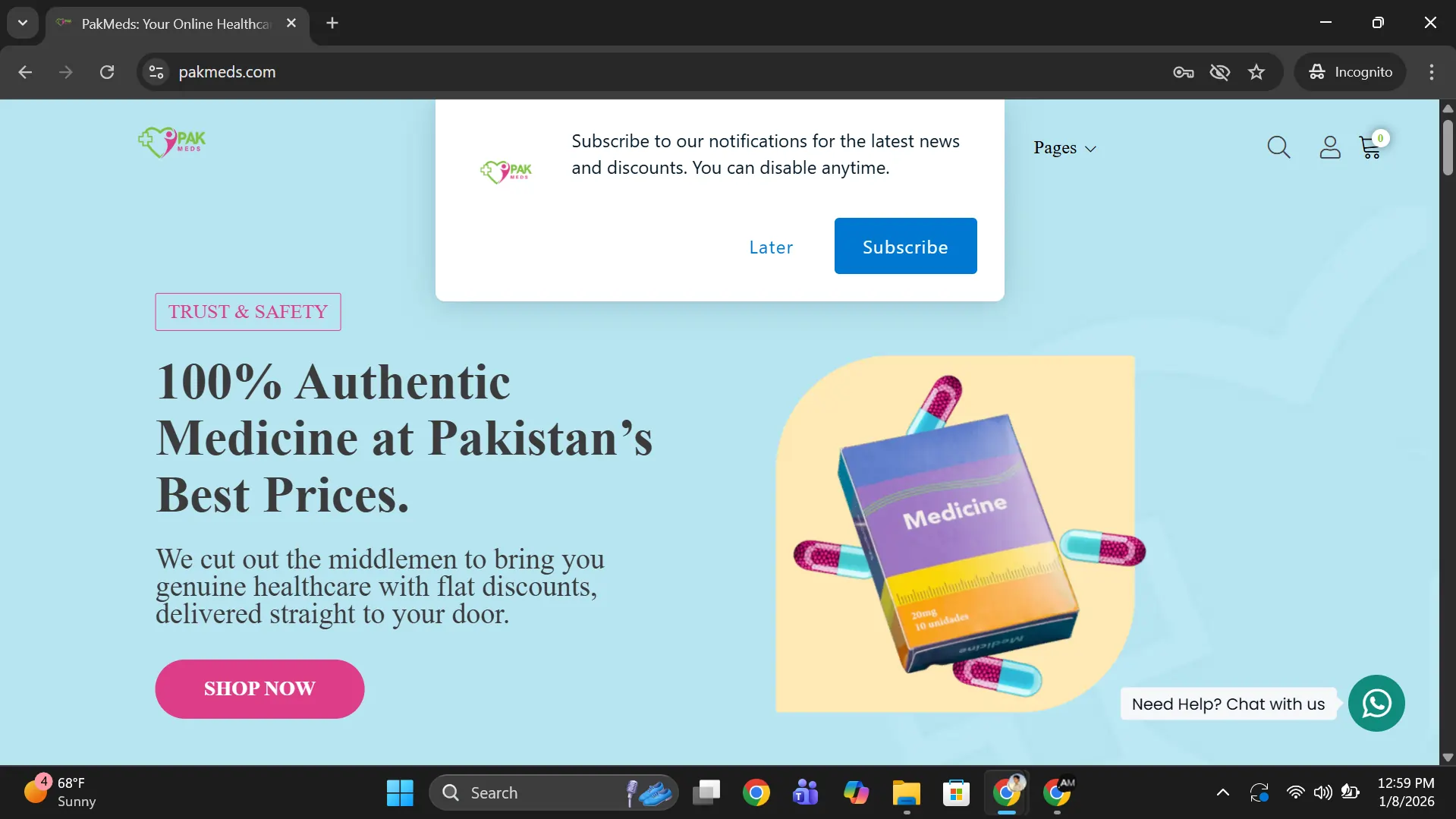
Here's one example, of a site called PakMeds.com. The actual desktop version of the site is as follows:
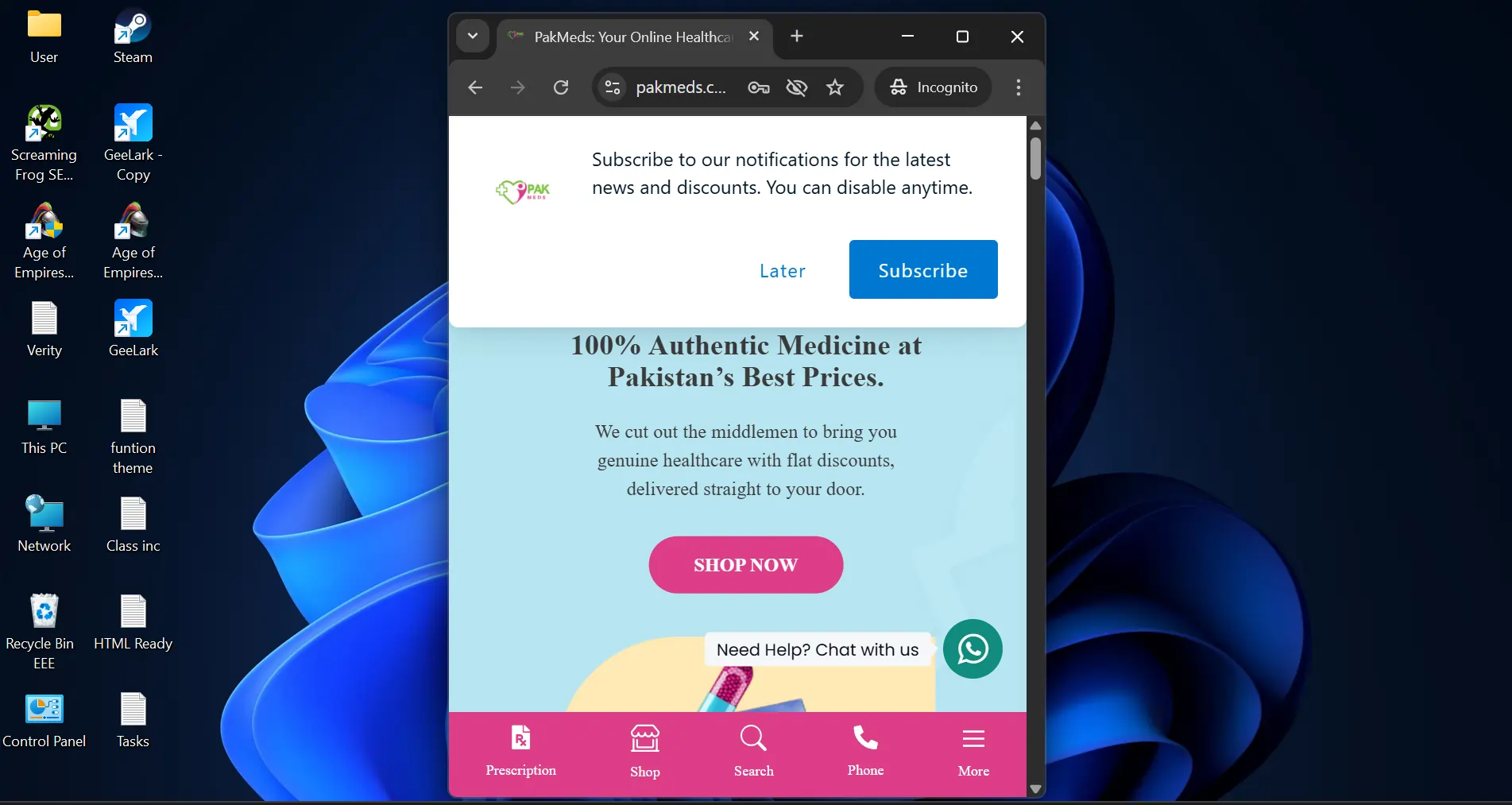
Now, here is the mobile version of the website:
And here is what markup.io showed as the desktop version:
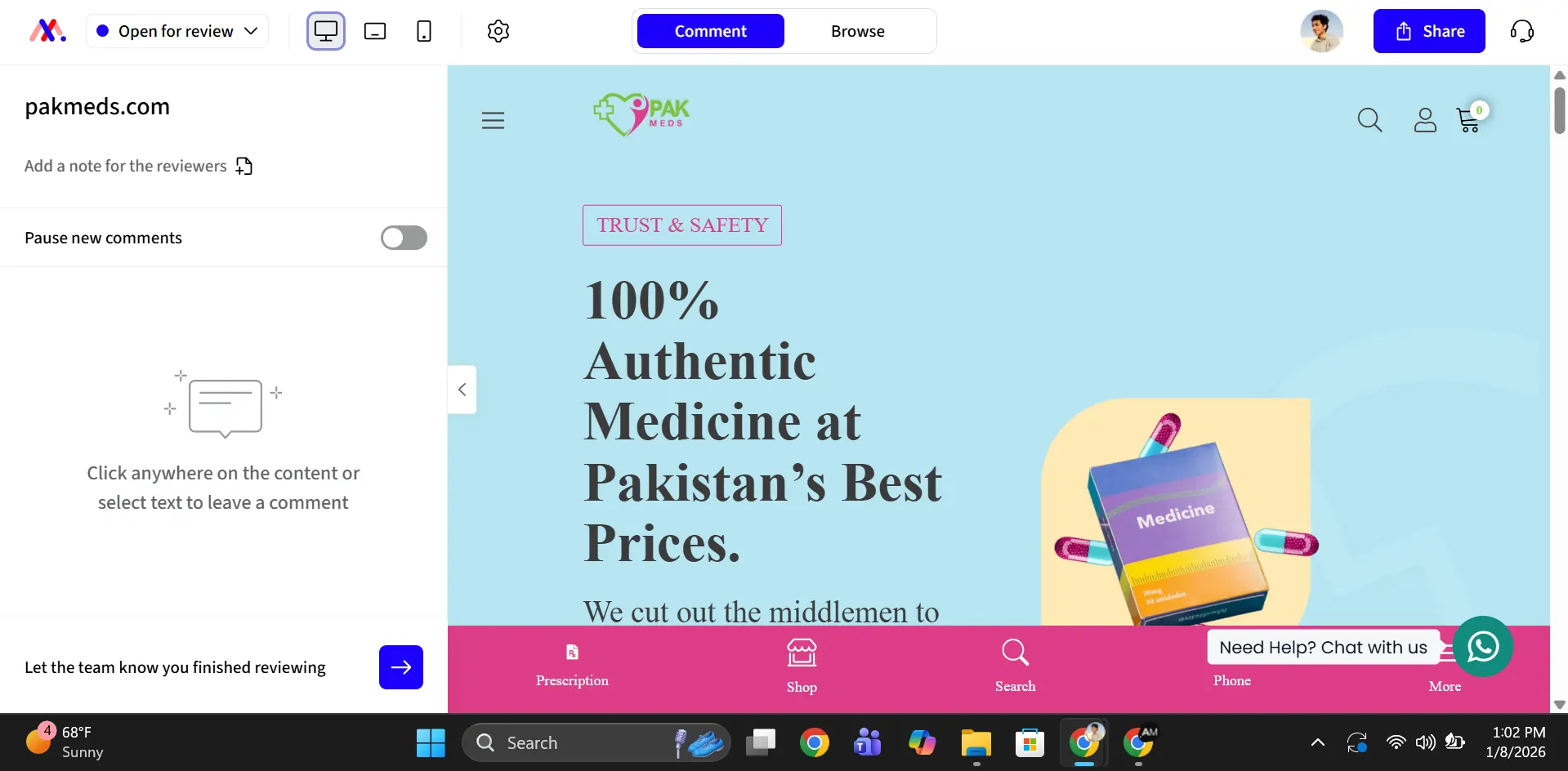
This happened because the expanded side menu squashed the pixels of the screen on the right side. It forced the screen on the right side into the mobile or small-screen version. You can easily get rid of this by clicking on the small arrow icon on the menu.
Unfortunately, it took me 5 minutes to figure that out. I'm not the sharpest tool in the shed, but I can bet it will confuse other people as well. This could be especially confusing for clients who don't know about different render versions and changes.
Usability of Tool
Both BoastImage and Markup.io are functional tools, designed for creative freedom and ease of use. BoastImage is more beginner-friendly with simple and minimalistic controls. You upload the image, scroll as you like, and add visual feedback at will.
Markup.io offers the same features with more depth, but with one small caveat. The tool operates exactly like BoastImage on JPEG and PDF uploads, but doesn't allow page scrolling on Live Websites.
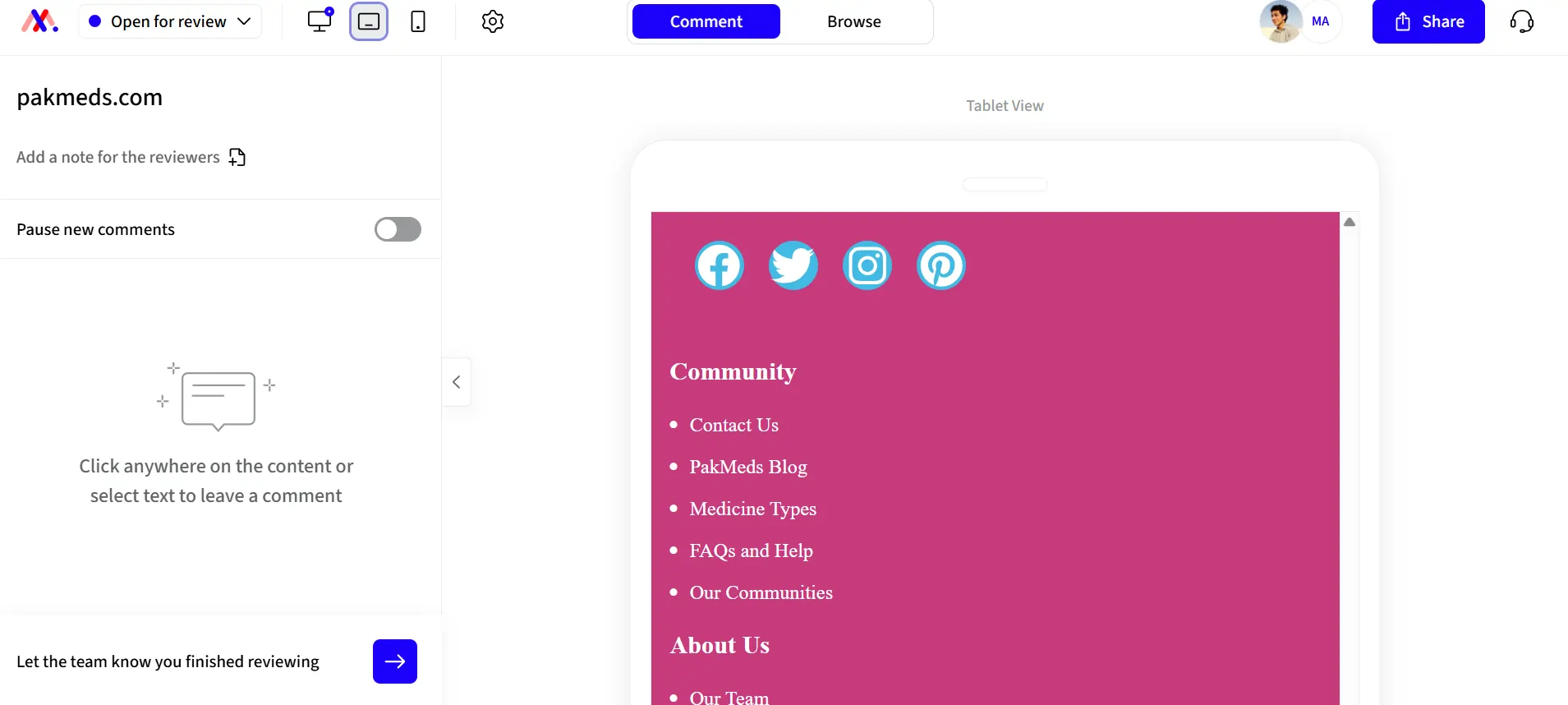
You just can't scroll down, which is a bit vexing. The only way to see the whole layout is to press "CTRL" & "-" to de-magnify the screen.
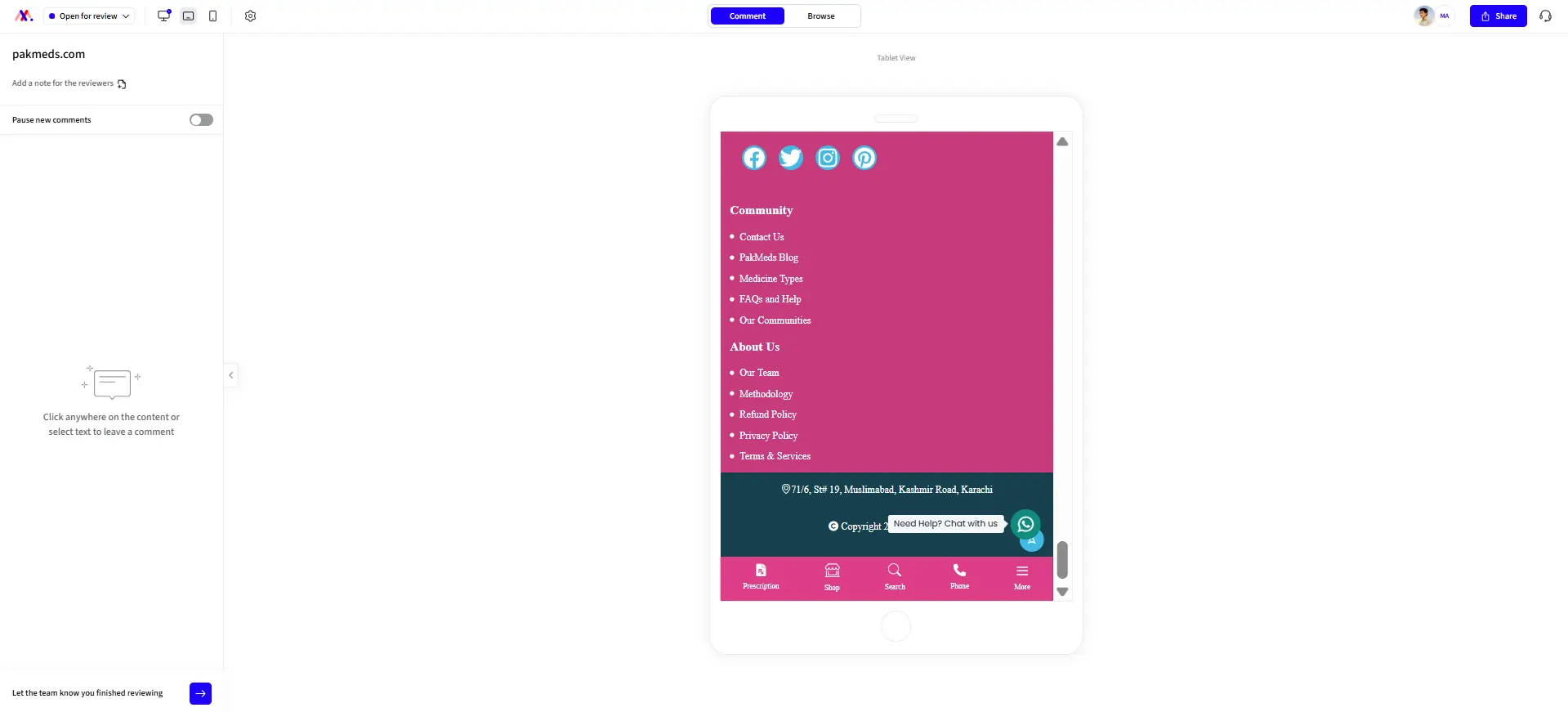
It's a small UI bug that can make things much harder for clients. Apart from this, the UI is very smooth and intuitive. You can click and annotate just about everything on any website.
File Uploads and Compatibility
BoastImage allows you to annotate JPEGs, PDFs, and SVGS, with a max file size limit of 20 mb. You can also use our Chrome Extension to capture page-length screenshots of a website. You get full creative freedom for each file.
Markup.io supports more file types, including TIFF, RTF, DOCX, PPTX, and MP4. There are no known size limits, which is very nifty for detailed annotation. Unfortunately, adding annotations to MP4 and PPTX files is very clunky.
The reason is simple: markup.io automatically converts other file types, including docx to PNG snaps, which doesn't work well for MP4 or PPTX files. Despite this, their support for multiple files is commendable.
Access Management and Productivity
Clients hate being left out of the loop, and team members can't do anything when they aren't in the loop. BoastImage makes the whole process simple and safe. You can:
- Invite collaborators through email or links
- Allow guest commenting for zero-friction feedback
- Share entire projects or singular pages for specific teams
- Manage access for sensitive projects through access codes
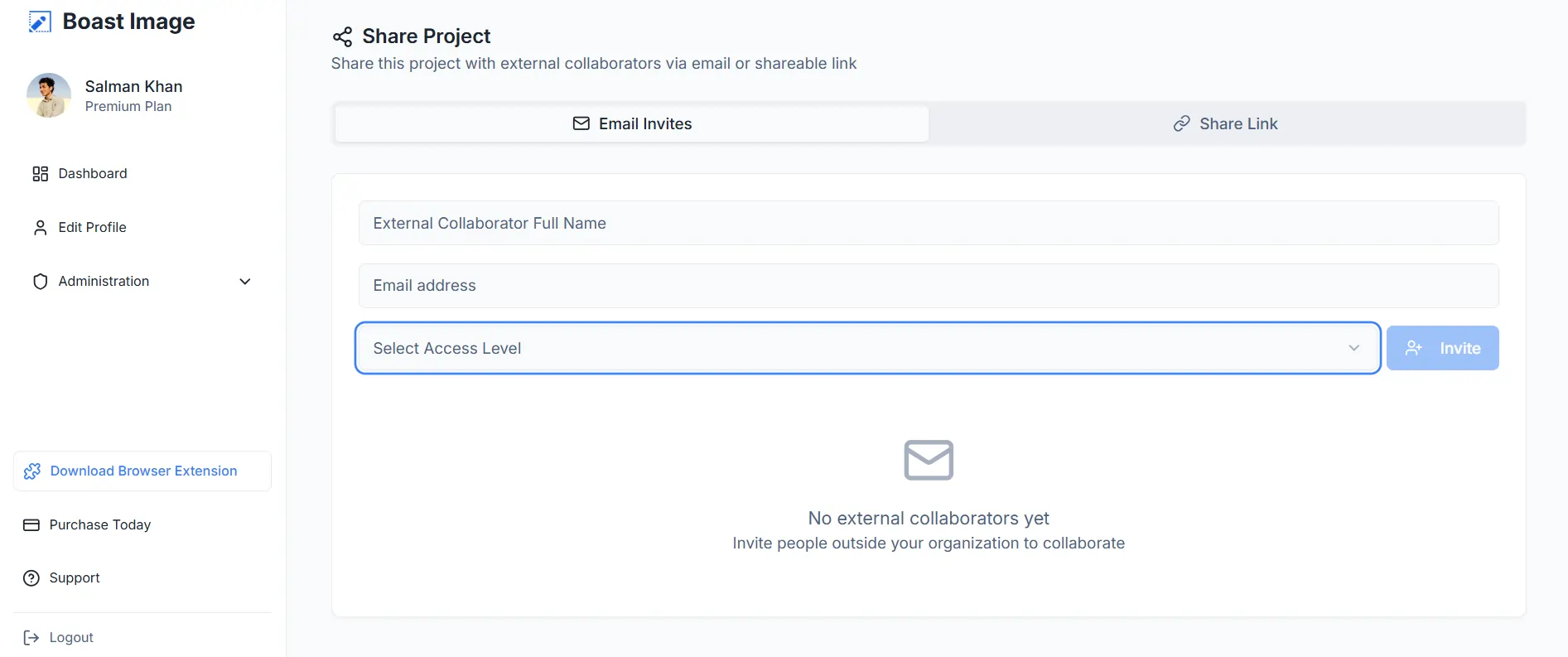
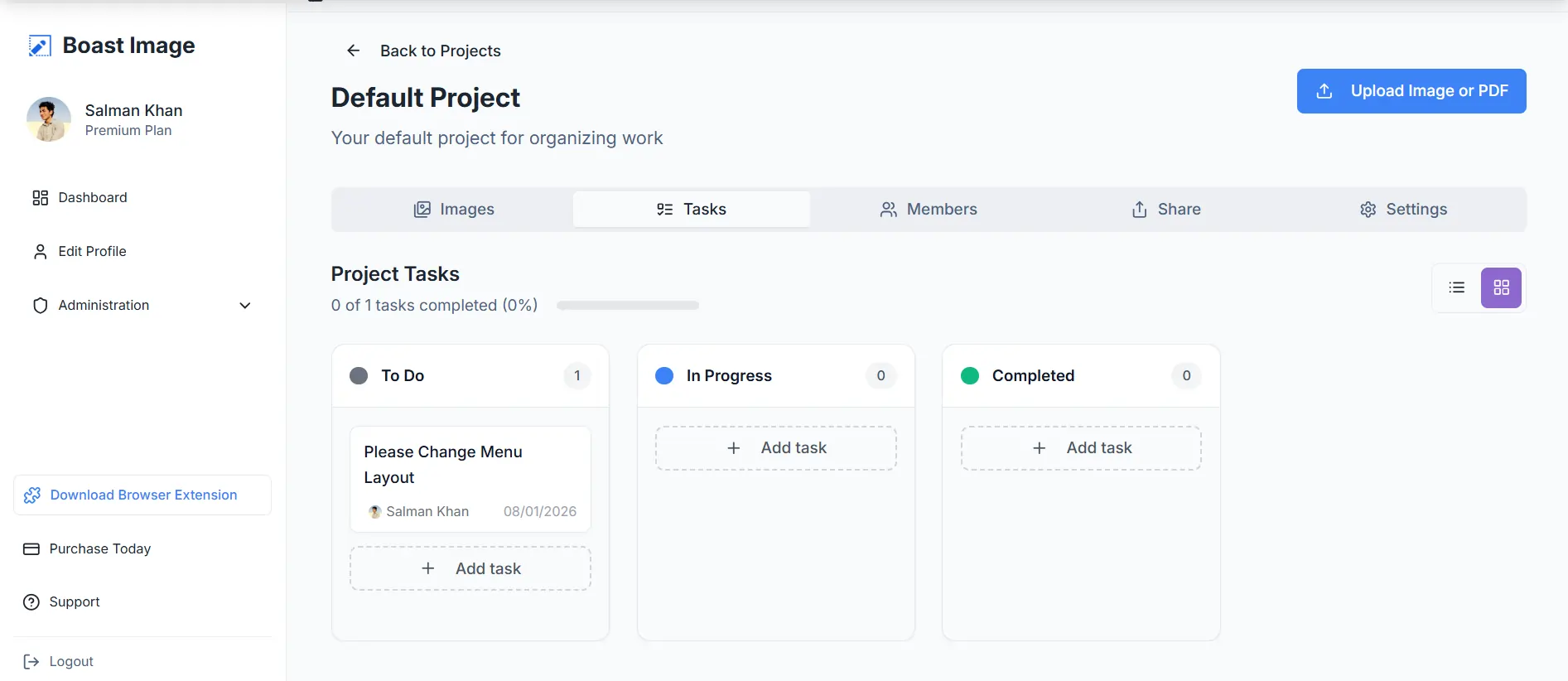
The workflow stays directly in our app, so there are no "oopsies" when handing off tasks to members. Clients can lodge feedback directly in the app, so you don't have to spend days creating and assigning tasks in Jira, Asana, or Trello.
Markup.io also allows project shares and link access. They even allow SSO (SAML) for increased security, especially with 3rd-party integrations. Unfortunately, this feature is limited to custom plans, which cost more than $80 per month.
Version Histories and Tracking
Any Markup.io alternative would be incomplete if it didn't have a version history. So we give you version histories with improved tracking. You can review the complete timeline and feedback of a project with BoastImage.
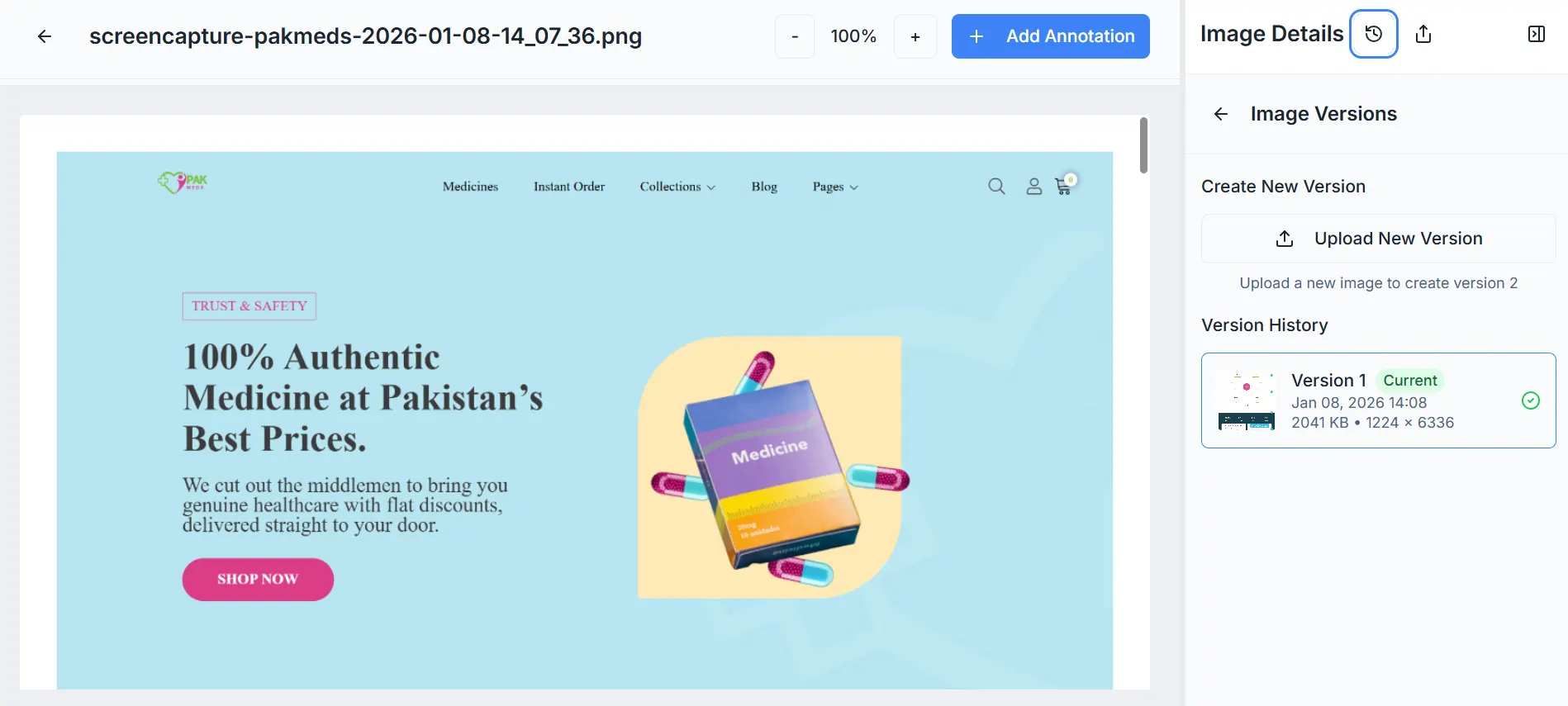
Accidentally removed a comment that wasn't resolved? Load the previous version. Client wants a breakdown of the project trajectory? Load the original version and backtrack. It's all intuitive, simple, and hassle-free.
Markup.io offers archives, which are comparable to BoastImage. The only difference is that we offer version history with our lowest tiered plans ($9.95 per month), while Markup's lowest tier begins at $79 per month.
BoastImage vs Markup Ease of Use
BoastImage is all about zero-friction and universal understanding. Our app is easy to use for everyone, including the clients you want to onboard and satisfy. How do we make this happen? By guaranteeing:
- Simplified dashboards and workspaces
- One-click share and collaborative access
- Seamless and user-friendly navigation
There are no steps five, six, and beyond. Upload, share, annotate, and deliver, that's what we stand for, and that's what you get. Newton would have problems with how friction-free our application makes the feedback process.
Markup.io has a similar layout but with a steep learning curve. You need at least 2 hours to get the groove of things. Finally, you have to click 4 times to delete a comment:
- First, click on the pin.
- Second, click on the 3 dots in the annotation window.
- Third, on the delete button.
- Fourth, on the Confirm button, to actually delete the comment.
Adding a delete button beside the small resolve window would work wonders. Wouldn't it be nice if clients could add and remove annotations at will? It is, and we allow everyone to do just that. Are a few extra clicks really that bad? Try it out!
With BoastImage, stakeholders and members can add, approve, delete, and change with a click. Clients stay happy, team members know what to do, it's a win-win for everyone, including you (rhyme was unintentional)!
Integrations and Plugins
Markup.io seamlessly integrates with project management (PM) tools like Jira, Asana, Trello, etc. You can add project management tools to assign tasks and manage workflows. But the core problem is that 3rd party integrations remove stakeholders from the feedback loop.
- Client or stakeholder adds feedback to Markup.
- The project manager translates feedback to the 3rd-party tool.
- Assigns feedback to relevant departments.
- Team members resolve issues.
- The project manager reaches out to the client.
- Client stakeholder approves changes.
- If the client doesn't like the changes, the process repeats.
It's clunky, indirect, and slow, especially for new agencies and freelancers. We solve that problem with a close ecosystem that keeps everyone in the loop. With BoastImage, you won't need a plugin because everything you need is in our app.
Assign tasks directly in the app and add comments at will. Clients are happy when their voices are heard. Choose Boast for zero-clutter and 100% client satisfaction!
Markup.io and BoastImage Pricing
We keep things simple, even when it's about pricing. You can choose from 4 different plans, including a free plan that gives you 1 project and 5 items for feedback. There are no hidden catches; you can sign up and try it out right now!
Markup.io is 2 to 8 times more expensive than BoastImage. The price barrier is often too much for freelancers or individual designers and developers. Unfortunately, they don't have a free plan, but they do offer a 30-day free trial.
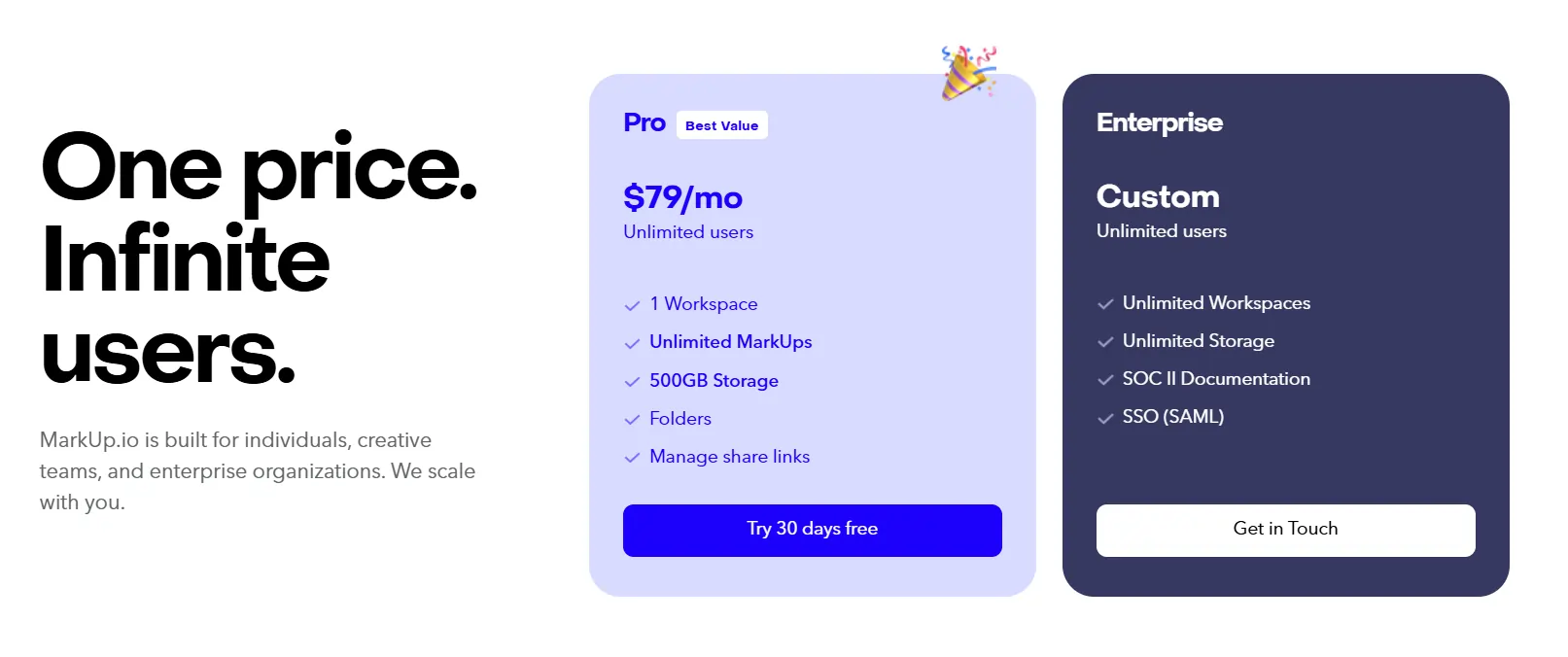
The choice is yours. Would you rather have an affordable, client-centric tool with built-in management or a design and team-focused app that is a bit expensive?
Where Does BoastImage Win vs Markup.io?
BoastImage excels in client-centric workflows and one-tool project feedback and management. Markup.io excels in 3rd-party integrations, file support, and team-centric workflows. Choosing one or the other depends on your specific needs. Is BoastImage what you need, or will Markup.io streamline your work? Let's find out:
| Criteria | Winner / Detail |
|---|---|
| Client-Facing Feedback Collection | BoastImage: Optimized for zero-friction; clients can comment immediately via a shared link without the hurdle of account creation or complex UI navigation. |
| Internal Team Collaboration & QA | Markup.io: Designed for deep engagement between internal team members, supporting more technical review modes and cross-departmental discussions. |
| Budget-Conscious Freelancers/Solopreneurs | BoastImage: The $9.95/mo Solo plan provides professional features at a fraction of the cost compared to Markup's $79/mo entry point for pros. |
| High Volume of Non-Technical Reviewers | BoastImage: The minimalist design ensures that non-tech-savvy stakeholders don't get overwhelmed, maximizing the rate of feedback completion. |
| Immediate Tool Adoption | BoastImage: Features a very gentle learning curve, allowing teams to start getting feedback within minutes rather than hours of training. |
| Fast-Track Project Timelines | BoastImage: The "Closed Ecosystem" with built-in task management eliminates the time wasted setting up and syncing third-party plugins (Jira/Trello). |
| Reviewing Complex Web Interactions | Markup.io: Ideal for reviewing live, dynamic websites where you need to interact with hovers, menus, and state changes in real-time. |
| Diverse Asset Support (Video/Office) | Markup.io: While conversion can be clunky, it supports specialized formats like MP4, RTF, and PPTX that are not natively handled by BoastImage. |
FAQs on The Best Markup.io Alternative
Is BoastImage better than Markup.io?
BoastImage is better than Markuo.io for client-facing feedback processes and actionable workflows. Markup.io is more team-centric and focuses on in-depth design feedback and 3rd-party integration. It's better for large departments working on different aspects of one project.
How much does markup io cost?
Markup.io costs at least $79 per month for the lowest plan, while the more expansive plans have custom pricing. Custom or enterprise plans can cost well over $200 per month, depending on your organizational needs.
What is the free app for marking up photos?
BoastImage offers a complete free plan for photo and PNG markups. You can upload images in various formats to annotate, assign, and implement markups on photo mockups. The free plan allows you to work on and store five simultaneous photos.
BoastImage Is a Markup.io Improvement: Try It Now
BoastImage is an improved photo and PDF tool for website feedback and annotation. We don't offer a watered-down alternative to Markup IO. We offer a project feedback, annotation, and management tool that streamlines your client's journey.
You get a simplistic tool that allows clients to provide feedback and project managers to assign work. Our workflow is simple: add, share, annotate, assign, and implement. Your clients stay in the loop, and your team stays functional.
We offer a completely free plan that you can try out today. Click on the button now and start converting clients!
Also compare:
Ready to streamline your feedback workflow?
Try Boast free for 14 days. No credit card required.
Start Free Trial